
1. Introduction
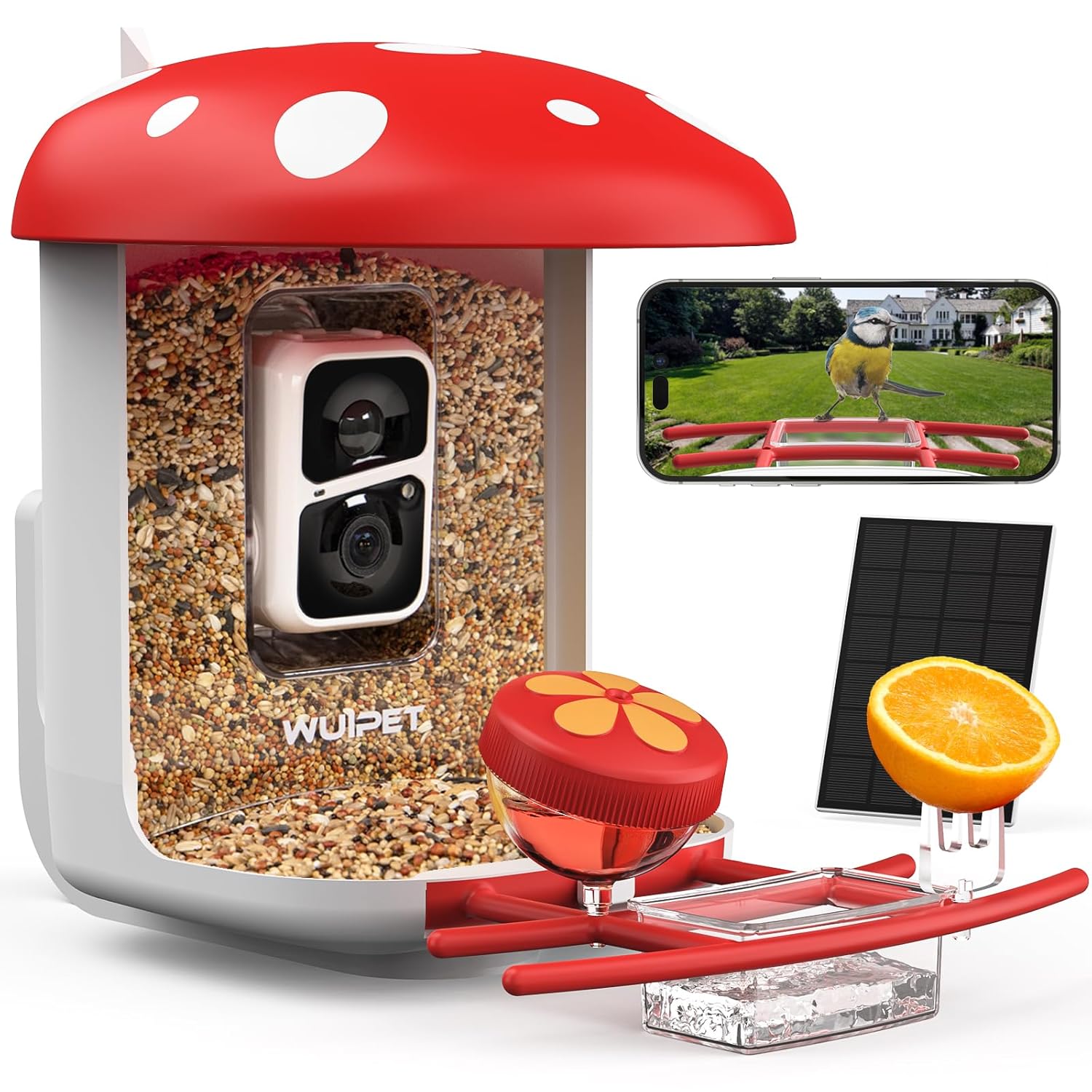
Thank you for choosing the WUIPET Smart Bird Feeder Camera. This device allows you to observe and interact with wild birds in your backyard, capturing high-quality footage and identifying various species through its integrated AI technology. Powered by a solar panel, it offers a sustainable and convenient bird-watching experience.
Caractéristiques principales
- 1080P HD Camera with 2 Megapixels
- Objectif grand angle 160°
- AI Bird Species Identification (10,000+ species)
- Instant Arrival Notifications to Mobile Phone
- Solar Powered for Continuous Operation
- 2.0L Large Capacity Bird Seed Container
- Conception résistante aux intempéries IP65
- Supports 2.4G Wi-Fi Connection
- Cloud Storage (3-day loop trial) and SD Card Support (up to 128G)
2. Contenu du colis
Veuillez vérifier que tous les composants suivants sont inclus dans votre colis :
- WUIPET Smart Bird Feeder Camera Unit (with integrated camera)
- Panneau solaire
- Perch/Feeding Tray (DIY Add-ons Perch)
- Water/Nectar Dispenser (red cap)
- Vis de fixation et chevilles murales
- Tuyau Clamps (for pole mounting)
- Câble de chargement USB
- Manuel d'utilisation

3. Guide de configuration
3.1. Charge initiale
Before first use, fully charge the camera battery using the provided USB cable. The charging port is typically located on the camera module. A full charge ensures optimal performance from the start.
3.2. Installation de l'application
Download the dedicated WUIPET app from your smartphone's app store (iOS or Android). Follow the on-screen instructions to create an account and prepare for device pairing.
3.3. Connexion au Wi-Fi
Open the app and follow the prompts to add a new device. Ensure your smartphone is connected to a 2.4GHz Wi-Fi network. The camera does not support 5.0GHz Wi-Fi. You will typically scan a QR code displayed by the app with the camera to establish the connection.
3.4. Mounting the Bird Feeder
Choose a suitable location for your bird feeder, ensuring it receives adequate sunlight for the solar panel and is within range of your 2.4GHz Wi-Fi network. The feeder can be mounted on a wall, pole, or fence.
- Montage mural : Use the provided screws and wall anchors. Mark the drilling points, drill holes, insert anchors, and securely attach the feeder.
- Pole/Fence Mounting: Utilisez le tuyau fourniamps to secure the feeder to a pole or fence post.

3.5. Fixation du panneau solaire
Connect the solar panel to the designated port on the bird feeder camera. Position the solar panel to maximize direct sunlight exposure throughout the day for optimal charging and continuous operation.
4. Operating Your Smart Bird Feeder
4.1. Filling the Bird Feeder
Open the top of the feeder (mushroom cap) and fill the transparent compartment with up to 2.0 liters of birdseed. Ensure the cap is securely closed to protect the seeds from weather and maintain freshness.
4.2. Camera Functions and Live View
Access the live camera feed through the WUIPET app. The 1080P HD camera with a 160° wide-angle lens provides a clear view of visiting birds. You can manually capture photos or record videos directly from the live view interface.
4.3. Détection de mouvement et notifications
The camera features sensitive motion detection. When a bird (or other detected movement) approaches the feeder, you will receive an instant notification on your mobile phone with an HD snapshot, allowing you to observe arrivals in real-time.

4.4. Identification des espèces d'oiseaux par IA
The integrated AI recognition system can identify over 10,000 bird species. After a bird is detected, the app will attempt to identify the species and provide relevant information. Note that AI recognition may require a paid subscription after an initial free trial period.

4.5. Enregistrement et stockage
Captured videos and photos can be saved to the cloud (with a 3-day loop recording trial) or to a local SD card (up to 128GB, not included). Manage your recordings and create bird albums within the app for easy viewla communication et le partage.
5. Entretien
5.1. Nettoyage du distributeur
Regularly clean the bird feeder to prevent the spread of diseases among birds. Remove old seeds and debris. The transparent seed compartment and perch can be detached for easier cleaning with mild soap and water. Ensure all parts are completely dry before reassembling and refilling.
5.2. Entretien des panneaux solaires
Keep the solar panel clean and free of dust, leaves, or snow to ensure efficient charging. Wipe it gently with a soft, damp cloth as needed to maintain optimal sunlight absorption.
5.3. Protection contre les intempéries
The feeder is designed with IP65 weather resistance, protecting it from rain and dust. However, during extreme weather conditions (e.g., severe storms, prolonged heavy snow), consider bringing the feeder indoors or providing additional shelter to prolong its lifespan.
6. Dépannage
- Pas d'alimentation/La caméra ne s'allume pas : Ensure the camera battery is fully charged. Check the solar panel connection and its exposure to sunlight. If issues persist, try charging directly via USB.
- Impossible de se connecter au Wi-Fi : Verify your Wi-Fi network is 2.4GHz. Ensure the feeder is within Wi-Fi range. Restart your router and the camera. Re-attempt the connection process in the app.
- Aucune notification : Check app notification settings on your phone and within the WUIPET app. Ensure motion detection is enabled and sensitivity is adjusted appropriately. Verify stable Wi-Fi connection.
- Unclear Images/Videos: Clean the camera lens with a soft cloth. Ensure there is adequate lighting. Check Wi-Fi signal strength, as a weak signal can affect video quality.
- AI Identification Issues: Ensure your app is updated. Verify your subscription status for AI recognition if applicable. Clear views of the bird are essential for accurate identification.
- Seeds Not Dispensing: Check for blockages in the seed compartment or dispenser. Ensure seeds are dry and not clumped together.
7. Spécifications du produit
| Fonctionnalité | Détail |
|---|---|
| Marque | WUIPET |
| Numéro de modèle | WP001 |
| Source d'énergie | Alimentation solaire |
| Capacité | 2 Litres (Seed) |
| Dimensions du produit | 23L x 37l x 32H centimètres |
| Poids de l'article | 3 kg 70 g |
| Caractéristiques spéciales | Easy-Refill Top, Weatherproof (IP65), AI Bird Identification |
| Type de montage | Montage mural, montage sur poteau |
| Connectivité Wi-Fi | Wi-Fi 2.4 GHz (5.0 GHz non pris en charge) |
| Résolution de la caméra | 1080P HD, 2 Megapixels |
| Angle de l'objectif | Grand angle de 160° |
| Options de stockage | Cloud (3-day loop trial), SD Card (up to 128GB, not included) |
| Code UPC | 683125785658 |
8. Consignes de sécurité
- Keep out of reach of children and pets to prevent accidental ingestion of small parts or birdseed.
- Veillez à ce que le distributeur soit solidement fixé afin d'éviter toute chute et les blessures ou dommages qui pourraient en résulter.
- Do not attempt to open or repair the camera module yourself. Refer to qualified service personnel.
- Use only the specified charging cable and power adapter (if applicable) to avoid damage or fire hazards.
- Avoid placing the feeder near electrical wires or other potential hazards.
9. Garantie et assistance
For warranty information, technical support, or service inquiries, please refer to the contact details provided with your product packaging or visit the official WUIPET website. Please have your model number (WP001) and purchase details ready when contacting support to expedite assistance.