
ZHDBD 8898
ZHDBD 8898 2-in-1 Soldering and Rework Station User Manual
Modèle: 8898
Introduction
This manual provides essential instructions for the safe and effective operation, setup, and maintenance of your ZHDBD 8898 2-in-1 Soldering and Rework Station. This device integrates a hot air gun and a soldering iron, designed for precision electronic repair and soldering tasks.
Veuillez lire attentivement ce manuel avant d'utiliser le produit et conservez-le pour toute consultation ultérieure.
Précautions de sécurité
- Utilisez toujours la station dans un endroit bien ventilé afin d'éviter d'inhaler des fumées.
- Portez l'équipement de protection individuelle approprié, notamment des lunettes de sécurité et des gants résistants à la chaleur.
- The soldering iron tip and hot air nozzle reach very high temperatures. Avoid direct contact.
- Vérifiez que le cordon d'alimentation n'est pas endommagé et qu'il est correctement mis à la terre.
- N’utilisez pas la station à proximité de matériaux ou de gaz inflammables.
- Débranchez l'appareil de la prise de courant lorsqu'il n'est pas utilisé ou avant de le nettoyer/de l'entretenir.
- Tenir hors de portée des enfants.
Composants du produit
The ZHDBD 8898 Soldering and Rework Station typically includes the following components:
- Main Control Unit with Digital Displays
- Hot Air Gun
- Fer à souder
- Support de fer à souder
- Buses à air chaud (différentes tailles)
- Cordon d'alimentation
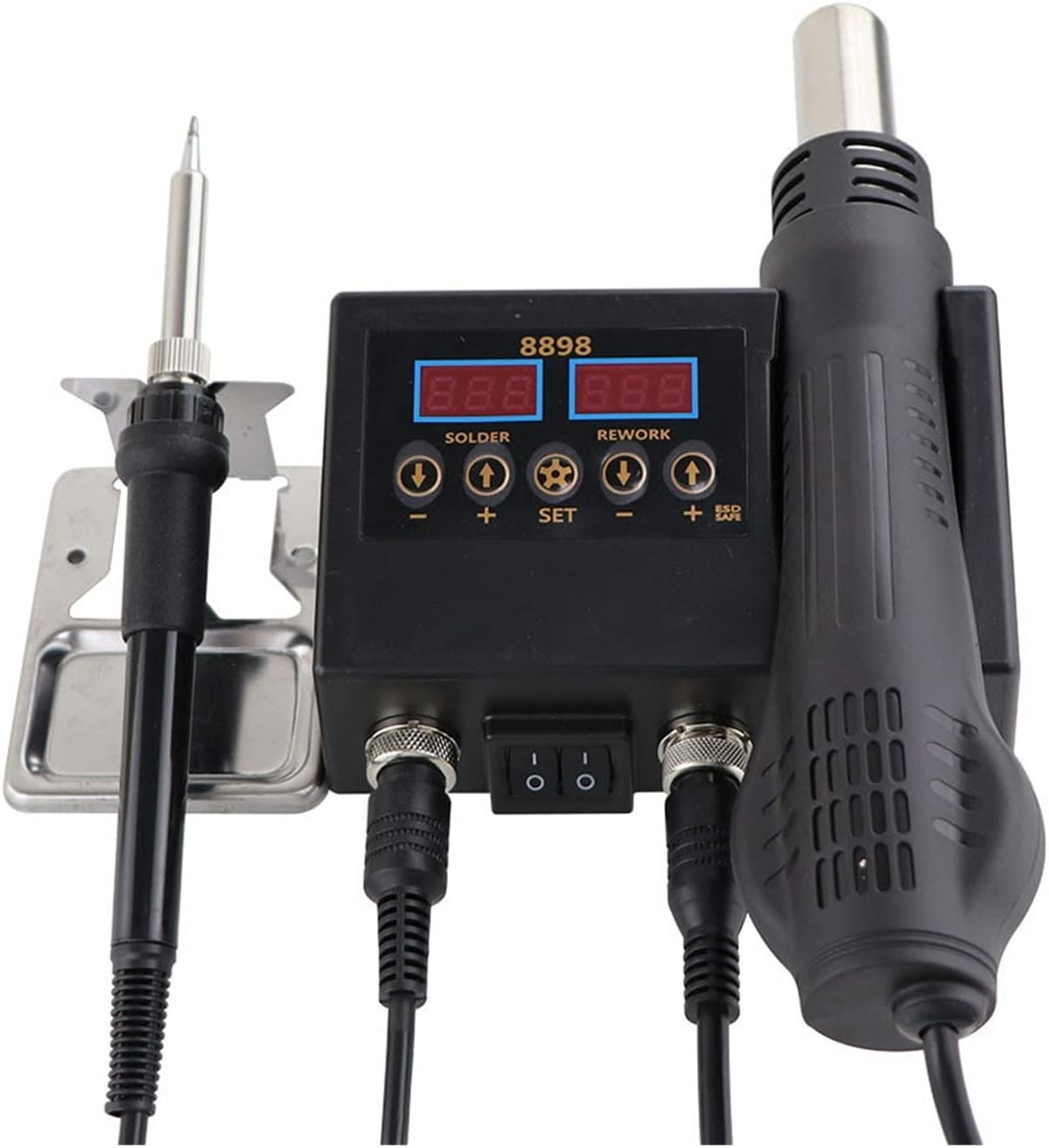
Image: The ZHDBD 8898 Soldering and Rework Station, showing the main control unit, soldering iron, and hot air gun connected. The digital displays for solder and rework temperatures are visible.

Image: The ZHDBD 8898 Soldering and Rework Station, including the main unit, soldering iron, hot air gun, and a set of three different sized hot air nozzles.
Instructions d'installation
- Déballage: Retirez soigneusement tous les composants de leur emballage. Vérifiez qu'ils ne sont pas endommagés.
- Placement: Place the main control unit on a stable, heat-resistant, and non-flammable surface. Ensure adequate clearance for ventilation.
- Brancher le fer à souder : Plug the soldering iron cable into the designated "SOLDER" port on the main unit. Place the soldering iron securely in its stand.
- Connecter le pistolet à air chaud : Plug the hot air gun cable into the designated "REWORK" port on the main unit. Ensure the hot air gun is placed in its holder on the side of the unit.
- Fixez l'embout (pistolet à air chaud) : Select the appropriate hot air nozzle for your task and securely attach it to the hot air gun.
- Connexion électrique : Raccordez le cordon d'alimentation à l'unité principale, puis branchez-la dans une prise électrique mise à la terre.
Mode d'emploi
Fonctionnement général
- Mise sous tension : Flip the main power switch on the front of the unit to the "ON" position. The digital displays will illuminate.
- Réglage de la température :
- Pour le Fer à souder: Use the "SOLDER" temperature adjustment buttons (+ et -) to set the desired temperature. The recommended temperature range is 180°C-500°C.
- Pour le Hot Air Gun: Use the "REWORK" temperature adjustment buttons (+ et -) to set the desired temperature. The recommended temperature range is 100°C-480°C.
- Air Flow Adjustment (Hot Air Gun): Use the "REWORK" air flow adjustment button (often labeled with a fan icon or "AIR") to control the air volume.
- Automatic Standby (Hot Air Gun): The hot air gun features a sensor switch in its handle. When the handle is placed in its holder, the system will automatically enter standby mode, cooling down the element and prolonging its life. When the handle is picked up, it will quickly return to the set operating temperature.
- Éteindre: When finished, flip the main power switch to the "OFF" position. Allow the hot air gun to cool down completely in its holder before unplugging.
Soldering Iron Usage
- Préparation: Ensure the electronic components to be soldered are clean.
- Pré-étamage : Once the iron reaches the desired temperature (recommended 300-400°C), apply a small amount of solder to the heated iron tip. This prevents oxidation and helps transfer heat efficiently. Rub the tip to evenly spread the solder.
- Soudure: Bring the heated, tinned iron tip into contact with both the component lead and the PCB pad simultaneously. Apply solder to the joint, not directly to the iron tip. Allow the solder to flow smoothly and form a shiny, conical joint. Remove the iron and allow the joint to cool without disturbance.
Hot Air Gun Usage (Rework)
- Retrait des composants : Select an appropriate nozzle. Set the desired temperature and airflow. Direct the hot air stream evenly over the component to be removed. Once the solder melts, carefully lift the component using tweezers.
- Installation des composants : Apply solder paste to the pads on the PCB. Carefully place the SMD component onto the solder paste. Direct the hot air stream evenly over the component and pads until the solder paste melts and reflows, forming solid connections.
- Refroidir: After use, place the hot air gun back into its holder. The unit will automatically initiate a cooling cycle to protect the heating element.
Entretien
- Nettoyage de la panne du fer à souder : Regularly clean the soldering iron tip using a damp sponge or brass wool to remove excess solder and oxidation. Re-tin the tip after cleaning.
- Remplacement de la pointe : Replace worn or damaged soldering iron tips to ensure optimal heat transfer and soldering performance.
- Nettoyage des buses à air chaud : Ensure hot air nozzles are free from debris or blockages. Clean gently if necessary.
- Nettoyage des unités : Débranchez l'appareil avant de le nettoyer. Essuyez-le avec un chiffon doux et sec. N'utilisez pas de produits abrasifs ni de solvants.
- Stockage: Rangez l'appareil dans un endroit sec et exempt de poussière lorsqu'il n'est pas utilisé.
Dépannage
| Problème | Cause possible | Solution |
|---|---|---|
| Le fer à souder ne chauffe pas. | Power switch off, loose connection, faulty heating element. | Check power switch. Ensure iron is securely plugged in. If problem persists, contact support. |
| Hot air gun not producing hot air. | Hot air gun not picked up from holder, loose connection, faulty heating element/fan. | Ensure hot air gun is picked up from its holder. Check connection. If problem persists, contact support. |
| La soudure ne fond pas correctement. | Insufficient temperature, oxidized iron tip, incorrect solder. | Increase temperature. Clean and re-tin the iron tip. Use appropriate solder for electronics. |
| L'appareil affiche un code d'erreur. | Défaut interne. | Refer to specific error code documentation (if available) or contact customer support. |
Spécifications techniques
| Fonctionnalité | Spécification |
|---|---|
| Modèle | 8898 |
| Vol d'entréetage | Not specified (typically 110V/220V AC, 50/60Hz) |
| Puissance de sortie totale | 750 W |
| Hot Air Gun | |
| Puissance de sortie | 500 W |
| Fréquence | 50 Hz/60 Hz |
| Plage de température | 100°C - 480°C |
| Stabilité de la température | ±2°C |
| Débit d'air | 120 L/min (max) |
| Fer à souder | |
| Puissance de sortie | 60 W |
| Fréquence | 50 Hz/60 Hz |
| Plage de température | 180°C - 500°C |
| Stabilité de la température | ±1°C |
| Matériau de chauffage | Céramique |
| Conception | ESD Safe |
Garantie et assistance
For warranty information or technical support, please refer to the documentation provided with your purchase or contact the manufacturer directly. Keep your purchase receipt as proof of purchase.
Manufacturer: ZHDBD
Ask a question about this manual
Ask about setup, troubleshooting, compatibility, parts, safety, or missing instructions. Manuals+ will review the question and use this page’s manual context to help answer it.