
1. Introduction
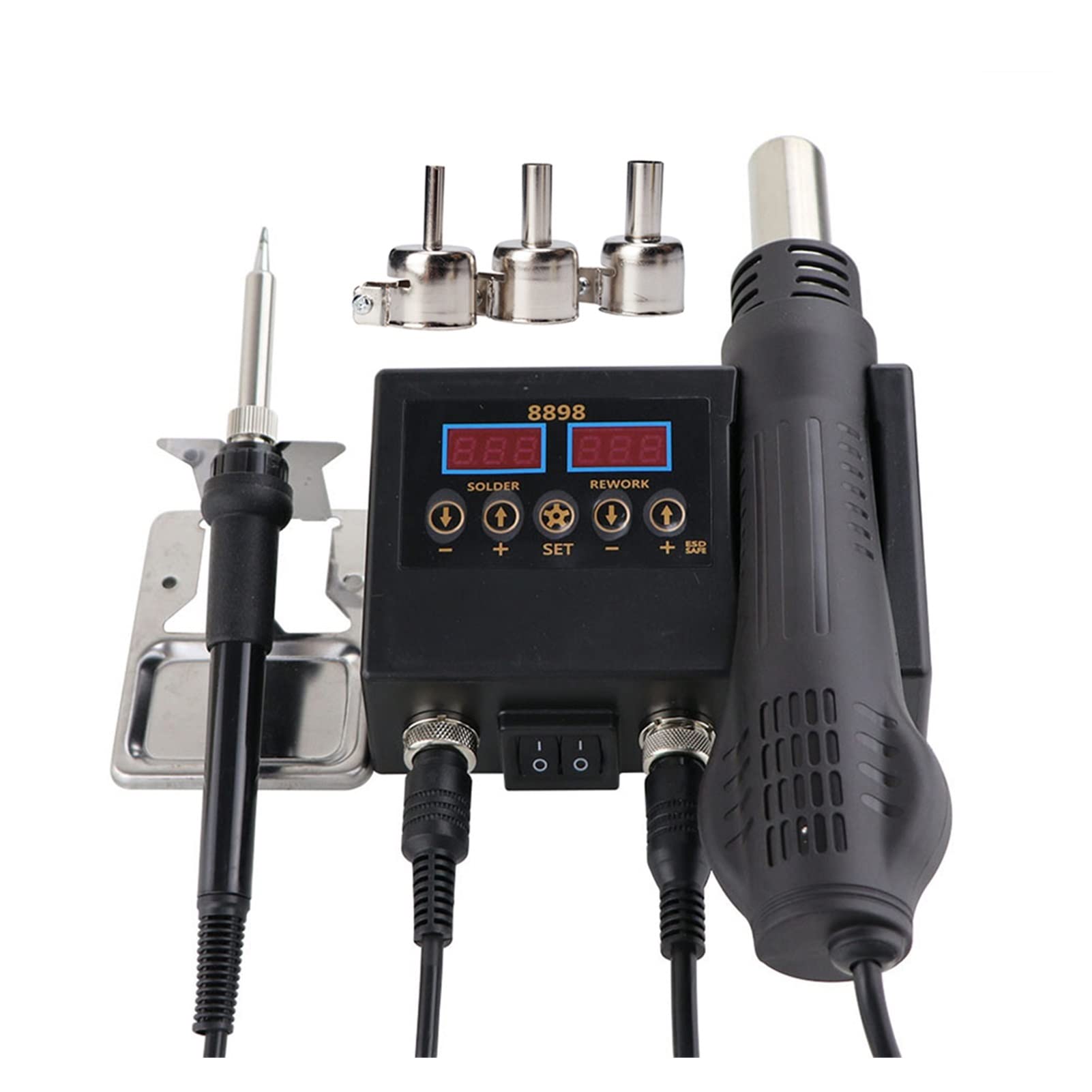
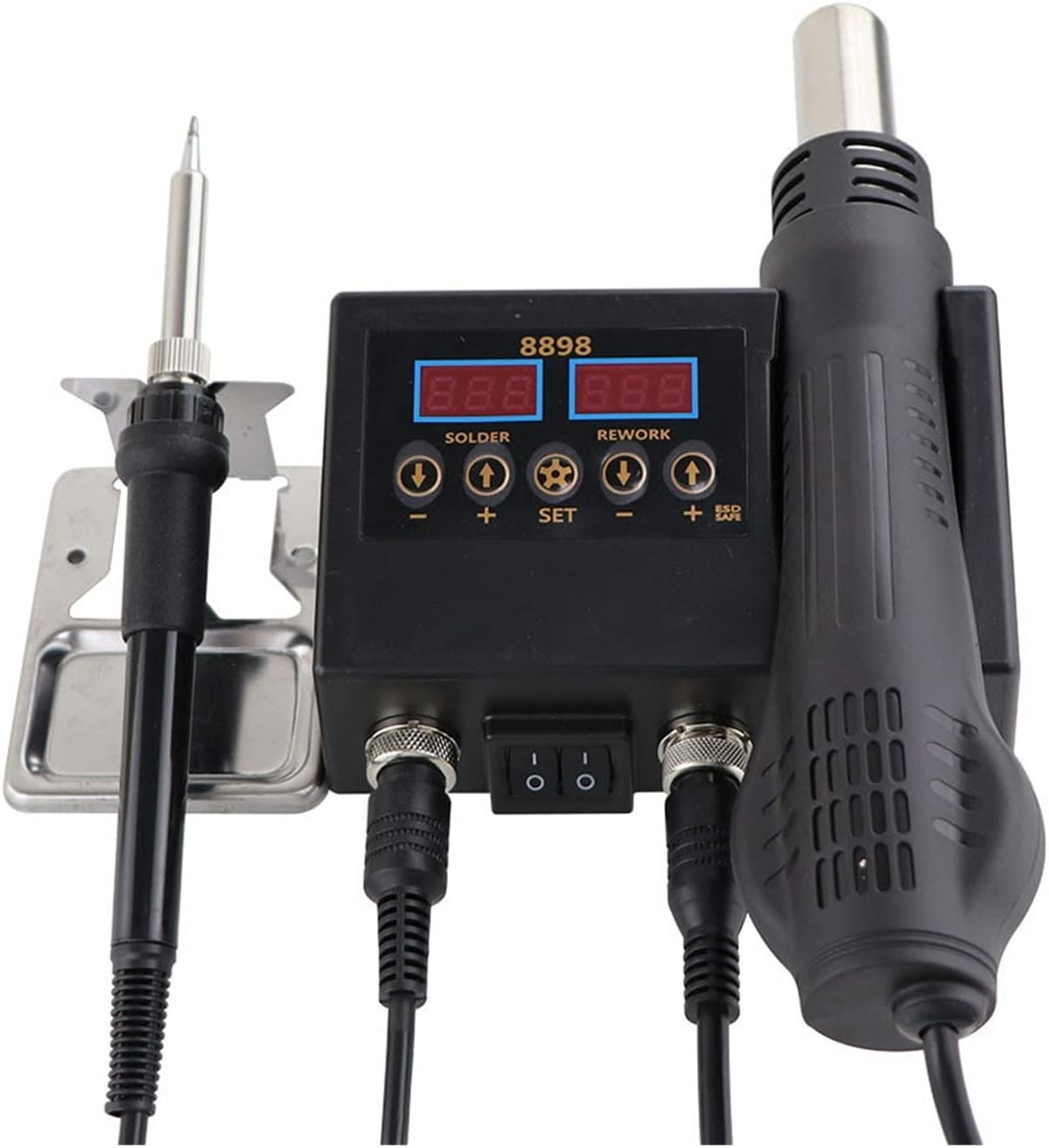
Thank you for choosing the ZHDBD 8898 2-in-1 Soldering Rework Station. This device integrates a hot air gun and a soldering iron into a single unit, providing versatile functionality for electronic repair, SMD component rework, and general soldering tasks. This manual provides essential information for safe operation, setup, and maintenance of your new equipment. Please read it thoroughly before use.
2. caractéristiques du produit
- Integrated hot air gun and soldering iron for 2-in-1 rework station functionality.
- Dual LCD digital displays for precise temperature monitoring of both tools.
- Compact design with extremely low noise operation, optimizing workspace.
- Intelligent self-detection function ensures safe personal operation.
- Automatic cooling function extends heater lifespan and protects the hot air gun.
- Handle with sensor switch for quick access to operation mode and automatic standby.
3. Contenu du colis
Veuillez vérifier le contenu du colis à réception afin de vous assurer que tous les articles sont présents :
- ZHDBD 8898 Main Control Unit
- Poignée de pistolet à air chaud
- Poignée de fer à souder
- Support pour pistolet à air chaud
- Support pour fer à souder avec éponge
- Assorted Hot Air Nozzles (typically 3-4 sizes)
- Cordon d'alimentation
- Manuel de l'utilisateur (ce document)
4. Spécifications
| Fonctionnalité | Spécification |
|---|---|
| Puissance totale de sortie | 750 W |
| Vol d'entréetage | (Typically 110V/220V, 50Hz/60Hz - not specified, assuming standard) |
| Hot Air Gun | |
| Puissance de sortie | 500 W |
| Plage de température | 100°C - 480°C |
| Stabilité de la température | ±2°C |
| Débit d'air | 120 L/min (Max) |
| Fer à souder | |
| Puissance de sortie | 60 W |
| Plage de température | 180°C - 500°C |
| Stabilité de la température | ±1°C |
| Matériau de chauffage | Céramique |
| Conception | ESD Safe |
| Type d'affichage | Écran LCD |
5. Consignes de sécurité
To prevent injury or damage to the equipment, always observe the following safety precautions:
- Températures élevées : Le pistolet à air chaud et les pointes du fer à souder atteignent des températures très élevées. Évitez tout contact direct avec la peau ou les matériaux inflammables.
- Ventilation: Use the station in a well-ventilated area to avoid inhaling solder fumes, which can be harmful.
- Protection des yeux : Portez toujours des lunettes de sécurité pour protéger vos yeux des projections de soudure ou des débris volants.
- Sécurité électrique : Ensure the power cord is properly grounded. Do not operate with wet hands or in damp Environnements. Coupez l'alimentation avant tout nettoyage ou entretien.
- Placement approprié : Place the unit on a stable, heat-resistant surface. Ensure the hot air gun is always placed in its holder when not in use, allowing it to cool down safely.
- Enfants et animaux domestiques : Gardez l’appareil hors de portée des enfants et des animaux domestiques.
- Matériaux inflammables : Keep flammable liquids, gases, and materials away from the work area.
- Protection ESD : The soldering iron features an ESD-safe design. For sensitive components, ensure proper grounding practices are followed.
6. Installation
Follow these steps to set up your ZHDBD 8898 Soldering Rework Station:
- Déballer: Retirez soigneusement tous les composants de l'emballage.
- Placement: Place the main control unit on a stable, heat-resistant, and level workbench. Ensure adequate space around the unit for ventilation.
- Connecter le pistolet à air chaud : Connect the hot air gun handle cable to the corresponding port on the main unit. Secure the connector by tightening the retaining ring.
- Brancher le fer à souder : Connect the soldering iron handle cable to its designated port on the main unit. Secure the connector.
- Installer les supports : Attach the hot air gun holder to the side of the main unit. Place the soldering iron stand on your workbench and insert the soldering iron into it. Ensure the cleaning sponge is moistened.
- Connexion électrique : Raccordez le cordon d'alimentation à l'unité principale, puis branchez-la dans une prise électrique mise à la terre.
7. Mode d'emploi
Cette section décrit en détail le fonctionnement du pistolet à air chaud et du fer à souder.
7.1 Fonctionnement général
- Mise sous tension : Flip the main power switch on the front panel to the "ON" position. The digital displays will illuminate.
- Sélection d'outils : The unit allows independent operation of the hot air gun and soldering iron. Use the respective power switches for each tool if available, or simply pick up the tool to activate it (due to sensor switch).
- Réglage de la température : Utilisez le UP et VERS LE BAS buttons below each display to set the desired temperature for the hot air gun and soldering iron. The ENSEMBLE button may be used to cycle through settings or confirm.

7.2 Fonctionnement du pistolet à air chaud
- Sélectionnez la buse : Choose an appropriate nozzle size for your application and attach it securely to the hot air gun.
- Température réglée : Adjust the hot air gun temperature using the controls. Recommended range for most SMD rework is 300°C - 400°C, but consult component datasheets.
- Régler le flux d'air : Adjust the airflow using the dedicated knob or buttons (if present) to a suitable level. Start with lower airflow for delicate components.
- Activation : Pick up the hot air gun from its holder. The unit will automatically start heating to the set temperature.
- Opération: Direct the hot air stream evenly over the component to be reworked. Maintain a safe distance to avoid overheating or damaging surrounding components.
- Standby/Cool-down: When finished, place the hot air gun back into its holder. The unit will automatically enter cool-down mode, blowing cool air until a safe temperature is reached, then entering standby. Do not unplug the unit during cool-down.
7.3 Utilisation du fer à souder
- Nettoyer les composants : Ensure the electronic components and PCB pads to be soldered are clean and free of oxidation.
- Température réglée : Adjust the soldering iron temperature. A common starting point is 300°C - 400°C, depending on the solder type and component sensitivity.
- Étamer la pointe : Once the iron reaches the set temperature, apply a small amount of solder to the tip. This "tins" the tip, preventing oxidation and improving heat transfer. Wipe excess solder on the moistened sponge.
- Soudure:
- Place the hot soldering iron tip onto the joint where the component lead meets the PCB pad.
- Apply solder to the joint, not directly to the iron tip. The heat from the iron should melt the solder, allowing it to flow smoothly around the joint.
- Retirez le fil de soudure, puis le fer à souder. Laissez la soudure refroidir naturellement sans y toucher.
- Nettoyage: Regularly clean the soldering iron tip on the moistened sponge during use to remove oxidation and old solder.
8. Entretien
Proper maintenance ensures the longevity and optimal performance of your rework station.
- Entretien de la pointe du fer à souder :
- Always tin the tip before and after use.
- Nettoyez régulièrement l'embout avec un produit nettoyant pour vitres.amp Laine de laiton ou éponge.
- Avoid excessive pressure when cleaning, as this can damage the tip plating.
- Replace tips when they become pitted or heavily oxidized and cannot be tinned.
- Buses pour pistolet à air chaud : Ensure nozzles are clean and free of debris. Replace if damaged or clogged.
- Nettoyage général :
- Débranchez l’alimentation avant le nettoyage.
- Wipe the main unit and handles with a soft, damp chiffon. N'utilisez pas de nettoyants abrasifs ou de solvants.
- Ensure no liquids enter the unit's vents or ports.
- Stockage: Rangez l'appareil dans un endroit sec et exempt de poussière lorsqu'il n'est pas utilisé.
9. Dépannage
Consultez le tableau ci-dessous pour connaître les problèmes courants et leurs solutions :
| Problème | Cause possible | Solution |
|---|---|---|
| L'unité ne s'allume pas. | Pas d'alimentation électrique ; interrupteur éteint ; cordon d'alimentation défectueux. | Check power cord connection; ensure power switch is ON; test outlet. |
| Le pistolet à air chaud ne chauffe pas ou ne laisse pas passer l'air. | Handle not seated correctly; heater element failure; fan failure. | Ensure hot air gun is properly placed in its holder and then removed to activate; check connections. If problem persists, contact support. |
| Le fer à souder ne chauffe pas. | Iron not connected; heater element failure; tip not making good contact. | Check soldering iron cable connection; ensure tip is securely fastened. If problem persists, contact support. |
| Soldering iron tip not tinning or poor heat transfer. | Oxidized tip; insufficient temperature; incorrect tip. | Clean and re-tin the tip; increase temperature; replace with a new tip if severely damaged. |
| Code d'erreur affiché. | Défaut interne ; problème de capteur. | Refer to specific error codes in a more detailed manual (if available) or contact customer support with the error code. |
10. Garantie et assistance
The ZHDBD 8898 Soldering Rework Station is designed for reliability and performance. For warranty information, please refer to the documentation provided at the time of purchase or contact your retailer. If you encounter any issues or require technical assistance, please contact ZHDBD customer support through your purchase platform or the official brand website for prompt service.