
1. Introduction
Thank you for choosing the WORKPRO 7.2V Cordless Rotary Tool. This manual provides essential information for the safe and effective operation, maintenance, and troubleshooting of your tool. Please read it thoroughly before use and retain it for future reference.
The WORKPRO 7.2V Cordless Rotary Tool is a versatile and compact device designed for various DIY and craft projects. Its lightweight design and variable speed settings make it suitable for tasks such as sanding, engraving, cutting, drilling, grinding, and polishing.

Figure 1: WORKPRO 7.2V Cordless Rotary Tool with included accessories and storage bag.
2. Consignes de sécurité
Respectez toujours les consignes de sécurité de base afin de réduire les risques d'incendie, d'électrocution et de blessures corporelles lors de l'utilisation d'outils électriques.
- Lisez toutes les instructions: Familiarisez-vous avec le fonctionnement de l'outil et les consignes de sécurité.
- Portez une protection pour les yeux : Portez toujours des lunettes de sécurité ou des lunettes de sécurité avec écrans latéraux.
- Sécuriser la pièce à travailler : Toujours clamp ou fixer la pièce d'une autre manière afin d'éviter tout mouvement pendant l'opération.
- Maintenir une zone de travail propre : Les zones encombrées invitent aux accidents.
- Évitez les environnements dangereux : N'utilisez pas d'outils électriques dans damp ou des endroits humides, ou les exposer à la pluie. Gardez la zone de travail bien éclairée.
- Tenir les enfants à l’écart : Tous les visiteurs doivent être maintenus à une distance de sécurité de la zone de travail.
- S'habiller correctement : Do not wear loose clothing or jewelry. They can be caught in moving parts. Non-skid footwear is recommended. Wear protective hair covering to contain long hair.
- Utilisez le bon outil : Ne forcez pas l'outil ou l'accessoire à effectuer un travail pour lequel il n'a pas été conçu.
- Débrancher l'alimentation : Disconnect the tool from its power source before making adjustments, changing accessories, or storing it.
- Ne dépassez pas : Gardez toujours une bonne position et un bon équilibre.
- Entretenez les outils avec soin : Gardez les outils aiguisés et propres pour des performances meilleures et plus sûres. Suivez les instructions de lubrification et de changement des accessoires.
- Vérifiez les pièces endommagées : Avant toute nouvelle utilisation de l'outil, une protection ou une autre pièce endommagée doit être soigneusement vérifiée pour déterminer qu'elle fonctionnera correctement et exécutera sa fonction prévue.
- Ne pas utiliser pendant la charge : For safety reasons, do not use the tool while it is being charged.
3. Produit terminéview
The WORKPRO 7.2V Cordless Rotary Tool is designed for precision work. Understanding its components is key to effective operation.
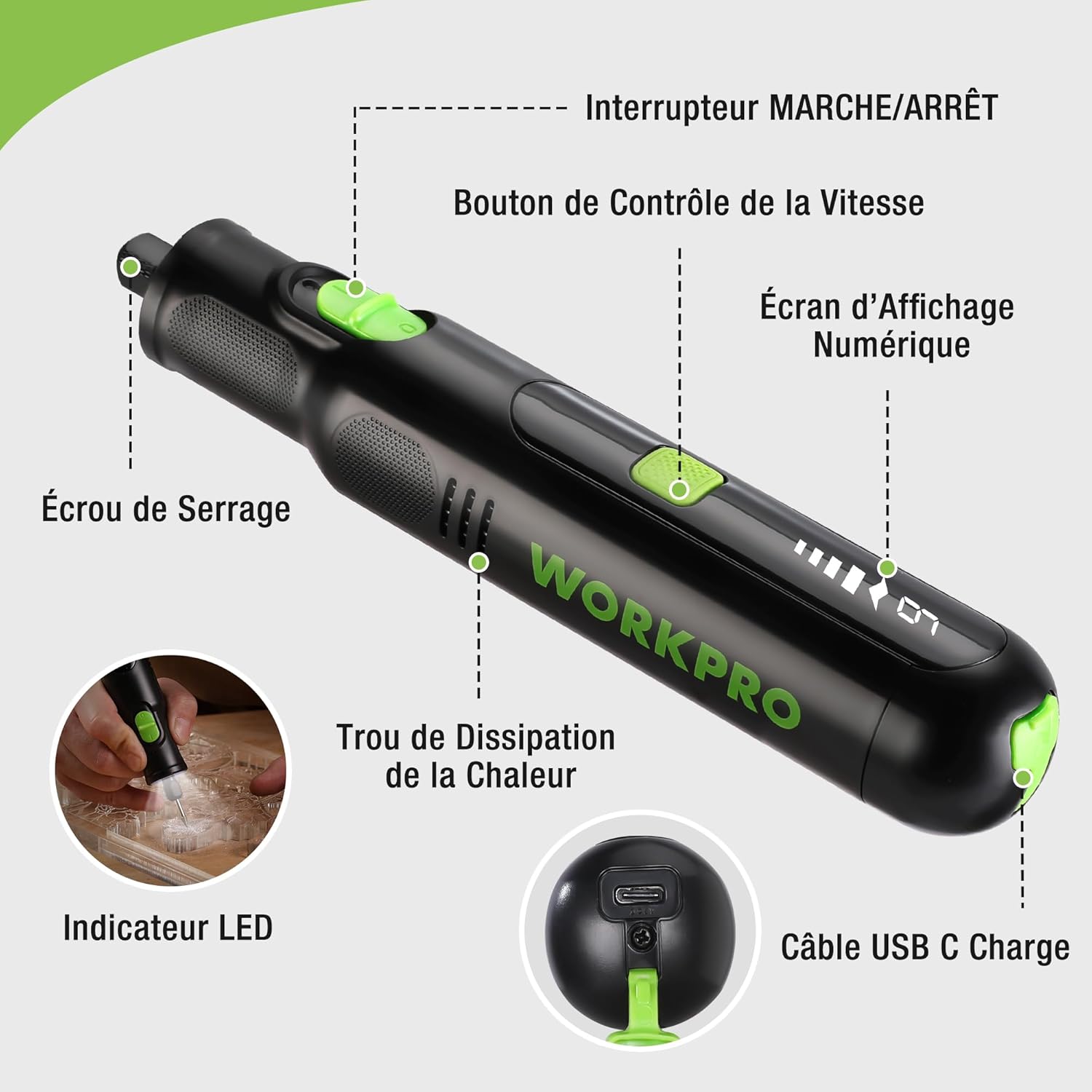
Figure 2 : Composants clés de l'outil rotatif.
Composants:
- Interrupteur marche / arrêt: Active et désactive l'outil.
- Bouton de contrôle de vitesse : Régle la vitesse de rotation de l'outil.
- Écran d'affichage numérique : Affiche le réglage de vitesse actuel.
- Écrou à collet : Secures the accessory bits in place.
- Trou de dissipation thermique : Ensures proper cooling of the motor during operation.
- Indicateur LED : Fournit un éclairage à la zone de travail.
- Port de chargement USB-C : Pour recharger la batterie interne.
Accessoires inclus :
Your WORKPRO rotary tool comes with 117 diverse accessories, enabling a wide range of applications. These include:

Figure 3 : Plusview parmi les 117 accessoires inclus.
- Affûtage/Remouillement : Grinding stones and wheels for material shaping and sharpening.
- Sculpture: Diamond bits for detailed carving and engraving.
- Polissage: Wool felt wheels, felt wheels, screw mandrels, and metal brushes for achieving smooth, shiny finishes.
- Fraisage : Milling bits for precise material removal.
- Coupe: Cutting discs and saw blades for various cutting tasks, along with a cutting disc holder.
- Ponçage: Sandpaper, rubber sanding drums, and sanding bands for surface preparation and finishing.
- Pinces : 2.35mm and 3.2mm collets to accommodate different shank sizes.
- Forage: 2.35mm and 3.2mm drill bits for small-scale drilling.
- Clé: For securing and loosening collet nuts.
4. Installation
4.1 Chargement de l'outil
The tool is equipped with a 7.2V 1100mAh Lithium-ion rechargeable battery. Before first use, fully charge the tool.
- Connect the provided USB-C charging cable to the tool's USB-C charging port.
- Connectez l'autre extrémité du câble USB à une source d'alimentation USB compatible (par exemple, un ordinateur, un adaptateur secteur USB).
- L'écran numérique affichera l'état de la charge. Une charge complète prend généralement environ 2 heures.
- Une fois complètement chargée, débranchez le câble de charge.
Note: For optimal battery life, it is recommended to store the tool with the battery charged between 50% and 75%. Recharge the tool at least once every 3 to 6 months if not used regularly.

Figure 4: Charging the rotary tool via USB-C.
4.2 Installation des accessoires
The WORKPRO rotary tool features an automatic spindle lock design for easy and secure accessory changes.
- Assurez-vous que l'outil est éteint.
- Unscrew the collet nut at the front of the tool.
- Select the appropriate collet size for your desired accessory (2.35mm or 3.2mm). Insert the collet into the tool if not already present.
- Insert the shank of the accessory bit into the center of the collet nut. Ensure the bit is fully seated.
- Hand-tighten the collet nut. For a secure fit, use the included wrench to tighten the collet nut firmly. Do not overtighten.

Figure 5: Two-step accessory replacement process.

Figure 6: Detailed installation steps for various accessories.
Note: The automatic spindle lock engages when the tool is off, allowing for accessory changes without needing to press a separate button. A slight clicking sound when the tool stops is normal due to this mechanism.
5. Mode d'emploi
5.1 Mise sous/hors tension
To turn the tool ON, slide the ON/OFF switch to the 'ON' position. To turn it OFF, slide the switch to the 'OFF' position.
5.2 Réglage de la vitesse
The tool features 6 variable speed settings, ranging from 5000 RPM to 30000 RPM. Press the Speed Control Button to cycle through the speeds. The current speed setting will be displayed on the digital screen.
- Speed I: 5000 RPM
- Speed II: 10000 RPM
- Speed III: 15000 RPM
- Speed IV: 20000 RPM
- Speed V: 25000 RPM
- Speed VI: 30000 RPM
Choose the appropriate speed for your task and material. Lower speeds are generally suitable for polishing, delicate work, and softer materials, while higher speeds are for cutting, grinding, and harder materials.

Figure 7: Variable speed settings and powerful motor.
5.3 Lumière LED intégrée
The tool includes an integrated LED light that illuminates the work area, improving visibility in dimly lit spaces and for detailed tasks.

Figure 8: Using the LED light for precision engraving.
5.4 Applications
The WORKPRO rotary tool is highly versatile and can be used for:
- Coupe: Use appropriate cutting discs for various materials.
- Sculpture/Gravure : Utilize diamond bits for intricate designs on wood, plastic, or soft metals.
- Polissage: Apply felt wheels and polishing compounds to restore shine to surfaces.
- Ponçage: Use sanding bands and drums for smoothing rough edges or preparing surfaces.
- Forage: Employ small drill bits for precision holes.

Figure 9 : Examples of versatile applications.
6. Entretien
6.1 Nettoyage
- Débranchez toujours l'outil de toute source d'alimentation avant de le nettoyer.
- Utilisez un chiffon doux et sec.amp Utilisez un chiffon pour essuyer l'extérieur de l'outil. N'utilisez pas de produits chimiques agressifs ni de nettoyants abrasifs.
- Use a small brush or compressed air to clear dust and debris from the heat dissipation holes and around the collet area.
6.2 Entretien et stockage de la batterie
- To prolong battery life, avoid completely discharging the battery regularly.
- For long-term storage, ensure the battery is charged to approximately 50-75%. Recharge the tool every 3 to 6 months to prevent deep discharge and maintain battery health.
- Rangez l'outil dans un endroit frais et sec, à l'abri de la lumière directe du soleil et des températures extrêmes.
6.3 Rangement d'accessoires
Keep all accessories organized in the provided storage bag or a suitable container to prevent loss and damage.
7. Dépannage
This section addresses common issues you might encounter with your WORKPRO rotary tool.
| Problème | Cause possible | Solution |
|---|---|---|
| L'outil ne s'allume pas. | La batterie est déchargée. | Chargez complètement l'outil à l'aide du câble USB-C. |
| Tool stops unexpectedly during use. | Batterie faible ou outil surchargé. | Recharge the battery. Reduce pressure on the tool or use a lower speed setting for the task. |
| Clicking sound when turning off. | Normal operation of the automatic spindle lock. | This is a normal function and does not indicate a fault. |
| Accessory bit is loose or wobbles. | Collet nut not tightened sufficiently or incorrect collet size. | Ensure the correct collet size is used for the accessory. Tighten the collet nut firmly with the included wrench. |
| Reduced performance or short runtime. | Battery degradation or improper charging/storage. | Ensure proper charging and storage practices are followed (refer to Section 6.2). If the issue persists, the battery may need replacement. |
8. Spécifications
Below are the technical specifications for the WORKPRO 7.2V Cordless Rotary Tool (Model W123024A).
| Fonctionnalité | Spécification |
|---|---|
| Marque | TRAVAIL PRO |
| Numéro de modèle | W123024A |
| Voltage | 7.2 volts |
| Type de batterie | Lithium-ion (1 inclus) |
| Capacité de la batterie | 1100 mAh |
| Vitesse de rotation maximale | 30000 tr/min |
| Vitesses variables | 6 (5000-30000 tr/min) |
| Temps de charge | Environ 2 heures |
| Durée d'exécution (vitesse maximale) | Environ 45 minutes |
| Poids | 227 gramme |
| Dimensions (L x l x H) | 25.2 x 16.8 x 5.5 cm |
| Dossier spécial | Cordless, Integrated LED Light, Automatic Spindle Lock |
| Composants inclus | 117 Accessoires |
| Fabricant | Hang Zhou Great Star Industrial Co.,LTD |
9. Garantie et assistance
For warranty information, please refer to the documentation provided at the time of purchase or contact your retailer. WORKPRO is committed to providing quality products and customer satisfaction.
If you encounter any issues or have questions regarding your WORKPRO 7.2V Cordless Rotary Tool, please contact the seller or WORKPRO customer support through their official website or contact channels. Please have your model number (W123024A) and purchase details ready when seeking support.