
1. Produit terminéview
The OPTFOCUS USB WiFi Adapter is a compact and efficient wireless network receiver designed to provide high-speed internet connectivity for your desktop PC or laptop. This adapter supports WiFi 6 (802.11ax) for Windows 10/11 systems, offering speeds up to 286Mbps, and WiFi 5 (802.11n) for Windows 7/8 systems with speeds up to 150Mbps. Its driver-free installation on compatible Windows versions makes it easy to set up and use.

Image: The OPTFOCUS USB WiFi Adapter, a compact black and silver device with "Driver Free 286Mbps" and "WiFi 6" markings.
Caractéristiques principales :
- Connectivité haut débit : Débit de transmission sans fil jusqu'à 286 Mbps.
- Installation sans pilote : Automatic installation on Windows 10/11.
- Sécurité avancée : Supports 64/128-bit WEP, 128-bit WPA (TKIP/AES), MIC, IV Expansion, Shared Key Authentication, and IEEE 802.1X.
- Large compatibilité : Compatible with 802.11b/g/n/ax devices and Windows 7, 10, 11 operating systems.
- Conception compacte : Mini USB form factor for discreet integration.

Image: A graphic highlighting the adapter's features: WIFI6 USB ADAPTER, 286Mbps, Mini, Fast, Free Drive, Plug and Play.
2. Contenu du colis
Veuillez vérifier que tous les articles sont présents dans le colis :
- 1 x OPTFOCUS USB WiFi Adapter
- 1 x Manuel d'utilisation (ce document)
3. Configuration et installation
Configuration requise :
- Système d'exploitation : Windows 7, Windows 10, Windows 11.
- USB Port: Available USB 2.0 or 3.0 port.
- Remarque importante : This adapter does NOT support PlayStation (PS) or macOS operating systems. For Windows 7/8, it operates at WiFi 5 (150Mbps Max). For Windows 10/11, it supports WiFi 6 (286Mbps Max).

Image: A diagram illustrating compatibility with Windows XP, 7, 8, 8.1, and 10. Note: The product feature bullets specify Windows 7, 10, 11, and explicitly state PS/MacOS NOT SUPPORTED. The text description clarifies current compatibility.
Étapes d'installation :
- Insérez l'adaptateur : Locate an available USB port on your desktop PC or laptop. Carefully insert the OPTFOCUS USB WiFi Adapter into the USB port.
- Automatic Driver Installation (Windows 10/11): For Windows 10 and Windows 11, the adapter is designed to be driver-free. The operating system should automatically detect the device and install the necessary drivers. This process may take a few moments.
- Driver Installation (Windows 7/8): For Windows 7 and Windows 8, you may need to allow the system to search for and install the driver automatically. If automatic installation does not occur, please refer to the troubleshooting section or check the manufacturer's website de téléchargement de pilotes.
- Vérifier l'installation : Once the driver is installed, the adapter should appear in your computer's network adapters list. You can usually find this in "Network and Sharing Center" or "Network & Internet settings" in Windows.

Image: A diagram showing the USB WiFi adapter plugged into a desktop PC, receiving a WiFi signal from a router in another room, enabling wireless internet access for the desktop.
4. Mode d'emploi
Connexion à un réseau sans fil :
- Accéder aux paramètres réseau : Click on the Wi-Fi icon in the system tray (usually in the bottom-right corner of your screen) to open the list of available wireless networks.
- Sélectionnez réseau: Choisissez le réseau Wi-Fi (SSID) souhaité dans la liste.
- Entrez le mot de passe: Si le système vous y invite, saisissez la clé de sécurité réseau (mot de passe Wi-Fi) et cliquez sur « Se connecter ».
- Confirmer la connexion : Once connected, the Wi-Fi icon will indicate a successful connection, and you should be able to access the internet.

Image: A visual representation of the adapter's function, showing a router transmitting WiFi, the wireless network card (adapter) inserting into a host PC, and the desktop PC receiving the WiFi signal.
Soft AP Function (Wi-Fi Hotspot):
The adapter supports Soft AP functionality, allowing your computer to act as a Wi-Fi hotspot. This enables other devices, such as smartphones or tablets, to connect to your computer's internet connection wirelessly.
- Enable Mobile Hotspot (Windows 10/11): Go to "Settings" > "Network & Internet" > "Mobile hotspot".
- Share Connection: Select the internet connection you want to share (e.g., Ethernet or another Wi-Fi connection if your PC has two network adapters).
- Activer le point d'accès : Toggle the "Mobile hotspot" switch to "On". You can customize the network name (SSID) and password in the settings.
- Connecter d'autres appareils : Other devices can now search for your computer's hotspot name and connect using the password you set.

Image: A diagram illustrating the Soft AP function, where a laptop with the USB WiFi adapter shares its internet connection, allowing other devices like phones and other computers to connect wirelessly.
5. Entretien
The OPTFOCUS USB WiFi Adapter is designed for durability and requires minimal maintenance. Follow these guidelines to ensure optimal performance and longevity:
- Garder propre: Periodically wipe the adapter with a soft, dry cloth to remove dust or debris. Avoid using liquid cleaners.
- Manipulation appropriée : Évitez de laisser tomber l'adaptateur ou de le soumettre à des chocs violents.
- Stockage: Lorsqu'il n'est pas utilisé, rangez l'adaptateur dans un endroit frais et sec, à l'abri de la lumière directe du soleil et des températures extrêmes.
- Entretien du port USB : Ensure the USB port on your device is clean and free of obstructions before inserting the adapter.
6. Dépannage
| Problème | Cause possible | Solution |
|---|---|---|
| Adaptateur non détecté / Aucun réseau Wi-Fi trouvé. |
|
|
| Vitesse Wi-Fi lente. |
|
|
| Impossible de se connecter à un réseau spécifique. |
|
|
| "PS/MACOS NOT SUPPORTED" warning. |
|
|
7. Spécifications
| Modèle | B0CS5NLTSM |
| Marque | OPTFOCUS |
| Interface matérielle | USB |
| Taux de transfert de données | 286 mégabits par seconde (Mbps) |
| Normes sans fil | 802.11b/g/n/ax (WiFi 6) |
| Bande de fréquence | 2.4 GHz |
| Fonctionnalités de sécurité | 64/128-bit WEP, 128-bit WPA (TKIP/AES), MIC, IV Expansion, Shared Key Authentication, IEEE 802.1X |
| Systèmes d'exploitation compatibles | Windows 7, Windows 10, Windows 11 (Note: MacOS and PS are NOT supported) |
| Dimensions du produit (L x l x H) | 0.8 x 0.2 x 0.6 pouces (environ 20 mm x 6 mm x 15 mm) |
| Poids de l'article | 0.247 once (7 grammes) |
| Couleur | Noir |
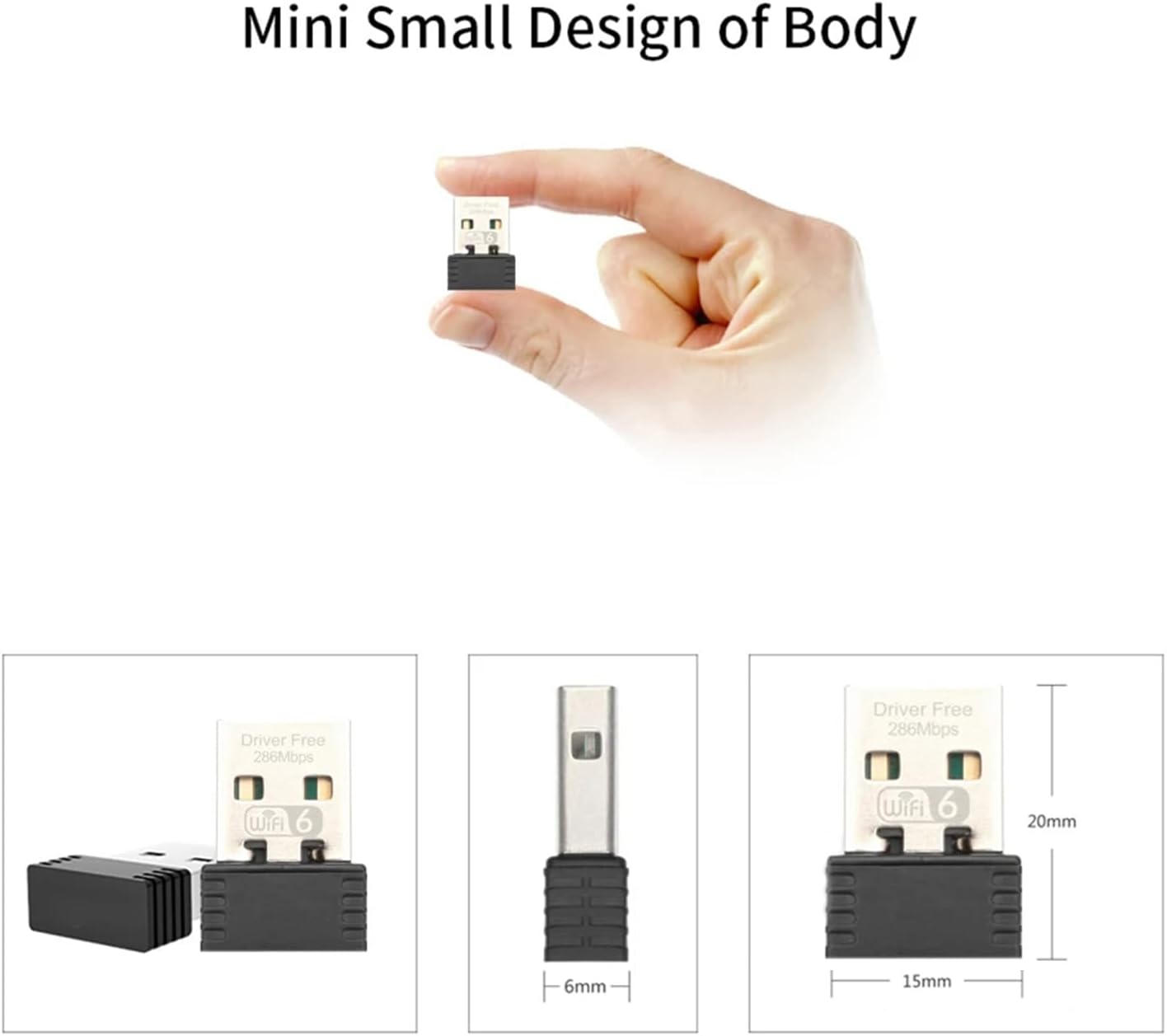
Image: A visual representation of the adapter's small size, shown held between fingers and with detailed dimensions (20mm length, 6mm width, 15mm height).
8. Garantie et assistance
For warranty information and technical support, please refer to the product packaging or contact the manufacturer directly. You can typically find support contact details on the official OPTFOCUS website ou via votre plateforme d'achat.
Fabricant: Leitong Tec
Date de mise en ligne sur Amazon : 12 janvier 2024