
1. Introduction
Thank you for choosing the Huepar TL25 Digital Level Ruler. This precision instrument is designed for accurate angle and level measurements in various applications. It combines traditional spirit levels with a digital display for enhanced versatility and readability. Please read this manual thoroughly before operating the device to ensure safe and correct usage.
2. Consignes de sécurité
- Manipulez toujours l'appareil avec précaution afin d'éviter tout dommage.
- N’exposez pas l’appareil à des températures extrêmes, à l’humidité ou à la lumière directe du soleil pendant des périodes prolongées.
- Tenez l'appareil éloigné des champs magnétiques puissants, qui pourraient affecter sa précision.
- Ne tentez pas de démonter ou de modifier l'appareil. Les réparations doivent être effectuées uniquement par du personnel autorisé.
- Jetez les piles conformément aux réglementations locales.
3. Produit terminéview
The Huepar TL25 Digital Level Ruler features a robust design with both digital and traditional bubble levels. Key components include a backlit LED display, control buttons, horizontal and vertical spirit levels, a magnetic base, and a V-groove for measuring cylindrical objects.
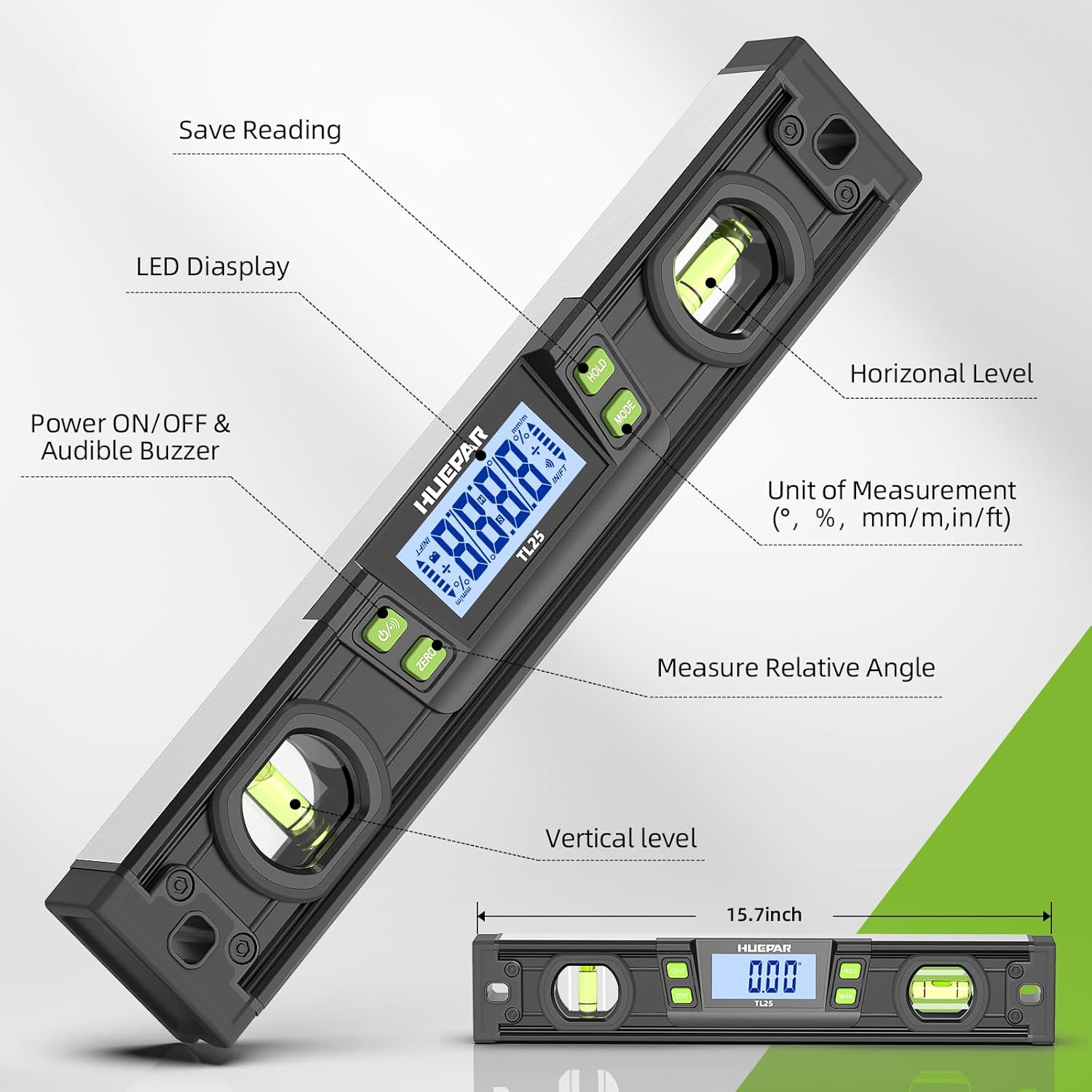
Figure 3.1 : Surview of the Huepar TL25 Digital Level Ruler with labeled components. This image highlights the LED display, power button, audible buzzer, horizontal and vertical spirit levels, unit selection, relative angle measurement button, and the save reading (HOLD) button. The overall length is approximately 15.7 inches.
Caractéristiques principales :
- Affichage LED numérique : Provides clear, precise angle readings.
- Dual Spirit Levels: For traditional horizontal and vertical leveling.
- Base magnétique : Allows for secure attachment to metal surfaces.
- Rainure en V : Facilitates stable placement on cylindrical pipes and conduits.
- Plusieurs unités de mesure : Degrees (°), Percentage (%), mm/m, and in/ft.
- Fonction de maintien : Fige la lecture actuelle affichée.
- Mesure d'angle relatif : Allows setting a new zero reference.
- Indicateur sonore : Alerts when the device reaches 0° or 90°.
- Automatic Display Reversal: Display automatically flips when the level is inverted.
4. Installation
4.1 Installation de la batterie
- Repérez le couvercle du compartiment de la batterie sur l'appareil.
- Open the cover and insert the required button cell batteries, ensuring correct polarity (+/-).
- Fermez soigneusement le couvercle du compartiment à piles.
4.2 Mise sous/hors tension
Appuyez sur le MARCHE/ARRÊT button to power on the device. Press and hold the MARCHE/ARRÊT button to power off the device. The device may also feature an auto-off function to conserve battery life after a period of inactivity.
5. Fonctionnement
5.1 Précision des mesures
The TL25 Digital Level Ruler offers high accuracy for precise measurements. The resolution is accurate to 0.05°.

Figure 5.1 : The digital level ruler displaying its accuracy. It shows an accuracy of ±0.1° at 0° and 90°, and ±0.2° at other angles.
5.2 Unit of Measurement Selection
Appuyez sur le MODE button to cycle through the available measurement units: Degrees (°), Percentage (%), mm/m, and in/ft.

Figure 5.2 : The digital level ruler demonstrating its four unit measurement selections: Degree (°), Percentage (%), mm/m, and in/ft.
5.3 Relative Angle Measurement (ZERO Function)
To measure a relative angle, place the level on a reference surface and press the ZÉRO button. The display will show 0.00°, establishing this as your new reference point. Any subsequent movement will show the angle relative to this set zero.

Figure 5.3 : Illustration of relative angle measurement. The level is first set to 0° on a 30° surface, then moved to a 40° surface, displaying a relative angle of 10°.
5.4 Fonction de maintien
Appuyez sur le PRISE button to freeze the current reading on the display. This is useful for taking measurements in hard-to-see areas. Press PRISE again to release the reading and resume live measurement.
5.5 Automatic Display Reversal
The digital display automatically reverses its orientation when the level is turned upside down, ensuring readability from any position.

Figure 5.4 : The digital level ruler demonstrating the HOLD function and automatic display reversal when the tool is inverted.
5.6 Bright LED Display & Audible Indicator
The device features a bright LED display for clear visibility in various lighting conditions. An audible indicator will sound when the level reaches a perfectly horizontal (0°) or vertical (90°) position, providing an additional cue for precise alignment.

Figure 5.5 : The digital level ruler showcasing its bright LED display and the icon for the audible indicator.
5.7 Base magnétique
The strong magnets integrated into the base of the level allow it to be securely attached to metal surfaces, freeing your hands for other tasks.
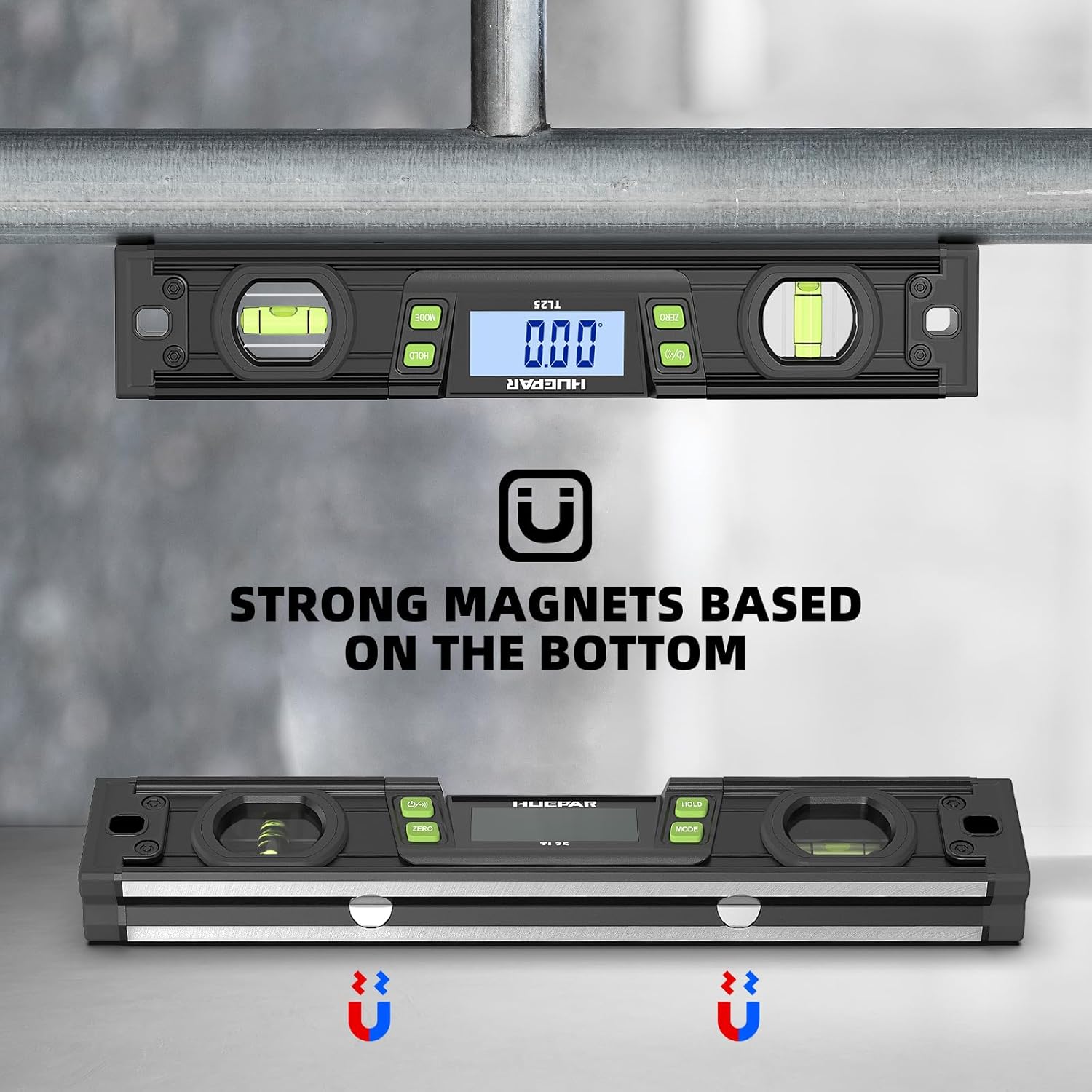
Figure 5.6 : The digital level ruler demonstrating its strong magnetic base, allowing it to adhere to metal structures both horizontally and vertically.
5.8 V-Groove for Cylindrical Objects
The V-groove design on the measuring edge allows for stable placement and accurate measurement on cylindrical objects such as pipes or conduits.

Figure 5.7 : The digital level ruler positioned on a cylindrical object, utilizing its V-groove for stable and accurate measurement.
6. Entretien
- Nettoyage: Essuyez l'appareil avec un chiffon doux et sec. N'utilisez pas de nettoyants abrasifs ni de solvants.
- Stockage: Store the device in its protective case in a dry, cool place when not in use. Remove batteries if storing for extended periods to prevent leakage.
- Étalonnage: If you suspect accuracy issues, refer to the calibration instructions (if provided separately) or contact customer support.
7. Dépannage
7.1 L'écran ne fonctionne pas
- Vérifiez que les piles sont correctement installées et suffisamment chargées. Remplacez-les si nécessaire.
- Assurez-vous que l'appareil est sous tension.
7.2 Lectures inexactes
- Ensure the measuring surface is clean and free of debris.
- Vérifiez que l'appareil est placé de manière stable sur la surface.
- Avoid strong magnetic fields during measurement.
- Perform a calibration if available (refer to specific calibration instructions if provided with your product).
7.3 Audible Indicator Not Sounding
- Ensure the device is at 0° or 90°.
- Vérifiez le niveau de la batterie.
8. Spécifications
| Fonctionnalité | Spécification |
|---|---|
| Marque | Huépar |
| Modèle | TL25 |
| Matériel | Métal, plastique |
| Couleur | Noir |
| Style | Magnétique |
| Mode de fonctionnement | Automatique |
| Nom du type d'élément | Niveau |
| Composants inclus | NIVEAU |
| Nombre d'unités | 1.0 Nombre |
9. Garantie et assistance
Huepar products are manufactured to high-quality standards. For warranty information, technical support, or service inquiries, please refer to the warranty card included with your product or visit the official Huepar webVeuillez conserver votre preuve d'achat pour toute réclamation au titre de la garantie.