
1. Produit terminéview
The Irfora SZ305 is a professional digital multimeter designed for accurate and rapid measurement of various electrical parameters. It features a high-definition backlit LCD display for clear readings in diverse environments and a retractable stand for convenient use.
Les principales fonctions comprennent :
- Vol AC/DCtage et mesure de courant
- Diode, Resistance, and Capacitance testing
- Mesure de fréquence
- Buzzer continuity test
- hFE Triode testing for NPN/PNP transistors
- Vol sans contacttage (NCV) détection
- Battery detection (1.5V, 3V, 9V, 12V)

Image 1.1: The Irfora SZ305 Digital Multimeter highlighting its various measurement functions including AC/DC voltage/current, diode, capacitance, frequency, buzzer, resistance, NCV induction, hFE, and battery detection.
2. Consignes de sécurité
Please read and understand all safety instructions before operating the multimeter. Failure to follow these instructions may result in electric shock, fire, or damage to the device.
- Avant toute mesure, assurez-vous toujours que le multimètre est réglé sur la fonction et la plage appropriées.
- N'essayez pas de mesurer le voltages or currents exceeding the maximum specified limits for the device.
- Faites preuve d'une extrême prudence lorsque vous travaillez sur des circuits sous tension. Haute tensiontagCela peut être dangereux.
- Avant chaque utilisation, inspectez les cordons de test afin de détecter tout dommage. Ne les utilisez pas si l'isolation est fissurée ou endommagée.
- N’utilisez pas le multimètre s’il semble endommagé ou s’il ne fonctionne pas correctement.
- Évitez d'utiliser le multimètre dans des environnements humides ou pendant les orages électriques.
- Remplacez les piles dès que le voyant de batterie faible s'allume afin de garantir des mesures précises.
- Débranchez toujours les cordons de test du circuit avant de modifier les fonctions ou les plages de réglage.
3. Installation et utilisation initiale
3.1 Installation de la batterie
Le multimètre nécessite des piles pour fonctionner. Pour installer ou remplacer les piles :
- Assurez-vous que le multimètre est éteint et que les cordons de test sont déconnectés.
- Repérez le couvercle du compartiment à piles à l'arrière de l'appareil.
- Utilisez un tournevis pour ouvrir le compartiment.
- Insérez les piles neuves en respectant la polarité (+ et -).
- Replacez le couvercle du compartiment des piles et fixez-le avec la vis.
3.2 Using the Retractable Support Stand
The multimeter is equipped with a retractable stand on its back for convenient viewpendant les mesures.
- To deploy the stand, gently pull it outwards from the back of the device until it locks into position.
- Place the multimeter on a flat surface.
- To retract the stand, push it back into its original position until it is flush with the device body.
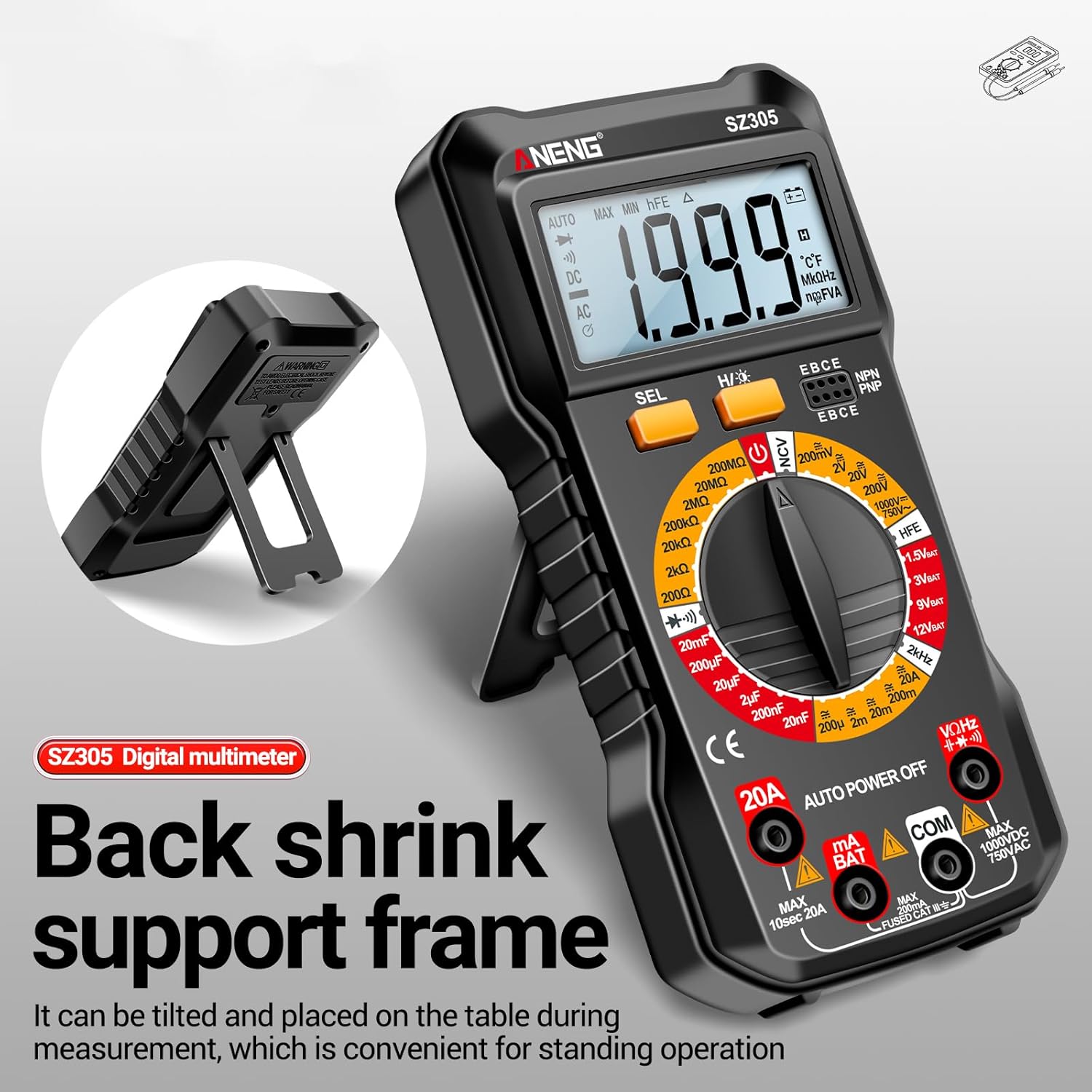
Image 3.1: The Irfora SZ305 Digital Multimeter demonstrating its retractable back support frame for angled viewing on a table.
4. Mode d'emploi
This section details how to perform various measurements with your Irfora SZ305 Digital Multimeter.
4.1 Mise sous/hors tension et rétroéclairage
- To power on the device, rotate the rotary switch from "AUTO POWER OFF" to any desired measurement function.
- To power off, rotate the switch back to "AUTO POWER OFF". The device also features an auto-power-off function after a period of inactivity.
- To activate the LCD backlight, press and hold the "H/☝" button. The backlight will illuminate, improving visibility in dark environments. Press and hold again to turn off.

Image 4.1: The Irfora SZ305 Digital Multimeter displaying its high-definition backlit LCD screen, enhancing readability in low-light conditions.
4.2 Volume CA/CCtage Mesure
- Insert the red test lead into the "VHz" jack and the black test lead into the "COM" jack.
- Rotate the rotary switch to the "V~" (AC Voltage) ou "V=" (Volume CCtage) gamme.
- Connectez les sondes de test aux bornes du circuit ou du composant à mesurer.
- Lire le voltage valeur affichée sur l'écran LCD.
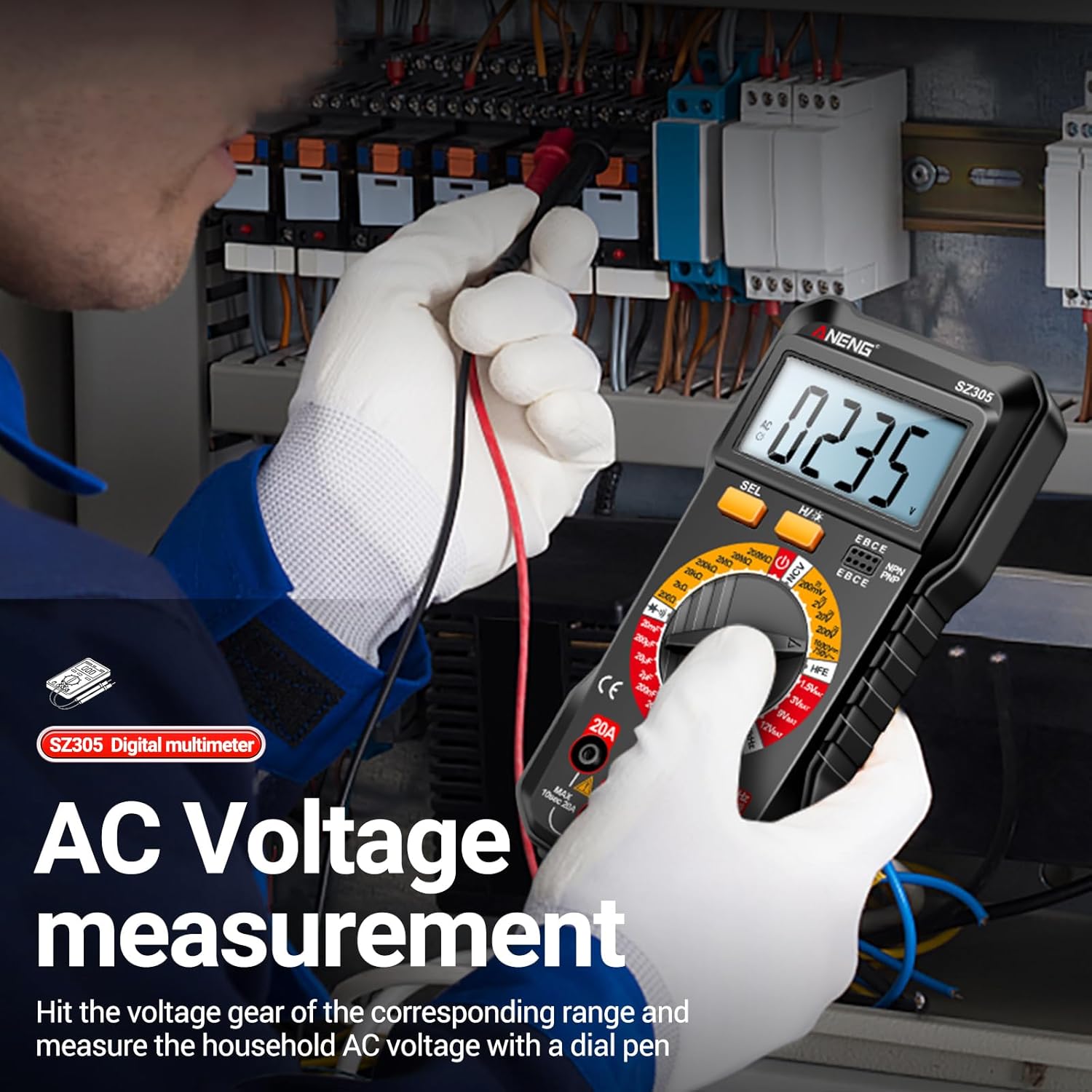
Image 4.2: A user measuring AC voltage with the Irfora SZ305 Digital Multimeter in an electrical panel, demonstrating proper probe placement.
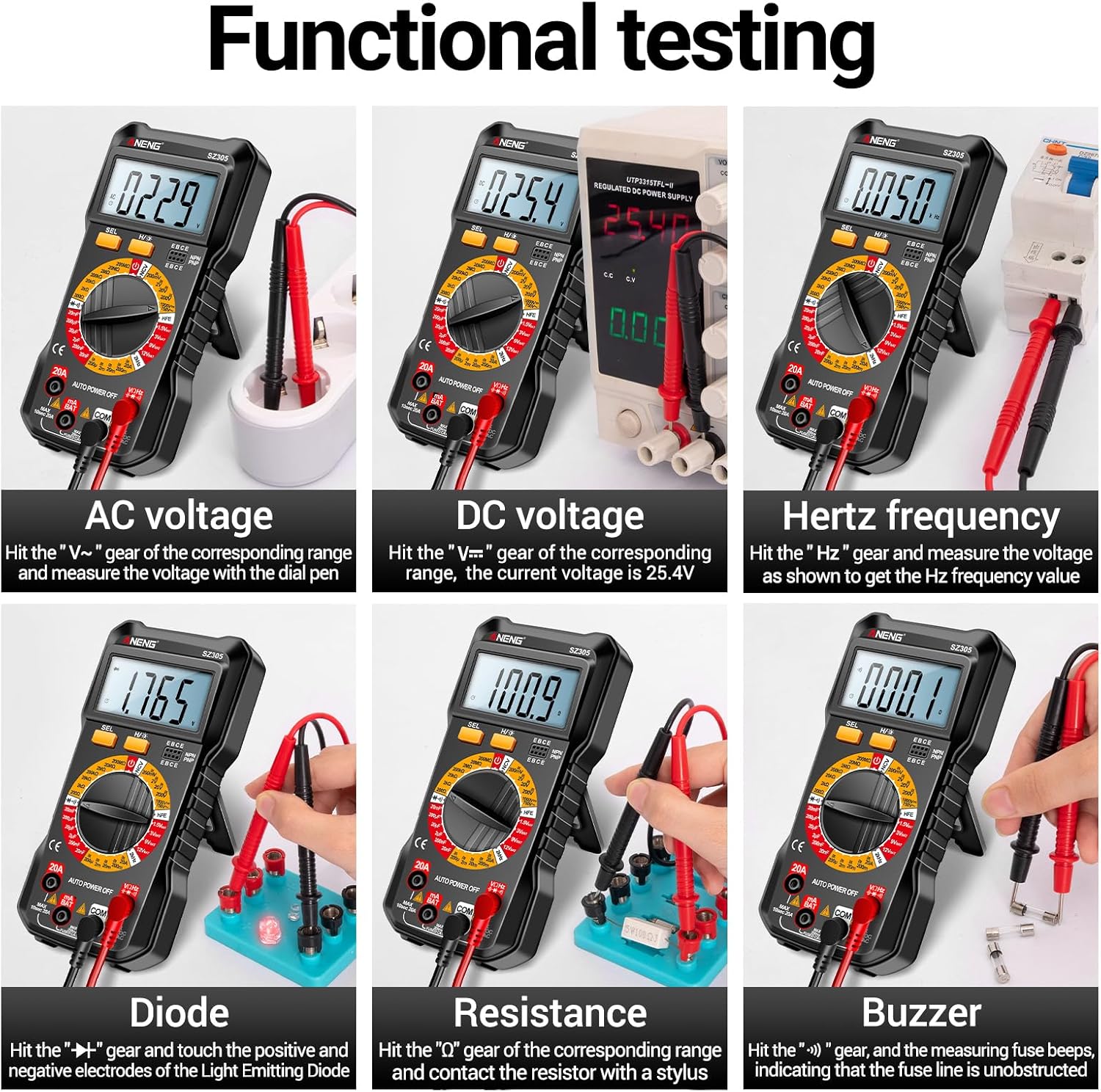
Image 4.3 : Examples of functional testing with the Irfora SZ305, showing measurements for AC voltage, vol continutage, Hertz frequency, diode, resistance, and continuity (buzzer).
4.3 Mesure du courant alternatif/continu
Prudence: Ensure the circuit is de-energized before connecting the multimeter in series for current measurement. Incorrect connection can blow the fuse or damage the meter.
- Insert the red test lead into the "mA" or "20A" jack (depending on expected current) and the black test lead into the "COM" jack.
- Rotate the rotary switch to the appropriate "mA~" / "mA=" or "20A~" / "20A=" range.
- Ouvrez le circuit où le courant doit être mesuré et connectez le multimètre en série.
- Mettez le circuit sous tension et lisez la valeur du courant.

Image 4.4 : Examples of functional testing with the Irfora SZ305, showing measurements for 9V, 3V, 1.5V, and 12V batteries, hFE, capacitance, AC current, and DC current.
4.4 Mesure de résistance
- Insert the red test lead into the "VHz" jack and the black test lead into the "COM" jack.
- Rotate the rotary switch to the "Ω" (Resistance) range.
- Ensure the component to be measured is de-energized. Connect the test probes across the component.
- Lisez la valeur de la résistance.
4.5 Mesure de capacité
- Insert the red test lead into the "VHz" jack and the black test lead into the "COM" jack.
- Rotate the rotary switch to the "F" (Capacitance) range.
- Assurez-vous que le condensateur soit complètement déchargé avant la mesure afin d'éviter d'endommager l'appareil de mesure.
- Connectez les sondes de test aux bornes du condensateur.
- Lisez la valeur de la capacité.
4.6 Diode Test and Continuity (Buzzer)
- Insert the red test lead into the "VHz" jack and the black test lead into the "COM" jack.
- Rotate the rotary switch to the "Diode/Buzzer" symbol.
- Pour le test des diodes : Connectez la sonde rouge à l'anode et la sonde noire à la cathode de la diode. Un volume directtage drop will be displayed. Reverse the probes; an open circuit ("OL") should be displayed.
- Pour le test de continuité : Connect the probes across the circuit or component. If resistance is below a certain threshold, the buzzer will sound, indicating continuity.
4.7 Mesure de fréquence (Hz)
- Insert the red test lead into the "VHz" jack and the black test lead into the "COM" jack.
- Rotate the rotary switch to the "Hz" range.
- Connectez les sondes de test à la source du signal.
- Read the frequency value displayed.
Test de triode 4.8 hFE
This function measures the DC current gain (hFE) of transistors.
- Rotate the rotary switch to the "hFE" position.
- Identify whether the transistor is NPN or PNP type.
- Insert the transistor leads (Emitter, Base, Collector) into the corresponding sockets on the multimeter's hFE test port.
- Read the hFE value displayed on the screen.

Image 4.5: The Irfora SZ305 Digital Multimeter conducting an hFE test, showing a transistor inserted into the dedicated test socket.
4.9 volumes sans contacttage (NCV) Détection
La fonction NCV permet la détection du volume alternatiftaget sans contact direct, ce qui renforce la sécurité.
- Tournez le commutateur rotatif sur la position « NCV ».
- Bring the top front part of the multimeter close to the suspected AC voltagune source (par exemple, un fil électrique sous tension, une prise de courant).
- The multimeter will emit an audible alarm and the NCV indicator will flash. The closer the device is to the voltage source, the more urgent the alarm will be.

Image 4.6: The Irfora SZ305 Digital Multimeter demonstrating its Non-Contact Voltage (NCV) detection feature near an electrical outlet, indicating the presence of AC voltage.
4.10 Battery Detection (1.5V, 3V, 9V, 12V)
The multimeter can test common battery voltaget.
- Rotate the rotary switch to the desired battery voltage range (e.g., "1.5V BAT", "3V BAT", "9V BAT", "12V BAT").
- Connectez le fil de test rouge à la borne positive de la batterie et le fil de test noir à la borne négative.
- Lire le voltage affiché à l'écran.
5. Entretien
5.1 Nettoyage
Pour nettoyer le multimètre, essuyez le boîtier avec un chiffon humide.amp Utilisez un chiffon et un détergent doux. N’utilisez ni abrasifs ni solvants. Assurez-vous que l’appareil est hors tension et débranché de tout circuit avant de le nettoyer.
5.2 Remplacement de la batterie
Refer to section 3.1 for instructions on battery installation and replacement. Replace batteries when the low battery indicator appears on the display to maintain measurement accuracy.
5.3 Remplacement du fusible
If the current measurement function fails, the fuse may need replacement. This typically requires opening the back casing of the multimeter. Refer to the specifications for the correct fuse type and rating. If unsure, consult a qualified technician.
6. Dépannage
- Aucun affichage ou affichage faible :
- Vérifiez le niveau de charge de la batterie. Remplacez les piles si elles sont faibles.
- Ensure the multimeter is powered on by rotating the switch from "AUTO POWER OFF".
- Lectures incorrectes :
- Assurez-vous que la fonction et la plage de mesure appropriées sont sélectionnées.
- Check test leads for proper connection and damage.
- Verify battery charge. Low batteries can affect accuracy.
- Ensure the circuit or component is properly prepared (e.g., capacitor discharged).
- Le système de mesure actuel ne fonctionne pas :
- Check if the fuse is blown. Replace if necessary (refer to section 5.3).
- Ensure test leads are connected to the correct current jacks ("mA" or "20A").
- Verify the multimeter is connected in series with the circuit.
- NCV function not responding:
- Ensure the rotary switch is set to "NCV".
- Confirm there is an AC voltage source present.
7. Spécifications
| Fonctionnalité | Détail |
|---|---|
| Modèle | SZ305 |
| Marque | Irfora |
| Afficher | 1999 points, écran LCD rétroéclairé |
| Fonctions | Vol AC/DCtage, AC/DC Current, Resistance, Capacitance, Frequency, Diode, Continuity, hFE, NCV, Battery Test |
| Arrêt automatique | Oui |
| Couleur | Noir |
| Référence constructeur | TYHDEE24863B |
Note: Detailed measurement ranges and accuracies are typically found in the full product datasheet.