
1. Introduction
This manual provides detailed instructions for the setup, operation, maintenance, and troubleshooting of your Vontar X3 S905X3/4GB/32GB Android TV Box. Please read this manual thoroughly before using the device to ensure proper functionality and to maximize your user experience. Keep this manual for future reference.
2. Produit terminéview
The Vontar X3 S905X3/4GB/32GB is an Android TV Box designed to transform your television into a smart entertainment hub. It runs on Android 9.0 and features a powerful S905X3 processor, 4GB of RAM, and 32GB of internal storage, providing a smooth and responsive user experience for streaming, gaming, and app usage.
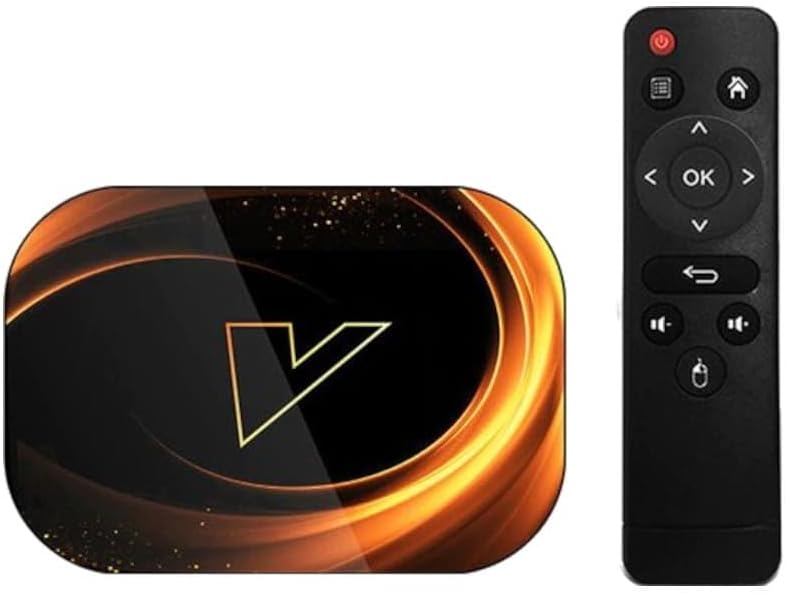
Figure 2.1 : The Vontar X3 Android TV Box shown alongside its included remote control. The TV box features a sleek, dark design with a prominent 'V' logo on top, while the remote is a standard black infrared type with navigation and media control buttons.
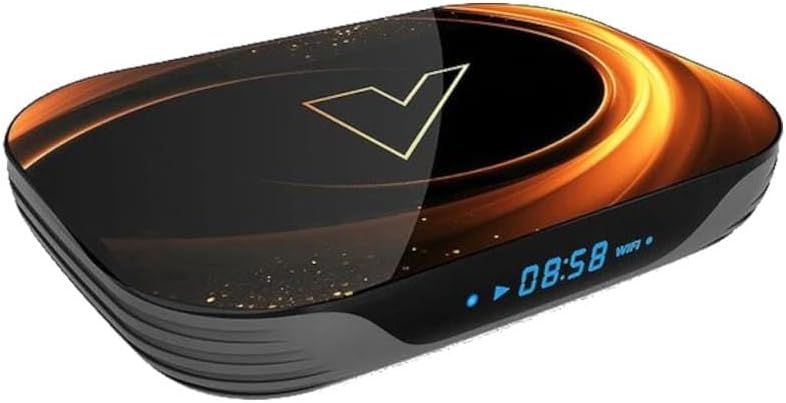
Figure 2.2 : Un angle de face view of the Vontar X3 Android TV Box, highlighting its digital display which shows the current time (08:58) and Wi-Fi status. The device has a dark, glossy finish with an illuminated 'V' logo and subtle golden accents.
Contenu du colis :
- Vontar X3 S905X3/4GB/32GB Android TV Box
- Télécommande
- Adaptateur secteur
- Câble HDMI
- Manuel d'utilisation
3. Guide de configuration
3.1 Connexion de l'appareil
- Se connecter à la télévision : Insert one end of the HDMI cable into the HDMI port on the Vontar X3 TV Box and the other end into an available HDMI input on your television.
- Connexion à l'alimentation : Plug the power adapter into the DC IN port on the TV Box, then plug the adapter into a wall outlet. The device should power on automatically or can be turned on using the power button on the remote.
- Connexion au réseau (facultatif) :
- Wifi: Once the device is powered on, navigate to the 'Settings' menu, select 'Network & Internet', and choose your Wi-Fi network. Enter the password if prompted.
- Ethernet : For a wired connection, connect an Ethernet cable from your router to the LAN port on the TV Box. The device will automatically detect the wired connection.
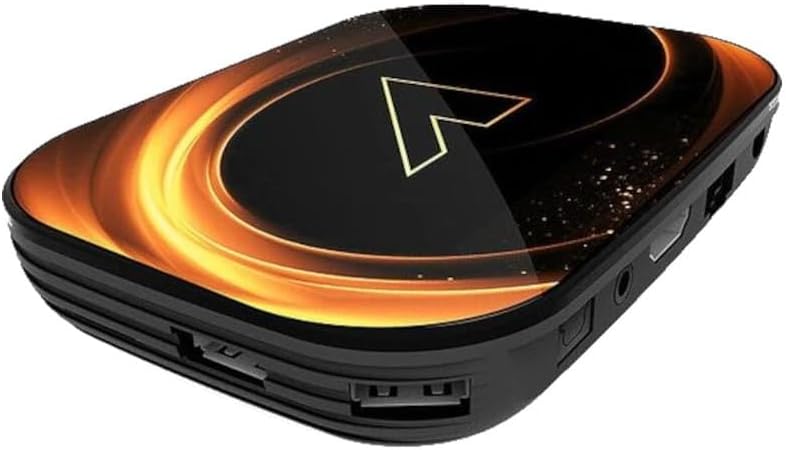
Figure 3.1 : Arrière view of the Vontar X3 Android TV Box, showing various ports including HDMI, Ethernet (LAN), and DC power input. These ports are essential for connecting the device to a television and power source.

Figure 3.2 : Côté view of the Vontar X3 Android TV Box, displaying additional connectivity options such as USB ports (one USB 3.0, one USB 2.0) and a MicroSD card slot for expandable storage.
3.2 Démarrage initial
After connecting all necessary cables, switch your TV's input source to the corresponding HDMI port. The Vontar X3 TV Box will display the boot-up screen. Follow any on-screen prompts for initial setup, such as language selection and Google account login.
4. Mode d'emploi
4.1 Fonctions de la télécommande
The included remote control allows you to navigate the Android TV interface and control media playback. Familiarize yourself with the main buttons:
- Bouton d'alimentation : Allume ou éteint l'appareil.
- Pavé de navigation (Haut/Bas/Gauche/Droite) : Déplace le curseur ou la sélection.
- Bouton OK : Confirme la sélection ou ouvre un élément.
- Bouton Retour : Revient à l'écran précédent.
- Bouton d'accueil: Retour à l'écran d'accueil principal.
- Boutons de volume : Règle le volume audio.
- Bouton Menu : Accède aux menus contextuels.
4.2 Navigation dans l'interface Android 9.0
The Vontar X3 runs on Android 9.0, offering a user-friendly interface. Use the remote's navigation pad to browse through apps, settings, and content. The home screen typically displays frequently used apps, recommended content, and quick access to settings.
4.3 Installation et désinstallation d'applications
- Installation d'applications: Access the Google Play Store from the home screen. Rechercher desired applications and select 'Install'.
- Désinstallation des applications : Go to 'Settings' > 'Apps'. Select the app you wish to uninstall and choose 'Uninstall'.
4.4 Lecture multimédia
The device supports various media formats. You can play media from:
- Services de diffusion en continu : Install apps like Netflix, YouTube, Hulu, etc., from the Google Play Store.
- Stockage local : Connect a USB drive or MicroSD card to play media files directly. Use a file manager or media player app.
- Stockage réseau : Accéder aux médias files à partir d'un stockage en réseau (NAS) ou de dossiers partagés sur votre réseau local.
5. Entretien
5.1 Nettoyage de l'appareil
To clean the Vontar X3 TV Box, use a soft, dry cloth. Do not use liquid cleaners or abrasive materials, as they may damage the device's finish or internal components.
5.2 Mises à jour logicielles
Periodically check for software updates to ensure optimal performance and access to the latest features. Go to 'Settings' > 'Device Preferences' > 'About' > 'System update'.
5.3 Réinitialisation d'usine
Si vous rencontrez des problèmes persistants, une réinitialisation d'usine peut les résoudre. Avertissement: A factory reset will erase all data, settings, and installed applications. Go to 'Settings' > 'Device Preferences' > 'Reset'. Confirm your choice when prompted.
6. Dépannage
This section addresses common issues you might encounter with your Vontar X3 TV Box.
| Problème | Cause possible | Solution |
|---|---|---|
| Pas de courant | Power adapter not connected; Power outlet not working; Device faulty. | Vérifiez que l'adaptateur secteur est bien branché à l'appareil et à une prise de courant fonctionnelle. Essayez une autre prise. |
| Pas de signal à la télévision | Incorrect HDMI input selected; HDMI cable loose or faulty; TV Box not powered on. | Select the correct HDMI input on your TV. Check HDMI cable connections. Ensure the TV Box is powered on. |
| Le Wi-Fi ne se connecte pas | Incorrect Wi-Fi password; Router issues; Device too far from router. | Vérifiez votre mot de passe Wi-Fi. Redémarrez votre routeur. Rapprochez le boîtier TV du routeur ou utilisez un câble Ethernet. |
| La télécommande ne fonctionne pas | Piles déchargées ; Obstruction entre la télécommande et l'appareil ; Télécommande non appariée (si Bluetooth). | Replace batteries. Ensure no obstructions. If it's a Bluetooth remote, re-pair it via settings. |
| Les applications plantent ou se bloquent. | Insufficient memory; App specific issue; Software glitch. | Close background apps. Clear app cache/data (Settings > Apps). Restart the device. Perform a factory reset if issues persist. |
7. Spécifications
The following are the technical specifications for the Vontar X3 S905X3/4GB/32GB Android TV Box:
- Modèle: X3 S905X3/4GB/32GB
- Système opérateur: Android 9.0
- Processeur: Amlogic S905X3
- BÉLIER: 4 Go
- Stockage interne : 32 Go
- Connectivité : Wi-Fi, Ethernet, HDMI, USB 3.0, USB 2.0, MicroSD Card Slot
- Dimensions: 13.78 x 9.45 x 6.3 pouces (dimensions de l'emballage)
- Poids de l'article : 1.76 livres (800 XNUMX grammes)
- Couleur: Colourful (Device exterior design)
- Fabricant: Vontar
- Numéro de modèle de l'article : 62353
- ASIN: B0CPPPXYKP
8. Garantie et assistance
For warranty information and technical support, please refer to the documentation provided with your purchase or contact Vontar customer service directly. Keep your proof of purchase for any warranty claims.