
1. Introduction
This manual provides essential information for setting up, operating, maintaining, and troubleshooting your Xiaomi Redmi 13C smartphone. Please read this guide carefully to ensure proper use and optimal performance of your device.
The Xiaomi Redmi 13C is a new product featuring 128GB storage and 6GB RAM, with Dual SIM capability, in Midnight Black. This device is supplied by a specialized distributor.
2. Contenu de la boîte
Lors du déballage de votre Xiaomi Redmi 13C, vérifiez que tous les éléments suivants sont inclus :
- Smartphone Xiaomi Redmi 13C
- Câble USB
- Chargeur
- Outil d'éjection du tiroir SIM
3. Appareil terminéview
Familiarize yourself with the key components of your Redmi 13C.

Figure 3.1 : Plusview of Xiaomi Redmi 13C key features, including its 6.74-inch 90Hz display, 50MP AI triple camera, 5000mAh battery with 18W fast charging, and powerful octa-core processor.
The Redmi 13C features a large 6.74-inch display with a 90Hz refresh rate for smooth visuals. It is equipped with a 50MP AI triple camera system and a robust 5000mAh battery supporting 18W fast charging. The device is powered by an octa-core processor, ensuring efficient performance.
4. Installation
4.1. Insertion de la carte SIM et de la carte SD
Your Redmi 13C supports Dual SIM cards and expandable storage via a microSD card (up to 128GB). Use the provided SIM tray ejector tool to open the SIM card slot.
- Repérez le tiroir SIM sur le côté de votre téléphone.
- Insérez l'outil d'éjection de la carte SIM dans le petit trou situé à côté du tiroir et appuyez fermement jusqu'à ce que le tiroir sorte.
- Insérez votre ou vos cartes Nano-SIM et/ou votre carte microSD dans les emplacements prévus à cet effet sur le plateau. Assurez-vous que les contacts dorés sont orientés vers le bas.
- Réinsérez soigneusement le plateau dans le téléphone.
4.2. Mise sous tension et configuration initiales
- Maintenez le bouton Marche/Arrêt enfoncé jusqu'à ce que le logo Xiaomi apparaisse.
- Suivez les instructions à l'écran pour sélectionner votre langue, votre région, vous connecter au Wi-Fi et configurer votre compte Google.
- You can also set up fingerprint recognition for enhanced security during this initial setup.
5. Utilisation de votre appareil
5.1. Fonctions d'affichage

Figure 5.1: The Redmi 13C features an immersive 6.74-inch display, providing a fluid visual experience.
The Redmi 13C boasts a 6.74-inch display with a 90Hz refresh rate, offering a smooth and immersive viewing experience for all your content. The maximum display resolution is 720x1600 pixels with a 16:9 aspect ratio.
5.2. Utilisation de l'appareil photo
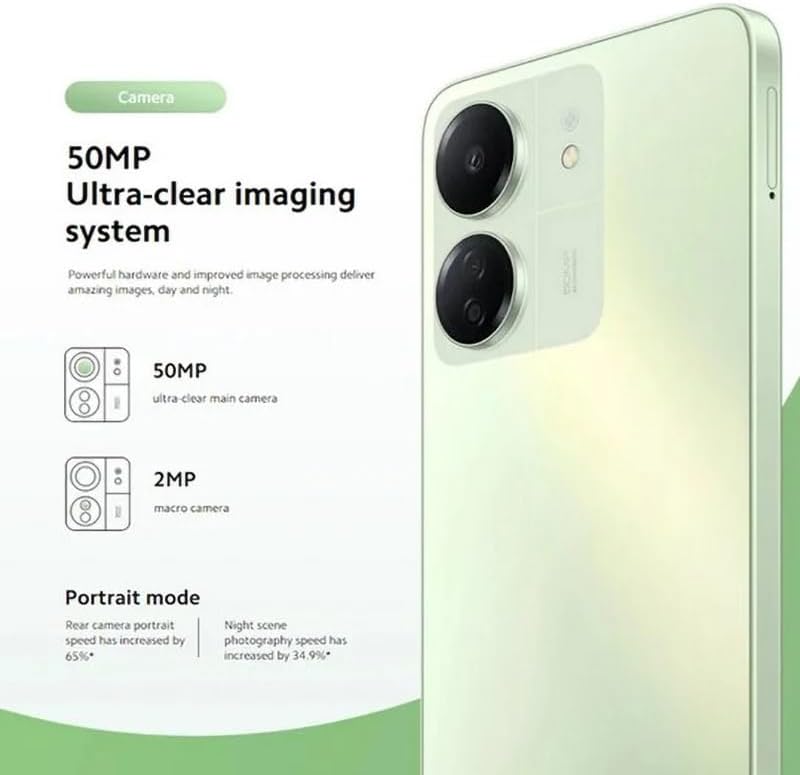
Figure 5.2: The Redmi 13C's 50MP Ultra-clear imaging system includes a 50MP main camera and a 2MP macro camera, supporting Portrait and Night modes.
The device is equipped with a 50MP Ultra-clear imaging system. The rear camera setup includes a 50MP main sensor and a 2MP macro camera. The front camera has an 8MP sensor. Utilize various shooting modes such as Portrait mode and Night mode to capture high-quality photos in different conditions.
5.3. Gestion de la batterie
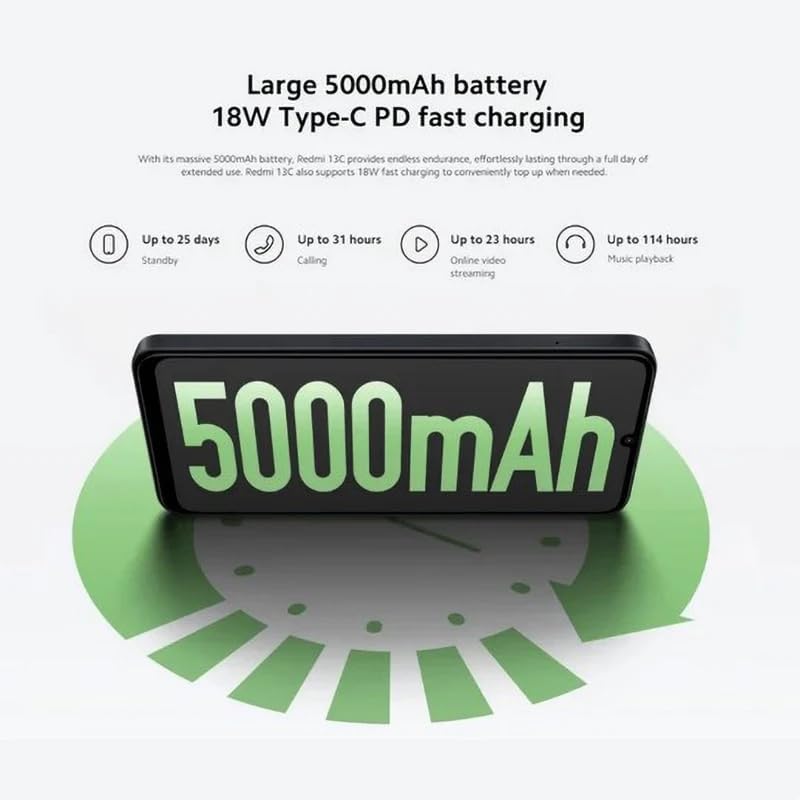
Figure 5.3: The Redmi 13C features a large 5000mAh battery with 18W Type-C PD fast charging, offering extended usage times.
Your Redmi 13C comes with a large 5000mAh Lithium-ion battery, providing extended usage. It supports 18W Type-C PD fast charging, allowing for quick power-ups. For optimal battery life, use the provided charger and avoid extreme temperatures.
- Jusqu'à 25 jours d'autonomie en veille
- Jusqu'à 31 heures d'appel
- Up to 23 hours online video streaming
- Jusqu'à 114 heures d'écoute musicale
5.4. Performance

Figure 5.4: The Redmi 13C is powered by an Octa-core MediaTek Helio G85 processor, delivering smooth and stable performance.
The Redmi 13C is powered by a MediaTek Helio G85 octa-core processor, ensuring smooth and stable performance for daily tasks and applications. It comes with 6GB of RAM and 128GB of internal storage, expandable up to 1TB with a microSD card.
5.5. Connectivité et sécurité
The device supports Wi-Fi, Bluetooth, and 4G cellular technology. It is an unlocked phone, allowing use with various wireless carriers. For security, the Redmi 13C includes a fingerprint recognition feature.
6. Entretien
6.1. Nettoyage de votre appareil
To clean your Redmi 13C, use a soft, lint-free cloth. Avoid using harsh chemicals or abrasive materials, as these can damage the screen and finish. The device is not water-resistant, so avoid exposure to liquids.
6.2. Mises à jour logicielles
Regularly check for and install software updates to ensure your device has the latest features, security patches, and performance improvements. You can usually find this option in the phone's settings under "About phone" or "System updates."
6.3. Entretien de la batterie
To prolong battery life, avoid fully discharging the battery frequently. Charge your phone using the original charger and cable. Do not expose the device to extreme heat or cold.
7. Dépannage
Cette section aborde les problèmes courants que vous pourriez rencontrer avec votre Redmi 13C.
- L'appareil ne s'allume pas : Assurez-vous que la batterie est chargée. Branchez le téléphone au chargeur et attendez quelques minutes avant de tenter de le rallumer.
- Applications qui plantent ou se bloquent : Fermez les applications en arrière-plan. Videz le cache de l'application problématique ou réinstallez-la. Si le problème persiste, envisagez une réinitialisation d'usine (sauvegardez vos données au préalable).
- Mauvaise autonomie de la batterie : Reduce screen brightness, disable unnecessary features like GPS or Bluetooth when not in use, and check for apps consuming excessive power in battery settings.
- Problèmes de connectivité réseau : Ensure your SIM card is properly inserted. Try restarting the device. Check your network settings and contact your carrier if problems persist.
- Le capteur d'empreintes digitales ne fonctionne pas : Assurez-vous que votre doigt est propre et sec. Enregistrez à nouveau vos empreintes digitales dans les paramètres de sécurité.
8. Spécifications
| Fonctionnalité | Spécification |
|---|---|
| Marque | XIAOMI |
| Nom du modèle | Redmi 13C |
| Système opérateur | Androïde |
| Taille de la RAM installée | 6 Go |
| Capacité de stockage de la mémoire | 128 Go (extensible jusqu'à 1 To) |
| Modèle de processeur | MediaTek Helio G85 (Octa-core) |
| Vitesse du processeur | Jusqu'à 2.0 GHz |
| Type d'affichage | Écran AMOLED |
| Taille de l'écran | 6.74 pouces |
| Résolution d'affichage maximale | 720x1600 |
| Taux de rafraîchissement | 90 Hz |
| Rear Camera Sensor Resolution | 50 Megapixels (Main), 2 Megapixels (Macro) |
| Front Camera Sensor Resolution | 8 mégapixels |
| Capacité de la batterie | 5000 mAh (lithium-ion) |
| Chargement | 18W Type-C PD Fast Charging |
| Technologie de connectivité | Bluetooth, Wi-Fi, 4G LTE |
| Emplacements pour cartes SIM | Dual SIM (Nano) |
| Sécurité biométrique | Reconnaissance des empreintes digitales |
| Prise casque | USB Type-C |
| Couleur | Noir de minuit |
| Poids de l'article | 410 gramme |
| Niveau de résistance à l'eau | Non résistant à l'eau |
| Année modèle | 2023 |
9. Garantie et assistance
9.1. Informations sur la garantie
The Xiaomi Redmi 13C comes with a standard manufacturer's warranty. Please refer to the warranty card included with your product for specific terms and conditions. Spare parts availability is stated as 2 years.
9.2. Official Documents and Support
For additional information and support, you can refer to the official user guide and data transparency statement:
For further assistance, please visit the official XIAOMI support website ou contactez leur service client.