
Introduction
The deleyCON Micro HDMI to HDMI Adapter (Model MK6093) is designed to connect devices with a Micro HDMI output to displays or cables with a standard HDMI input. This adapter supports high-resolution video and audio transmission, ensuring a reliable connection for various multimedia applications. It is built with an aluminum casing for enhanced durability and optimal signal integrity.
Caractéristiques du produit
- Prise en charge haute résolution : Supports impressive 4K resolutions (4096 x 2160) at 60Hz and 2K resolutions at 120Hz.
- Norme HDMI 2.0 : Compliant with HDMI 2.0, ensuring compatibility with current and future display technologies.
- Débit de données élevé : Capable of transmitting data up to 18 Gbit/s.
- Fonctionnalités avancées : Supports Audio Return Channel (ARC), High Dynamic Range (HDR), 3D video, Variable Refresh Rate (VRR), Auto Low Latency Mode (ALLM), and High-bandwidth Digital Content Protection (HDCP).
- Construction durable : Features a robust black aluminum casing for excellent signal transmission and long-lasting reliability.
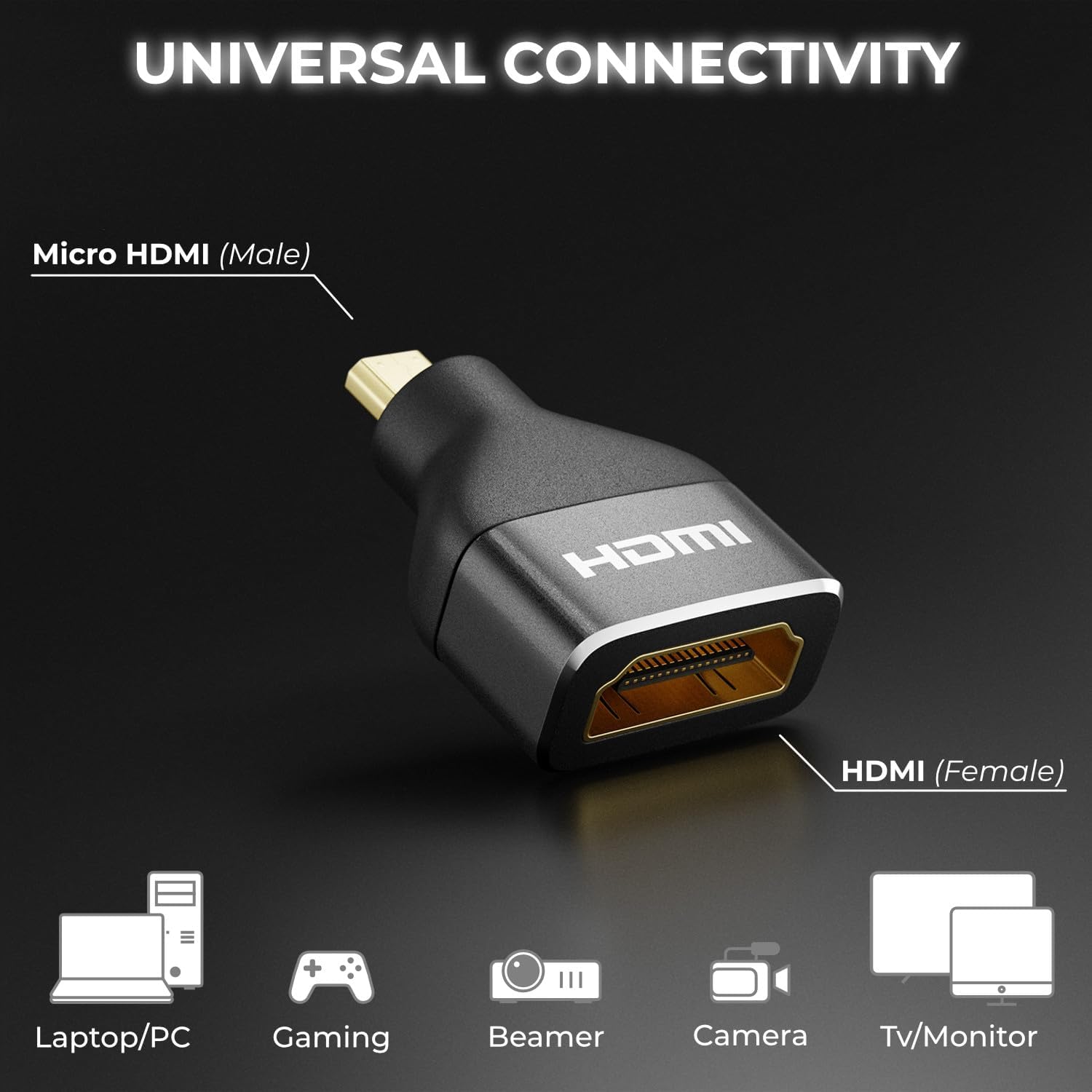
- Connectivité universelle : Connects Micro HDMI (male) to HDMI (female), compatible with a wide range of devices.

Contenu du colis
The deleyCON Micro HDMI to HDMI Adapter package includes:
- 1 x deleyCON Micro HDMI to HDMI Adapter (Model MK6093)
Consignes de sécurité
Please read and follow these safety guidelines to ensure proper use and prevent damage to the adapter or connected devices:
- N’exposez pas l’adaptateur à l’eau, à l’humidité ou à des températures extrêmes.
- Évitez de faire tomber l'adaptateur ou de le soumettre à des chocs violents.
- Do not attempt to disassemble or modify the adapter. This will void the warranty.
- Tenir hors de portée des enfants.
- À utiliser uniquement avec des appareils et des câbles compatibles.
Installation
The deleyCON Micro HDMI to HDMI Adapter is designed for simple plug-and-play installation. Follow these steps to connect your devices:
- Identify the Micro HDMI output port on your source device (e.g., camera, tablet, laptop).
- Connect the Micro HDMI (male) end of the deleyCON adapter into the Micro HDMI output port of your source device.
- Take a standard HDMI cable (not included) and connect one end into the HDMI (female) port of the deleyCON adapter.
- Connect the other end of the standard HDMI cable to the HDMI input port of your display device (e.g., TV, monitor, projector).
- Assurez-vous que votre périphérique source et votre périphérique d'affichage sont tous deux allumés.

Mode d'emploi
Once the adapter is correctly connected as described in the Setup section, the deleyCON Micro HDMI to HDMI Adapter operates automatically. It functions as a passive converter, transmitting the audio and video signal from your Micro HDMI source device to your HDMI display device.
- Ensure your source device is configured to output video and audio through its Micro HDMI port.
- Sélectionnez la bonne entrée HDMI sur votre périphérique d'affichage.
- The adapter will automatically negotiate the best possible resolution and refresh rate supported by both your source and display devices, up to its maximum capabilities (4K@60Hz, 2K@120Hz).
Dépannage
If you encounter issues while using the deleyCON Micro HDMI to HDMI Adapter, refer to the following common troubleshooting steps:
- Aucun signal affiché :
- Ensure all cables are securely connected to both the adapter and your devices.
- Vérifiez que votre écran est configuré sur la source d'entrée HDMI appropriée.
- Test with a different HDMI cable to rule out cable issues.
- Try connecting the source device directly to the display (if possible) to confirm the source device's output functionality.
- Redémarrez à la fois le périphérique source et l'écran.
- Mauvaise qualité d'image ou scintillement :
- Check the resolution and refresh rate settings on your source device. Ensure they are within the adapter's supported specifications (e.g., 4K@60Hz, 2K@120Hz).
- Ensure the HDMI cable used is rated for the desired resolution and data rate (e.g., High-Speed HDMI for 4K).
- Minimize cable length if possible, especially for high-resolution signals.
- Pas d'audio :
- Vérifiez que les paramètres de sortie audio de votre appareil source sont correctement configurés pour HDMI.
- Check the volume levels on both your source device and display.
- Assurez-vous que votre périphérique d'affichage prend en charge l'audio via HDMI.
Caractéristiques
| Fonctionnalité | Détail |
|---|---|
| Numéro de modèle | MK6093 |
| Marque | deleyCON |
| Type de connecteur | Micro HDMI (Male) to HDMI (Female) |
| Norme HDMI | HDMI 2.0 |
| Prise en charge de la résolution maximale | 4K (4096x2160) @ 60Hz, 2K @ 120Hz, 1440p @ 120Hz, 1080p @ 120Hz |
| Débit de données | Jusqu'à 18 Gbit/s |
| Technologies prises en charge | ARC, HDR, 3D, VRR, ALLM, HDCP |
| Matériel | Aluminum (Metallic finish) |
| Couleur | Noir |
| Poids de l'article | 7.99 gramme |
| Nombre de ports | 2 |
| Alimentation électrique | Aucune alimentation externe requise |
| Appareils compatibles | TV box, recorder, monitor, DVD player, camera, video game console, PC, projector, TV |
| Pays d'origine | Chine |

Entretien
To ensure the longevity and optimal performance of your deleyCON Micro HDMI to HDMI Adapter, follow these maintenance guidelines:
- Nettoyage: Use a soft, dry cloth to gently wipe the adapter. Do not use liquid cleaners or abrasive materials, as they may damage the surface or internal components.
- Stockage: Rangez l'adaptateur dans un endroit frais et sec, à l'abri de la lumière directe du soleil et des températures extrêmes lorsqu'il n'est pas utilisé.
- Manutention: Always grasp the connector housing when plugging or unplugging the adapter. Avoid pulling on the cable itself, as this can damage the internal wiring.
Garantie et assistance
deleyCON products are designed for reliability and performance. For information regarding warranty coverage, technical support, or service inquiries, please refer to the documentation provided with your purchase or visit the official deleyCON webConsultez le site. Conservez votre preuve d'achat pour toute réclamation au titre de la garantie.