
Hiwill HW210
Manuel d'utilisation de la barre de son Hiwill HW210 avec caisson de basses et système audio surround 2.1
Modèle: HW210
1. Introduction
Thank you for choosing the Hiwill HW210 Soundbar with Subwoofer. This 2.1 channel surround sound system is designed to enhance your audio experience for televisions, PCs, gaming consoles, and other compatible devices. This manual provides detailed instructions for setup, operation, and maintenance to ensure optimal performance and longevity of your product. Please read this manual thoroughly before use and retain it for future reference.

Image 1.1: The Hiwill HW210 Soundbar and Subwoofer system, shown with a television for illustrative purposes.
2. Consignes de sécurité
Pour réduire les risques d'électrocution, d'incendie ou d'endommagement de l'appareil, veuillez respecter les consignes de sécurité suivantes :
- N'exposez pas cet appareil à la pluie ou à l'humidité.
- Ne placez pas d’objets remplis de liquide, tels que des vases, sur l’appareil.
- Assurez une ventilation adéquate. Ne bloquez aucune ouverture de ventilation.
- Ne pas installer à proximité de sources de chaleur telles que radiateurs, bouches de chauffage, poêles ou autres appareils (y compris amp(échangeurs thermiques) qui produisent de la chaleur.
- Protégez le cordon d'alimentation contre tout piétinement ou pincement, en particulier au niveau des fiches, des prises de courant et du point de sortie de l'appareil.
- Utilisez uniquement les accessoires spécifiés par le fabricant.
- Débranchez cet appareil pendant les orages ou lorsqu’il n’est pas utilisé pendant de longues périodes.
- Confiez toute réparation à un technicien qualifié. Une réparation est nécessaire lorsque l'appareil a été endommagé de quelque façon que ce soit, par exemple si le cordon d'alimentation ou la prise sont endommagés, si du liquide a été renversé ou si des objets sont tombés à l'intérieur de l'appareil, si l'appareil a été exposé à la pluie ou à l'humidité, s'il ne fonctionne pas normalement ou s'il est tombé.
3. Contenu du colis
Veuillez vérifier que tous les articles sont présents et en bon état :
- Hiwill Soundbar
- Caisson de basses filaire
- Télécommande
- Adaptateur secteur
- Optical Cable (may vary by region)
- AUX Cable (may vary by region)
- Wall Mounting Kit (screws, anchors)
- Manuel de l'utilisateur (ce document)
4. Produit terminéview
4.1 Caractéristiques de la barre de son
- Ultra-slim design (3.8 cm height)
- Integrated orbital aluminum diaphragm speakers
- Built-in HiFi and DSP technology for immersive 3D surround sound
- Maximum output power: 120 Watts
- Niveau de pression acoustique : 106 dB
- Bluetooth 5.3 for wireless streaming
- Multiple input options: HDMI ARC, Optical, AUX, USB
- 3 adjustable EQ modes: Game, Movie, Music
- Adjustable bass and treble levels
4.2 Caractéristiques du caisson de basses
- 9-liter capacity for deep, resonant bass
- Wired connection to the soundbar for stable audio transmission
4.3 Commandes et indicateurs
The soundbar features an integrated display and control buttons, typically located on the top or front panel. The remote control provides full functionality.
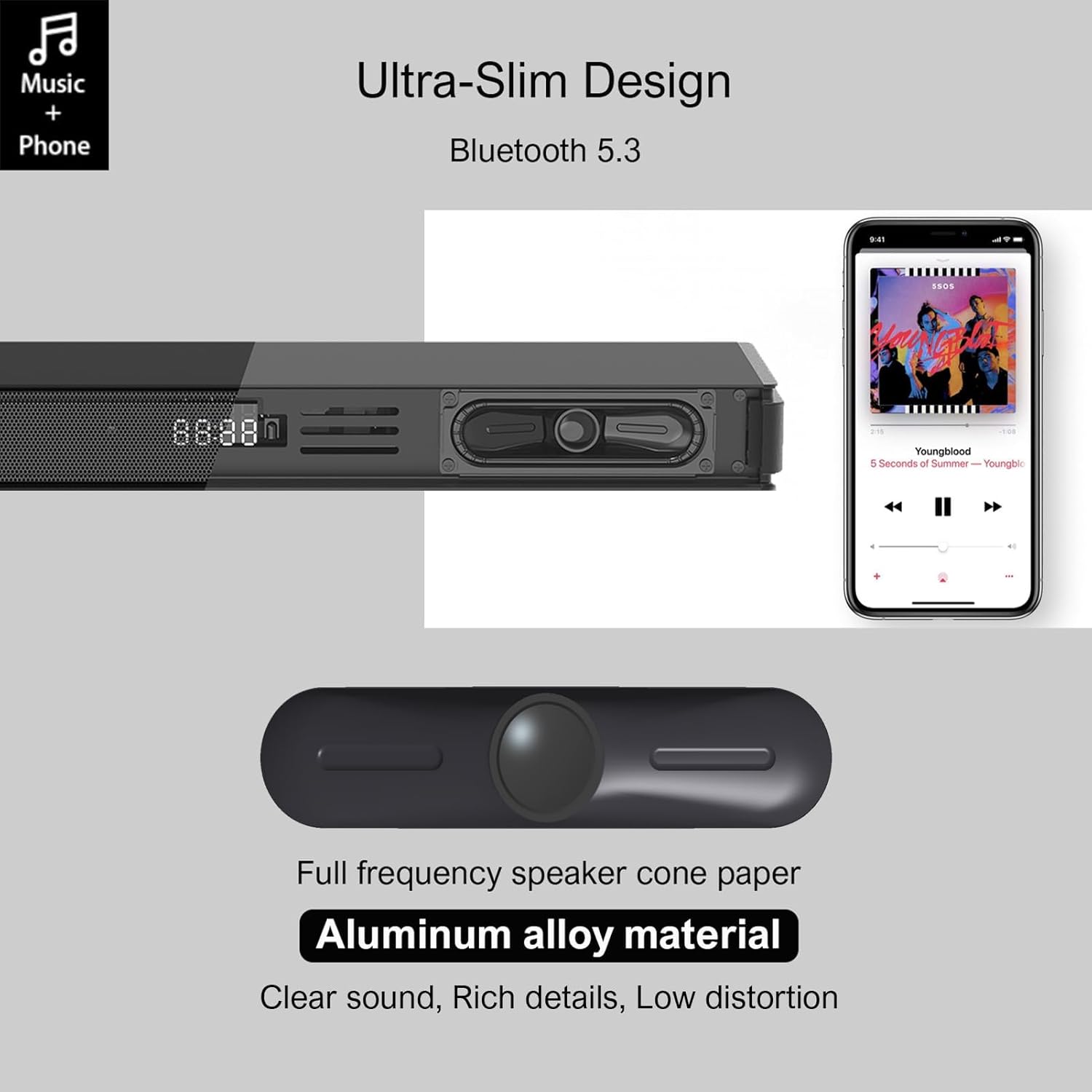
Image 4.1: Detail of the soundbar's ultra-slim design, showing the front display and integrated speakers.
4.4 Connexions du panneau arrière
The rear panel of the soundbar provides various ports for connecting to your audio sources and power.

Image 4.2 : Arrière view of the soundbar showing input ports: AUX, HDMI ARC, USB, Optical, Subwoofer Out, and DC In.
- AUX (3.5 mm) : Pour connecter des appareils dotés d'une sortie audio 3.5 mm.
- ARC (HDMI) : For connecting to a TV's HDMI ARC port. Supports CEC for unified control.
- USB: Pour la lecture audio files depuis une clé USB.
- OPTIQUE: For connecting to a TV or other device with an optical audio output.
- SOUS SORTIE : For connecting the wired subwoofer.
- DC IN: Pour connecter l'adaptateur secteur.
5. Installation
5.1 Options de placement
The Hiwill HW210 soundbar offers flexible placement options to suit your home entertainment setup.

Image 5.1: Illustrates placing the soundbar on a tabletop in front of the TV or mounting it on the wall below the TV.
- Placement sur table : Place the soundbar on a stable, flat surface directly in front of your TV. Ensure it does not obstruct the TV's remote sensor.
- Montage mural : The soundbar can be mounted on the wall below your TV. Use the provided wall mounting kit and follow these steps:
- Mark the desired mounting positions on the wall, ensuring the soundbar is centered with your TV.
- Percez des avant-trous aux emplacements marqués.
- Insert wall anchors (if necessary for your wall type).
- Secure the mounting brackets (if separate) or the soundbar directly using screws.
- Emplacement du caisson de basses : Place the subwoofer on the floor near the soundbar. Experiment with placement to find the best bass response for your room.
5.2 Connexion à l'alimentation
- Connect the power adapter to the DC IN port on the soundbar's rear panel.
- Branchez l'autre extrémité de l'adaptateur secteur dans une prise murale.
- Connect the wired subwoofer cable to the SUB OUT port on the soundbar.
5.3 Connexion aux sources audio
Choose one of the following connection methods based on your device:
- HDMI ARC (Recommended for TVs):
- Connect one end of an HDMI cable (not included) to the ARC port on the soundbar.
- Connectez l'autre extrémité au port HDMI ARC de votre téléviseur.
- Ensure HDMI CEC is enabled in your TV's settings for unified control.
- Optique:
- Connect the optical cable (included) to the OPTICAL port on the soundbar.
- Connect the other end to the optical audio output port on your TV or other device.
- Ensure your TV's audio output is set to "PCM" if you experience no sound.
- AUX (3.5 mm) :
- Connect the 3.5mm AUX cable (included) to the AUX port on the soundbar.
- Connect the other end to the headphone jack or AUX output of your device.
- USB:
- Insérez une clé USB contenant de l'audio files dans le port USB de la barre de son.
6. Mode d'emploi
6.1 Mise sous/hors tension
- Appuyez sur le Pouvoir bouton sur la barre de son ou la télécommande pour allumer ou éteindre l'appareil.
6.2 Sélection de la source d'entrée
- Appuyez sur le Saisir button on the remote control or the soundbar to cycle through available input sources (ARC, OPT, AUX, USB, BT). The selected input will be displayed on the soundbar's screen.
6.3 Couplage Bluetooth
- Turn on the soundbar and select the "BT" input source. The soundbar will enter pairing mode, indicated by a flashing "BT" on the display.
- Sur votre appareil mobile, activez Bluetooth et recherchez les appareils disponibles.
- Select "Hiwill HW210" (or similar name) from the list of devices.
- Once paired, the soundbar will emit a confirmation tone, and "BT" will stop flashing.
- To disconnect, turn off Bluetooth on your device or select a different input source on the soundbar.
6.4 Contrôle du volume
- Utilisez le Augmenter le volume (+) et Baisser le volume (-) buttons on the soundbar or remote control to adjust the master volume.
- Appuyez sur le Muet bouton de la télécommande pour couper ou rétablir le son.
6.5 EQ Modes and Tone Adjustment
The soundbar features three preset equalizer modes and adjustable bass/treble settings.

Image 6.1: Visual representation of the three equalizer modes: Game, Movie, and Music, optimized for different audio content.
- Appuyez sur le EQ button on the remote control to cycle through the preset modes: Jeu, Film, et Musique.
- Utilisez le Basse +/- buttons on the remote control to adjust the bass level.
- Utilisez le Aigus +/- buttons on the remote control to adjust the treble level.
7. Entretien
- Nettoyage: Utilisez un chiffon doux et sec pour nettoyer la surface de la barre de son et du caisson de basses. N'utilisez pas de nettoyants liquides ni de produits abrasifs.
- Stockage: Si vous devez entreposer l'appareil pendant une période prolongée, débranchez-le de la prise de courant et rangez-le dans un endroit frais et sec.
- Évitez les obstacles : Ensure that the speaker grilles and ventilation openings are not blocked by dust or other objects.
8. Dépannage
| Problème | Cause possible | Solution |
|---|---|---|
| Pas de courant | Cordon d'alimentation non branché ; prise de courant inactive | Vérifiez que le cordon d'alimentation est bien branché ; essayez une autre prise de courant. |
| Pas de son | Source d'entrée incorrecte sélectionnée ; Volume trop faible ; Câbles mal connectés ; Paramètres de sortie audio du téléviseur incorrects. | Select the correct input source; Increase volume; Check all audio cables are securely connected; For Optical/ARC, ensure TV audio output is set to PCM. |
| L'appairage Bluetooth échoue | Barre de son non en mode appariement ; appareil trop éloigné ; interférences. | Ensure soundbar is in BT mode and flashing; Move device closer; Turn off other Bluetooth devices. |
| La télécommande ne fonctionne pas | Piles déchargées ; Obstruction entre la télécommande et la barre de son. | Remplacez les piles de la télécommande ; assurez-vous d'une ligne de visée dégagée vers le capteur de la barre de son. |
| Mauvaise qualité sonore | Incorrect EQ mode; Source audio quality; Cable issues. | Adjust EQ modes and bass/treble settings; Try a different audio source; Check/replace audio cables. |
9. Spécifications
| Nom du modèle | Hiwill HW210 Soundbar |
| Type de haut-parleur | Barre de son avec caisson de basses filaire |
| Configuration du son surround | Canal 2.1 |
| Puissance de sortie maximale des haut-parleurs | 120 watts |
| Technologie de connectivité | Bluetooth 5.3, HDMI ARC, AUX (3.5mm), USB, Optical |
| Mode de sortie audio | Entourer |
| Caractéristiques spéciales | High-resolution audio support, 3 EQ modes, Adjustable Bass/Treble, Wall-mountable |
| Utilisations recommandées | TV, Gaming Consoles, Computers, Smartphones, Tablets, Music Players, DVD Players, Home Theater |
10. Garantie et assistance
Hiwill products are designed and manufactured to the highest quality standards. For detailed warranty information, please refer to the warranty card included in your package or visit the official Hiwill website. If you encounter any issues or require technical assistance, please contact Hiwill customer support through the contact information provided on the product packaging or website.
Please have your model number (HW210) and purchase date ready when contacting support.
Ask a question about this manual
Ask about setup, troubleshooting, compatibility, parts, safety, or missing instructions. Manuals+ will review the question and use this page’s manual context to help answer it.