
EPTTECH Smart TLC2206
EPTTECH TLC2206 Ultrasonic Liquid Level Monitor
Manuel d'instructions de l'utilisateur
1. Introduction
The EPTTECH TLC2206 is a wireless ultrasonic liquid level monitor designed for contactless measurement of liquid levels in various tanks. It provides real-time data and automatic alerts directly to your smartphone via the Tuya Smart or Smart Life mobile application. This manual provides detailed instructions for installation, operation, maintenance, and troubleshooting to ensure optimal performance of your device.

Figure 1: EPTTECH TLC2206 Ultrasonic Liquid Level Monitor, power adapter, and mobile app interface.
2. Consignes de sécurité
Please read and understand all safety precautions before installing and operating the device.
- The sensor unit is IP67 waterproof, suitable for outdoor use and protection against temporary immersion. However, the power adapter is pas étanche et doit être protégé de l'humidité.
- Ensure the power adapter is connected to a compatible power source (100-240V AC input, 9V DC output).
- Operate the device within the specified temperature range of -10℃ to +70℃.
- N’essayez pas de démonter ou de réparer l’appareil vous-même. Confiez toute intervention à un technicien qualifié.
- Éloignez l'appareil des champs électromagnétiques puissants afin d'éviter les interférences.
3. Produit terminéview
The TLC2206 utilizes ultrasonic technology to accurately measure liquid levels without direct contact with the liquid. Data is transmitted wirelessly via WiFi to your mobile device.
3.1 Composants
- Ultrasonic Sensor Unit (TLC2206)
- Adaptateur secteur (9 V CC)
3.2 Principales caractéristiques
- Contactless Measurement: Ultrasonic technology ensures no direct contact with the liquid, preventing corrosion and contamination.
- Large plage de mesure : Measures liquid levels from 10 cm to 3.0 meters from the sensor.
- Connectivité sans fil: Connects to your home or office WiFi network for remote monitoring via mobile app.
- Surveillance en temps réel: View liquid level ratio and depth in real-time on your smartphone.
- Alertes automatiques : Receive push notifications for full and low liquid levels.
- Multi-Tank Monitoring: The app supports monitoring up to 100 sensors simultaneously.
- Conception durable : IP67 waterproof rating for the sensor unit, suitable for various weather conditions.
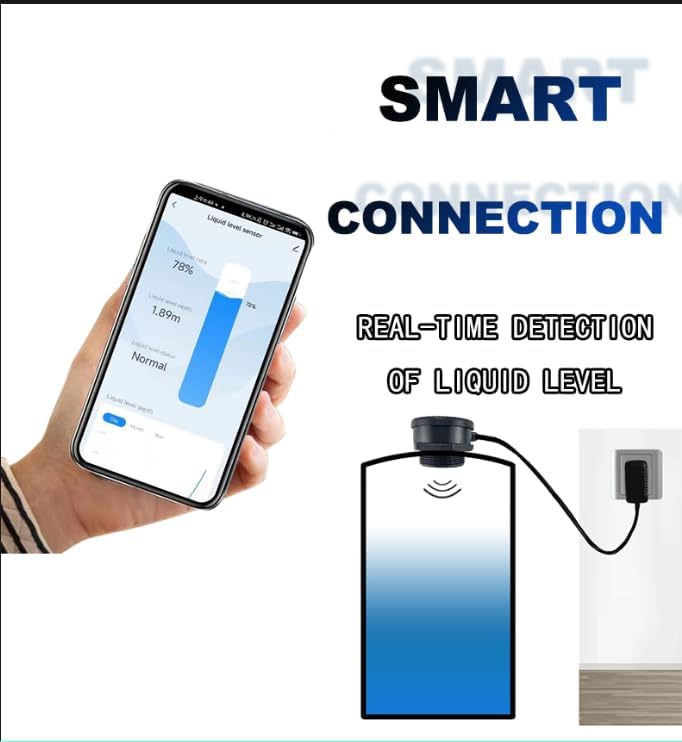
Figure 2: Smart connection for real-time liquid level detection.
4. Installation
4.1 Installation physique
- Identify a suitable location on top of your tank for sensor installation.
- Drill a hole with a diameter of 72 mm at the chosen location.
- Insert the sensor into the drilled hole and secure it using the provided nut. Ensure a tight and stable fit.
- Connect the power adapter to the sensor and plug it into a suitable power outlet.

Figure 3: Sensor installation steps.
4.2 Mobile App Installation and Device Pairing
- Téléchargez le "Tuya Smart" or "Vie intelligente" app from your mobile app store. You can use the QR codes below for direct access:

Scan for Tuya Smart or Smart Life App
Vous pouvez également télécharger le fichier depuis : Tuya Smart or Vie intelligente
- Assurez-vous que le Bluetooth de votre téléphone portable est activé.
- Connect your mobile phone to the same 2.4GHz WiFi network that the sensor will use.
- Ouvrez l'application Tuya Smart ou Smart Life.
- On the sensor unit, press the button inside for approximately 5 seconds until the green LED flashes, indicating pairing mode.
- In the app, click "Add Device" or the "+" icon to search for new devices. The app should automatically detect the "Ultrasonic Sensor".
- If the connection fails or the device cannot be found, short press the button on the sensor twice and try adding it again.
- Once successfully connected, the blue LED on the sensor will illuminate.
4.3 Initial Configuration in App
After successful pairing, you need to set up the tank parameters in the app for accurate readings.
- From the main device screen in the app, slide down to reveal the settings option.
- Click on "Setting".
- Set the data according to the actual situation of your tank, including:
- Hauteur d'installation : The total height of your tank.
- Sensor to Full Line: The distance from the sensor to the maximum fill level of the tank.
- Définir le maximum : Le pourcentagetage or depth for the high-level alarm.
- Set Mini: Le pourcentagetage or depth for the low-level alarm.
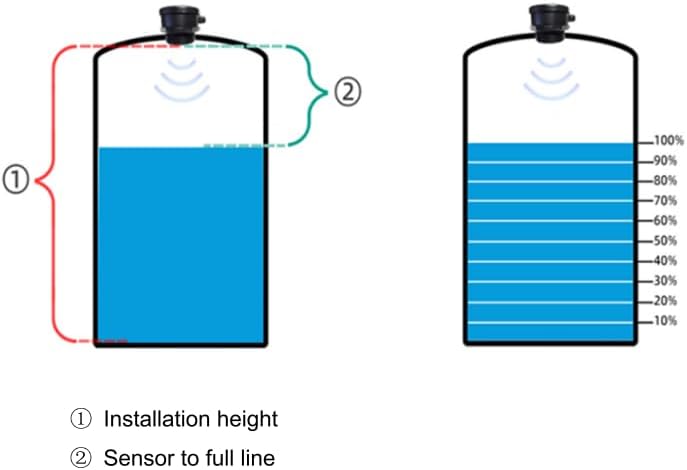
Figure 4: Tank measurement parameters for app configuration.

Figure 5: App interface for multifunctional monitoring and settings.
5. Mode d'emploi
5.1 Surveillance en temps réel
Once configured, the app will display the current liquid level ratio and depth. The status will indicate "Normal", "Low alarm", or "High alarm" based on your settings.

Figure 6: Real-time liquid level monitoring on the app.
5.2 Setting Up Alarms and Notifications
To receive notifications when the liquid level reaches a specific state (e.g., full or low), you need to create a "scene" in the app:
- Return to the app's home page.
- Click on the "Scene" tab (usually at the bottom of the screen).
- Click "When device status changes".
- Select your TLC2206 sensor.
- Choose the option to alarm (e.g., "Low alarm" or "Full alarm").
- Click "Then".
- Select "Send notification".
- Choose "Message Center" for in-app push notifications. (Note: Phone call or SMS reminders may be a paid feature of the Tuya platform).
- Click "Next" and then "Save".
- Enter a scene name (e.g., "Low Water Alert") and confirm.
When the liquid level reaches the alarm state set in the scene, a pop-up message will remind you.
Video 1: Detailed instructions on setting up the EPTTECH Smart TLC2206 APP Liquid Level Sensor and configuring alarms.
Video 2: Demonstration of the EPTTECH TLC2206 Tank Level Monitor in action.
5.3 Historique des données
The app displays a graph table that updates the average liquid level every half hour. If the data does not appear to update, return to the APP homepage and pull down to refresh the screen.
6. Entretien
- Regularly inspect the sensor unit for any debris or buildup that might obstruct the ultrasonic signal. Clean the sensor surface gently with a soft, damp tissu.
- Vérifiez que l'adaptateur secteur et le câble ne sont pas endommagés et sont correctement connectés.
- Periodically check the app for firmware updates to ensure optimal performance and access to new features.
- While the sensor is IP67 waterproof, prolonged exposure to extreme conditions or direct water jets on the cable entry point should be avoided.
7. Dépannage
If you encounter issues with your TLC2206 monitor, refer to the following common problems and solutions:
| Problème | Cause possible | Solution |
|---|---|---|
| Device cannot connect to WiFi / App cannot find sensor. | Weak WiFi signal, incorrect pairing procedure, phone not on same network. | Ensure strong 2.4GHz WiFi signal (within 30m without obstacles). Confirm phone is on the same WiFi. Short press the sensor button twice to re-enter pairing mode and try adding again. |
| Inaccurate liquid level readings. | Incorrect app calibration settings, sensor obstruction, condensation, unsuitable tank shape/material. | Verify "Installation Height" and "Sensor to Full Line" settings in the app are accurate. Ensure the sensor's path to the liquid is clear. Avoid installation where the liquid surface is not flat or where objects are too small/soft to reflect the ultrasonic signal effectively. If condensation is suspected inside the unit, contact support. |
| Notifications are not timely or not received. | Poor WiFi signal, app notification settings, Tuya platform limitations. | Check WiFi signal strength. Ensure app notifications are enabled in your phone's settings. Note that advanced notification types (SMS/calls) may require a subscription from Tuya. |
| Device stopped working after some time. | Internal component failure, water intrusion (condensation). | Contact EPTTECH customer support for warranty service or troubleshooting assistance. |

Figure 7: Situations that may cause sensor test errors.
8. Spécifications
| Fonctionnalité | Spécification |
|---|---|
| Numéro de modèle | Smart TLC2206 |
| Mesurer la distance | 10 cm to 3.0 meters (3.94 to 118.11 inches) |
| Méthode de contrôle | Application (Tuya Smart / Smart Life) |
| Techniques de détection | Capteur à ultrasons |
| Puissance d'entrée | 100-240V AC (via adapter) |
| Puissance de sortie | 9 V CC |
| Connectivité | Wireless WiFi (2.4GHz) |
| Gamme WiFi | Jusqu'à 30m (sans obstacle) |
| Indice d'étanchéité | IP67 (sensor unit only) |
| Température de fonctionnement | -10℃ à +70℃ |
| Matériel | Plastique |
| Poids de l'article | 13.1 onces |
| Dimensions du produit | 3.62 x 2.83 x 2.83 pouces |
| Code UPC | 705530908559 |


Figure 8: Sensor dimensions (side and top view(s).
9. Garantie et assistance
The EPTTECH TLC2206 Ultrasonic Liquid Level Monitor comes with a Garantie de 1 ans à compter de la date d'achat.
For any after-sales problems, technical assistance, or warranty claims, please contact EPTTECH customer support. Refer to the contact information provided with your product packaging or visit the official EPTTECH store on Amazon: EPTTECH Amazon Store.
Ask a question about this manual
Ask about setup, troubleshooting, compatibility, parts, safety, or missing instructions. Manuals+ will review the question and use this page’s manual context to help answer it.