
1. Introduction
Thank you for choosing the techno line WT2600 Digital Calendar. This device provides accurate time, date, indoor temperature, and humidity readings, along with alarm functions. This manual will guide you through the setup, operation, and maintenance of your new digital calendar.
2. Consignes de sécurité
- N’exposez pas l’appareil à des températures extrêmes, à la lumière directe du soleil ou à une forte humidité.
- Évitez de faire tomber l'appareil ou de le soumettre à des chocs violents.
- N’essayez pas de démonter ou de réparer l’appareil vous-même. Veuillez faire appel à un technicien qualifié.
- Jetez les piles usagées de manière responsable conformément aux réglementations locales.
- Gardez l’appareil hors de portée des enfants.
3. Contenu du colis
Veuillez vérifier que tous les articles sont présents dans votre colis :
- techno line WT2600 Digital Calendar Unit
- Manuel de l'utilisateur (ce document)
- Batteries (may be included depending on region)
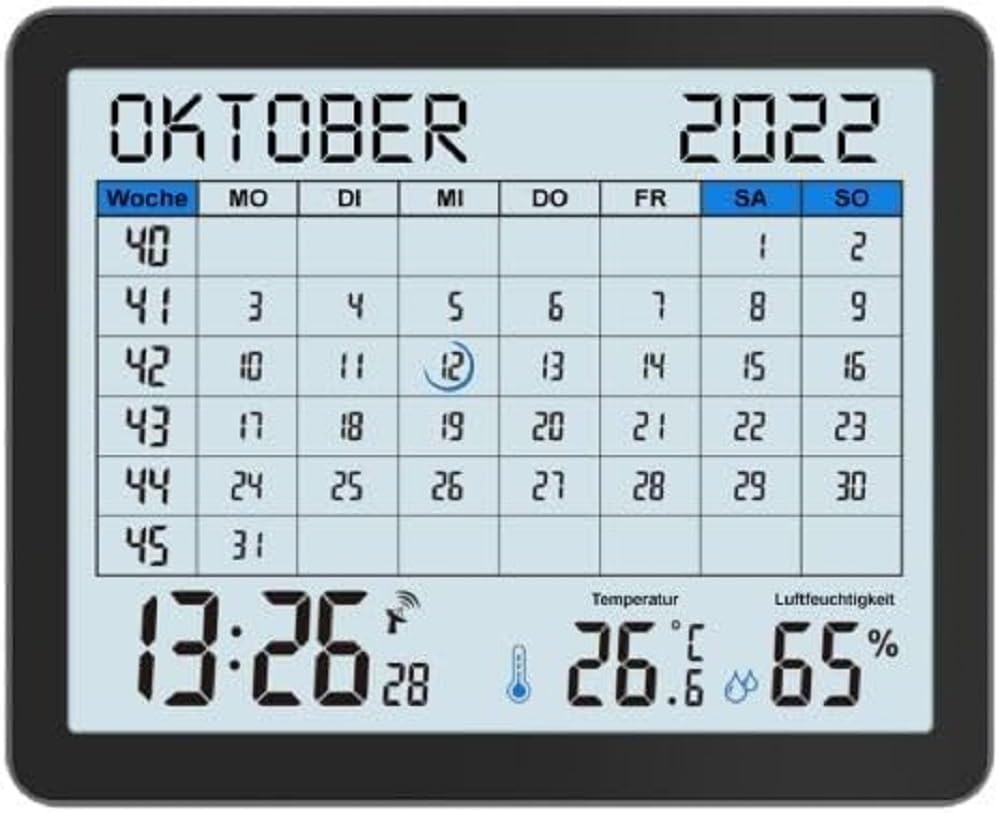
Image of the techno line WT2600 Digital Calendar packaging, showing the device and its key features.
4. caractéristiques du produit
The techno line WT2600 Digital Calendar offers the following key features:
- DCF-77 Radio-Controlled Clock: Automatic time synchronization for precise timekeeping, with an option for manual setting.
- 12/24 Hour Time Display: Select your preferred time format.
- Affichage du calendrier : Shows the current date, day of the week, and month.
- 7-Language Month Display: Choose from seven languages for the month display.
- Affichage de la température intérieure : Affiche la température intérieure en degrés Celsius (°C) ou Fahrenheit (°F).
- Indoor Humidity Display: Displays the current indoor humidity level.
- MIN/MAX Display: Records and displays the minimum and maximum temperature and humidity values.
- Double alarme avec fonction snooze : Set two independent alarms with a convenient snooze function.
- Indicateur de batterie faible : Vous avertit lorsque les piles doivent être remplacées.
- Placement polyvalent : Designed for both wall mounting and table standing.

Devant view of the techno line WT2600 Digital Calendar display, showing the calendar grid, current time, temperature, and humidity.
5. Installation
5.1 Installation de la batterie
- Localisez le compartiment à piles à l’arrière de l’appareil.
- Ouvrez le couvercle du compartiment à piles.
- Insert the required batteries (e.g., 2 x AAA, not specified in data, common for such devices) according to the polarity markings (+ and -).
- Fermez soigneusement le couvercle du compartiment à piles.
5.2 Initial Power On and DCF-77 Signal Reception
Upon battery insertion, the device will power on and automatically begin searching for the DCF-77 radio signal. This process may take several minutes. For optimal reception, place the unit near a window and away from electronic interference.
- A signal icon (e.g., an antenna symbol) will flash during signal search.
- Once the signal is received, the time and date will be set automatically, and the signal icon will become solid.
- If no signal is received after 10-15 minutes, try repositioning the unit.
5.3 Réglage manuel de la date et de l'heure
If automatic synchronization is not desired or unsuccessful, you can set the time and date manually.
- Press and hold the 'SET' button (or similar, refer to device buttons) for a few seconds to enter manual setting mode.
- Utilisez les boutons « + » ou « - » pour ajuster la valeur clignotante (par exemple, heure, minute, année, mois, jour).
- Press 'SET' again to confirm the current setting and move to the next adjustable parameter.
- Répétez l'opération jusqu'à ce que tous les réglages soient effectués.
5.4 Paramètre de langue
To change the display language for the month:
- Enter the setting mode (e.g., by pressing 'SET').
- Navigate through the settings until the language option appears.
- Use the '+' or '-' buttons to cycle through the available 7 languages.
- Confirmez votre sélection.
6. Fonctionnement
6.1 Viewing Time, Date, Temperature, and Humidity
The main display continuously shows the current time, date, indoor temperature, and indoor humidity. You can switch between 12-hour and 24-hour time formats by pressing a dedicated button (e.g., '12/24H' or 'MODE').
6.2 Réglage des alarmes
The device features two independent alarms.
- Press the 'ALARM' button (or similar) to view Alarme 1 fois.
- Press and hold 'ALARM' to enter Alarm 1 setting mode.
- Use '+' or '-' to adjust the hour and minute, pressing 'ALARM' to confirm each.
- Repeat for Alarm 2.
- To activate/deactivate an alarm, press 'ALARM' repeatedly until the alarm icon appears/disappears.
6.3 Utilisation de la fonction Snooze
When an alarm sounds, press the 'SNOOZE' button (or similar, often a large button on top) to temporarily silence the alarm. The alarm will sound again after a few minutes (typically 5-10 minutes). To stop the alarm completely, press any other button.
6.4 MIN/MAX Display Function
The device records the minimum and maximum temperature and humidity values since the last reset.
- Press the 'MIN/MAX' button (or similar) once to view les valeurs maximales enregistrées.
- Press it again to view les valeurs minimales enregistrées.
- To reset the MIN/MAX records, press and hold the 'MIN/MAX' button while viewles enregistrements.

Close-up of the techno line WT2600 Digital Calendar display, highlighting the time, temperature, and humidity readings.
7. Entretien
7.1 Nettoyage
Essuyez l'appareil avec un chiffon doux, damp chiffon. N’utilisez pas de nettoyants abrasifs ni de solvants, car ils pourraient endommager l’écran ou le câble.asing.
7.2 Remplacement de la batterie
When the low battery indicator appears on the display, replace all batteries with new ones of the same type. Follow the battery installation steps in Section 5.1.
8. Dépannage
- Pas d'affichage : Vérifiez la polarité des piles et assurez-vous qu'elles sont neuves.
- Date/heure incorrecte : Ensure the DCF-77 signal icon is solid. If not, reposition the unit or set the time manually (Section 5.3). Check your time zone setting if applicable (not explicitly mentioned in data, but common).
- Temperature/Humidity Readings Seem Inaccurate: Ensure the unit is placed in a location with good air circulation, away from direct heat sources or drafts. Allow some time for readings to stabilize after initial setup or relocation.
- L'alarme ne sonne pas : Verify that the alarm is activated (alarm icon displayed) and the alarm time is set correctly.
9. Spécifications
| Fonctionnalité | Spécification |
|---|---|
| Numéro de modèle | WT2600 |
| Dimensions (L x l x H) | 17.3 x 3.81 x 14 cm |
| Poids | 380 g |
| Couleur | Noir |
| Matériel | Plastique |
| Source d'énergie | Alimenté par batterie |
| Type d'affichage | Numérique |
| Utilisation intérieure/extérieure | Intérieur |
10. Garantie et assistance
Information regarding product warranty and customer support was not available in the provided product data. Please refer to the retailer or manufacturer's official webConsultez le site pour plus de détails sur la couverture de garantie et les options d'assistance.