
GOL GOLXM
Manuel d'utilisation du téléphone portable déverrouillé GOL XM 2G
Model: GOLXM
Introduction
Welcome to the user manual for your new GOL XM 2G Unlocked Cell Phone. This guide provides comprehensive instructions on setting up, operating, maintaining, and troubleshooting your device. Please read this manual carefully to ensure optimal performance and longevity of your phone.
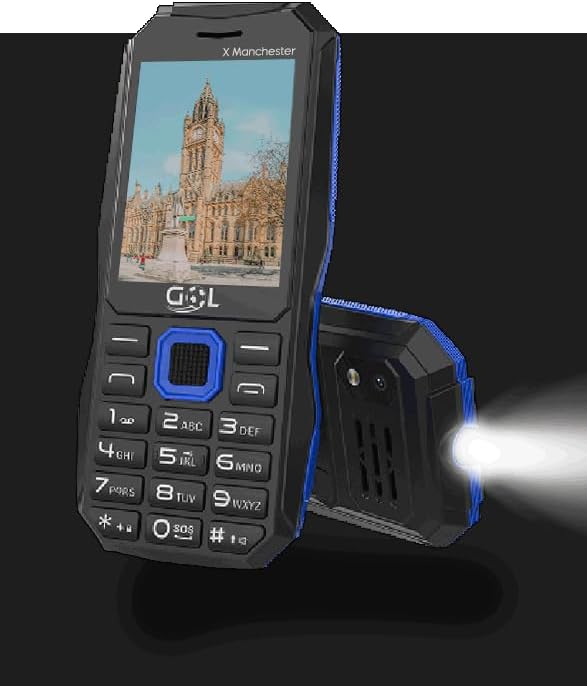
Image : Avant view of the GOL XM 2G Unlocked Cell Phone, showcasing its screen and physical keypad.
Qu'y a-t-il dans la boîte
Upon opening your GOL XM 2G Cell Phone package, please verify that all the following items are included:
- GOL XM Cell Phone
- Batterie Lithium Ion 1000mAh
- Écouteurs
- Chargeur Micro USB
- Manuel de l'utilisateur (ce document)

Image: Visual representation of the items included in the product package, showing icons for the phone, battery, earbuds, charger, and manual.
Produit terminéview et fonctionnalités
The GOL XM 2G Cell Phone is designed for essential communication and multimedia functions. Key features include:
- Unlocked Cellphone: Compatible with any carrier of your choice.
- Dual SIM: Two SIM card slots for simultaneous use, ideal for managing work and personal lines.
- Écran de 2.4 pouces : A vibrant full-color display for clear viewing.
- Support multimédia : Enjoy MP3 audio and MP4 video playback.
- Radio FM: Écoutez vos stations de radio préférées.
- Bluetooth : Pour une connectivité sans fil avec les appareils compatibles.
- Caméra: Immortalisez les moments avec la caméra intégrée.
- Microphone: For calls and audio recording.
- Batterie 1000 mAh : Provides prolonged talk time and usage.
- Torche LED : A powerful LED light for illumination.

Image : Un surview of the GOL XM phone highlighting its various features through icons and text, including screen size, multimedia capabilities, and connectivity options.

Image : Un gros plan view demonstrating the powerful LED torch feature of the GOL XM phone, showing it illuminating a path.
Installation
1. Installation de la batterie
- Repérez le cache de la batterie à l'arrière du téléphone.
- Gently slide or lift the cover to remove it.
- Align the gold contacts of the battery with the contacts inside the phone's battery compartment.
- Insérez fermement la batterie en place.
- Replace the battery cover, ensuring it clicks securely.
2. Installation de la carte SIM
The GOL XM supports Dual SIM cards.
- With the battery removed, locate the SIM card slots. There are typically two slots.
- Carefully insert your SIM card(s) into the designated slot(s) with the gold contacts facing down and the cut corner aligned as indicated.
- Assurez-vous que la ou les cartes SIM sont bien insérées.
- Réinstallez la batterie et le couvercle de la batterie.
3. Mise sous tension et charge initiales
- Maintenez le bouton Marche/Arrêt/Fin d'appel enfoncé jusqu'à ce que l'écran s'allume.
- If the battery is low, connect the Micro USB charger to the phone's charging port and plug it into a power outlet. Allow the phone to charge fully before first use.
4. Paramètres de langue
To change the display language of your phone, follow these steps:
- Accéder à Menu.
- Sélectionner Ajuste (Paramètres).
- Choose Option #2: Ajustes del telefonos (Phone settings).
- Sélectionner Configuracion de Idioma (Language Settings).
- Choisir Mostrar Idioma (Display Language).
- Select your desired language: English, French, Portuguese, or Spanish.
Mode d'emploi
Passer et recevoir des appels
- To Dial: Saisissez le numéro de téléphone à l'aide du clavier et appuyez sur le bouton Appeler (généralement vert).
- Répondre: Appuyez sur le bouton d'appel lorsque le téléphone sonne.
- Pour mettre fin à l'appel : Appuyez sur le bouton Fin d'appel (généralement rouge).
Messagerie (SMS)
- Navigate to the "Messages" or "SMS" menu.
- Sélectionnez « Nouveau message » ou « Écrire un message ».
- Saisissez le numéro du destinataire et tapez votre message à l'aide du clavier.
- Appuyez sur « Envoyer ».
Fonctions multimédia
- Lecteur MP3/MP4 : Access the "Multimedia" or "Player" menu to play audio (MP3) and video (MP4) files stored on your phone or memory card (if supported).
- Radio FM: Plug in the included earbuds (they act as an antenna). Navigate to the "FM Radio" application. You can auto-scan for stations or manually tune.
Connectivité Bluetooth
- Allez dans « Paramètres » > « Bluetooth ».
- Activez le Bluetooth.
- Rechercher Sélectionnez les appareils disponibles et choisissez celui que vous souhaitez associer.
- Enter the passkey if prompted.
Utilisation de la caméra
- Accédez à l'application « Appareil photo » depuis le menu principal.
- Cadrez votre prise de vue en utilisant l'écran.
- Press the designated button (often the center navigation button) to capture the image.

Image : Une image détaillée view of the GOL XM phone's rear camera, indicating its position and design.
torche LED
- The LED torch can typically be activated by a dedicated button or a long press of a specific key (e.g., '0' or a side button). Refer to your phone's on-screen prompts or quick guide for exact activation.
Entretien
- Entretien de la batterie: To prolong battery life, avoid extreme temperatures. Charge the battery fully before it completely drains, but do not leave it plugged in for excessively long periods after it's full.
- Nettoyage: Utilisez un chiffon doux, sec et non pelucheux pour nettoyer l'écran et le boîtier du téléphone. Évitez d'utiliser des produits chimiques agressifs ou des matériaux abrasifs.
- Stockage: Rangez le téléphone dans un endroit frais et sec, à l'abri de la lumière directe du soleil et de l'humidité, lorsqu'il n'est pas utilisé pendant une période prolongée.
Dépannage
| Problème | Cause/solution possible |
|---|---|
| Le téléphone ne s'allume pas. | Battery might be completely discharged. Connect the charger and allow it to charge for at least 15 minutes before attempting to power on. Ensure the battery is correctly installed. |
| Cannot install the battery. | Ensure the battery is oriented correctly, aligning the gold contacts. Do not force the battery. If the battery cover is difficult to remove, gently slide or pry it open from the designated notch. Refer to the "Battery Installation" section. |
| Aucun signal réseau / Impossible de passer des appels. | Ensure your SIM card is properly inserted. Check if your carrier's network is available in your area. Verify that your phone plan is active and supports 2G networks. This phone is unlocked, but compatibility with specific carrier features may vary. |
| Cannot change language. | Follow the exact steps outlined in the "Language Settings" section: Menu > Ajustes > Ajustes del telefonos > Configuracion de Idioma > Mostrar Idioma. |
| La radio FM ne fonctionne pas. | Ensure the earbuds are plugged into the phone's audio jack, as they function as the antenna for the FM radio. |
Caractéristiques

Image: A visual summary of the GOL XM phone's key specifications, presented with illustrative icons.
| Fonctionnalité | Détail |
|---|---|
| Marque | GOL |
| Nom du modèle | GOLXM |
| Taille de l'écran | 2.4 pouces |
| Technologie cellulaire | 2G |
| Opérateur sans fil | Débloqué pour tous les transporteurs |
| Nombre d'emplacements pour carte SIM | Double SIM |
| Capacité de la batterie | 1000 millièmeamp Heures (1000mAh) |
| Système opérateur | iOS 3 (Note: This refers to the phone's internal feature phone operating system, not Apple's iOS.) |
| Technologies de connectivité | Bluetooth |
| Autres caractéristiques | FM Radio, MP3/MP4 Playback, Camera (Rear, Front), Microphone, LED Torch |
| Facteur de forme | Bar |
| Couleur | NOIR |
| Poids de l'article | 5.4 onces |
| Dimensions du colis | 5 x 3 x 2.25 pouces |
| Fabricant | GOL |
| Pays d'origine | Chine |
| Date de première disponibilité | 12 octobre 2023 |
Garantie et assistance
Pour toute information relative à la garantie et à l'assistance technique, veuillez consulter la documentation fournie avec votre achat ou contacter directement le fabricant. Conservez votre preuve d'achat pour toute réclamation au titre de la garantie.
Manufacturer: GOL
For further assistance, you may visit the official GOL website ou contactez leur service client.
Ask a question about this manual
Ask about setup, troubleshooting, compatibility, parts, safety, or missing instructions. Manuals+ will review the question and use this page’s manual context to help answer it.