1. Introduction
Thank you for choosing the Devoko 120x60cm Electric Standing Desk. This desk is designed to enhance your workspace by allowing seamless transitions between sitting and standing positions, promoting better posture, reducing fatigue, and increasing productivity. This manual provides essential information for the safe assembly, operation, and maintenance of your new desk.

Image 1: The Devoko 120x60cm Electric Standing Desk in a typical setup, showcasing its spacious design and monitor support.
2. Avertissements de sécurité
- Capacité de poids maximale : Ne pas dépasser la capacité de charge maximale de 70 kg (154 lb). Overloading the desk can cause damage or injury.
- Assemblage sécurisé : Ensure all components are securely mounted and tightened according to the assembly instructions before use.
- Mouvement et réglage : Exercise caution when moving or adjusting the desk due to its metal structure and electrical components. Keep hands and objects clear of moving parts.
- Enfants et animaux domestiques : Tenez les enfants et les animaux domestiques éloignés du bureau pendant son utilisation afin d'éviter tout accident.
- Alimentation: Use only the provided power adapter and ensure it is connected to a grounded outlet. Do not operate the desk with a damaged power cord or plug.
- Déversements de liquide : Évitez de renverser des liquides sur le panneau de commande ou les composants du moteur. En cas de déversement, débranchez immédiatement le bureau et laissez-le sécher complètement avant de le rebrancher.
3. Configuration et assemblage
Detailed installation instructions are included in the product packaging. Please follow these instructions carefully for proper assembly. The desk features a robust metal frame and a multi-part wooden tabletop designed for stability.
Conseils clés pour l'assemblage :
- Espace de travail : Assurez-vous d'avoir ampl'espace pour l'assemblage.
- Tabletop Alignment: The tabletop consists of multiple wooden parts. Take time to align them properly during assembly to ensure a smooth and even surface.
- Gestion des câbles: Utilize the integrated cable pass-throughs to keep your workspace tidy.

Image 2: Integrated design features such as cable management, rounded corners, and a convenient hook for headphones or bags.
4. Mode d'emploi
Your Devoko electric standing desk is equipped with an intuitive control panel for easy height adjustment and memory functions.
4.1. Réglage de la hauteur
- Adjusting Up: Appuyez et maintenez enfoncé le HAUT (▲) bouton permettant de régler la hauteur du bureau à la hauteur souhaitée en position debout.
- Adjusting Down: Appuyez et maintenez enfoncé le BAS (▼) bouton permettant d'abaisser le bureau à la hauteur d'assise souhaitée.
- The desk height can be adjusted smoothly and quietly between 73 cm et 118 cm. Release the button once the desired height is reached.
4.2. Préréglages de mémoire
The control panel allows you to save two preferred height settings for quick recall.
- Enregistrement d'un préréglage :
- Réglez le bureau à la hauteur souhaitée (par exemple, hauteur assise).
- Appuyez sur le M button (or similar memory button, if present). The LED display may flash.
- Immediately press either 1 or 2 pour enregistrer la hauteur actuelle dans cet emplacement mémoire.
- Rappel d'un préréglage : Appuyez simplement sur le 1 or 2 button corresponding to your saved height. The desk will automatically move to that position.
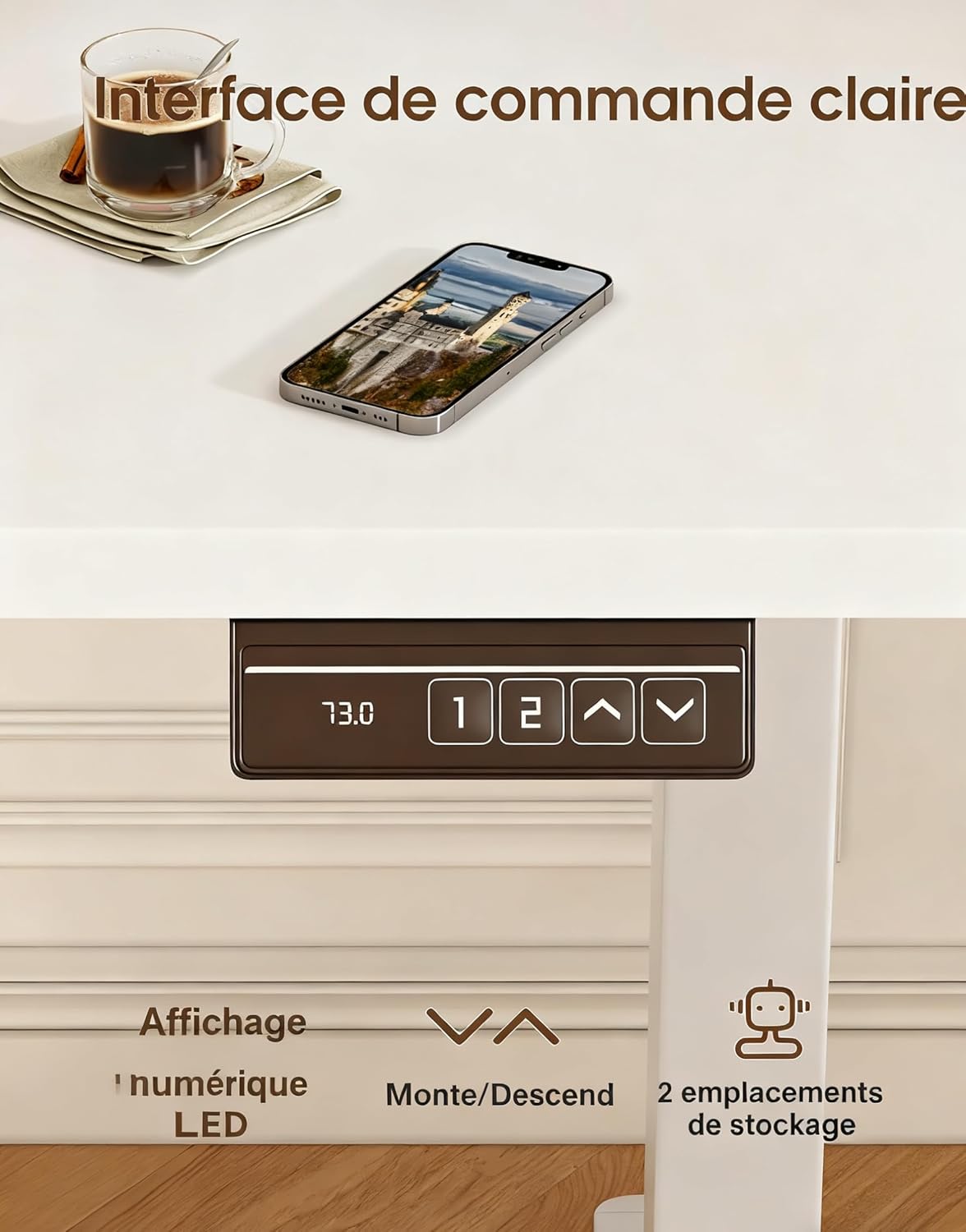
Image 3: The desk's control panel, featuring an LED display for current height, up/down adjustment buttons, and two memory preset buttons.

Image 4: Visual guide demonstrating proper ergonomic posture when using the desk in both sitting and standing positions, highlighting the benefit of the monitor support.
5. Entretien
- Nettoyage: Essuyez les surfaces du bureau avec un chiffon doux et sec.amp Chiffon. Évitez les nettoyants abrasifs ou les produits chimiques agressifs qui pourraient endommager la finition.
- Vérifier les connexions : Vérifiez régulièrement le serrage de toutes les vis et boulons. Resserrer si nécessaire.
- Inspection des câbles : Inspect the power cord and motor cables for any signs of wear or damage. Replace immediately if damage is found.
- Entretien du moteur : The desk's motors are designed for durability (tested over 20,000 cycles). Avoid continuous operation for extended periods without rest to prevent overheating.
6. Dépannage
| Problème | Cause possible | Solution |
|---|---|---|
| Le bureau ne bouge pas. | Câble d'alimentation débranché ; surcharge ; erreur moteur. | Check power connections. Reduce weight on desk. Unplug for 10 minutes, then reconnect. |
| Le bureau bouge de façon irrégulière ou fait un bruit inhabituel. | Charge inégale ; connexions desserrées ; obstruction. | Distribute weight evenly. Check all assembly screws. Ensure no objects are obstructing the legs. |
| Les préréglages de mémoire ne fonctionnent pas. | Les préréglages n'ont pas été enregistrés correctement. | Enregistrez à nouveau les préréglages de mémoire en suivant les instructions de la section 4.2. |
| Le bureau vacille. | Connexions desserrées ; sol inégal. | Ensure all screws are tightened. Adjust leveling feet if your floor is uneven. |
Si vous rencontrez des problèmes non répertoriés ici ou si le problème persiste après avoir essayé les solutions proposées, veuillez contacter le service client.
7. Spécifications

Image 5: Key specifications and dimensions of the Devoko Electric Standing Desk.
| Fonctionnalité | Détail |
|---|---|
| Numéro de modèle | 0463 |
| Marque | Devoko |
| Couleur | Blanc |
| Dimensions du plateau (L x l) | 120 cm x 60 cm (47.2 po x 23.6 po) |
| Plage de réglage de la hauteur | 73 cm - 118 cm (28.7 po - 46.5 po) |
| Product Dimensions (L x W x H at lowest) | 60 x 120 x 72 cm |
| Capacité de poids | 70 kg (154 lb) |
| Poids du produit | 22 kg (48.5 lb) |
| Matériel | Wood (Tabletop), Metal (Base) |
| Caractéristiques | Adjustable, Electric, 2 Memory Presets, Monitor Support |
| Niveau de bruit | <60 dB |
8. Garantie et assistance
For warranty information, please refer to the documentation included with your purchase or contact the seller directly. Devoko is committed to providing quality products and customer satisfaction.
If you have any questions, require assistance with assembly, or need troubleshooting support, please contact the Devoko customer service team or the retailer from whom you purchased the product. Please have your model number (0463) and purchase details ready when contacting support.