
1. Introduction
This manual provides essential information for the safe and effective use of your DGFTB GK5CN-00-13-4S1P-0 laptop battery. Please read it thoroughly before installation and operation.
Produit terminéview
- Type de batterie : Li-ion
- Voltage: 15.2V
- Capacité: 62.32 Wh / 4100 mAh
Numéros de pièces compatibles
GK5CN, GK5CN-00-13-4S1P-0, GK5CN-00-13-3S1P-0, GK5CN3-3101, 4ICP6/63/69, 3ICP6/63/69
Modèles d'ordinateurs portables compatibles
- Getac Tongfang: GK6Z5CN, OP-LP2, Model Z GK5CQ7Z, GM7MPHS, GK5CN4Z, GK5CQ7Z, GK5CN6Z, GK7MRFR, GK5CN5Z, GK7CN6S
- Schenker: XMG Neo 15 XNE15M19, XMG Core 15 GK5CP6V, XMG Neo 17 Comet Lake, XMG Core 15 Ampere, XMG Neo 15 Turing, XMG Core 15 GK5NR0O, XMG Core 15-M20hdw, XMG Core 17 Comet Lake, XMG Neo 15
- Maingear: Vecteur 15
- Médion: Gomme X680

The DGFTB GK5CN-00-13-4S1P-0 laptop battery, shown with a small screwdriver, indicating tools may be required for installation.
2. Consignes de sécurité
Observe the following safety precautions to prevent injury or damage to your battery and device:
- Ne pas démonter, ouvrir ou déchiqueter le bloc-batterie.
- N'exposez pas la batterie à la chaleur ou au feu. Eviter le stockage en plein soleil.
- Ne court-circuitez pas la batterie.
- Do not crush, puncture, or apply excessive force to the battery.
- Ne plongez pas la batterie dans l’eau ou d’autres liquides.
- Gardez la batterie hors de portée des enfants.
- Jetez les piles usagées conformément aux réglementations locales.
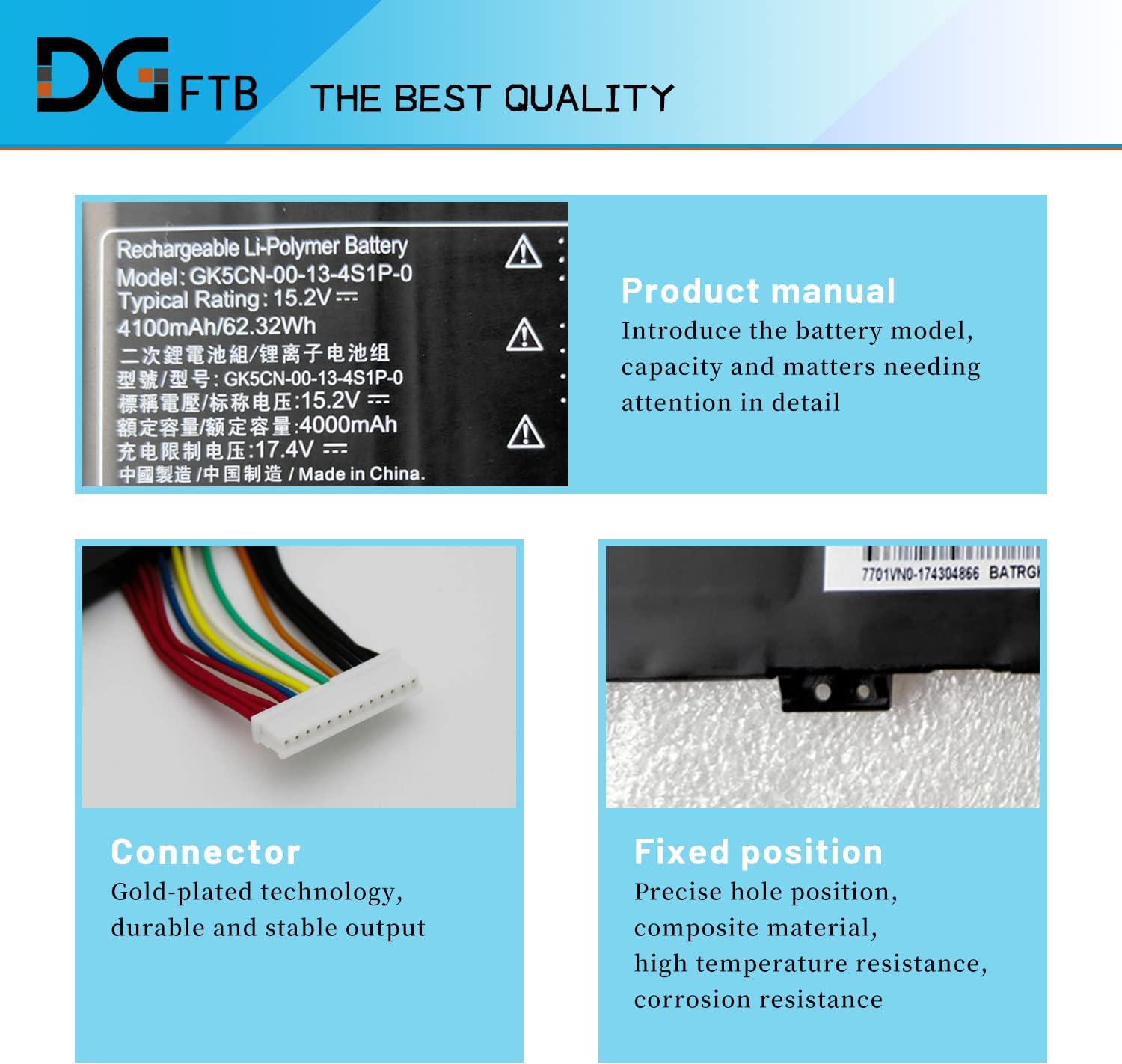
This image displays the battery's label, detailing its model number (GK5CN-00-13-4S1P-0), voltage (15.2V), capacity (4100mAh/62.32Wh), and important safety warnings regarding handling and disposal.
3. Configuration et installation
Before installing the new battery, ensure your laptop is powered off and disconnected from any power source. It is recommended to consult your laptop's service manual for specific disassembly instructions.
3.1 Identifying Your Laptop Model
To ensure compatibility and proper installation, it is crucial to correctly identify your laptop's model. Follow these steps:
- Appuyez sur le Touche Windows + R simultaneously to open the Run dialog box.
- Taper msinfo32 into the Run dialog box and click OK.
- In the System Information window, locate the 'System Model' entry to find your laptop's model number.

This diagram illustrates the steps to identify your laptop's system model: 1. Press Windows+R. 2. Type 'msinfo32' and click OK. 3. Locate 'System Model' in the System Information window.
3.2 Étapes d'installation de la batterie
- Éteindre: Shut down your laptop completely and disconnect the AC adapter.
- Démonter: Carefully open your laptop's back cover. This may require a small screwdriver (often included).
- Retirer l'ancienne batterie : Disconnect the old battery's cable from the motherboard and unscrew any retaining screws. Gently lift out the old battery.
- Installez une nouvelle batterie : Place the new DGFTB battery into the battery compartment. Ensure it aligns with the fixed positions and screw holes.
- Connecter: Reconnect the battery's cable securely to the motherboard. Ensure the interface is fully connected.
- Remonter: Replace any screws and reattach the laptop's back cover.

An image showing the DGFTB laptop battery being carefully placed into the designated compartment within a laptop, with arrows indicating the proper alignment for installation.

Un détail view of the battery's gold-plated multi-pin connector, designed for secure and stable power transmission.
4. Mode d'emploi
4.1 Initial Battery Calibration
For optimal performance and accurate battery reporting, perform the following calibration steps after initial installation:
- Fully charge the battery to 100%.
- Discharge the battery by using the laptop until it reaches approximately 5% charge (do not let it discharge to 0% and shut down).
- Fully charge the battery again to 95-100%.
- Repeat this charge/discharge cycle 3-4 times.
This process helps the battery management system accurately gauge the battery's full capacity.
5. Maintenance et entretien
Proper maintenance extends the lifespan of your laptop battery:
- Évitez les températures extrêmes : Do not expose the battery to very high or very low temperatures. Optimal operating temperature is typically between 10°C and 35°C (50°F and 95°F).
- Utilisation régulière : If you frequently use your laptop plugged in, consider discharging the battery to about 50% once a month and then recharging it to maintain battery health.
- Stockage: If storing the battery for an extended period, charge it to about 50-60% and store it in a cool, dry place. Avoid storing it fully charged or fully discharged.
- Nettoyage: Keep the battery contacts clean and free of dust or debris.
6. Dépannage
If you encounter issues with your new battery, consider the following:
- Batterie non détectée : Ensure the battery connector is firmly seated. Reinstall the battery to confirm all connections are secure.
- La batterie ne charge pas : Verify that your AC adapter is functioning correctly and that the charging port on your laptop is not damaged. Ensure the battery calibration steps (Section 4.1) have been performed.
- Autonomie de batterie réduite : Perform the battery calibration steps (Section 4.1). Check for background applications consuming excessive power.
- Incorrect Battery Percentage: This can often be resolved by performing the battery calibration steps.
Si les problèmes persistent après avoir suivi ces étapes, veuillez contacter le service client.
7. Spécifications
| Fonctionnalité | Détail |
|---|---|
| Numéro de modèle | GK5CN-00-13-4S1P-0 (DG06XL) |
| Type de batterie | Lithium-ion (Li-ion) |
| Voltage | 15.2V |
| Capacité | 62.32 Wh / 4100 mAh |
| Nombre de cellules | 1 (Lithium Ion batteries required, included) |
| Poids de l'article | 11.2 onces |
| Dimensions du colis | 11.8 x 4.3 x 0.9 pouces |
| Fabricant | Foshan Eurasia Energy Technology Co., Ltd. |

This image provides the physical dimensions of the battery: Length 7.68 inches, Width 3.42 inches, and Thickness 0.35 inches, useful for verifying compatibility.

Un éclaté view illustrating the internal structure of the battery, identifying key components such as the main chip, protection chip, resistance, temperature sensing element, and conductor copper sheet, which contribute to its performance and safety.
8. Garantie et assistance
Your DGFTB GK5CN-00-13-4S1P-0 laptop battery comes with the following:
- Garantie: Garantie 12 mois.
- Service client: Un service client est disponible 24h/24 et 7j/7 pour vous assister.
For warranty claims or technical support, please refer to the contact information provided with your purchase or visit the DGFTB official website.

A hexagonal diagram highlighting the battery's safety features: over-heat protection, over-charge protection, premium microchip, Class A protection, 12-month warranty, and 24/7 customer service.