
1. Introduction
This manual provides essential information for the safe assembly, operation, and maintenance of your ProForm X Bike Folding Exercise Bike, Model PFEX78918R. Please read all instructions carefully before using the equipment. Retain this manual for future reference.
2. Informations importantes sur la sécurité
AVERTISSEMENT: To reduce the risk of serious injury, read all important precautions and instructions in this manual and all warnings on your exercise bike before use. ProForm assumes no responsibility for personal injury or property damage sustained by or through the use of this product.
- Consult your physician before beginning any exercise program. This is especially important for individuals over age 35 or persons with pre-existing health problems.
- The exercise bike is intended for home use only. Do not use in any commercial, rental, or institutional setting.
- Keep children and pets away from the exercise bike at all times. The exercise bike is not a toy.
- Place the exercise bike on a level surface with at least 0.6 m (2 ft.) of clearance around it. Do not place the exercise bike on any surface that blocks air openings.
- Wear appropriate exercise clothing and athletic shoes. Do not wear loose clothing that could become caught in the exercise bike.
- The maximum user weight capacity for this exercise bike is 113.4 kg (250 lbs).
- Inspectez et serrez régulièrement toutes les pièces. Remplacez immédiatement toute pièce usée.
- Always hold the handlebars when mounting or dismounting the exercise bike.
- Ensure the seat adjustment knob is securely tightened before each use.
3. Contenu du colis
Avant l'assemblage, vérifiez que tous les composants sont présents. Si des pièces sont manquantes ou endommagées, contactez le service client.
- Assemblage du cadre principal
- Barres stabilisatrices (avant et arrière)
- Pédales (gauche et droite)
- Selle et tige de selle
- Handlebar Assembly with Console
- Porte-haltères
- Deux haltères de 2 lb
- Hardware Packet (bolts, washers, nuts, tools)
4. Instructions de montage
Assembly typically takes 30-60 minutes. Two people are recommended for easier assembly.
- Fixez les barres stabilisatrices : Fixez les barres stabilisatrices avant et arrière au cadre principal à l'aide des boulons et rondelles fournis. Assurez-vous qu'elles sont bien serrées.
- Fixez les pédales : Repérez les pédales gauche (G) et droite (D). La pédale gauche se visse dans le sens antihoraire, et la pédale droite dans le sens horaire. Enfilez-les soigneusement sur les manivelles et serrez-les fermement à l'aide d'une clé.
- Installer la tige de selle et la selle : Insérez la tige de selle dans le cadre principal et fixez-la à la hauteur souhaitée à l'aide du bouton de réglage. Fixez ensuite la selle à la tige de selle.
- Fixer l'ensemble du guidon : Connect the handlebar assembly to the main frame. Ensure all cables from the console are properly connected to the main frame wiring. Secure with bolts.
- Install Dumbbell Holder: Attach the dumbbell holder to the rear of the seat post. Place the two 2 lb dumbbells into the holder.

Image: The ProForm X Bike fully assembled, showing the integrated dumbbell holder at the rear of the seat.
5. Mode d'emploi
5.1 Réglage du siège
To adjust the seat height, loosen the adjustment knob located on the seat post. Raise or lower the seat to a comfortable position where your knees have a slight bend at the bottom of the pedal stroke. Tighten the knob securely before use.

Image: A person demonstrating how to adjust the seat height using the knob on the seat post.
5.2 Using the Console and Adjusting Resistance
The console displays your workout metrics. It typically requires batteries (not included) or a power adapter (if specified) to operate. Refer to the console's specific instructions for battery installation.

Image : Un gros plan view of the LCD console, displaying workout time, and the handlebars with EKG grip sensors.
- Mise sous tension : The console typically activates when you begin pedaling or press any button.
- Indicateurs d'affichage : The LCD window shows mileage, speed, calorie burn, heart rate, and time. Use the 'DISPLAY' button to cycle through different metrics if available.
- Ajustement de la résistance : Use the '+' and '-' buttons on the console to increase or decrease the magnetic resistance. There are 10 digital resistance levels.
- EKG Grip Sensors: To measure your heart rate, firmly grasp the metal sensors on the handlebars with both hands. Your heart rate will appear on the console after a few seconds.
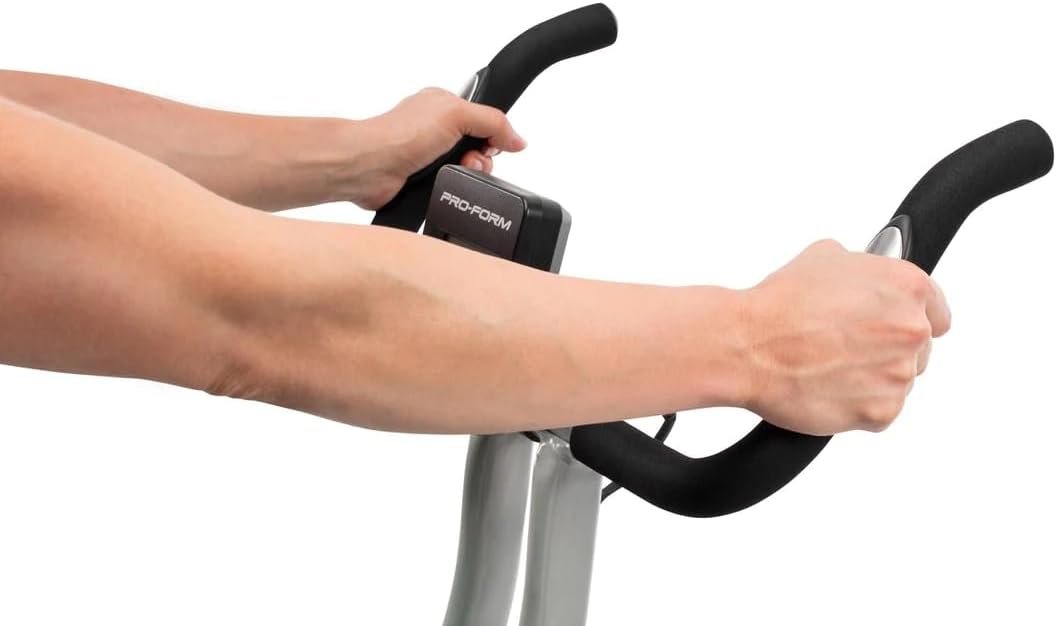
Image: A user's hands gripping the EKG pulse sensors integrated into the handlebars for heart rate monitoring.
5.3 Utilisation des haltères incluses
The ProForm X Bike includes two 2 lb dumbbells for upper-body exercises during your workout. They are stored in a holder behind the seat.
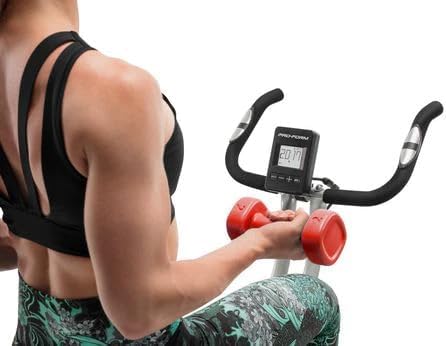
Image: A woman seated on the ProForm X Bike, performing upper body exercises with the included 2 lb dumbbells.
6. Pliage et rangement
The ProForm X Bike features a folding design for convenient storage.
- Ensure the area around the bike is clear.
- Locate the folding pin or knob (refer to your specific model's diagram if available) on the main frame.
- Pull or loosen the pin/knob and carefully fold the bike's frame inward until it locks into the folded position.
- The bike can then be rolled using its transport wheels or stored upright against a wall.
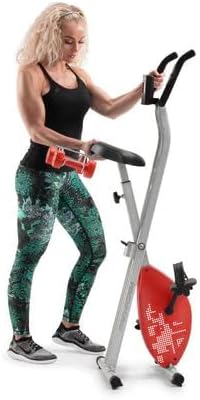
Image: A woman standing beside the ProForm X Bike in its folded, space-saving configuration, demonstrating its compact storage.
7. Entretien
Un entretien régulier garantit des performances optimales et une longue durée de vie à votre vélo d'exercice.
- Nettoyage: Essuyez le vélo d'exercice après chaque utilisation avec un chiffon humide.amp Chiffon pour enlever la transpiration et la poussière. Éviter les nettoyants abrasifs ou les solvants.
- Inspection: Vérifiez régulièrement le serrage de tous les boulons, écrous et fixations. Resserrer les fixations desserrées.
- pédales: Vérifiez que les pédales sont bien fixées et tournent librement.
- Ceinture de sécurité: The belt drive system is generally maintenance-free. Do not attempt to lubricate or adjust the belt.
- Stockage: Store the exercise bike in a dry, temperate environment, away from direct sunlight and extreme temperatures.
8. Dépannage
| Problème | Cause possible | Solution |
|---|---|---|
| La console n'affiche pas les données | Low or dead batteries; Loose cable connection | Replace batteries; Check all console cable connections. |
| La résistance ne change pas | Console malfunction; Internal mechanism issue | Ensure console is powered on. If problem persists, contact customer support. |
| Le vélo est instable ou vacille. | Surface inégale ; boulons de stabilisateur desserrés | Move bike to a level surface; Tighten all bolts on stabilizer bars. |
| Les pédales semblent lâches ou font du bruit | Pédales mal serrées | Retighten pedals securely. Remember left pedal is reverse threaded. |
9. Spécifications
| Fonctionnalité | Spécification |
|---|---|
| Numéro de modèle | PFEX78918R |
| Dimensions du produit (L x l x H) | 108 x 42 x 94 cm (42.5 x 16.5 x 37 pouces) |
| Poids de l'article | 18.1 kg (39.9 lb) |
| Poids maximum de l'utilisateur | 113.4 kg (250 lb) |
| Système de résistance | Résistance magnétique silencieuse SMR |
| Niveaux de résistance | 10 niveaux numériques |
| Type d'affichage | Écran LCD |
| Métriques affichées | Time, Speed, Distance, Calories, Heart Rate |
| Surveillance de la fréquence cardiaque | EKG Grip Pulse Sensors |
| Accessoires inclus | Deux haltères de 2 lb |
| Matériel | Acier inoxydable |
| Système d'entraînement | Ceinture |

Image: A diagram illustrating the key dimensions of the ProForm X Bike: 108cm height, 94cm length, and 42cm width.
10. Garantie et assistance
ProForm products are manufactured with high-quality materials and craftsmanship. For specific warranty details, including coverage period and terms, please refer to the warranty card included with your product or visit the official ProForm website. For technical assistance, replacement parts, or customer service inquiries, please contact ProForm customer support through their official channels.
Support en ligne: www.proform.com/support
Assistance téléphonique : Refer to your warranty card or the ProForm website pour les numéros de contact régionaux.