
Introduction
Thank you for choosing the EUREKA ERGONOMIC ERK-OC12-B Office Chair. This manual provides detailed instructions for the assembly, operation, maintenance, and troubleshooting of your new ergonomic office chair. Please read this manual thoroughly before assembly and use to ensure proper function and longevity of the product.

Image: The EUREKA ERGONOMIC ERK-OC12-B office chair, showcasing its design and presence in a modern office environment.
Configuration et assemblage
Assembly of the EUREKA ERGONOMIC ERK-OC12-B office chair is required. Please ensure all components are present before beginning. It is recommended to assemble the chair on a soft, clean surface to prevent damage.
Outils requis :
- Clé hexagonale (généralement incluse)
Étapes d'assemblage :
- Déballer les composants : Carefully remove all parts from the packaging and lay them out. Verify against the parts list (if provided in the box) that all components are present and undamaged.
- Fixez les roulettes à la base : Insérez les roulettes dans les trous situés à l'extrémité de chaque pied du piètement de la chaise. Poussez fermement jusqu'à ce qu'elles s'enclenchent.
- Insérer le vérin à gaz : Placez le vérin à gaz dans l'orifice central du piètement de la chaise assemblée.
- Fixer le mécanisme au siège : Fixez le mécanisme du siège sous le coussin à l'aide des vis fournies. Assurez-vous que l'avant du mécanisme soit orienté vers l'avant du siège.
- Raccordez le siège au vérin à gaz : Placez soigneusement le siège assemblé sur le vérin à gaz, en vous assurant qu'il est bien centré et stable.
- Fixez le dossier : Fixez le dossier au mécanisme du siège à l'aide des vis prévues à cet effet.
- Installer les accoudoirs : Attach the armrests to the seat or backrest as indicated in the specific instructions provided with your chair.
- Installer l'appui-tête : Glissez l'appui-tête dans son logement prévu à cet effet en haut du dossier.
After assembly, sit on the chair to engage the gas lift and ensure all connections are secure.
Instructions d'utilisation et réglages
The EUREKA ERGONOMIC ERK-OC12-B chair offers multiple adjustments to customize your seating experience for optimal comfort and ergonomic support.

Image: A detailed diagram illustrating the various adjustable components of the chair, such as 5 locking positions, adjustable 3D armrests, and seat depth adjustment.
1. Réglage de la hauteur du siège :
Pour régler la hauteur du siège, repérez le levier situé à droite, sous le siège. Assis, tirez le levier vers le haut pour abaisser le siège. Pour le relever, levez-vous et tirez le levier vers le haut. Relâchez le levier à la hauteur souhaitée.
2. Adaptive Lumbar Support:
This chair features an innovative auto-following adaptive lumbar support. The lumbar support automatically adjusts to your sitting position. To fine-tune the support strength:
- Increase Support: Turn the knob on the side of the backrest clockwise.
- Reduce Support: Tournez le bouton dans le sens inverse des aiguilles d'une montre.
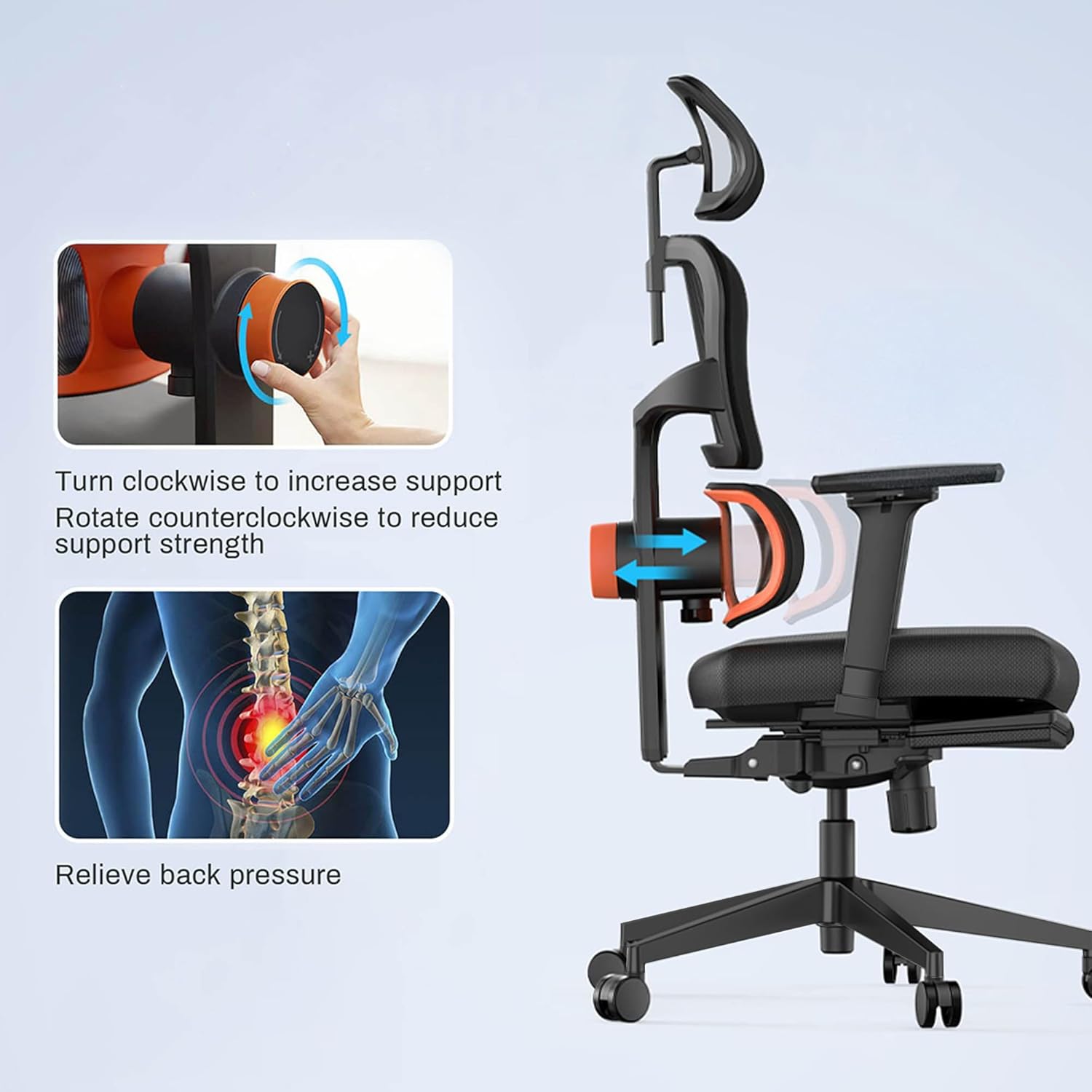
Image: Visual guide on adjusting the lumbar support. Turning the knob clockwise increases support, while counter-clockwise reduces it, helping to relieve back pressure.
3. Backrest Tilt Function:
The backrest can be tilted and locked at multiple angles (96°, 106°, 116°, 126°). Locate the tilt lever, typically on the left side beneath the seat.
- Unlock Tilt: Pull the lever outwards.
- Incliner: Lean back to the desired angle.
- Verrouiller l'inclinaison : Poussez le levier vers l'intérieur pour verrouiller le dossier en position.
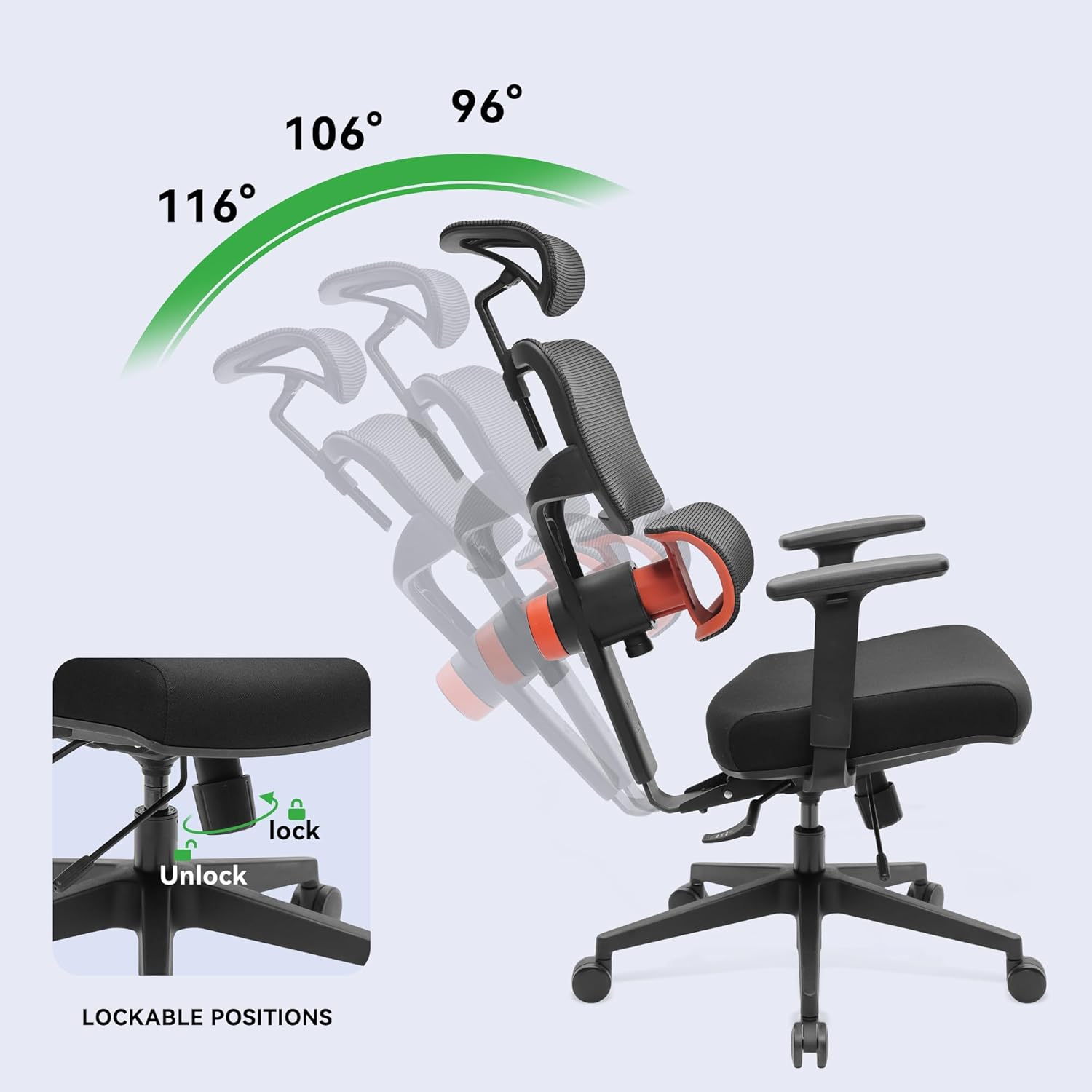
Image: The chair demonstrating its recline capabilities, showing four distinct lockable positions from 96° to 126° for varied comfort.
4. Seat Depth Adjustment:
To adjust the seat depth, locate the lever or button usually on the left side, beneath the seat. Engage the mechanism and slide the seat forward or backward to achieve the desired depth. Release the lever/button to lock the seat in place.
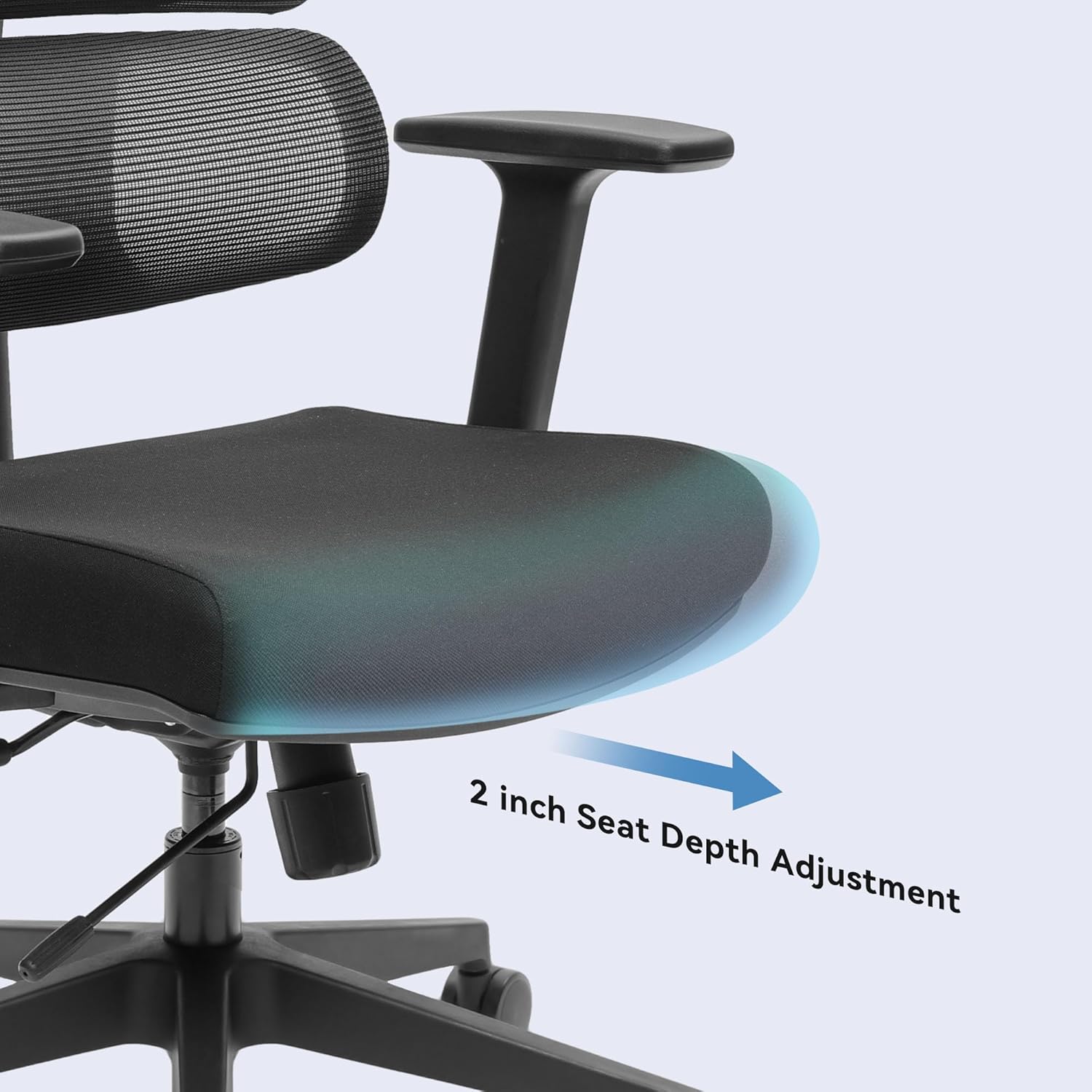
Image : Un gros plan view highlighting the seat depth adjustment, allowing the user to extend or retract the seat by up to 2 inches for personalized leg support.
5. 3D Adjustable Armrests:
The armrests can be adjusted in three dimensions:
- Hauteur: Appuyez sur le bouton situé sur le côté de l'accoudoir et faites-le glisser vers le haut ou vers le bas.
- En avant en arrière: Faites glisser le coussin de l'accoudoir vers l'avant ou vers l'arrière.
- Pivoter: Faites pivoter le coussin de l'accoudoir vers l'intérieur ou vers l'extérieur.
6. Appui-tête réglable :
The headrest can be adjusted for height and angle. Grasp the headrest and move it up or down, or tilt it to find your preferred position. It will lock into place.
Entretien et soins
Proper maintenance ensures the longevity and optimal performance of your EUREKA ERGONOMIC office chair.
- Nettoyage: Nettoyer avec une publicitéamp cloth. Avoid harsh chemicals or abrasive cleaners, as these can damage the mesh, fabric, or frame.
- Entretien des roulettes : Vérifiez régulièrement les roulettes pour y déceler l'accumulation de cheveux ou de débris et nettoyez-les afin de garantir un mouvement fluide.
- Vérification des fixations : Every few months, check all screws and bolts to ensure they are tight. Re-tighten if necessary to maintain stability and prevent squeaks.
- Inspection du maillage : Inspect the mesh backrest and seat for any signs of wear or damage.
Dépannage
If you encounter any issues with your EUREKA ERGONOMIC office chair, refer to the following common problems and solutions:
| Problème | Cause possible | Solution |
|---|---|---|
| La hauteur de la chaise n'est pas réglable. | Dysfonctionnement du vérin à gaz ou levier non actionné | Assurez-vous que le levier de réglage en hauteur est bien enclenché. Si le problème persiste, le vérin à gaz devra peut-être être remplacé. Contactez le service client. |
| La chaise est instable ou bancale. | Loose fasteners or damaged base/casters | Check and tighten all screws and bolts, especially those connecting the seat to the mechanism and the base. Inspect the base and casters for damage. |
| Bruits de grincement | connexions lâches ou frottement entre les pièces | Tighten all fasteners. Apply a small amount of silicone lubricant to moving parts or connection points if the noise persists. |
| Lumbar support makes a 'tik tik' noise | Internal mechanism friction or loose component | Ensure the lumbar support knob is securely fastened. If the noise persists, it may indicate an internal component issue. Contact customer support for assistance. |
| Les roulettes ne roulent pas en douceur. | Debris in casters or damaged wheels | Remove any hair, dust, or debris from the caster wheels. If a wheel is damaged, it may need replacement. |
Caractéristiques
Below are the technical specifications for the EUREKA ERGONOMIC ERK-OC12-B Office Chair:
| Fonctionnalité | Détail |
|---|---|
| Nom du modèle | ERGONOMIQUE |
| Numéro de modèle | ERK-OC12-B |
| Marque | EUREKA ERGONOMIQUE |
| Couleur | Noir |
| Matériel | Alloy Steel (Frame), Sponge (Fill), Fabric (Seat), Mesh (Back) |
| Dimensions du produit (P x L x H) | 69.5 cm (P) x 69.5 cm (L) x 111 cm (H) |
| Poids de l'article | 23.59 kg |
| Poids maximum recommandé | 136.08 kg (300 lb) |
| Style du dos | Dos rigide, maille |
| Matériau du cadre | Aluminium |
| Caractéristiques spéciales | Adjustable Lumbar, Adjustable Headrest, 3D Armrests, Tilt Function, Seat Depth Adjustment |
| Nombre de positions allongées | 4 (96°, 106°, 116°, 126°) |
| Assemblage requis | Oui |
| Certifications | BIFMA & SGS certified gas rods |
Garantie et support client
For warranty information, please refer to the documentation included with your purchase or visit the official EUREKA ERGONOMIC website. If you have any questions, require assistance with assembly, or need to troubleshoot an issue not covered in this manual, please contact EUREKA ERGONOMIC customer support.
Assistance clientèle : Veuillez vous référer à votre reçu d'achat ou aux instructions du fabricant. website pour les informations de contact les plus récentes.