1. Introduction
Thank you for choosing the TONGOU TO-Q-SY1-ZigBee 25A Smart ZigBee Switch. This device is designed to transform your conventional appliances into smart, connected devices, offering remote control, voice control, energy monitoring, and advanced timing functions. For optimal performance and safety, please read this manual thoroughly before installation and use.
2. Produit terminéview
The TONGOU TO-Q-SY1-ZigBee Smart Switch integrates seamlessly into your smart home ecosystem, provided you have a compatible TUYA ZigBee hub. It allows for intelligent control and monitoring of connected devices.
Caractéristiques principales :
- Protocole ZigBee 3.0 : Requires a TUYA ZigBee hub/gateway for connectivity.
- Universal Connected Home DIY Module: Easily convert small home appliances (lamps, fans, heaters) to smart devices in under 10 minutes.
- Télécommande APP : Control appliances via the "Smart Life" or "TUYA" APP from anywhere, anytime.
- Electricity Consumption Monitoring: Real-time and historical analysis of energy consumption, displaying current, voltage, and power, with data recording (hours, days, months, years).
- Contrôle vocal : Compatible avec Amazon Alexa et Google Assistant pour une utilisation mains libres.
- Fonctions de synchronisation : Features timing modes to prevent energy waste and optimize device operation.
- Easy Installation and Use: Simple wiring process with push-in terminals and screw tightening/loosening.
- Matériau de qualité supérieure : Constructed with high-quality, flame-retardant PA66 material and good conductivity copper for enhanced safety and durability.
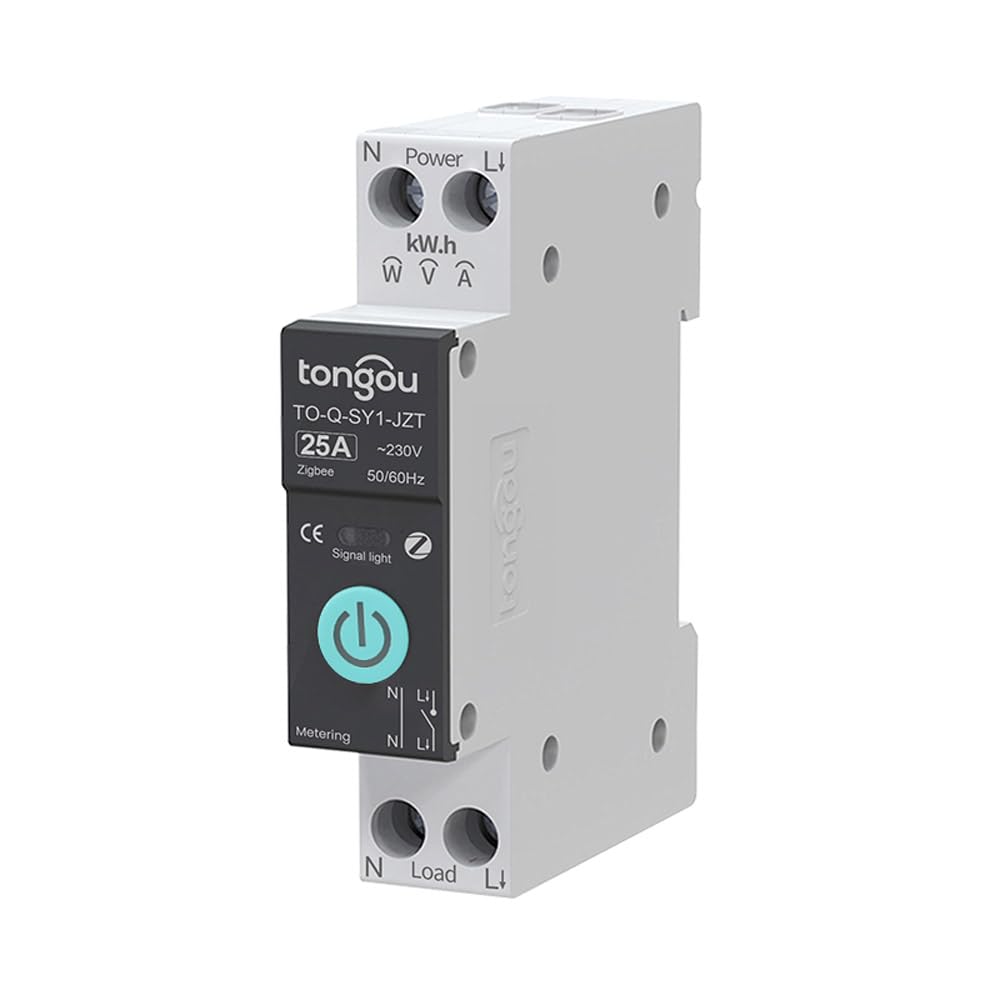
Image 2.1: TONGOU TO-Q-SY1-ZigBee Smart Switch highlighting its features like timer, countdown, circulate, and metering.
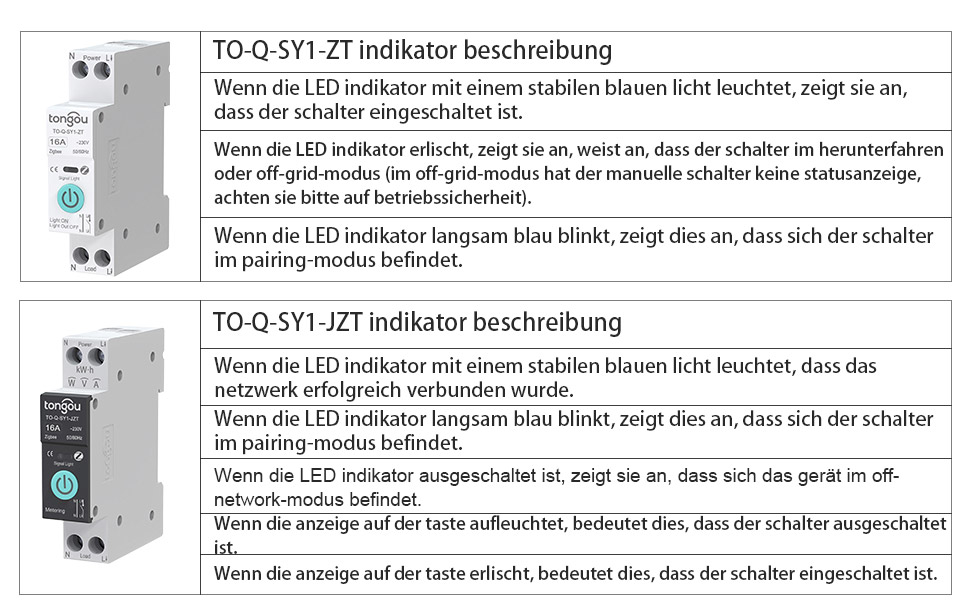
Image 2.2: Diagram illustrating the TONGOU TO-Q-SY1-ZigBee Smart Switch's connectivity and control options.
3. Consignes de sécurité
WARNING: Electrical shock hazard. Installation should only be performed by a qualified electrician.
- Coupez toujours l'alimentation au niveau du disjoncteur avant d'installer ou d'entretenir l'interrupteur.
- Assurez-vous que le volume du commutateurtagLes valeurs nominales de courant et d'intensité correspondent à votre système électrique.
- Ne pas actionner l'interrupteur avec les mains mouillées ou dans des conditions d'utilisation difficiles.amp conditions.
- Tenir hors de portée des enfants.
- N’essayez pas de réparer ou de modifier l’appareil. Contactez le service client pour obtenir de l’aide.
4. Installation
The TONGOU TO-Q-SY1-ZigBee Smart Switch is designed for DIN rail mounting. Follow these steps for safe and correct installation:
- Éteindre: Turn off the main power supply at your circuit breaker to prevent electrical shock.
- Montage: Securely mount the switch onto a standard 35mm DIN rail in your electrical box.
- Câblage : Connect the live (L) and neutral (N) wires to the input terminals (Power L and Power N) of the switch. Connect the load wires to the output terminals (Load L and Load N). Ensure all connections are tight and secure. The switch supports simple push-in cable insertion and screw tightening.
- Mise sous tension : Once all wiring is complete and secure, restore power at the circuit breaker.

Image 4.1 : Example wiring diagram for the TONGOU TO-Q-SY1-ZigBee Smart Switch with a light bulb and a Tuya ZigBee hub.

Image 4.2: Dimensions of the TONGOU TO-Q-SY1-ZigBee DIN Rail Switch for installation planning.
5. Configuration (Appairage de l'application)
To enable smart features, the switch must be paired with a TUYA ZigBee 3.0 hub and the Smart Life/TUYA app.
- Téléchargez l'application: Download the "Smart Life" or "TUYA" app from the App Store (iOS) or Google Play (Android).
- Ajouter un hub : Open the app and add your TUYA ZigBee 3.0 hub if you haven't already.
- Entrez en mode de couplage : On the TONGOU Smart Switch, press and hold the button for 5 seconds until the indicator light blinks blue. This indicates pairing mode.
- Découvrir l'appareil : In the Smart Life/TUYA app, navigate to your ZigBee hub and select "Add sub-device" or "Rechercher device." The app will discover the switch.
- Confirmer l'association : Follow the on-screen prompts to confirm pairing. Once successfully paired, the indicator light on the switch will stop blinking and remain solid blue.
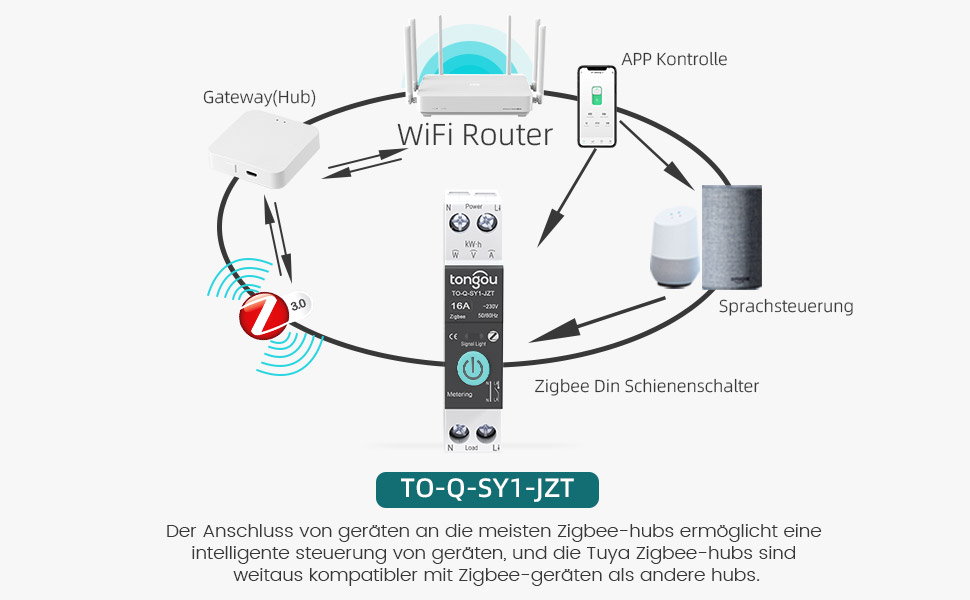
Image 5.1: Diagram showing the connection of the TONGOU TO-Q-SY1-ZigBee Smart Switch to a WiFi router via a ZigBee hub for app and voice control.
Video 5.1: This video demonstrates the pairing process of the TONGOU TO-Q-SY1-ZigBee Smart Switch with a Tuya ZigBee hub and the Smart Life app, including initial setup and basic control functions.
6. Fonctionnement
6.1. Contrôle manuel
The switch can be operated manually by pressing the physical button on the device. Press once to turn ON, press again to turn OFF.
6.2. Télécommande APP
After successful pairing, open the Smart Life/TUYA app. You will see the added switch. Tap the switch icon to toggle power ON/OFF. The app also provides real-time status updates.
6.3. Electricity Consumption Monitoring
Within the app, navigate to the switch's details page. Here you can view Données en temps réel pour le courant, voltage, and power. Historical data for energy consumption (kWh) is also available, broken down by day, month, and year.
6.4. Commande vocale
Integrate the Smart Life/TUYA app with Amazon Alexa or Google Assistant. Once linked, you can use voice commands to control your connected appliances. For example, "Alexa, turn on the living room light" or "Hey Google, turn off the fan."
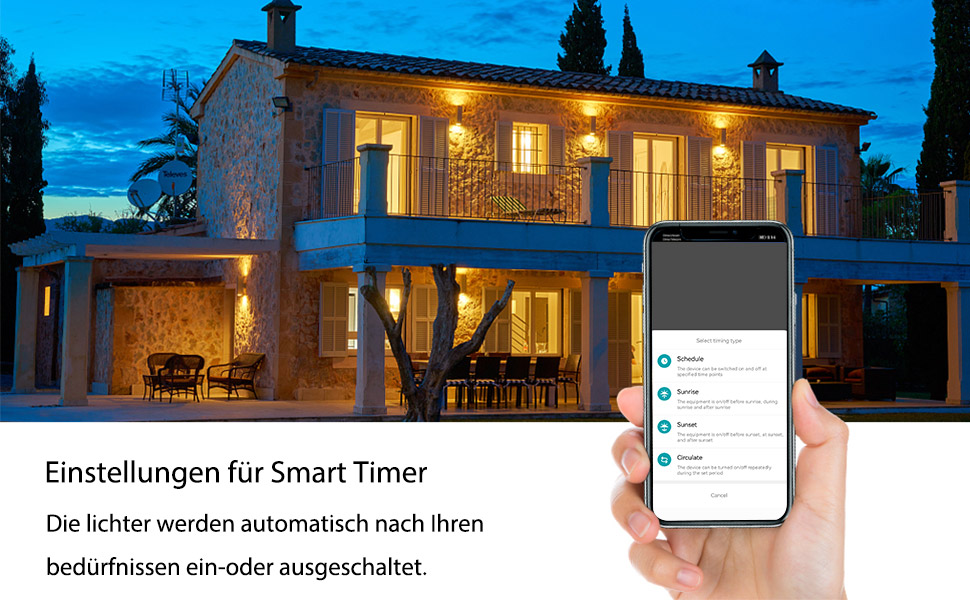
Image 6.1: Screenshot showing smart timer settings within the app, allowing users to schedule device operation.
6.5. Fonctions de temporisation
The app offers various timing options:
- Calendrier: Set specific ON/OFF times for your devices on selected days.
- Compte à rebours: Programmez une minuterie pour que l'appareil s'allume ou s'éteigne après une durée spécifiée.
- Circuler: Program the device to cycle ON and OFF repeatedly for set intervals.
7. Entretien
- Nettoyage: Essuyez délicatement l'appareil avec un chiffon doux et sec. N'utilisez pas de produits chimiques agressifs ni de nettoyants abrasifs.
- Vérification de la connexion : Vérifiez régulièrement les connexions électriques pour vous assurer qu'elles restent bien fixées.
- Mises à jour du micrologiciel : Keep the Smart Life/TUYA app updated to receive the latest firmware for your switch, which may include performance improvements and new features.
8. Dépannage
- L'appareil ne se couple pas :
- Ensure your TUYA ZigBee hub is powered on and connected to your network.
- Verify the switch is in pairing mode (blinking blue indicator light).
- Move the switch closer to the ZigBee hub.
- Reset the switch by holding the button for 10 seconds until the light turns off, then try pairing again.
- Pas de télécommande :
- Check your internet connection and the ZigBee hub's connection.
- Ensure the Smart Life/TUYA app is up to date.
- Verify the switch is still connected to the ZigBee network in the app.
- La commande vocale ne fonctionne pas :
- Confirm that your Alexa or Google Assistant device is properly linked to your Smart Life/TUYA account.
- Check if the device name in the app matches the name you are using in voice commands.
- Inaccurate energy monitoring:
- Ensure the switch is correctly wired and the load is within its rated capacity.
- Contactez le support client si le problème persiste.
9. Spécifications
| Fabricant | TONGOU |
| Numéro de modèle | TO-Q-SY1-ZigBee |
| Matériel | With measurement 25A (PA66 flame-retardant) |
| Voltage | 240 volts |
| Pouvoir | 6000 watts |
| Évaluation actuelle | 25 A |
| Type de commutateur | Single-phase, Touchpad |
| Type de montage | Montage sur rail DIN |
| Mode de fonctionnement | ALLUMÉ ÉTEINT |
| Connectivité | ZigBee 3.0 (requires Tuya ZigBee Hub) |
| Certifications | CE |
| Dimensions du colis | 8.5 x 7.1 x 2.2 cm ; 110 grammes |
| Pays d'origine | Chine |
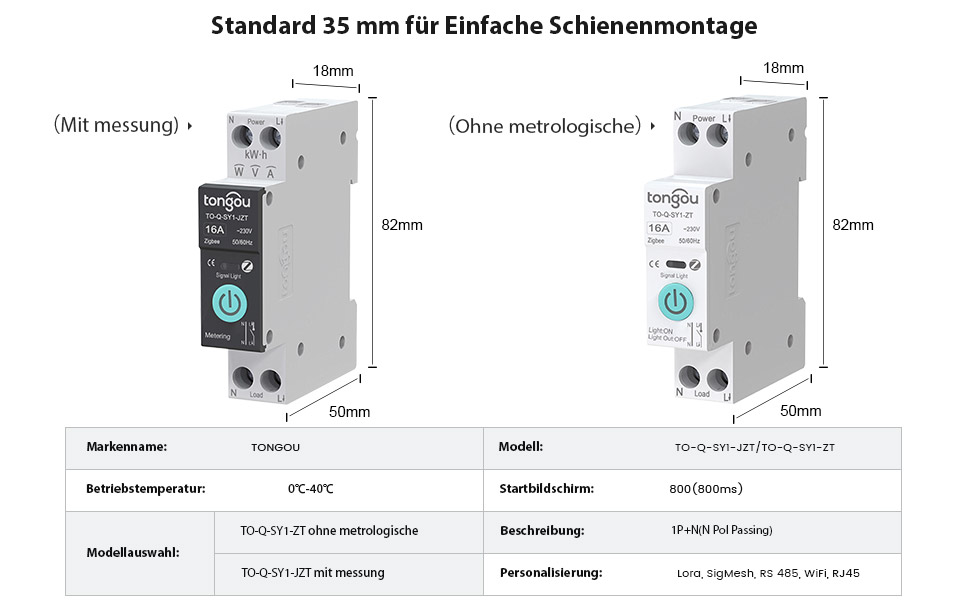
Image 9.1: Detailed product parameters for the TONGOU TO-Q-SY1-ZigBee Smart Switch.
10. Garantie et assistance
This TONGOU Smart ZigBee Switch comes with a garantie de deux ans à compter de la date d'achat. Cette garantie couvre les défauts de matériaux et de fabrication dans des conditions normales d'utilisation.
For technical support, warranty claims, or any questions regarding your product, please contact TONGOU customer service through your retailer or the official TONGOU website. Please have your purchase receipt and product model number (TO-Q-SY1-ZigBee) ready when contacting support.
Les informations concernant la disponibilité des pièces détachées ne sont actuellement pas disponibles.