
Rigol DHO802
Manuel d'utilisation de l'oscilloscope numérique RIGOL DHO802
Model: DHO802
1. Introduction
The RIGOL DHO802 Digital Oscilloscope is a high-performance instrument designed for precise signal analysis. It features ultra-low background noise for pure signal acquisition and a 12-bit hardware high resolution across all series. With up to 70MHz analog bandwidth and 2 analog channels, it supports real-time sampling rates up to 1.25 GSa/s and a storage depth of up to 25 Mpts. The Ultra Aqua mode provides an impressive 1 million wfms/s waveform capture rate, making it ideal for capturing transient events.
Key features include gray scale digital real-time brightness function, waveform search and navigation, a 7-inch 1024x600 high-definition touch screen, and a new Flex knob for enhanced interactive experience. Connectivity options include USB Device & Host, LAN, and HDMI ports. The compact design ensures convenient maneuverability, and it supports online version upgrades.

Figure 1.1: Common applications for the DHO802 Digital Oscilloscope, such as embedded development, factory production lines, instrument maintenance, education and research, and automotive manufacturing.
2. Contenu de la boîte
- Unité principale (1)
- Passive Probes (150MHz) (2)
- Alimentation (1)
- Câble USB (1)
- Grounding Cable (1)
- Carte de garantie (1)
- Calibration Certificate (1)
- Card Certificate of Conformity (1)

Figure 2.1: Contents of the RIGOL DHO802 Digital Oscilloscope packaging, including the main unit, probes, power supply, USB cable, grounding cable, and documentation.
3. Installation
3.1 Déballage et inspection
Carefully remove the oscilloscope and all accessories from the packaging. Inspect all items for any signs of damage during transit. If any damage is found, contact your supplier immediately.
3.2 Connexion d'alimentation
- Veillez à placer l'oscilloscope sur une surface stable et plane, bénéficiant d'une ventilation adéquate.
- Connect the provided power cable to the power input on the rear panel of the oscilloscope.
- Branchez l'autre extrémité du câble d'alimentation dans une prise de courant alternatif appropriée.
- Appuyez sur le bouton d'alimentation situé sur le panneau avant pour allumer l'appareil.
3.3 Connexion de la sonde
The DHO802 comes with two passive probes. To connect a probe:
- Align the BNC connector of the probe with one of the input channels (CH1 or CH2) on the front panel.
- Push the connector in and twist clockwise until it locks into place.
- Attach the probe's ground clip to a common ground point in your circuit.
- For accurate measurements, ensure the probe compensation is correctly adjusted. Refer to the "Probe Compensation" section in the full manual for detailed instructions.

Figure 3.1: The RIGOL DHO802 Digital Oscilloscope with its included probes and cables, ready for setup.
4. Mode d'emploi
4.1 Panneau avant surview
The front panel of the DHO802 features a 7-inch 1024x600 high-definition touch screen and various controls for intuitive operation. Key controls include vertical scale and position knobs for each channel, horizontal scale and position knobs, trigger controls, and dedicated function buttons.

Figure 4.1 : Face avant view of the DHO802, highlighting the touch screen and physical controls.
4.2 Acquisition de formes d'onde de base
- Connect the probe to the signal source you wish to measure.
- Appuyez sur le Auto button on the front panel for automatic setup of vertical, horizontal, and trigger parameters.
- Ajustez le Échelle verticale (V/div) and Position verticale knobs for each channel to optimize the waveform display.
- Ajustez le Échelle horizontale (s/div) and Position horizontale knobs to view la durée souhaitée de la forme d'onde.
- Utilisez le Déclenchement controls to stabilize repetitive waveforms.
4.3 fonctionnalités avancées
The DHO802 supports various advanced features accessible via the touch screen and Flex knob:
- Waveform Search and Navigation: Utilize the touch screen to easily navigate and search for specific events within long waveform records.
- Gray Scale Digital Real-time Brightness: Enhance waveform visibility with 256 levels of brightness, revealing signal details that might otherwise be hidden.
- Connectivité : Use the USB, LAN, and HDMI ports for data transfer, remote control, and external display.
The oscilloscope's system supports switching between 8 major languages, including Chinese, English, German, French, Korean, Portuguese, Polish, and Japanese.

Figure 4.2: The DHO802 display demonstrating multi-language support.
4.4 Démonstration vidéo
No official product videos from the seller were available for embedding at this time, as per the embedding guidelines.
5. Entretien
- Keep the oscilloscope clean and free from dust. Use a soft, dry cloth for cleaning the exterior.
- Évitez d'exposer l'appareil à des températures extrêmes, à l'humidité ou à la lumière directe du soleil.
- Do not block the ventilation openings on the rear and sides of the instrument.
- Regularly check the probes and cables for any signs of wear or damage. Replace if necessary.
- For internal cleaning or repair, contact qualified service personnel.
6. Dépannage
- Pas d'alimentation : Ensure the power cable is securely connected and the power outlet is functional. Check the power button.
- Aucun affichage de forme d'onde : Verify probes are correctly connected to the input channels and the signal source. Check vertical and horizontal scale settings. Ensure the trigger is properly set or use the Auto button.
- Forme d'onde instable : Adjust the trigger level and trigger mode. Ensure the trigger source is appropriate for the signal.
- Software Freezing: If the software locks up, try restarting the device. If the issue persists, check for available online firmware updates.
- Forme d'onde déformée : Check probe compensation. Ensure the input signal does not exceed the oscilloscope's maximum input voltage.
For persistent issues, refer to the comprehensive help file built into the device or contact RIGOL customer support.
7. Spécifications
| Fonctionnalité | Spécification |
|---|---|
| Bande passante | 70 MHz |
| Chaînes analogiques | 2 + EXT |
| S en temps réelample taux | Jusqu'à 1.25 GSa/s |
| Profondeur de la mémoire | Jusqu'à 25 Mpts |
| Taux de capture de forme d'onde | Jusqu'à 1 000 000 wfms/s (mode Ultra Aqua) |
| Résolution verticale | 12 bits |
| Plage de sensibilité verticale | 500 µV/div à 10 V/div |
| Afficher | 7-inch 1024 x 600 HD Touch Screen |
| Connectivité | USB Device & Host, LAN, HDMI |
| Dimensions du produit | 10.5 x 6.4 x 3.0 pouces (265.36 x 161.75 x 77.38 mm) |
| Poids du produit | 3.9 livres (1.78 kg) |

Figure 7.1: Key technical specifications of the DHO802 Digital Oscilloscope, highlighting its 70MHz bandwidth and 12-bit resolution.
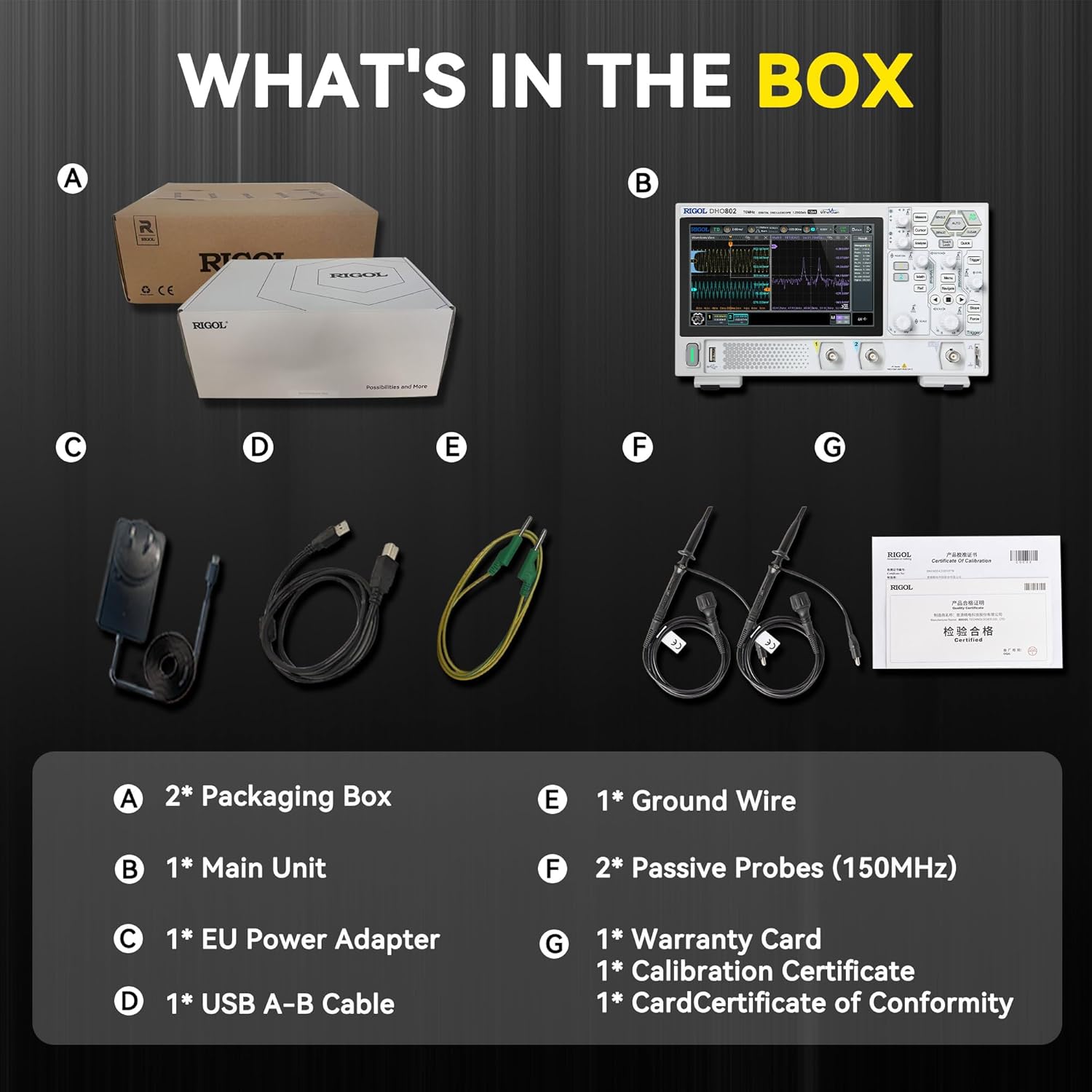
Figure 7.2: Physical dimensions and weight of the RIGOL DHO802 Digital Oscilloscope.
8. Garantie et assistance
The main body of RIGOL equipment, including the DHO802 Digital Oscilloscope, comes with a standard 3-year warranty. For detailed warranty terms and conditions, please refer to the warranty card included in the product packaging.
For further support, technical assistance, or service inquiries, please visit the official Rigol Store on Amazon: Magasin Rigol.
Documents connexes - DHO802
 |
MHO98 Digital Oscilloscope User Guide Comprehensive user guide for the RIGOL MHO98 Digital Oscilloscope, covering safety, setup, operation, and advanced measurement features. |
 |
Guide rapide de l'oscilloscope numérique RIGOL série DHO800 Guide rapide de l'oscilloscope numérique RIGOL série DHO800 : sécurité, installation, fonctionnement et commande à distance. Caractéristiques : résolution 12 bits, profondeur de mémoire de 25 Mpts et fréquence d'acquisition de 1 000 000 mots/s. |
 |
Guide rapide de l'oscilloscope numérique RIGOL série DHO800 Démarrez rapidement avec l'oscilloscope numérique RIGOL série DHO800. Ce guide contient des informations essentielles sur la sécurité et présente le produit.view, détails des panneaux avant et arrière, interface utilisateur, préparation à l'utilisation, gestes de l'écran tactile, réglage des paramètres et options de télécommande. |
 |
Guide rapide de l'oscilloscope numérique RIGOL série DHO800 Ce guide rapide fournit des informations essentielles sur les oscilloscopes numériques de la série RIGOL DHO800, notamment les précautions de sécurité et les informations sur le produit.view, preparation steps, user interface, touch gestures, parameter setting, remote control, and additional product information. It details the DHO802, DHO804, DHO812, and DHO814 models. |
 |
Guide rapide de l'oscilloscope numérique RIGOL série DHO800 Un guide rapide sur l'oscilloscope numérique de la série RIGOL DHO800, couvrant les exigences de sécurité, le produit etviewPréparation à l'utilisation, gestes sur l'écran tactile, paramétrage, télécommande, etc. Comprend les spécifications du modèle et les détails de fonctionnement. |
 |
Guide rapide de l'oscilloscope numérique RIGOL série DHO800 - Sécurité, fonctionnalités et fonctionnement Guide rapide complet pour l'oscilloscope numérique RIGOL série DHO800. Découvrez les consignes de sécurité et les détails du produit.viewDétails des panneaux avant et arrière, interface utilisateur, préparation et fonctionnement de base. Inclut les spécifications du modèle et les gestes de commande. |
Ask a question about this manual
Ask about setup, troubleshooting, compatibility, parts, safety, or missing instructions. Manuals+ will review the question and use this page’s manual context to help answer it.