
1. Introduction
Thank you for choosing the FLEXISPOT L-Shaped Electric Standing Desk. This manual provides essential information for the safe assembly, operation, and maintenance of your new desk. Please read these instructions carefully before use and retain them for future reference. This desk is designed to provide a versatile and ergonomic workspace, allowing seamless transitions between sitting and standing positions.
2. Consignes de sécurité
Pour garantir un fonctionnement sûr et prévenir les blessures ou les dommages, veuillez respecter les consignes de sécurité suivantes :
- Assurez-vous que tous les composants sont solidement fixés avant utilisation.
- Tenez les enfants et les animaux domestiques éloignés du bureau pendant son utilisation.
- Do not place hands or other body parts near moving parts of the desk frame.
- Avoid overloading the desk. The maximum load capacity is 80 kg.
- Ne vous asseyez pas et ne vous tenez pas debout sur le bureau.
- Utilisez ce bureau uniquement à l'intérieur, dans un environnement sec.
- Débranchez l'alimentation avant le nettoyage ou l'entretien.
- Si des pièces sont endommagées ou manquantes, contactez immédiatement le service client. N'essayez pas de réparer le bureau vous-même.
3. Contenu du colis
Please verify that all parts are present and undamaged before beginning assembly. Refer to the assembly diagram for a complete list of components.
- L-Shaped Desktop (2 parts)
- 4-Leg Frame (Dual Motor Mechanism)
- Panneau de contrôle intelligent
- Adaptateur secteur et câbles
- Matériel de montage (vis, outils, etc.)
- Manuel d'utilisation
4. Configuration et assemblage
L'assemblage nécessite généralement deux personnes. Suivez attentivement les étapes suivantes :
- Déballer les composants : Retirez soigneusement toutes les pièces de leur emballage et disposez-les sur une surface douce et propre afin d'éviter les rayures.
- Assemble the 4-Leg Frame: Connect the frame components according to the included diagram. Ensure all bolts are tightened securely. The 4-leg design provides enhanced stability.
- Install Dual Motor Mechanism: The dual motor system is integrated into the frame. Ensure all motor connections are secure. This mechanism allows for smooth and precise height adjustments.
- Ajouter des panneaux de bureau : Carefully place the two desktop panels onto the assembled frame. Align the pre-drilled holes and secure the desktop to the frame using the provided screws. The L-shaped design offers ampl'espace de travail.
- Panneau de commande du support : Attach the intelligent control panel to the underside of the desktop in an easily accessible location. Connect the control panel cable to the main control box.
- Connecter l'alimentation : Plug the power adapter into the control box, then plug the power cord into a standard electrical outlet.
- Réinitialisation initiale : After connecting power, perform an initial reset. Press and hold the 'Reset' button (usually marked with a circular arrow) until the desk reaches its lowest position and then slightly rises. This calibrates the desk.
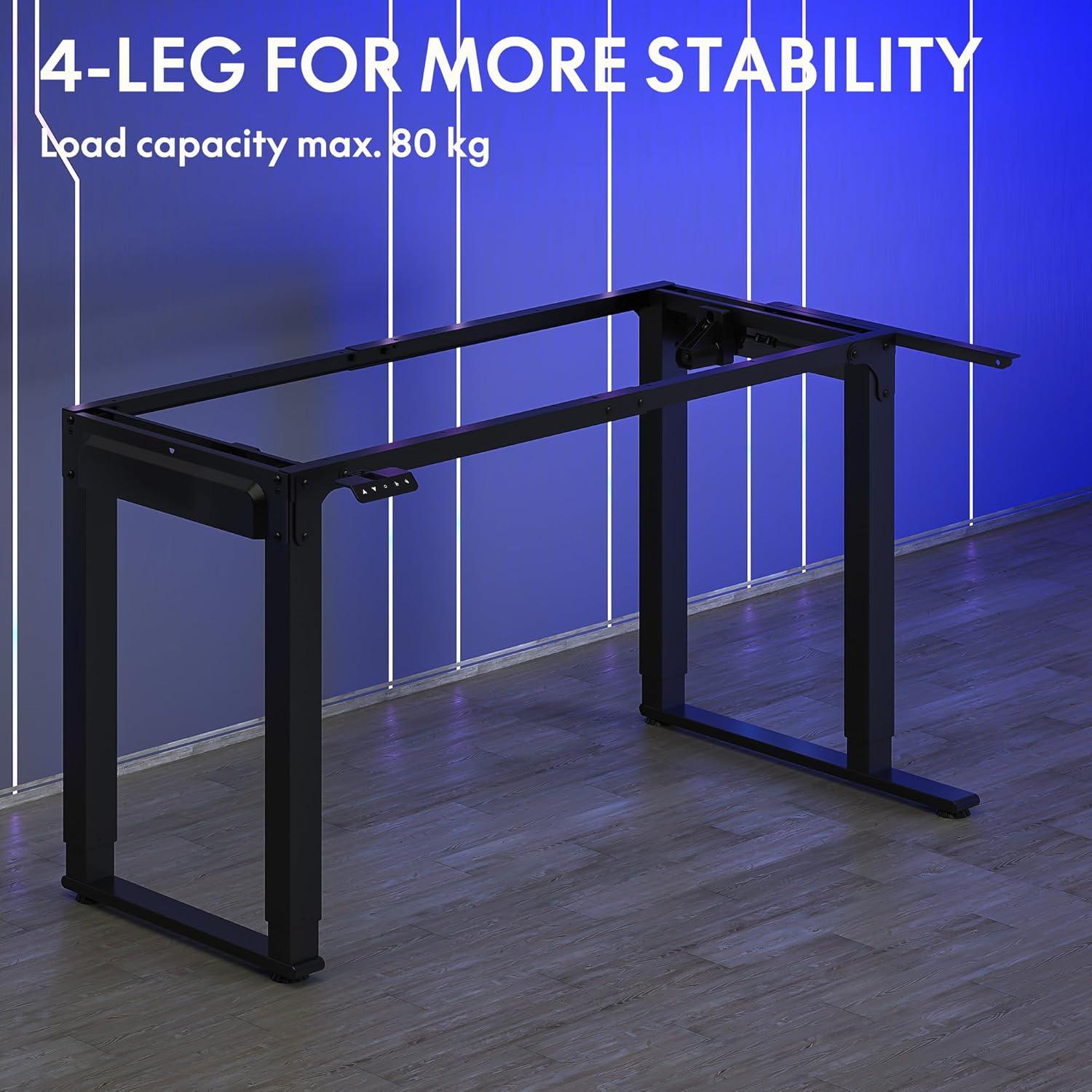
Image: The robust 4-leg frame provides superior stability for the L-shaped standing desk.

Image: Detail of the dual-motor mechanism, ensuring accurate and smooth height positioning.
5. Mode d'emploi
Your FLEXISPOT L-Shaped Electric Standing Desk features an intelligent control panel for easy height adjustment and memory presets.
5.1 Fonctions du panneau de commande

Image: The intelligent control panel with clearly labeled buttons for desk operation.
- Boutons Haut/Bas (▲ / ▼) : Maintenez la pression pour régler la hauteur du bureau en continu. Relâchez le bouton pour vous arrêter à la hauteur souhaitée.
- Reset Button (↺): Used for initial calibration or to reset the desk if an error occurs. Press and hold until the desk moves to its lowest point and slightly rises.
- Sitting Preset Button (👭): Press to automatically move the desk to your programmed sitting height.
- Standing Preset Button (👭 with upward arrow): Press to automatically move the desk to your programmed standing height.
5.2 Configuration des préréglages de mémoire
To save your preferred sitting or standing height:
- Réglez le bureau à la hauteur souhaitée à l'aide des boutons Haut/Bas.
- Press and hold the desired preset button (Sitting or Standing) for approximately 3-5 seconds until you hear a beep or see the display flash. This indicates the height has been saved.

Image: The desk can be adjusted from a minimum height of 72cm to a maximum of 117cm.

Image: The spacious L-shaped desktop (180cm x 110cm) provides ample room for multiple computers and accessories.
6. Entretien
Un entretien régulier garantit la longévité et les performances optimales de votre bureau.
- Nettoyage: Essuyez le bureau et le cadre avec un chiffon doux et sec.amp chiffon. Évitez les produits chimiques agressifs ou les nettoyants abrasifs.
- Inspection: Vérifiez régulièrement le serrage de toutes les vis et fixations. Resserrer si nécessaire.
- Gestion des câbles: Ensure power cables and other device cables are properly managed to prevent entanglement or damage during height adjustments.
- Entretien du moteur : The dual motors are designed for durability. Avoid obstructing the desk's movement or exceeding the weight limit to prevent strain on the motors.

Image: The desk features safe and stylish rounded corners.
7. Dépannage
Si vous rencontrez des problèmes avec votre bureau, consultez les problèmes courants et leurs solutions ci-dessous :
| Problème | Cause possible | Solution |
|---|---|---|
| Le bureau ne bouge pas. | Câble d'alimentation débranché ; câble du panneau de commande desserré ; protection contre les surcharges activée. | Check power connections; Ensure control panel cable is secure; Reduce weight on desk and perform a reset. |
| Le bureau bouge de façon irrégulière ou fait un bruit inhabituel. | Unbalanced load; Loose connections; Obstruction. | Distribute weight evenly; Check and tighten all frame connections; Remove any obstructions. Perform a reset. |
| Les préréglages de hauteur ne fonctionnent pas. | Les préréglages n'ont pas été enregistrés correctement. | Re-save the desired height by holding the preset button until confirmation. |
| Le bureau s'arrête en plein mouvement. | Overload protection; Overheating protection. | Reduce weight on the desk. Allow the desk to cool down for 20-30 minutes if it has been used continuously. |
Si le problème persiste après avoir essayé ces solutions, veuillez contacter le service client de FLEXISPOT.
8. Spécifications
| Fonctionnalité | Détail |
|---|---|
| Numéro de modèle | QS2LB-1811 |
| Marque | FLEXIPOT |
| Type de bureau | Bureau debout électrique en forme de L |
| Type de moteur | Moteur double |
| Type de cadre | 4-Leg Frame |
| Plage de réglage de la hauteur | 72 cm à 117 cm |
| Dimensions du bureau (L x l) | 180 cm x 110 cm |
| Capacité de charge maximale | 80 kg |
| Niveau de bruit | < 50 dB |
| Matériel | Acier allié (cadre) |
| Couleur | Noir |
| Poids de l'article | 30 kilogrammes |
9. Garantie et assistance
FLEXISPOT products are designed for quality and durability. For specific warranty information, please refer to the warranty card included with your purchase or visit the official FLEXISPOT website. If you require technical assistance, have questions about assembly, or need to report a missing/damaged part, please contact FLEXISPOT customer support directly. Ensure you have your model number (QS2LB-1811) and purchase details available when contacting support.
Coordonnées: Please refer to the contact details provided on the FLEXISPOT official webPour connaître les canaux d'assistance les plus récents, veuillez consulter le site ou votre documentation d'achat.