
1. Introduction
Merci pour votre achatasing the BLOW 4625FHD DVB-T2 H.265 Digital Terrestrial TV Tuner. This device allows you to receive digital terrestrial television broadcasts (DVB-T2) with H.265 (HEVC) compression, offering high-definition video quality. This manual provides essential information for the safe and efficient setup, operation, and maintenance of your new tuner. Please read it thoroughly before use and retain it for future reference.
2. Consignes de sécurité
- Sécurité électrique : Pour éviter tout risque d'électrocution, ne pas ouvrir le casing. Confiez toutes les interventions de maintenance à un personnel qualifié.
- Source d'alimentation : Utilisez uniquement l'adaptateur secteur spécifié. Assurez-vous que le volumetage correspond aux exigences de l'appareil.
- Ventilation: Ne pas obstruer les ouvertures de ventilation. Assurer une circulation d'air suffisante autour de l'appareil pour éviter toute surchauffe.
- Humidité: Tenez l'appareil à l'écart de l'eau, de la pluie et d'une humidité excessive.
- Nettoyage: Disconnect the power before cleaning. Use a soft, dry cloth. Do not use liquid cleaners or aerosols.
- Placement: Place the device on a stable, flat surface. Avoid placing it near heat sources or in direct sunlight.
3. Contenu du colis
À l'ouverture du colis, veuillez vérifier que tous les composants sont présents et en bon état :
- BLOW 4625FHD DVB-T2 Tuner Unit
- Télécommande
- Power Adapter (integrated cable)
- Manuel de l'utilisateur (ce document)

Image 3.1: Retail packaging of the BLOW 4625FHD DVB-T2 Tuner, showing the tuner unit and remote control.
4. Produit terminéview
4.1. Panneau avant
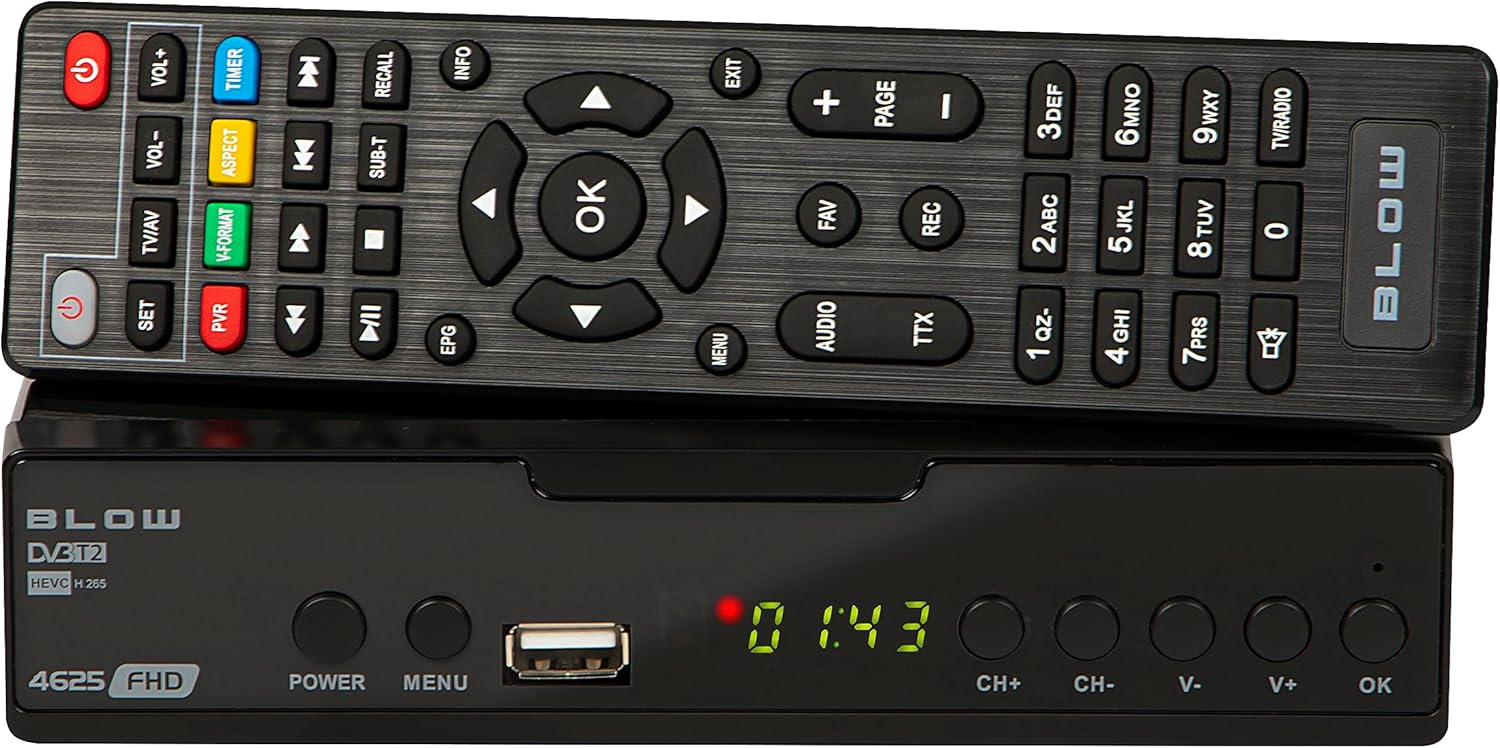
Illustration 4.1 : Avant view of the BLOW 4625FHD DVB-T2 Tuner with its remote control.
The front panel features a digital display, a USB port for media playback and PVR functions, and essential control buttons:
- Afficher: Shows channel number, time, or menu information.
- POUVOIR: Met l'appareil en marche ou l'éteint (veille).
- M E N U: Accède au menu principal.
- Port USB : Pour connecter des périphériques de stockage USB.
- CH+/CH- : Change de chaîne (vers le haut ou vers le bas).
- V+/V- : Règle le volume vers le haut ou vers le bas.
- OK: Confirme les sélections effectuées dans le menu.
4.2. Panneau arrière

Image 4.2: Rear panel of the BLOW 4625FHD DVB-T2 Tuner, showing various input and output ports.
Le panneau arrière comporte tous les ports de connexion nécessaires :
- ENTRÉE RF : Se connecte à votre antenne terrestre.
- SORTIE RF : For looping the antenna signal to another device (e.g., another TV or tuner).
- COAXIAL: Sortie audio numérique.
- HDMI: High-Definition Multimedia Interface output for connecting to modern TVs.
- PÉRITEL : Analog video and audio output for connecting to older TVs.
- ENTRÉE CA : Alimentation électrique de l'appareil.
4.3. Télécommande
The remote control provides full functionality for operating the tuner. Familiarize yourself with its buttons for easy navigation and control.
- POUVOIR: Active/désactive l'accordeur.
- VOL+/VOL- : Règle le volume.
- CH+/CH- : Change de chaîne.
- OK: Confirme les sélections.
- Boutons de navigation (haut/bas/gauche/droite) : Permet de naviguer dans les menus.
- M E N U: Ouvre le menu principal.
- SORTIE: Quitte le menu ou l'écran actuel.
- Guide électronique des programmes : Affiche le guide électronique des programmes.
- PVR: Permet d'accéder aux fonctions de l'enregistreur vidéo personnel.
- REC : Starts recording the current program.
- FAV : Accède à la liste des chaînes favorites.
- Télévision/AV : Switches between TV and AV input modes on the tuner.
- FORMAT V : Changes video output format.
- AUDIO: Selects audio track (if available).
- TTX : Fonction télétexte.
- Touches numériques (0-9): Sélection directe de la chaîne.
5. Installation
5.1. Connecting the Tuner
- Connexion d'antenne: Connectez votre câble d'antenne terrestre à ENTRÉE RF port on the rear panel of the tuner.
- Connexion TV (HDMI) : For best picture quality, connect an HDMI cable from the HDMI port on the tuner to an available HDMI input on your television.
- Connexion TV (SCART) : If your TV does not have an HDMI input, connect a SCART cable from the Péritel port on the tuner to the SCART input on your television.
- Connexion électrique : Connectez l'adaptateur secteur au ENTRÉE CA port on the tuner, then plug the adapter into a wall outlet.
5.2. First Time Installation and Channel Scan
- Turn on your television and select the correct input source (HDMI or SCART) corresponding to where you connected the tuner.
- Appuyez sur le POUVOIR button on the tuner or remote control to turn on the device.
- The first time you power on the tuner, a "First Time Installation" wizard will appear. Follow the on-screen prompts.
- Select your preferred language, country, and other initial settings.
- Initiate the "Auto Scan" or "Channel Search" function. The tuner will automatically search for available DVB-T2 channels in your area. This process may take several minutes.
- Once the scan is complete, the tuner will save the channels and display the first available channel.
6. Fonctionnement
6.1. Télévision de base Viewing
- Changement de canal: Utilisez le CH+/CH- buttons on the remote or front panel, or enter the channel number directly using the number buttons.
- Réglage du volume : Utilisez le VOL+/VOL- boutons de la télécommande.
- Muet: Appuyez sur le Muet button on the remote to mute/unmute audio.
- Barre d'informations : Appuyez sur le INFO button on the remote to display current program information.
6.2. Guide électronique des programmes (EPG)
Appuyez sur le Guide électronique des programmes button on the remote control to access the Electronic Program Guide. This displays program schedules for all available channels. Use the navigation buttons to browse through channels and programs. Press OK à view details or set a reminder/recording.
6.3. Lecture multimédia (USB)
The BLOW 4625FHD supports media playback from a USB storage device. Insert a USB drive into the front USB port. Navigate to the "Multimedia" or "USB" section in the main menu to browse and play supported audio (MP3, WMA) and video files.
6.4. Personal Video Recorder (PVR)
To use the PVR function, connect a USB storage device (e.g., USB flash drive or external hard drive) to the USB port. The device must be formatted correctly (usually FAT32 or NTFS). You can record live TV programs by pressing the REC button on the remote. Scheduled recordings can be set via the EPG or the PVR menu.
- Enregistrement instantané : Pendant le visionnage d'un programme, appuyez sur REC pour commencer l'enregistrement. Presse ARRÊT pour finir.
- Enregistrement programmé : In the EPG, select a program and press OK, then choose the option to schedule a recording.
- Enregistrements de lecture : Access recorded content through the PVR or Multimedia menu.
7. Entretien
- Nettoyage: Ensure the device is unplugged before cleaning. Use a soft, dry, lint-free cloth to wipe the exterior. Do not use abrasive cleaners, waxes, or solvents.
- Ventilation: Regularly check that the ventilation slots are not obstructed by dust or debris.
- Mises à jour logicielles : Vérifiez périodiquement les instructions du fabricant. website for any available software updates. Follow the instructions provided with the update carefully.
8. Dépannage
| Problème | Cause/solution possible |
|---|---|
| Pas d'image ni de son |
|
| Message « Aucun signal » |
|
| La télécommande ne fonctionne pas |
|
| Picture freezes or pixelates |
|
9. Spécifications
| Modèle | BLOW 4625FHD (77-048) |
| Dimensions (L x l x H) | 9 cm (P) x 9 cm (L) x 2.5 cm (H) |
| Poids | 428 gramme |
| Connectivité | HDMI, USB, SCART, Coaxial, RF IN/OUT |
| Résolution de sortie vidéo | 1080p |
| Normes prises en charge | DVB-T2, H.265 (HEVC), H.264 |
| Gamme de fréquences | VHF : 170-230 MHz, UHF : 470-860 MHz |
| Formats audio | MP3, WMA |
| Mode de sortie audio | Stéréo, Surround |
| Alimentation électrique | 12 Volt, 43 Milliampere (Operating) |
| Consommation d'énergie en veille | < 0.5 W |
| Utilisation recommandée | Digital terrestrial TV viewing et enregistrement |
| Fabricant | Souffler |
10. Garantie
The BLOW 4625FHD DVB-T2 H.265 Digital Terrestrial TV Tuner comes with a Garantie constructeur de 2 ans from the date of purchase. This warranty covers defects in materials and workmanship under normal use. It does not cover damage caused by misuse, accident, unauthorized modification, or external causes. Please retain your proof of purchase for warranty claims.
11. Assistance
If you encounter any issues that cannot be resolved using the troubleshooting guide, or if you require further assistance, please contact your retailer or the manufacturer's customer support. Refer to the product packaging or the manufacturer's official website pour les coordonnées.