
Introduction
This manual provides detailed instructions for the safe and efficient use of your Blow Portable Bluetooth Speaker, Model 30-391. Please read this manual thoroughly before operating the device and retain it for future reference.
The Blow 30-391 is a versatile portable Bluetooth speaker designed for universal use with smartphones, tablets, computers, and other audio devices. It features Bluetooth 5.0 connectivity, AUX input, Micro USB port, and an integrated microphone for various audio applications.
Contenu du colis
Vérifiez que tous les éléments énumérés ci-dessous sont présents dans votre colis :
- Blow Portable Bluetooth Speaker (Model 30-391)
- Câble de chargement USB
- Câble de microphone
- Manuel de l'utilisateur (ce document)
- Télécommande

Image : Avant view of the Blow Portable Bluetooth Speaker 30-391, showcasing its RGB lighting, included remote control, and wired microphone.

Image: The USB charging cable and the microphone cable that come with the speaker.
Caractéristiques du produit
- Connectivité : Bluetooth 5.0, AUX-in (3.5mm), Micro USB, USB port, MicroSD card slot.
- Sortie audio : 10 Watts maximum speaker output.
- Batterie: Integrated 4500 mAh rechargeable battery.
- Caractéristiques spéciales : Integrated microphone, RGB lighting effects, voice control capability.
- Portabilité: Compact design with a handle for easy transport.
- Compatibilité: Universal compatibility with desktop computers, laptops, smartphones, and tablets.
Installation
1. Chargement du haut-parleur
Before first use, fully charge the speaker. Connect the supplied USB charging cable to the Micro USB port on the speaker and the other end to a standard USB power adapter (not included) or a computer's USB port. The charging indicator light will illuminate during charging and turn off when fully charged.
2. Mise sous/hors tension
Locate the power switch on the top panel of the speaker. Slide the switch to the "ON" position to power on the speaker. Slide it to the "OFF" position to power off the speaker.

Image: Close-up of the speaker's top control panel, showing the power switch, volume knob, and various input ports.
3. Couplage Bluetooth
- Allumez l'enceinte. Elle passera automatiquement en mode de couplage Bluetooth, indiqué par un voyant LED clignotant.
- Sur votre appareil mobile (smartphone, tablette, etc.), activez le Bluetooth et recherchez les appareils disponibles.
- Select "Blow 30-391" from the list of devices.
- Une fois l'appairage effectué, l'enceinte émet une confirmation sonore et le voyant LED cesse de clignoter.
- L'enceinte se reconnectera automatiquement au dernier appareil apparié lors de sa mise sous tension, si cet appareil se trouve à portée et si le Bluetooth est activé.
4. Connexion AUX
To connect an external audio device via AUX, use a 3.5mm audio cable (not included). Plug one end into the AUX-in port on the speaker and the other end into the headphone jack or audio output of your device. The speaker will automatically switch to AUX mode.
5. Lecture USB/MicroSD
Insert a USB flash drive or a MicroSD card (up to 32GB) containing MP3 audio files into the respective port on the speaker. The speaker will automatically detect the storage device and begin playing music. Use the control buttons to navigate tracks.
Mode d'emploi
1. Contrôles surview
The speaker features a control panel on the top for easy operation. Refer to the image in the "Setup" section for button layout.
- Interrupteur: MARCHE/ARRÊT.
- Bouton de volume : Tournez pour régler le volume principal.
- Bouton Mode : Press to switch between Bluetooth, AUX, USB, and MicroSD modes.
- Bouton Lecture/Pause : Appuyez pour lire ou mettre en pause le son.
- Boutons de piste précédente/suivante : Appuyez pour passer à la piste précédente ou suivante.
- Bouton EQ : Appuyez pour parcourir les préréglages de l'égaliseur.
- Bouton de mode d'éclairage : Appuyez pour modifier les effets d'éclairage RVB.
- Entrée microphone : Branchez le microphone filaire ici.
2. Utiliser le microphone
Connect the supplied wired microphone to the microphone input port on the speaker. Adjust the microphone volume using the dedicated control (if available) or the main volume knob. The integrated microphone allows for voice control and hands-free calling when connected via Bluetooth.
3. Effets d'éclairage RVB
The speaker features dynamic RGB lighting. Press the "Light Mode" button on the control panel or remote control to cycle through different lighting patterns or to turn the lights off.
Entretien
- Nettoyage: Utilisez un chiffon doux et sec pour nettoyer l'extérieur du haut-parleur. N'utilisez pas de nettoyants abrasifs ni de solvants.
- Entretien de la batterie: Pour prolonger la durée de vie de la batterie, évitez de la décharger complètement fréquemment. Rechargez l'enceinte régulièrement, même si vous ne l'utilisez pas pendant une période prolongée.
- Stockage: Rangez l'enceinte dans un endroit frais et sec, à l'abri de la lumière directe du soleil et des températures extrêmes.
- Résistance à l'eau : Cette enceinte n'est PAS étanche. Évitez tout contact avec l'eau ou une humidité excessive.
Dépannage
| Problème | Solution possible |
|---|---|
| Le haut-parleur ne s'allume pas. | Ensure the battery is charged. Connect the speaker to a power source using the USB cable. Check the power switch position. |
| Impossible de coupler via Bluetooth. | Ensure the speaker is in pairing mode (flashing LED). Make sure your device's Bluetooth is enabled and within range (up to 10 meters). Forget previous pairings on your device and try again. |
| Pas de son. | Check the volume level on both the speaker and your connected device. Ensure the correct input mode (Bluetooth, AUX, USB, MicroSD) is selected. Check cable connections for AUX mode. |
| Mauvaise qualité sonore. | Ensure the speaker is not too far from the Bluetooth device. Avoid obstacles between the speaker and the device. Try a different audio source or file. |
| Le microphone ne fonctionne pas. | Ensure the microphone is securely connected to the input port. Check microphone volume settings. |
Caractéristiques
| Numéro de modèle | 30-391 |
| Marque | Souffler |
| Technologie de connectivité | Bluetooth 5.0, Auxiliary (3.5mm), Micro USB, USB |
| Mode de sortie audio | AUX, Bluetooth |
| Puissance de sortie maximale des haut-parleurs | 10 watts |
| Capacité de la batterie | 4500 mAh |
| Max Memory Card Size | 32 Go (MicroSD) |
| Caractéristiques spéciales | Integrated Microphone, RGB Lighting, Voice Control |
| Source d'énergie | Alimenté par batterie |
| Dimensions du produit (L x l x H) | 26 x 46 x 24 cm (environ) |
| Poids du produit | 3.67 kg (environ) |
| Couleur | Black (with multicolor RGB lighting) |

Image : Côté view of the Blow Portable Bluetooth Speaker 30-391, showing its vertical orientation.
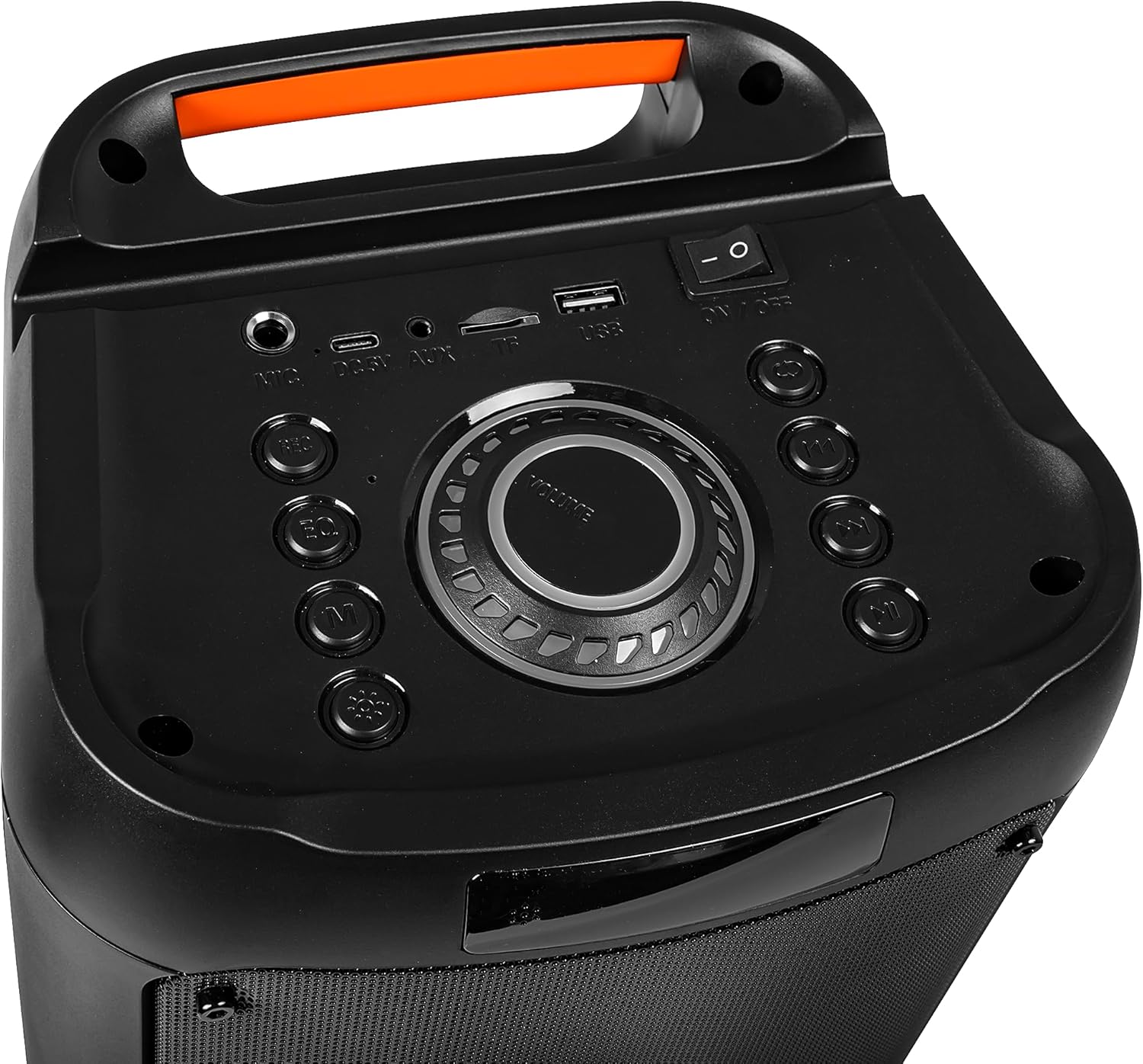
Image : Dos view of the Blow Portable Bluetooth Speaker 30-391, highlighting the integrated carrying handle.
Image : détaillée view of the top control panel, including the power switch, volume knob, and various input ports.

Image: The retail packaging for the Blow Portable Bluetooth Speaker 30-391, showing product features and accessories.
Garantie et assistance
The Blow Portable Bluetooth Speaker 30-391 comes with a limited warranty. Please refer to the warranty card included in your package for specific terms and conditions. For technical support, troubleshooting assistance, or warranty claims, please contact your retailer or the manufacturer directly. Contact information can typically be found on the product packaging or the manufacturer's official website.
Fabricant: Souffler
ASIN: B0CDXQRT9Q