
Introduction to the HOVERAir X1
The HOVERAir X1 is an innovative self-flying camera designed for effortless content creation. Weighing only 125g, this foldable mini-drone offers intelligent flight paths, HDR video capture, and hands-free control, making it an ideal companion for capturing life's moments. Its advanced tracking algorithms and triple stabilization system ensure smooth, high-quality footage, while its user-friendly design allows for palm takeoff and intuitive operation.
Qu'y a-t-il dans la boîte
Upon unboxing your HOVERAir X1, please ensure all components are present:
- HOVERAir X1 Self-Flying Camera (with battery) X1
- Batterie X1
- Battery Charging Hub X1
- Câble USB X1
- Sac de rangement X1

Figure 1: All components included in the HOVERAir X1 package.
Guide d'installation
- Charger les batteries : Fully charge the HOVERAir X1 batteries using the provided USB cable and charging hub. Ensure the drone's battery is fully charged before first use.
- Dépliez le drone : Gently unfold the HOVERAir X1's protective frame until it locks into its flight position.
- Téléchargez l'application : Download the Hover X1 App from your device's app store. The app is compatible with iOS 12.1 or later and Android 10.0 or later.
- Connectez-vous à l'application : Follow the in-app instructions to connect your HOVERAir X1 to your smartphone via Wi-Fi. This enables live monitoring, manual control, and access to advanced features.
- Décollage de Palm : The HOVERAir X1 is designed for easy palm takeoff. With one click, it can launch directly from your hand. Ensure a minimum height of 0.5 meters above the ground for proper takeoff and flight.

Figure 2: The HOVERAir X1 in its unfolded, flight-ready configuration.

Figure 3: Initiating palm takeoff with the HOVERAir X1.
Modes de fonctionnement
The HOVERAir X1 features several intelligent flight paths for hands-free operation:
- Flotter: The drone maintains a stable position in the air.
- Suivre: The drone tracks your movement, keeping you in the center of the frame.
- Dézoomer: Le drone vole en arrière et vers le haut, dévoilant le paysage environnant.
- Orbite: The drone circles around you, capturing a dynamic 360-degree view.
- Bird's Eye: The drone ascends to capture an overhead shot.
- Contrôle manuel: Take full control of the drone's flight path via the Hover X1 App.

Figure 4: Visual representation of HOVERAir X1's intelligent flight modes.
Commandes gestuelles
The HOVERAir X1 also supports multiple gesture controls for convenient operation:
- Gesture for Landing: Cross your hands above your head.
- Gesture for Bird's Eye: Raise both your hands.
- Gesture for Zoom Out: Wave both your hands twice.
- Gesture for Orbit-R: Wave your hand twice (right).
- Gesture for Orbit-L: Wave your hand twice (left).

Figure 5: Hand gestures for controlling HOVERAir X1 flight modes.
Capture d'image et de vidéo
The HOVERAir X1 camera drone is equipped to capture stunning visuals:
- Supports a maximum of 2.7K@30fps and 1080P HDR video shooting.
- Features a triple stabilization system for smooth video effects and excellent fast motion capturing capability.
- Utilizes Face AE Technology for natural-looking photos.
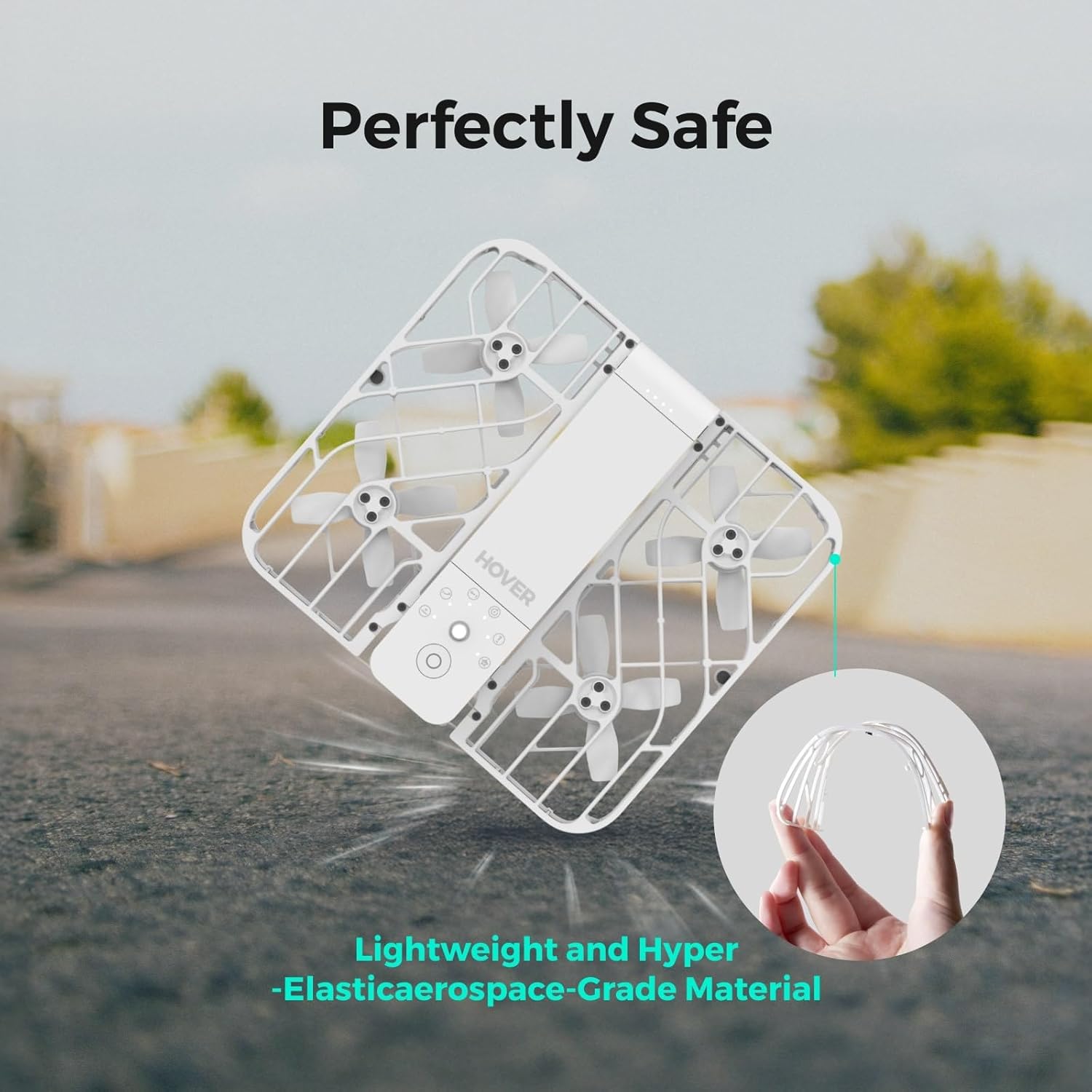
Figure 6: Enhanced image quality with Face AE Technology.

Figure 7: Smooth video capture with Triple Stabilization.
Fonctionnalités de l'application
The Hover X1 App enhances your drone experience:
- Surveillance en direct : Get real-time previews of the drone's camera feed.
- Contrôle manuel: Optimize flight paths and capture shots directly through the app.
- Stockage interne : Boasts 32GB of internal storage, eliminating the need for SD cards.
- Easy Download & Sharing: Download photos and videos via the app or by connecting the drone to your computer, then easily share to social media.

Figure 8: The Hover X1 App interface for mode selection and control.
Consignes de sécurité
The HOVERAir X1 is designed with user safety in mind:
- Weighs only 125g, making it lighter than many smartphones and exempt from FAA registration requirements.
- Features a foldable design and enclosed propellers for enhanced safety and portability.
- Constructed with lightweight and hyper-elastic aerospace-grade material for durability and safety upon impact.

Figure 9: The durable and safe design of the HOVERAir X1.
Entretien
To ensure the longevity and optimal performance of your HOVERAir X1, regular maintenance is recommended:
- Keep the drone clean, especially the propellers and camera lens, using a soft, dry cloth.
- Inspect propellers for any damage or wear before each flight. Replace if necessary.
- Store the drone in its provided storage bag in a cool, dry place when not in use.
Dépannage
If you encounter issues with your HOVERAir X1, consider the following:
- Takeoff Issues: Ensure the drone's battery is fully charged. Maintain a minimum height of 0.5 meters above the ground for proper takeoff. If issues persist, contact customer support.
- Problèmes de connectivité : Verify your device's Wi-Fi is enabled and connected to the HOVERAir X1's network. Restart both the drone and the app if necessary.
Caractéristiques
| Fonctionnalité | Détail |
|---|---|
| Marque | HOVERAir |
| Nom du modèle | Combo (with 2 batteries) |
| Poids de l'article | 125 grammes (4.4 onces) |
| Dimensions du produit | 10.63"L x 6.69"l x 1.97"H |
| Résolution de capture vidéo | 2.7K |
| Résolution de sortie vidéo | 1920x1080 pixels |
| Technologie de connectivité | Wifi |
| Type de contrôle | Contrôle des applications |
| Capacité de la batterie | 2100 millièmeamp Heures |
| Stockage interne | 32 Go |
Garantie et assistance
The HOVERAir X1 comes with a 1-year warranty against manufacturing defects. For detailed information, please refer to the official user guide.
- Guide d'utilisation officiel : Télécharger le PDF
- Assistance aux vendeurs : For any product-related inquiries or support, please contact Hover Camera Direct.