
1. Introduction
This manual provides detailed instructions for the installation, operation, and maintenance of your SECULINK C17-4MP Dual-Band WiFi Dome Security Camera. This camera is designed for outdoor surveillance, featuring 4MP resolution, pan/tilt/zoom capabilities, automatic tracking, human detection, and color night vision. Please read this manual thoroughly before use to ensure proper functionality and safety.
2. Contenu du colis
Vérifiez que tous les éléments sont présents dans votre colis :
- SECULINK C17-4MP Dome Security Camera
- Adaptateur secteur (chargeur)
- Vis de fixation et chevilles
- Kit étanche pour câble réseau (le cas échéant)
- Guide de démarrage rapide
3. Produit terminéview
The SECULINK C17-4MP camera features a robust dome design suitable for outdoor environments. Key components include:
- Objectif de l'appareil photo : Capture une vidéotage.
- LED infrarouges : Fournir un éclairage pour la vision nocturne.
- White Light LEDs (Floodlight): Enhance color night vision and act as a deterrent.
- Microphone: Pour l'entrée audio et la communication bidirectionnelle.
- Conférencier: Pour la sortie audio et la communication bidirectionnelle.
- Antennes: For dual-band 2.4GHz/5GHz Wi-Fi connectivity.
- Emplacement pour carte micro SD : Prend en charge le stockage local jusqu'à 256 Go.
- Bouton de réinitialisation : Pour réinitialiser les paramètres d'usine.
- Port d'alimentation: Entrée d'alimentation CC 12V.

Image 3.1 : Terminéview of the SECULINK C17-4MP camera and its mobile application interface.
4. Installation
4.1 Téléchargement de l'application et inscription au compte
- Téléchargez le SECUEYE mobile application from the App Store (iOS) or Google Play Store (Android).
- Ouvrez l'application et suivez les instructions à l'écran pour créer un nouveau compte ou vous connecter si vous en avez déjà un.
4.2 Mise sous tension de l'appareil photo
Connect the provided power adapter to the camera's power port and plug it into an electrical outlet. The camera will initiate its self-test sequence, indicated by a rotating motion and status light changes.
4.3 Connexion au Wi-Fi
The SECULINK C17-4MP supports dual-band Wi-Fi (2.4GHz and 5GHz) for flexible network connectivity.
- Ensure your mobile device is connected to the same Wi-Fi network you intend to connect the camera to.
- In the SECUEYE app, tap the "Add Device" or "+" icon.
- Sélectionnez votre modèle d'appareil photo ou scannez le code QR sur l'appareil photo (si disponible).
- Follow the app's instructions to enter your Wi-Fi network name (SSID) and password.
- L'application vous guidera tout au long du processus d'appairage, qui peut impliquer de scanner un code QR affiché sur votre téléphone avec l'objectif de l'appareil photo ou d'écouter un message audio.
- Once connected, the camera's status light will indicate a successful connection (refer to the app or quick start guide for specific light indicators).
4.4 Montage de la caméra
The camera is designed for wall mounting and is IP65/IP66 weatherproof, making it suitable for outdoor installation.
- Choisissez un emplacement de montage approprié qui offre les avantages souhaités viewangle d'inclinaison et se trouve à portée du Wi-Fi.
- Utilisez le gabarit de montage (s'il est fourni) ou la base de la caméra pour marquer les trous de perçage sur le mur.
- Percez des trous et insérez les chevilles.
- Fixez la base de la caméra au mur à l'aide des vis fournies.
- Attach the camera body to the base.
- Ensure all cable connections are secure and protected from weather using the waterproof kit if necessary.
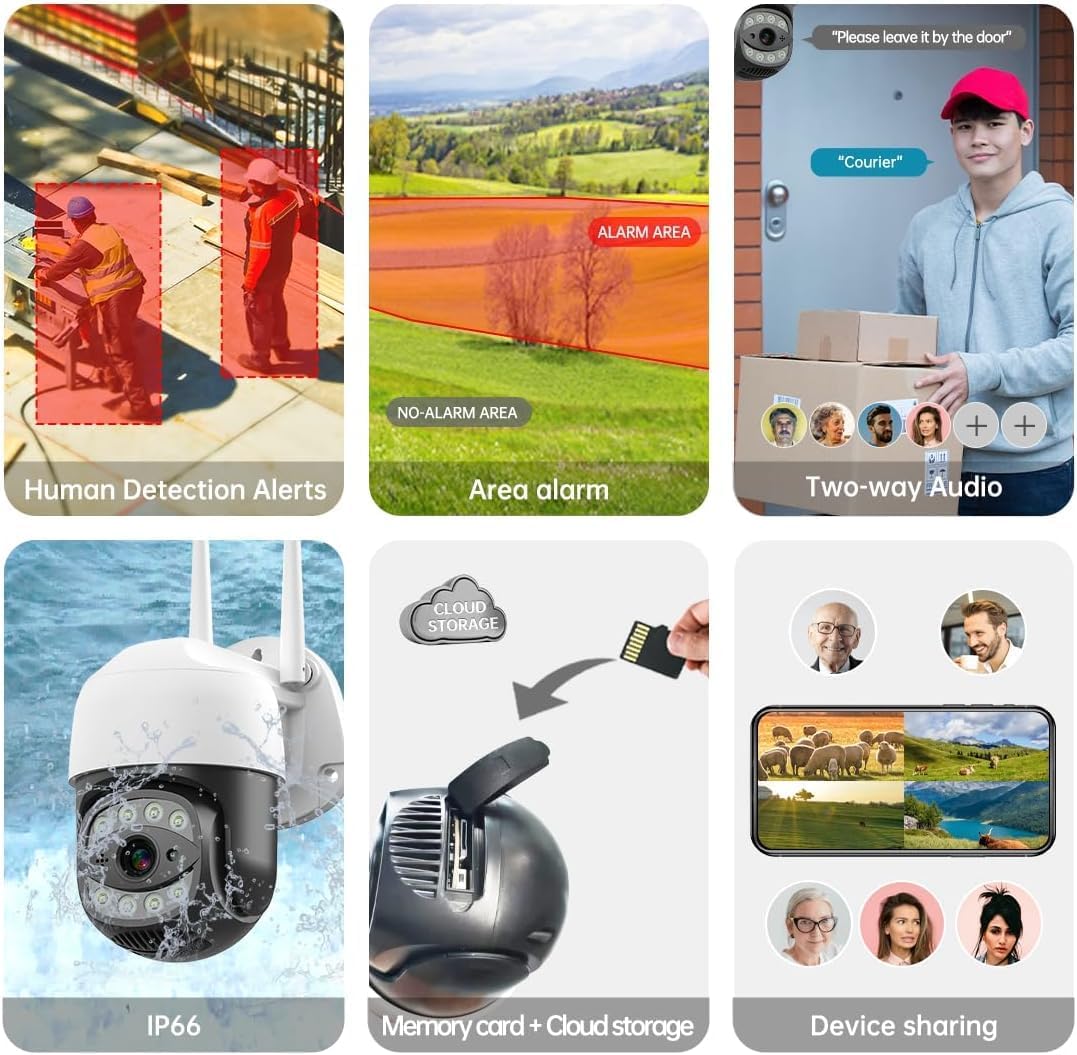
Image 4.1: The SECULINK C17-4MP camera is rated IP66 for dust and water resistance, suitable for various weather conditions.
5. Mode d'emploi
5.1 En direct View et lecture
Access the live video feed and review enregistré footage through the SECUEYE app. The camera provides 4MP (2560x1440p) resolution for clear images.

Image 5.1: Visual comparison demonstrating the enhanced clarity of 5MP resolution over lower resolutions.
5.2 Pan, Tilt, and Digital Zoom (PTZ)
Contrôler la caméra viewing angle remotely using the SECUEYE app. The camera offers:
- Rotation horizontale: 335 degrés
- Inclinaison verticale : 90 degrés
- Zoom numérique : Grossissement 10x
Use pinch-to-zoom gestures on your mobile device to digitally zoom in on specific areas of interest.

Image 5.2: Demonstrates controlling the camera's pan and tilt functions via the mobile app.

Image 5.3: Illustration of the 10x digital zoom feature, allowing closer inspection of details.
5.3 Automatic Tracking and Human Motion Detection
The camera features intelligent detection capabilities to enhance security monitoring.
- Suivi automatique : When enabled, the camera will automatically detect and follow moving human figures within its field of view, recording their path.
- Détection de mouvement humain : Advanced algorithms distinguish human activity from other movements (e.g., pets, swaying branches), reducing false alarms.
- Alertes : Upon detection, the camera can send real-time alerts to your mobile phone.
- Floodlight and Sound Alarm: Built-in spotlights activate upon motion detection at night, and a security siren can be triggered as an additional deterrent.

Image 5.4: The camera's AI Humanoid Detection identifies human presence and sends alerts.

Image 5.5: The camera's automatic tracking capability follows detected human movement.

Image 5.6: Illustrates the camera's ability to differentiate human activity from other movements, reducing false alarms.
5.4 Modes de vision nocturne
The camera offers multiple night vision options for clear surveillance in low-light conditions:
- Vision nocturne infrarouge (IR) : Uses IR LEDs to provide black and white video in complete darkness, with a range of up to 100ft (30m).
- Vision nocturne couleur: Utilizes white light LEDs (floodlight) to capture full-color video at night when motion is detected or manually activated.
- Capteur de lumière stellaire : Enhances low-light performance to produce clearer images even without additional illumination.

Image 5.7: Demonstrates the different night vision modes: infrared (black and white), white light (color), and full-color night vision.

Image 5.8: The camera's infrared night vision provides visibility up to 20 meters in darkness.
5.5 Audio bidirectionnel
The built-in microphone and speaker allow for real-time two-way communication through the SECUEYE app. You can listen to audio from the camera's location and speak through the camera's speaker.
5.6 Options de stockage
The camera supports two primary storage methods for recorded footage:
- Carte Micro SD: Insert a Micro SD card (up to 256GB, sold separately) into the designated slot for local storage. The camera can record 24/7 or motion-triggered videos.
- Stockage dans le cloud : Optional cloud storage services are available through the SECUEYE app for secure, remote backup of your recordings.
5.7 Partage d'appareils
You can share access to your camera's live feed and recordings with family members or trusted individuals through the SECUEYE app, allowing multiple users to monitor the property simultaneously.
6. Entretien
To ensure optimal performance and longevity of your SECULINK C17-4MP camera, consider the following maintenance tips:
- Nettoyer la lentille : Periodically wipe the camera lens with a soft, clean, lint-free cloth to remove dust, dirt, or water spots that may affect image clarity. Avoid abrasive cleaners.
- Vérifiez la connexion électrique : Ensure the power adapter and cable remain securely connected and free from damage, especially in outdoor environments.
- Mises à jour du micrologiciel : Regularly check the SECUEYE app for available firmware updates. Updates often include performance improvements, new features, and security enhancements.
- Inspecter le montage : Periodically check the camera's mounting for stability, especially after severe weather conditions.
7. Dépannage
If you encounter issues with your SECULINK C17-4MP camera, refer to the following common troubleshooting steps:
7.1 La caméra ne se connecte pas au Wi-Fi
- Vérifiez le signal Wi-Fi : Ensure the camera is within range of your Wi-Fi router. Weak signals can cause connection issues.
- Verify Network Credentials: Double-check that the Wi-Fi network name (SSID) and password entered in the app are correct.
- Compatibilité du routeur : Confirm your router supports 2.4GHz or 5GHz bands, and that the camera is attempting to connect to a compatible band.
- Redémarrez les appareils : Power cycle both your Wi-Fi router and the camera.
- Réinitialiser l'appareil photo : If issues persist, perform a factory reset on the camera (refer to the quick start guide for reset button location and procedure) and attempt the setup process again.
7.2 Mauvaise qualité d'image
- Nettoyer la lentille : Assurez-vous que l’objectif de l’appareil photo est propre et exempt de taches ou de saleté.
- Bande passante du réseau : A slow internet connection can affect live stream quality. Check your network speed.
- Conditions d'éclairage : Assurez un éclairage adéquat pour une qualité d'image optimale, notamment pour la vision nocturne couleur.
7.3 Motion Detection Not Working or Too Sensitive
- Ajuster la sensibilité : In the SECUEYE app settings, adjust the motion detection sensitivity level.
- Zones de détection: Configure specific detection zones to monitor only relevant areas and exclude areas with frequent irrelevant motion (e.g., public roads, swaying trees).
- Check Schedule: Ensure motion detection is enabled for the desired time periods in the app.
7.4 No Recording to SD Card
- Insert SD Card Correctly: Ensure the Micro SD card is inserted properly into the slot.
- Formater la carte SD: Format the SD card through the camera settings in the SECUEYE app.
- Card Capacity/Health: Ensure the SD card is not full or corrupted. Try a different, known-good SD card if necessary.
- Paramètres d'enregistrement : Verify that continuous recording or motion-triggered recording is enabled in the app settings.
8. Spécifications
| Fonctionnalité | Spécification |
|---|---|
| Modèle | C17-4MP |
| Résolution | 4MP (2560x1440p Max) |
| Capteur d'images | CMOS |
| Distance focale | 3.6 mm |
| Angle de rotation panoramique | 335 ° horizontal |
| Angle de rotation d'inclinaison | 90 ° vertical |
| Zoom numérique | 10x |
| Vision nocturne | IR-Cut, Starlight, LED (Color Night Vision) |
| Distance infrarouge | Jusqu'à 100 pieds (30 mètres) |
| Audio | Microphone et haut-parleur intégrés (audio bidirectionnel) |
| Résistance à l'eau | IP65, IP66 (Waterproof) |
| Connectivité | Dual-Band Wi-Fi (2.4GHz/5GHz), Wired Ethernet |
| Stockage | Carte microSD (jusqu'à 256 Go), stockage cloud |
| Pouvoir | DC 12V, 9 Watts |
| Température de fonctionnement | -10°C à +50°C (14°F à 122°F) |
| Compatibilité des applications | SECUEYE (iOS, Android) |
| Dimensions | 7 x 7 x 5 pouces (Emballage) |
| Poids de l'article | 1.2 livres |
9. Garantie et assistance
For warranty information and technical support, please refer to the official SECULINK webConsultez leur site web ou contactez directement leur service client. Conservez votre reçu d'achat comme preuve d'achat pour toute réclamation au titre de la garantie.
Fabricant: SÉCULINK