
1. Introduction
The EPTTECH Smart TLC2206 is an intelligent WiFi-enabled ultrasonic liquid level sensor designed for remote monitoring of water, oil, and fuel tanks. This device allows users to track liquid levels from a smartphone application, providing real-time data and alerts for various applications.
Caractéristiques principales :
- Long Measuring Distance: Capable of measuring distances from 10 cm to 3.0 meters (4 to 118 inches) from the sensor.
- Surveillance à distance : Check tank levels anytime, anywhere via a smartphone application.
- Alertes : Receive message alerts for full or low liquid levels, with customizable alarm settings.
- Multi-Tank Monitoring: One application can monitor up to 50 sensors simultaneously.
- Durabilité: IP67 waterproof rating, with CE, RoHS, and Reach certifications.
- Large plage de températures de fonctionnement : Functions reliably in temperatures ranging from -10℃ to +70℃.
Scénarios applicables :
This sensor is suitable for a variety of liquid storage applications, including:
- Acid Alkali Tanks
- Réservoirs d'eau
- Chauffages
- Réservoirs
- Industrial Liquid Storage
- General Liquid Tanks

Image : Examples of tanks where the liquid level monitor can be used, demonstrating its versatility across different liquid storage types.
2. Consignes de sécurité
Veuillez lire attentivement toutes les consignes de sécurité avant l'installation et l'utilisation afin d'éviter toute blessure ou tout dommage à l'appareil.
- Alimentation: Use only the provided power adapter (Input: 100-240V AC, Output: 9V DC). Ensure the power source matches the adapter's requirements.
- Installation: Follow the drilling and threading installation instructions precisely. Improper installation may lead to device malfunction or tank damage.
- Environnement: The device is designed for an operating temperature range of -10℃ to +70℃. Avoid exposing the sensor to temperatures outside this range.
- Exposition à l'eau : While rated IP67 waterproof, ensure proper sealing during installation to prevent water intrusion, especially in outdoor or high-humidity environments.
- Entretien: N’essayez pas de démonter ou de réparer l’appareil vous-même. Consultez la section dépannage ou contactez le service client pour obtenir de l’aide.
- Produits chimiques : When used with chemical tanks, ensure the tank material and sensor are compatible with the stored liquid to prevent corrosion or damage.
3. Contenu du colis
Vérifiez que tous les éléments sont présents dans le colis :
- 1 x Smart TLC2206 Liquid Level Sensor
- 1 x Adaptateur secteur (9 V CC)

Image: The main components included in the product package.
4. Spécifications
| Spécification | Valeur |
|---|---|
| Numéro de modèle | Smart TLC 2206 |
| Marque | EPTTECH |
| Techniques de détection | Capteur à ultrasons |
| Portée maximale | 3 mètres (118 pouces) |
| Portée minimale | 0.1 mètres (4 pouces) |
| Voltage | 100 volts (CC) |
| Source d'énergie | Électrique avec fil |
| Méthode de contrôle | Application (Smartphone) |
| Type de montage | Drilling and Threading Installation |
| Poids de l'article | 10.5 onces |
| Dimensions du produit | 3.74"L x 3.74"l x 2.8"H (9.5 cm x 9.5 cm x 7.1 cm) |
| Matériel | Cuivre |
| Couleur | Blanc |
| Des piles sont-elles nécessaires ? | Non |
| Indice d'étanchéité | IP67 |
| Température de fonctionnement | -10℃ à +70℃ |
Dessin dimensionnel:
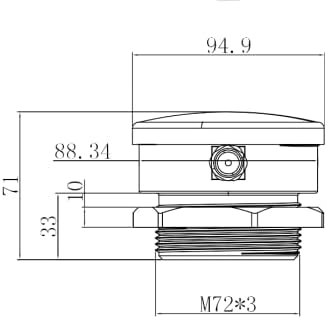
Image : Côté view dimensions of the sensor (measurements in mm).

Image : Haut view of the sensor, showing transducer placement.
5. Configuration et installation
Follow these steps to install your Smart TLC2206 liquid level monitor:
5.1 Téléchargement et configuration de l'application
- Download the "Smart Life" or "Tuya Smart" application from your smartphone's app store (available for iOS and Android).
- Vous pouvez également scanner le code QR ci-dessous pour télécharger l'application :

Scan this QR code to download the Smart Life app.
Pour télécharger directement, rendez-vous sur : https://smartapp.tuya.com/smartlife
- Inscrivez-vous ou connectez-vous à votre compte dans l'application.
- Add the device by following the in-app instructions for adding a new sensor. Ensure your phone is connected to a 2.4GHz Wi-Fi network during pairing.
5.2 Installation physique
The sensor is designed for drilling and threading installation on the top of the tank.
- Préparez le réservoir : Choose a location on the top of your tank that is flat and clear of obstructions. Ensure the sensor will have a clear line of sight to the liquid surface.
- Percer le trou : Using a hole saw, drill a hole with a diameter of 72 mm (environ 2.83 pouces) at the chosen location.
- Insert and Secure the Sensor: Insert the sensor into the drilled hole. Use the provided nut to screw and secure the sensor tightly from underneath the tank lid or from the inside of the tank.
- Connecter l'alimentation : Connect the power adapter to the sensor and plug it into a 100-240V AC power outlet. The sensor requires continuous power and does not use batteries.

Image: Step 1 - Drilling the 72mm hole.
Considérations importantes concernant l'installation :
- Ensure the sensor is installed vertically and directly above the liquid surface.
- Avoid installing the sensor where water inflow or outflow might directly interfere with the ultrasonic signal.
- The sensor should be positioned to avoid internal tank obstructions that could block the signal.

Image: Correct and incorrect sensor placement for optimal signal.
6. Mode d'emploi
Once installed and connected to the app, you can begin monitoring your liquid levels.
6.1 App Interface and Monitoring
- Open the Smart Life/Tuya Smart app. Your connected sensor will display the current liquid level.
- The app displays the liquid level as a percentage and in meters (Unit: M).
- The graph table updates the average liquid level every half hour. It is not real-time. To refresh the data, pull down on the app's homepage.

Image: Sensor, power adapter, and app interface showing liquid level data.

Image: App features for tracking and monitoring liquid level changes.
6.2 Data Settings and Calibration
To ensure accurate readings, it is crucial to correctly set the data within the app:
- Set Max/Min Levels: Configure the maximum and minimum liquid levels according to your tank's capacity.
- Hauteur d'installation : Input the precise height from the sensor to the bottom of the tank.
- Sensor to Full Line: Specify the distance from the sensor to the maximum fill line of the tank.

Image: App screens for creating scenes, data settings, and message reminders.
6.3 Alertes et notifications
The app allows you to set up custom alerts:
- You will receive message alerts when the liquid level reaches your set full or low thresholds.
- Customize alarm levels based on specific liquid heights or percentaget.
- The app provides pop-up reminders. Note that phone calls or SMS reminders are a separate, charged function of the Tuya platform.

Image: App interface for setting alarm heights and notification preferences.
6.4 Surveillance multi-réservoirs
The Smart Life/Tuya Smart app supports monitoring multiple tanks:
- You can connect and monitor as many as 50 sensors within a single app.
- Each sensor will appear as a separate entry, allowing you to easily switch between tank views.

Image: Illustration of multi-tank monitoring capability.
7. Entretien
The Smart TLC2206 sensor requires minimal maintenance. However, regular checks can ensure optimal performance:
- Sensor Surface: Periodically inspect the sensor's surface for any buildup of dirt, debris, or condensation. Gently wipe the surface with a soft, damp Essuyez avec un chiffon si nécessaire. Évitez d'utiliser des nettoyants abrasifs ou des solvants.
- Connexion électrique : Vérifiez que l'adaptateur secteur et le câble sont correctement connectés et ne présentent aucun dommage.
- Conditions environnementales : While the sensor is designed for various weather conditions, extreme temperature fluctuations or prolonged exposure to harsh elements might affect its lifespan.
- Scellage: If the sensor is installed outdoors or in a wet environment, periodically check the seal around the installation point to ensure it remains watertight.
8. Dépannage
If you encounter issues with your Smart TLC2206 sensor, refer to the following common problems and solutions:
8.1 Lectures inexactes ou erratiques
- Incorrect Data Settings: Ensure that the "Installation height" and "Sensor to full line" values in the app's data settings are accurately configured according to your tank's dimensions. Incorrect settings will lead to incorrect percentage affiche.
- Accumulation de condensation : Condensation on the sensor's surface can cause inaccurate readings. Clean the sensor surface gently.
- Obstruction du signal : The ultrasonic signal can be affected by obstructions or improper sensor alignment.
- Flat Object Not Facing Sensor: Ensure the liquid surface is relatively flat and directly below the sensor.
- Object Too Small: The sensor may struggle with very narrow tanks or small liquid surfaces.
- Object Too Soft: Certain materials or highly aerated liquids might absorb the ultrasonic signal, leading to errors.

Image: Common situations causing sensor reading errors.
8.2 Problèmes de connectivité
- Signal WiFi faible : Ensure the sensor is within range of your 2.4GHz WiFi router. The WiFi range is approximately 30m (98 feet) without obstacles. A weak signal can cause delayed messages or connection drops.
- App Not Refreshing: If the graph table or liquid level is not updating, return to the app homepage and pull down to refresh the data.
8.3 Waterproofing Concerns
- While the product has an IP67 waterproof rating, some users have reported water intrusion issues. Ensure the installation nut is screwed down tightly and consider adding an additional sealant (e.g., silicone) around the sensor's base if exposed to heavy rain or constant moisture.
- If the product has been flooded, contact customer support for after-sales service.
8.4 Questions générales
- Google Assistant/Alexa Compatibility: Ce produit est pas compatible with Google Assistant or Amazon Alexa.
- Unit of Display: The app displays liquid level in meters (M) and percentages. It does not display in feet or inches.
9. Garantie et assistance
The EPTTECH Smart TLC2206 Liquid Tank Level Monitor typically comes with a 1-year warranty from the date of purchase. For any after-sales problems, technical assistance, or warranty claims, please contact EPTTECH customer support.
You can usually find contact information for customer support through the seller's page on the platform where you purchased the product or by visiting the official EPTTECH website.
When contacting support, please provide your product model number (Smart TLC 2206), purchase date, and a detailed description of the issue.