
Introduction
Thank you for choosing the PETLIBRO 5L Automatic Pet Feeder with 1080P Camera. This device is designed to provide convenient and reliable feeding for your pets, ensuring they receive their meals on schedule while allowing you to monitor and interact with them remotely. This manual provides essential information for setting up, operating, and maintaining your feeder.

The PETLIBRO 5L Automatic Pet Feeder offers a range of features including a 1080p HD camera, night vision, two-way audio, remote feeding, in-app monitoring, and easy cleanup.
Consignes de sécurité
- Veuillez lire attentivement toutes les instructions avant d'utiliser le distributeur.
- Cet appareil est destiné à un usage intérieur uniquement.
- Ne plongez pas l'unité principale dans l'eau ou d'autres liquides.
- Gardez la mangeoire à l'abri de la lumière directe du soleil et des sources de chaleur.
- Ensure the power cord is not damaged and is placed where pets cannot chew on it.
- Utilisez uniquement l'adaptateur secteur d'origine fourni avec le distributeur.
- Always supervise children around the feeder.
- Only use dry pet food with a diameter between 2-15mm.
Contenu du colis
Vérifiez que tous les composants sont présents dans le package :
- PETLIBRO Automatic Pet Feeder (Main Unit)
- Bol alimentaire en acier inoxydable
- Adaptateur secteur
- Manuel d'utilisation
- Desiccant Bag (may be pre-installed)
Produit terminéview
Familiarize yourself with the different parts of your PETLIBRO Automatic Pet Feeder.

The main unit of the feeder, featuring the food hopper, dispensing mechanism, 1080P camera, and control panel. A cat is shown eating from the stainless steel bowl, with a smartphone displaying the live camera feed.
- Trémie alimentaire : Stocke des aliments secs pour animaux de compagnie.
- Lid with Twist-Lock: Secures the food hopper and keeps food fresh.
- Panneau de contrôle: Buttons for manual feeding and settings.
- Caméra HD 1080P: Pour la surveillance et l'enregistrement en direct.
- Capteur infrarouge: Detects low food levels and blockages.
- Haut-parleur et microphone : Pour une communication audio bidirectionnelle.
- Point de restauration : Là où les aliments sont versés dans le bol.
- Bol en acier inoxydable : Amovible pour un nettoyage facile.
- Port d'alimentation: Pour brancher l'adaptateur secteur.
- Compartiment à piles : Pour les batteries de secours (non incluses).
Installation
1. Déballage et montage
- Retirez tous les composants de l’emballage.
- Placez le distributeur principal sur une surface plane et stable.
- Insérez le bol en acier inoxydable dans la fente prévue à cet effet à la base du distributeur.
2. Alimentation électrique
- Branchez l'adaptateur secteur au port d'alimentation du distributeur et branchez-le à une prise murale.
- Pour l'alimentation outage protection, install 3 D-cell alkaline batteries (not included) into the battery compartment at the bottom of the feeder. This ensures continuous operation during power interruptions.
3. Remplissage de la trémie à aliments
- Open the Twist-Lock lid on top of the feeder.
- Pour dry pet food into the hopper. Ensure the food size is between 2-15mm.
- Refermez bien le couvercle en le tournant jusqu'à ce qu'il se verrouille.
4. Installation de l'application et connexion Wi-Fi
- Download the PETLIBRO app from the App Store (iOS) or Google Play Store (Android).
- Créez un compte et connectez-vous.
- Follow the in-app instructions to add your feeder. Ensure your smartphone is connected to a 2.4GHz or 5GHz Wi-Fi network. The feeder supports both for a more stable connection.
- The app will guide you through connecting the feeder to your home Wi-Fi network.
5. Configuration de la caméra
- Once connected to Wi-Fi, the 1080P camera will automatically activate.
- For video recording, insert a Micro SD card (up to 256GB, not included) into the designated slot, usually located near the camera or at the bottom of the unit.
Mode d'emploi
1. Alimentation manuelle
- Press the manual feed button on the feeder's control panel to dispense one portion of food instantly.
- Alternatively, use the 'Feed Now' option in the PETLIBRO app for immediate dispensing.
2. Planification des repas via l'application
The PETLIBRO app allows you to customize your pet's feeding schedule.

The PETLIBRO app provides an intuitive interface to set custom feeding times and amounts, and to review feeding logs.
- Open the PETLIBRO app and select your feeder.
- Navigate to the 'Feeding Schedule' section.
- Set up to 10 meals per day. For each meal, specify the time and the number of portions (1-50 portions per meal).
- Sauvegardez votre programme. Le distributeur distribuera automatiquement la nourriture aux heures programmées.
- Tu peux view feeding logs within the app to track your pet's meal history.
3. Two-Way Audio & Voice Recording
Communicate with your pet remotely using the two-way audio feature.

The feeder allows two-way audio communication, enabling you to speak to your pet and hear their responses through the app.
- Communication en direct : Dans l'application en direct view, tap the microphone icon to speak to your pet. Your voice will be played through the feeder's speaker.
- Enregistrement vocal: Record a personalized voice message (up to 10 seconds) in the app. This message can be set to play at meal times (0-5 times per meal). A new recording will overwrite any previous one.
4. Monitoring with 1080P Camera and Night Vision
The integrated camera allows you to keep an eye on your pet at all times.

The 1080P camera provides clear vision, even at night, allowing you to monitor your pet's meals with high-definition infrared night vision.
- Access the live camera feed through the PETLIBRO app to view votre animal de compagnie en temps réel.
- L'objectif grand angle de 145° offre un large champ de vision. view de la zone d'alimentation.
- Infrared night vision ensures clear visibility even in dark conditions.
- Videos can be stored on a Micro SD card (up to 256GB, not included).
5. Smart Alerts and Notifications
- Détection de mouvement et de son : The feeder automatically records pet activity and saves video clips (SD card required). You will receive notifications on your phone for detected motion or sounds.
- Low Food Level Alert: The infrared sensor monitors the food level in the hopper. You will receive an alert on your phone when the food supply is low, prompting you to refill.
- Blockage Detection: The sensor also detects potential food blockages in the dispensing mechanism and will send an alert if an issue occurs.
- Wi-Fi Disconnection Alert: If the feeder loses its Wi-Fi connection, you will be notified via the app.
Entretien
1. Nettoyage du distributeur
Un nettoyage régulier garantit l'hygiène et le bon fonctionnement du distributeur.
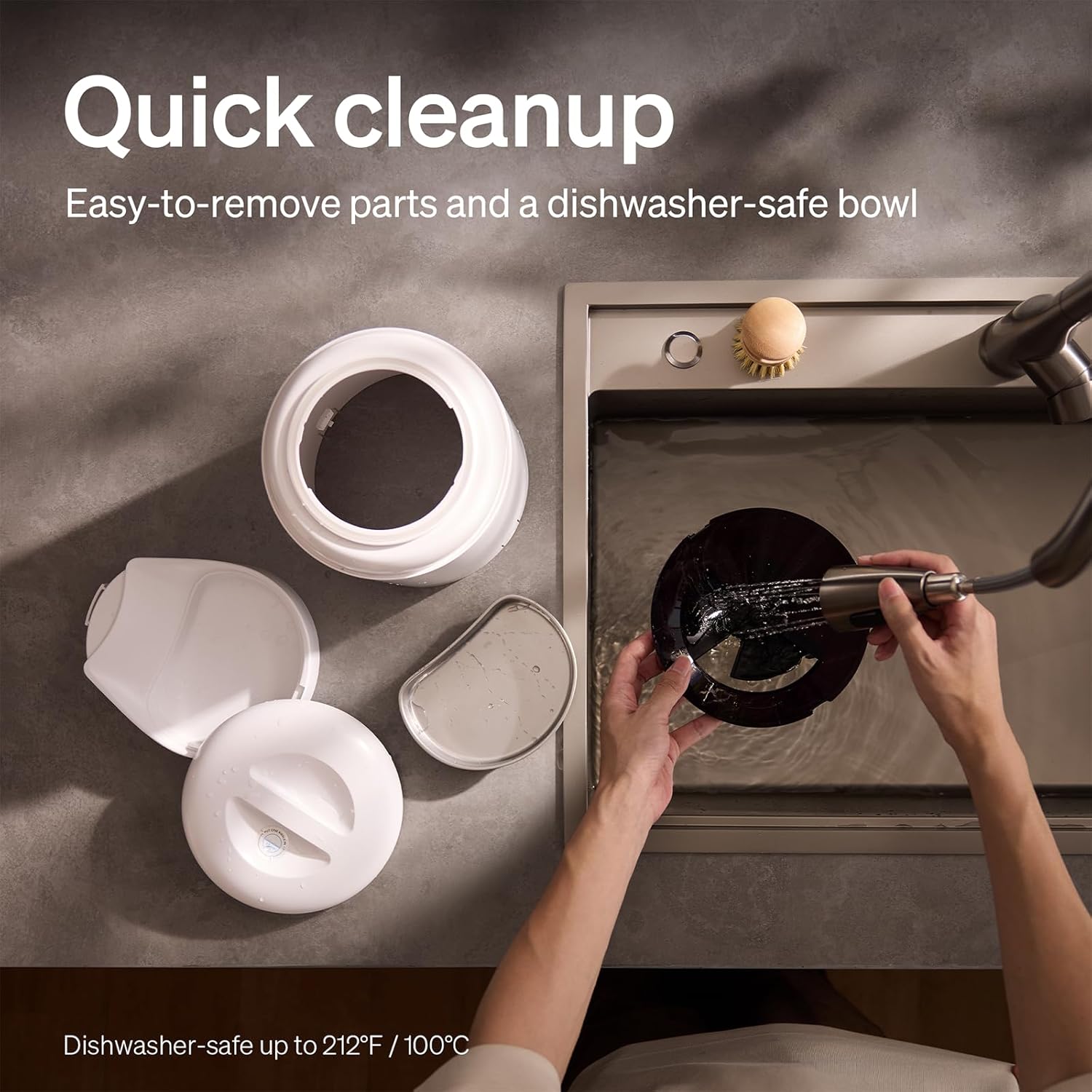
The feeder is designed for quick cleanup with easy-to-remove parts and a dishwasher-safe bowl.
- Débrancher l'alimentation : Débranchez toujours le distributeur avant de le nettoyer.
- Retirer les aliments : Videz les restes de nourriture de la trémie.
- Démonter: Remove the food bowl, lid, and food hopper.
- Pièces lavables : The stainless steel bowl and food hopper are dishwasher-safe (up to 100°C / 212°F) or can be hand-washed with mild soap and water.
- Unité principale : Essuyez l'unité principale avec un chiffon doux, damp chiffon. Ne le plongez pas dans l'eau.
- Bien sécher : Assurez-vous que toutes les pièces soient parfaitement sèches avant de remonter le tout et de le remplir à nouveau d'aliments.
2. Remplacement du dessiccant
- The desiccant bag helps keep the food fresh. It is recommended to replace it every 15 days.
- Locate the desiccant compartment, usually under the lid.
- Retirez le sachet déshydratant usagé et insérez-en un nouveau.
Dépannage
| Problème | Cause possible | Solution |
|---|---|---|
| Le distributeur ne distribue pas de nourriture. | Food blockage; empty hopper; dispensing mechanism issue. | Check for food blockages and clear them. Refill hopper if empty. Ensure food size is appropriate (2-15mm). |
| Déconnexion Wi-Fi. | Weak Wi-Fi signal; router issues; incorrect password. | Ensure feeder is within Wi-Fi range. Restart your router. Reconnect the feeder to Wi-Fi via the app, verifying the password. |
| Camera not working or frequently disconnecting. | Poor Wi-Fi connection; app glitch; SD card issue. | Check Wi-Fi stability. Restart the feeder and the app. Ensure the SD card is properly inserted and not full. Consider a system reset if issues persist. |
| App shows "status unknown" or feeding errors. | Wi-Fi disconnection; app synchronization issue. | Verify Wi-Fi connection. Close and reopen the app. Restart the feeder. |
| L'enregistrement vocal ne fonctionne pas. | No recording saved; volume too low; incorrect schedule. | Ensure a voice message is recorded and saved in the app. Check the playback settings for meal times. |
Caractéristiques
| Fonctionnalité | Détail |
|---|---|
| Numéro de modèle | AF203 |
| Dimensions (L x l x H) | 12 x 10 x 27 cm |
| Poids | 2.15 kg |
| Matériel | Acier inoxydable (bol) |
| Capacité | 5 litres |
| Espèces ciblées | Chat chien |
| Utilisations recommandées | Automatic indoor dog/cat feeding |
| Caractéristiques spéciales | 1080P Camera, Smart App, Two-way Audio |
| Couleur | Blanc |
| Technologie de connectivité | Wi-Fi (2.4 GHz et 5 GHz) |
| Mode de fonctionnement | Automatique |
| Conseils d'entretien | Dishwasher safe (bowl) |
| Piles requises | No (for primary operation), Yes (for backup, 3 D-cell, not included) |
Garantie et assistance
PETLIBRO products come with a standard manufacturer's warranty. For detailed warranty information, please refer to the warranty card included in your package or visit the official PETLIBRO website.
If you encounter any issues or have questions regarding your PETLIBRO Automatic Pet Feeder, please contact PETLIBRO customer support through the following channels:
- E-mail: Refer to your product packaging or the PETLIBRO website pour l'adresse e-mail d'assistance la plus récente.
- Website: Visit the official PETLIBRO webSite regroupant les FAQ, les guides de dépannage et les formulaires de contact.
- Assistance intégrée à l'application : The PETLIBRO app may offer a support section for direct assistance.
Please have your model number (AF203) and purchase information ready when contacting support.