
Introduction
This manual provides essential information for the safe and effective operation, maintenance, and troubleshooting of your DEWALT DCD794 20V Cordless 1/2" Drill Driver. The DCD794 is a compact and lightweight tool designed for drilling and fastening applications, delivering up to 1,650 RPMs with a 1/2" ratcheting chuck and an integrated LED work light.

Image : Avant view of the DEWALT DCD794 20V Cordless 1/2" Drill Driver.
Informations générales sur la sécurité
Always observe basic safety precautions to reduce the risk of fire, electric shock, and personal injury. Keep your work area clean and well-lit. Do not operate power tools in explosive atmospheres, such as in the presence of flammable liquids, gases, or dust. Keep children and bystanders away while operating a power tool. Wear appropriate personal protective equipment, including eye protection, hearing protection, and gloves. Ensure the tool is switched off before making any adjustments, changing accessories, or storing it.
Produit terminéview
The DEWALT DCD794 Drill Driver is engineered for performance and durability. Key features include:
- 1/2" Ratcheting Chuck: Provides high bit retention for secure accessory gripping.
- Transmission à 2 vitesses : Allows for versatile drilling and fastening applications.
- 15 réglages d'embrayage : Offers precise control for various torque requirements.
- Lampe de travail à LED : Illumine la zone de travail pour une meilleure visibilité.
- Conception compacte et légère : Enhances user comfort and maneuverability.
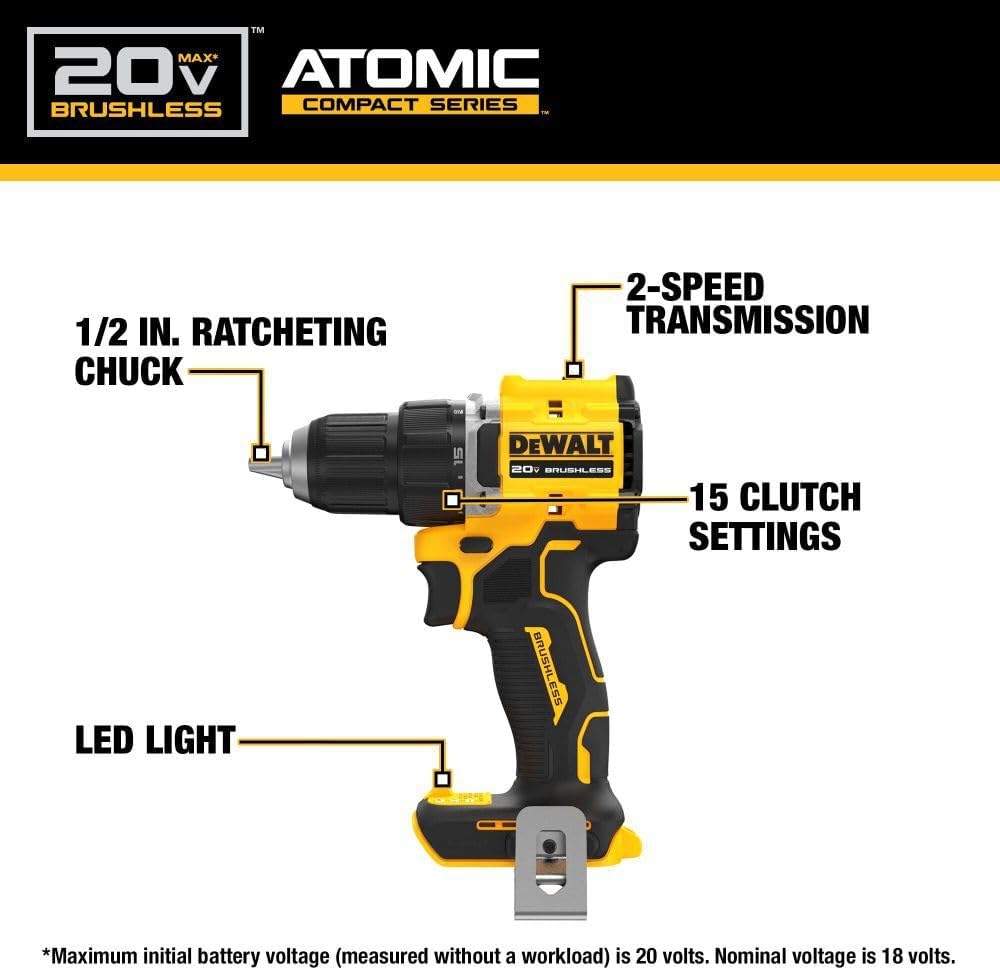
Image: Diagram highlighting the 1/2 inch ratcheting chuck, 2-speed transmission, 15 clutch settings, and LED light on the DEWALT DCD794 Drill Driver.
Installation
Installation et retrait de la batterie
- To install the battery, align the battery pack with the rails inside the tool's handle. Slide the pack firmly into the tool until it locks into place.
- To remove the battery, press the release button on the battery pack and pull the pack out of the handle.

Image: The DEWALT DCD794 Drill Driver with a 20V battery pack attached to the base.
Installation et retrait des bits
- To install a drill bit or driver accessory, grasp the rear half of the chuck and rotate the front half counter-clockwise until the chuck jaws open wide enough to accept the accessory.
- Insert the accessory fully into the chuck.
- Grasp the rear half of the chuck and rotate the front half clockwise until the accessory is firmly clampéd.
- Pour supprimer, inversez le processus.
Mode d'emploi
Sélection de la vitesse
The drill driver features a 2-speed transmission for optimal performance across different applications. Use the speed selector switch located on top of the tool:
- Position 1 (basse vitesse) : For high torque applications, such as driving screws or drilling large diameter holes.
- Position 2 (Haute vitesse) : For faster drilling with smaller bits.

Image: The DEWALT DCD794 Drill Driver being used to drill into wood, illustrating its 2-speed transmission capability.
Paramètres d'embrayage
The adjustable clutch ring allows you to select the appropriate torque setting for your task. Rotate the ring to align the desired number with the indicator mark. Lower numbers are for driving small screws or into soft materials, while higher numbers are for driving larger screws or into harder materials. The drill symbol setting provides maximum torque for drilling applications.
Trigger Switch and LED Light
The variable speed trigger switch controls the tool's speed. Press the trigger to start the tool and vary the pressure to adjust the speed. The integrated LED work light activates when the trigger is pressed, illuminating the work surface. The light remains on for a short period after the trigger is released.
Entretien
Un entretien régulier garantit des performances optimales et prolonge la durée de vie de votre outil.
- Nettoyage: Utilisez un chiffon doux et sec.amp cloth to clean the exterior of the tool. Do not use harsh chemicals or abrasive cleaners. Keep the ventilation slots clear of dust and debris.
- Entretien du mandrin : Nettoyez régulièrement les mâchoires du mandrin pour assurer une bonne prise.
- Entretien de la batterie: Conservez les piles dans un endroit frais et sec, à l'abri de la lumière directe du soleil. Ne les stockez pas déchargées pendant une période prolongée.
- Inspection: Regularly inspect the tool for any damaged parts, loose screws, or worn components. Have any damaged parts repaired by a qualified service technician.
Dépannage
| Problème | Cause possible | Solution |
|---|---|---|
| L'outil ne démarre pas | Batterie non chargée ou mal installée | Charge battery fully; ensure battery is securely inserted. |
| Perte de puissance pendant le fonctionnement | Charge de la batterie faible | Recharger la batterie. |
| L'embout glisse dans le mandrin | Chuck not tightened sufficiently or jaws are dirty | Tighten chuck firmly; clean chuck jaws. |
| Vibrations excessives | Bent drill bit or accessory | Replace with a straight, undamaged accessory. |
Caractéristiques
| Fonctionnalité | Spécification |
|---|---|
| Marque | DEWALT |
| Numéro de modèle | DCD794B-NBX |
| Source d'énergie | Alimenté par batterie (20 Volts) |
| Vitesse de rotation maximale | 1650 tr/min |
| Taille maximale du mandrin | 0.5 pouces |
| Couple maximal | 1.5 Newton-mètres |
| Puissance maximale | 300 watts |
| Type de matériau | Plastique |
| Dimensions de l'article (L x l x H) | 6"L x 3"l x 8"H |
| Poids de l'article | 2.54 livres |
Informations sur la garantie
DEWALT provides a limited warranty for its products. For specific details regarding the warranty period, coverage, and terms for your DCD794 Drill Driver, please refer to the warranty card included with your purchase or visit the official DEWALT webConsultez le site. Conservez votre preuve d'achat pour toute réclamation au titre de la garantie.
Soutien
Pour obtenir de l'aide supplémentaire, une assistance technique ou pour trouver des centres de service agréés, veuillez consulter le site officiel de DEWALT. webVous pouvez également consulter leur site web ou contacter leur service client. Vous trouverez plus d'informations et de ressources sur le site web. Boutique DEWALT sur Amazon or the main DEWALT corporate website.