
Introduction
The TTARTISAN Light Meter II is a compact and precise exposure meter designed for film cameras. It offers adjustable ISO, aperture, and shutter speed settings to help photographers achieve accurate exposures in various lighting conditions. This manual provides detailed instructions for its setup, operation, and maintenance.
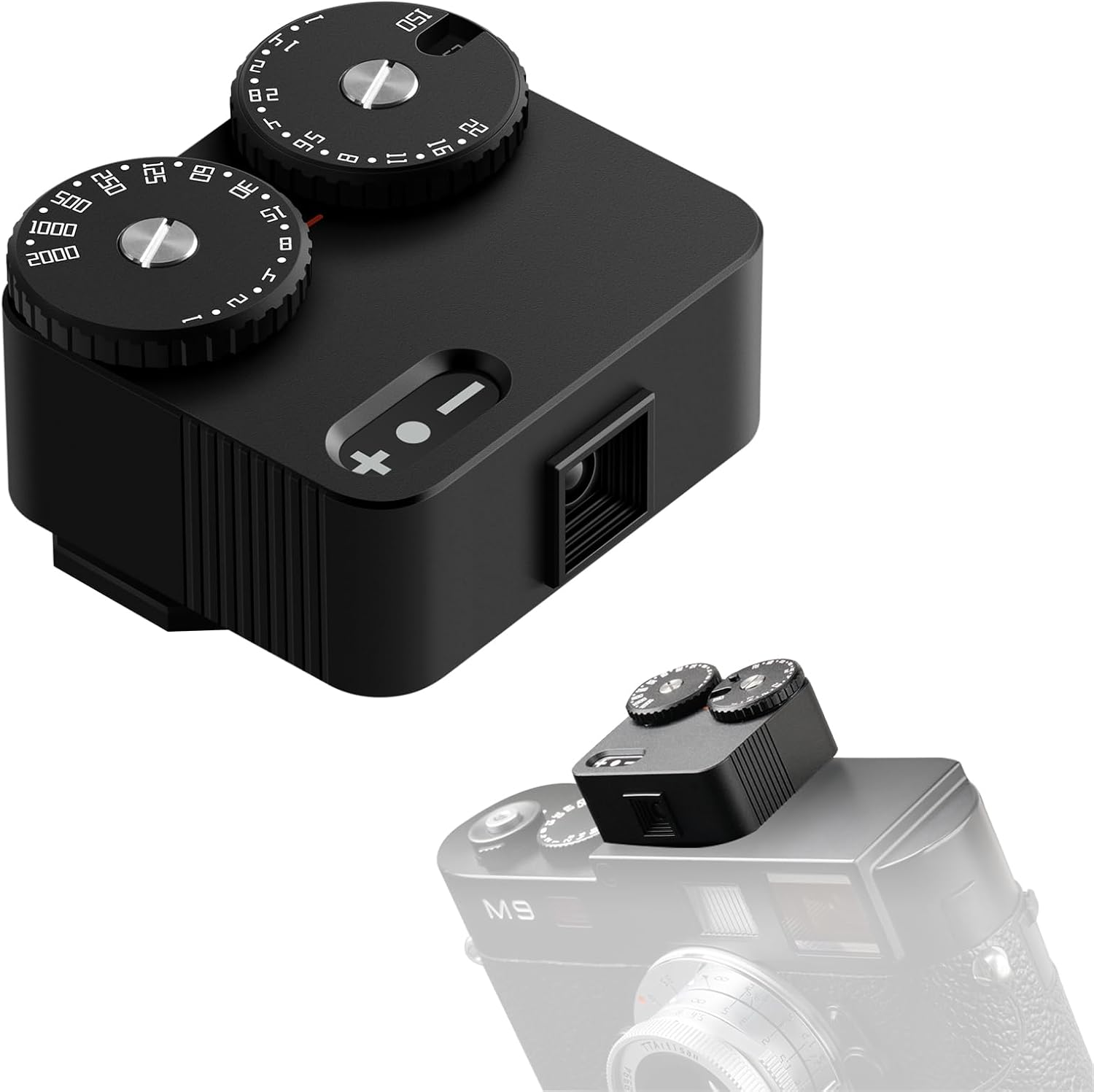
Image: The TTARTISAN Light Meter II mounted on a classic film camera, showcasing son design compact et son intégration.
Produit terminéview
The Light Meter II features a retro design with modern functionality, crafted from lightweight aircraft-grade aluminum. It offers enhanced sensors for faster and more accurate metering.
Caractéristiques principales :
- Vintage Charm, Modern Reliability: Made from featherlight aircraft-grade aluminum (34g), the retro-styled TTARTISAN Light Meter II enhances your classic vintage cameras’ elegance without adding bulk.
- Universal Cold Shoe Light Meter: Featuring an adjustable cold shoe mount with 3-position flexibility, this light meter fits seamlessly on any film camera, from 1970s SLRs to niche rangefinders—an essential tool for the analog photography revival.
- Precision-Tuned Controls: With upgraded 23-stop shutter speed and clicked aperture dials, accidental adjustments are prevented. The intuitive dual wheels and clear indicator lights replicate manual camera operation, ensuring flawless exposure every time.
- Photography Light Meter Accuracy: Enhanced sensors with 45° average metering calculate exposure twice as fast as TTARTISAN Light Meter Gen 1, achieving professional-level precision in challenging conditions, whether capturing golden-hour landscapes or moody low-light street scenes.
- Enduring Performance: Advanced double power-saving technology provides up to 60 hours of continuous metering, supported by user-replaceable batteries to avoid obsolescence from non-rechargeable batteries. (Note: Battery not included.)
Comparison with Light Meter I:

Image: A detailed comparison between the Light Meter II and its predecessor, the Light Meter I, outlining key improvements.
Installation
Installation de la batterie :
The Light Meter II uses a CR1632 battery (not included). Follow these steps for correct installation:
- Localisez le compartiment à piles sous l'appareil.
- Ouvrez avec précaution le couvercle du compartiment à piles.
- Insert the CR1632 battery, ensuring the correct polarity. Do not directly press the battery into the compartment; buckle it under the shrapnel and then into the compartment to avoid damage.
- Fermez soigneusement le couvercle du compartiment à piles.

Image: Visual guide for proper battery insertion, showing the correct method to buckle the battery under the metal plate.
Mounting the Light Meter:
The Light Meter II features an adjustable cold shoe mount for versatile attachment to your film camera.
- Slide the cold shoe mount onto your camera's hot shoe.
- Adjust the position (left, middle, or right) as desired for optimal viewing and balance.
- Secure the mount by tightening the screw mechanism.

Image: Instructions for adjusting the cold shoe mount to fit various camera configurations.
Mode d'emploi
Marche/Arrêt :
To power on the device, select a non-OFF position on the dials and press the metering button. To power off, select the OFF position on the dials.
Réglage de l'ISO :
The ISO of the light meter should match the ISO of the film loaded in your camera. Long press the dial to move the cursor to the ISO setting and adjust it to the desired value.
Modes de mesure:
The Light Meter II offers various metering modes to suit different shooting scenarios:
- Mode priorité à l'ouverture : Set your desired aperture, and the meter will suggest the appropriate shutter speed.
- Mode priorité à l'obturateur : Set your desired shutter speed, and the meter will suggest the appropriate aperture.
- Mode manuel : Set both aperture and shutter speed manually, and the meter will indicate if the exposure is correct, overexposed, or underexposed.
- Mode EV : Displays the Exposure Value (EV) based on your selected aperture and shutter speed.

Image: Understanding the indicator lights for various exposure statuses.
Adjusting Shutter Speed and Aperture:
The device features clicked dials for precise adjustments. The shutter speed range is 23 stops, and the aperture dials are clicked to prevent accidental changes.

Image: Detail of the 23-stop shutter speed dial.

Image: Detail of the clicked aperture dials.
Précision de la mesure:
The enhanced sensors with 45° average metering ensure professional-level precision. The convex lens and stepped light inlet prevent reflection and improve light gathering.

Image: The 45° average metering system for precise light measurement.
Vidéos officielles du produit :
For a visual guide on how to use your TTARTISAN Light Meter II, please watch the official videos below:
Vidéo : Un overview of the TTARTISAN Light Meter II, demonstrating its features and design.
Video: A step-by-step guide on how to effectively use the TTARTISAN Light Meter II for various photographic situations.
Entretien
To ensure the longevity and accuracy of your TTARTISAN Light Meter II, follow these maintenance guidelines:
- Veillez à ce que l'appareil reste propre et exempt de poussière et d'humidité. Utilisez un chiffon doux et sec pour le nettoyer.
- Avoid dropping the light meter or subjecting it to strong impacts.
- En cas de non-utilisation prolongée, retirez la batterie pour éviter les fuites.
- Store the light meter in a protective case to prevent scratches and damage.
Dépannage
If you encounter any issues with your Light Meter II, refer to the following common problems and solutions:
| Problème | Cause possible | Solution |
|---|---|---|
| L'appareil ne s'allume pas | Batterie faible ou déchargée ; batterie mal installée. | Replace battery with a new CR1632; ensure correct polarity and proper installation. |
| Lectures inexactes | Sensor obstructed; incorrect ISO setting; extreme lighting conditions. | Ensure sensor is clear; verify ISO matches film; re-meter in different conditions. |
| Dials are stiff or difficult to turn | Accumulation de poussière ou de débris. | Gently clean around the dials with a soft brush or compressed air. Avoid lubricants. |
Caractéristiques
| Fonctionnalité | Détail |
|---|---|
| Matériel | Aluminium d'avion |
| Source d'énergie | CR1632 |
| Mesure de l'angle | Environ 45° |
| Mode de mesure | Mesure moyenne |
| Shutter Speed Stops | 23 arrêts |
| Aperture Dials | cliqué |
| Poids de l'article | 2.82 onces |
| Dimensions du colis | 4.61 x 3.62 x 2.09 pouces |

Image: Detailed table of supported shutter speeds, IRIS values, and ISO settings.
Garantie et assistance
The TTARTISAN Light Meter II comes with a 12-month warranty, assuring quality and reliability. For any product-related inquiries, technical assistance, or support, please contact TTARTISAN's customer service. They offer one-stop product support to ensure a satisfactory user experience.