
Introduction
The Nonstop NSA2-BK Station A is a versatile bedside companion designed to enhance your daily routine. This device integrates a wireless Bluetooth speaker, an alarm clock, and a multi-functional charging station, providing convenience and relaxation in one compact unit. It features soothing soundscapes for improved sleep and multiple charging options for your devices.

Figure 1 : Face avant view of the Nonstop NSA2-BK Station A, displaying the digital clock, alarm settings, and charging indicators.
Caractéristiques principales
- Wireless Bluetooth Speaker: Enjoy enhanced stereo sound for music, videos, and apps from your Bluetooth-enabled devices.
- Relaxation Soundscapes: Improve sleep quality with built-in soothing sounds, including gentle ocean waves, calming rain, and noise-masking ambient sounds.
- Recharge sans fil Qi : Conveniently charge Qi-compatible smartphones by simply placing them on the top surface of the unit.
- Dual USB Universal Charging: Equipped with two USB ports to charge a variety of devices, including smartphones, iPads, Kindles, and wireless headphones.

Figure 2: Illustration of the relaxation sound features, showing icons for Gentle Waves, Soothing Rain, and White Noise.
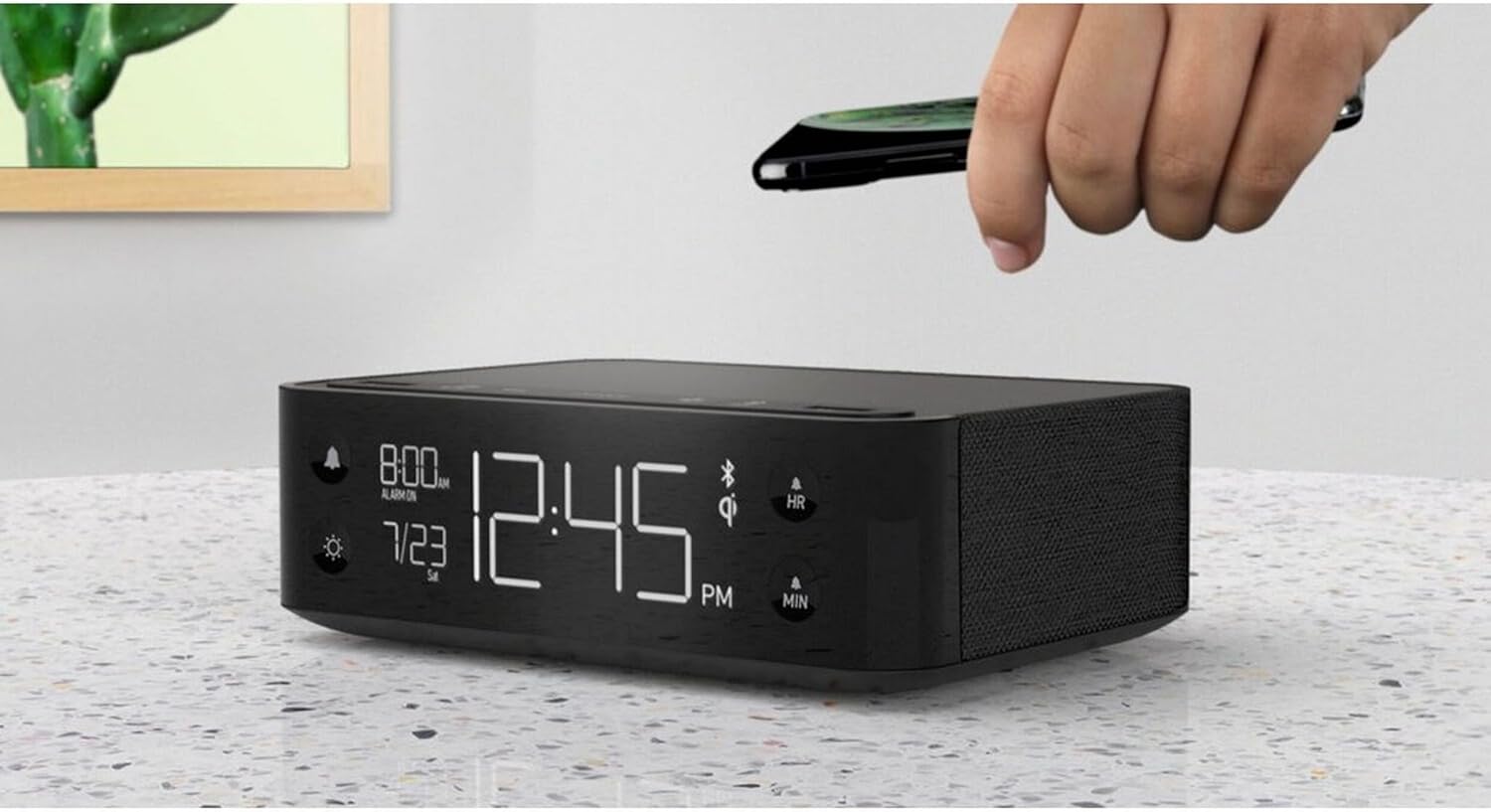
Figure 3: A smartphone being placed on the top surface of the Station A for wireless charging.
Installation
1. Connexion électrique
- Unpack the Nonstop NSA2-BK unit and all accessories from the packaging.
- Branchez l'adaptateur secteur fourni au port d'entrée CC situé à l'arrière de l'appareil.
- Plug the power adapter into a standard electrical outlet. The display will illuminate, indicating the unit is powered on.
2. Réglage initial de l'horloge
Upon first power-up, the clock may display a default time. Refer to the "Operating Instructions" section for detailed steps on setting the current time and date.
3. Couplage Bluetooth
- Assurez-vous que le Bluetooth est activé sur votre appareil mobile (smartphone, tablette, etc.).
- On the Nonstop NSA2-BK, press the Bluetooth pairing button (refer to button layout in "Operating Instructions" if available, otherwise assume a standard Bluetooth icon button). The Bluetooth indicator on the display will flash.
- On your mobile device, search for available Bluetooth devices. Select "Nonstop NSA2-BK" from the list.
- Once paired, the Bluetooth indicator on the unit will become solid, and you will hear an audible confirmation.
4. Wireless Qi Charging Setup
No specific setup is required for wireless charging beyond connecting the unit to power. Simply place your Qi-compatible device on the designated charging pad on top of the unit. Ensure the device is centered for optimal charging.
Mode d'emploi
Réglage de l'heure et de la date
- Appuyez et maintenez enfoncé le RÉGLAGE DE L'HEURE button (or equivalent, often combined with HR/MIN buttons).
- Utilisez le HR (Heure) et MIN Boutons (minute) pour régler le temps.
- Appuyez sur le RÉGLAGE DE L'HEURE button again to confirm and move to date setting (if applicable).
- Utilisez le HR et MIN buttons to adjust the month and day.
- Presse RÉGLAGE DE L'HEURE pour sortir.
Réglage et utilisation de l'alarme
- Appuyez et maintenez enfoncé le ENSEMBLE D'ALARME button (bell icon). The alarm time will flash.
- Utilisez le HR et MIN boutons pour régler l'heure de l'alarme souhaitée.
- Presse ENSEMBLE D'ALARME encore une fois pour confirmer.
- Pour activer/désactiver l'alarme, appuyez sur le ALARME ON / OFF button (bell icon). An alarm indicator will appear/disappear on the display.
- Lorsque l'alarme sonne, appuyez sur la ROUPILLON button (if available, or any button except alarm off) for a temporary pause. Press the ALARME ON / OFF bouton pour désactiver complètement l'alarme.
Using Bluetooth Speaker
- Ensure the unit is paired with your device (see "Bluetooth Pairing" in Setup).
- Play audio from your paired device. Sound will be output through the NSA2-BK speaker.
- Adjust volume using the volume controls on your paired device or on the NSA2-BK unit (if available).
Playing Relaxation Sounds
- Appuyez sur le SON button (or similar, possibly a wave/rain icon).
- Press repeatedly to cycle through available soundscapes (Ocean Waves, Rain, Ambient Sounds).
- Appuyez et maintenez enfoncé le SON button to turn off the soundscape.
Using Charging Functions
- Recharge sans fil Qi : Place your Qi-compatible smartphone centrally on the top charging pad. A charging indicator on the display will illuminate.
- Chargement USB : Connect your device's USB charging cable to one of the two USB ports on the back or side of the unit. Charging will begin automatically.
Réglage de la luminosité de l'écran
- Appuyez sur le VARIATEUR bouton (icône soleil).
- Press repeatedly to cycle through different brightness levels for the display.
Entretien
- Nettoyage: Débranchez l'appareil avant de le nettoyer. Utilisez un chiffon doux et sec pour essuyer l'extérieur. N'utilisez pas de nettoyants liquides ni de produits abrasifs.
- Stockage: Si vous devez entreposer l'appareil pendant une période prolongée, débranchez-le de l'alimentation électrique et rangez-le dans un endroit frais et sec.
- Évitez les liquides : Tenez l'appareil à l'écart de l'eau ou d'une humidité excessive.
- Ventilation: Assurez une ventilation adéquate autour de l'appareil afin d'éviter toute surchauffe. Ne bloquez pas les ouvertures de ventilation.
Dépannage
| Problème | Cause possible | Solution |
|---|---|---|
| L'unité ne s'allume pas. | L'adaptateur secteur n'est pas connecté ou la prise de courant n'est pas active. | Assurez-vous que l'adaptateur secteur est correctement branché à l'appareil et à une prise électrique fonctionnelle. |
| L'appareil Bluetooth ne peut pas être apparié. | Unit is not in pairing mode; device is too far; another device is already connected. | Ensure the NSA2-BK is in pairing mode. Move device closer. Disconnect any previously paired devices. |
| Le chargement sans fil ne fonctionne pas. | Device is not Qi-compatible; device not centered; foreign objects on pad; thick phone case. | Verify device supports Qi wireless charging. Re-position device centrally. Remove foreign objects or thick phone cases. |
| Le chargement USB ne fonctionne pas. | Cable is faulty; device is not compatible; unit is overloaded. | Try a different USB cable. Ensure device is compatible. Avoid charging too many high-power devices simultaneously. |
| L'alarme ne sonne pas. | Alarm is not activated; volume is too low. | Ensure the alarm is set and activated (alarm indicator visible). Increase the unit's volume. |
Caractéristiques
- Marque: Sans escale
- Modèle: NSA2-BK
- Couleur: Black, Ocean
- Poids de l'article : 3 livres
- Interface matérielle: USB
- Appareils compatibles : iPad, Smartphones, Kindle, Wireless Headphones (via USB/Qi)
- Nombre total de ports USB : 2
- Quoitage: 10 watts (for charging)
- Code à barres : 840148709171
- ASIN: B0C8LDWF57
- Première disponibilité : 29 juillet 2024
Garantie et assistance
Specific warranty details for the Nonstop NSA2-BK are typically provided with the product packaging or on the manufacturer's official webPour obtenir des informations complètes sur la garantie, veuillez consulter ce site.
For technical support, troubleshooting assistance beyond this manual, or inquiries regarding parts and service, please contact Nonstop customer support through their official website ou les coordonnées fournies dans la documentation originale de votre produit.
Remarque : Conservez toujours votre preuve d'achat pour toute réclamation au titre de la garantie.