
1. Introduction
This manual provides instructions for the proper use and care of your Docooler Portable USB Cassette Player. This device allows you to play audio cassettes and convert their content into digital MP3 files via a USB connection to a computer. Please read this manual thoroughly before operating the device to ensure optimal performance and longevity.
2. Produit terminéview
The Docooler Portable USB Cassette Player is a compact, handheld device designed for playing and digitizing audio cassettes. It features a transparent casing, allowing visibility of the internal mechanism.
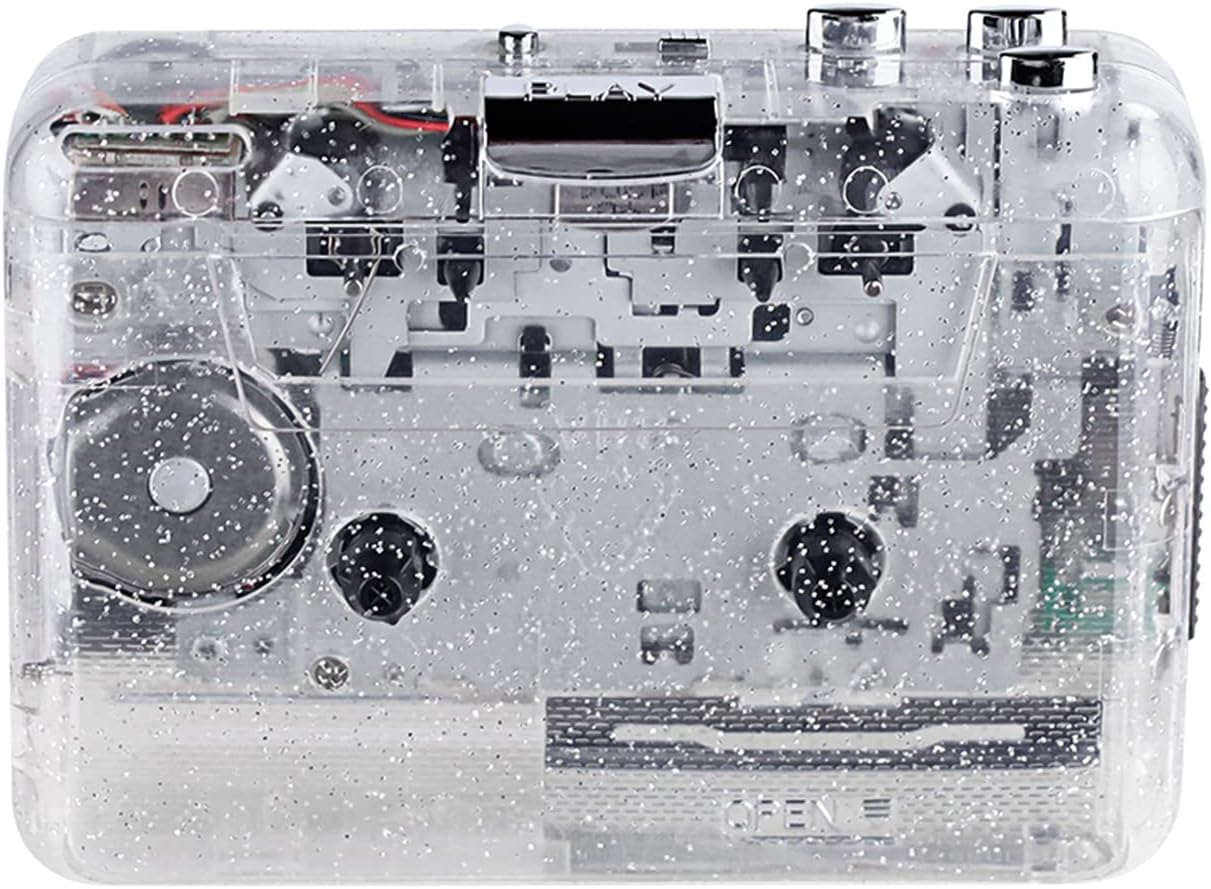
Figure 1 : Face avant view of the Docooler Portable USB Cassette Player, showcasing son design transparent.

Figure 2: Various angles of the cassette player, including top, side, and open views.
Contenu du colis :
- Docooler Portable USB Cassette Player
- Câble USB
- Manuel de l'utilisateur (ce document)
- Headphones (may vary by package)
3. Installation
3.1 Alimentation
The cassette player can be powered by either batteries or a USB connection.
Installation de la batterie :
- Localisez le compartiment à piles sur l'appareil.
- Ouvrez le couvercle du compartiment à piles.
- Insérez 2 piles AA (non incluses), en veillant à respecter la polarité (+/-).
- Fermez soigneusement le couvercle du compartiment à piles.
Puissance USB:
Connect the provided USB cable to the player's USB port and the other end to a powered USB port on your computer or a USB wall adapter. The device will draw power from the USB connection.
4. Mode d'emploi
4.1 Lecture d'une cassette audio
- Ouvrez le couvercle du compartiment à cassette.
- Insert an audio cassette tape with the open edge facing upwards.
- Close the cassette compartment cover firmly.
- Branchez des écouteurs ou des haut-parleurs externes à la prise de sortie audio 3.5 mm.
- Appuyez sur le JOUER bouton pour commencer la lecture.
- Utilisez le ARRÊT bouton pour arrêter la lecture.
- Utilisez le FF (Avance rapide) et REW (rembobinage) des boutons pour naviguer dans la bande.
- Adjust the volume using the volume control dial.
- The "DIR" button allows you to quickly flip the tape direction. The "play mode" button can be used to reverse playback once or an unlimited number of times.

Figure 3: The cassette player in use, demonstrating tape insertion and playback setup.

Figure 4: Users listening to audio through headphones connected to the cassette player.
4.2 Converting Tapes to MP3 Files
The Docooler Portable USB Cassette Player can convert your analog cassette audio into digital MP3 files. This process requires a computer and compatible audio recording software (not included).
- Ensure the cassette player is powered (via batteries or USB).
- Connect the cassette player to your computer using the provided USB cable.
- Install and open your preferred audio recording software on your computer. Software such as Audacity (free and open-source) is commonly used for this purpose.
- Configure your recording software to recognize the cassette player as an audio input device.
- Insert the cassette tape you wish to convert into the player.
- Start recording in your software, then press the JOUER bouton du lecteur de cassettes.
- Monitor the recording process. Once the tape has finished playing, stop the recording in your software.
- Enregistrez l'audio au format MP3. file sur votre ordinateur.

Figure 5: Illustration of the process to convert cassette audio to MP3 files using the player and a computer.
5. Entretien
5.1 Nettoyage de l'appareil
- Essuyez l'extérieur du lecteur avec un chiffon doux et sec.
- Do not use liquid cleaners or abrasive materials, as they may damage the surface.
- Periodically clean the tape heads and pinch rollers using a cotton swab lightly dampterminé avec de l'alcool isopropylique pour assurer une qualité sonore optimale et éviter d'endommager la bande.
5.2 Stockage
- En cas de non-utilisation prolongée, retirez les piles pour éviter les fuites.
- Conservez le lecteur dans un endroit frais et sec, à l'abri de la lumière directe du soleil et des températures extrêmes.
6. Dépannage
| Problème | Cause possible | Solution |
|---|---|---|
| Pas de courant | Dead batteries; USB cable not connected properly. | Replace batteries; ensure USB cable is securely connected. |
| Pas de son | Headphones/speakers not connected; volume too low; dirty tape heads. | Connect audio output device; increase volume; clean tape heads. |
| Poor sound quality (hissing, muffled) | Dirty tape heads; worn-out tape; low battery. | Clean tape heads; try a different tape; replace batteries. |
| La cassette ne fonctionne pas ou ne bouge pas. | Tape jammed; mechanism issue; low battery. | Check tape for damage; replace batteries. |
| Cannot convert to MP3 | USB connection issue; software not configured correctly; no recording software. | Ensure USB is connected; check software settings; install compatible recording software. |
7. Spécifications
- Modèle: B0C69FDZF6
- Alimentation: 2 x AA Batteries or USB 5V DC
- Interface: USB 2.0
- Sortie audio : Prise stéréo 3.5 mm
- Dimensions: 7.2 x 5.91 x 1.54 pouces (environ)
- Poids: 9.6 onces (environ)
- Fabricant: Docooler
8. Consignes de sécurité
- N’exposez pas l’appareil à l’eau ou à une humidité excessive.
- Évitez de laisser tomber ou de soumettre l'appareil à des impacts violents.
- N’essayez pas de démonter ou de réparer l’appareil vous-même. Veuillez faire appel à un technicien qualifié.
- Tenir hors de portée des enfants.
- Jetez les piles conformément aux réglementations locales.
9. Garantie et assistance
For warranty information or technical support, please refer to the documentation included with your purchase or contact Docooler customer service through their official website or the retailer where the product was purchased. Please have your model number (B0C69FDZF6) and purchase date available when contacting support.