
1. Introduction
This user manual provides comprehensive instructions for the installation, operation, and maintenance of your YUNTX Android 15 Car Radio. Designed specifically for Peugeot 308 models from 2007 to 2013, this unit integrates advanced features such as CarPlay, Android Auto, DSP, and GPS navigation to enhance your driving experience. Please read this manual thoroughly before using the product to ensure proper function and safety.
2. Consignes de sécurité
Always prioritize safety. Do not attempt to operate the unit or adjust settings while driving. Ensure all connections are secure and properly insulated to prevent electrical hazards. Professional installation is recommended for optimal performance and safety. Keep the unit away from water and extreme temperatures.
3. Contenu du colis
Avant l'installation, vérifiez que tous les éléments sont présents dans l'emballage :
- 1 x YUNTX Android Car Radio Unit
- 1 x câble d'alimentation
- 1 câble de sortie RCA A
- 1 câble de sortie RCA B
- 1 câble de sortie RCA C
- 1 câble de sortie RCA D
- 1 x antenne GPS
- 1 x câble USB
- 1 x microphone externe
- 1 antenne radio
- 1 x arrière View Caméra (4 LED)
- 1 x Manuel d'utilisation (ce document)
- Optional: CANBUS decoder (if required for your vehicle model)
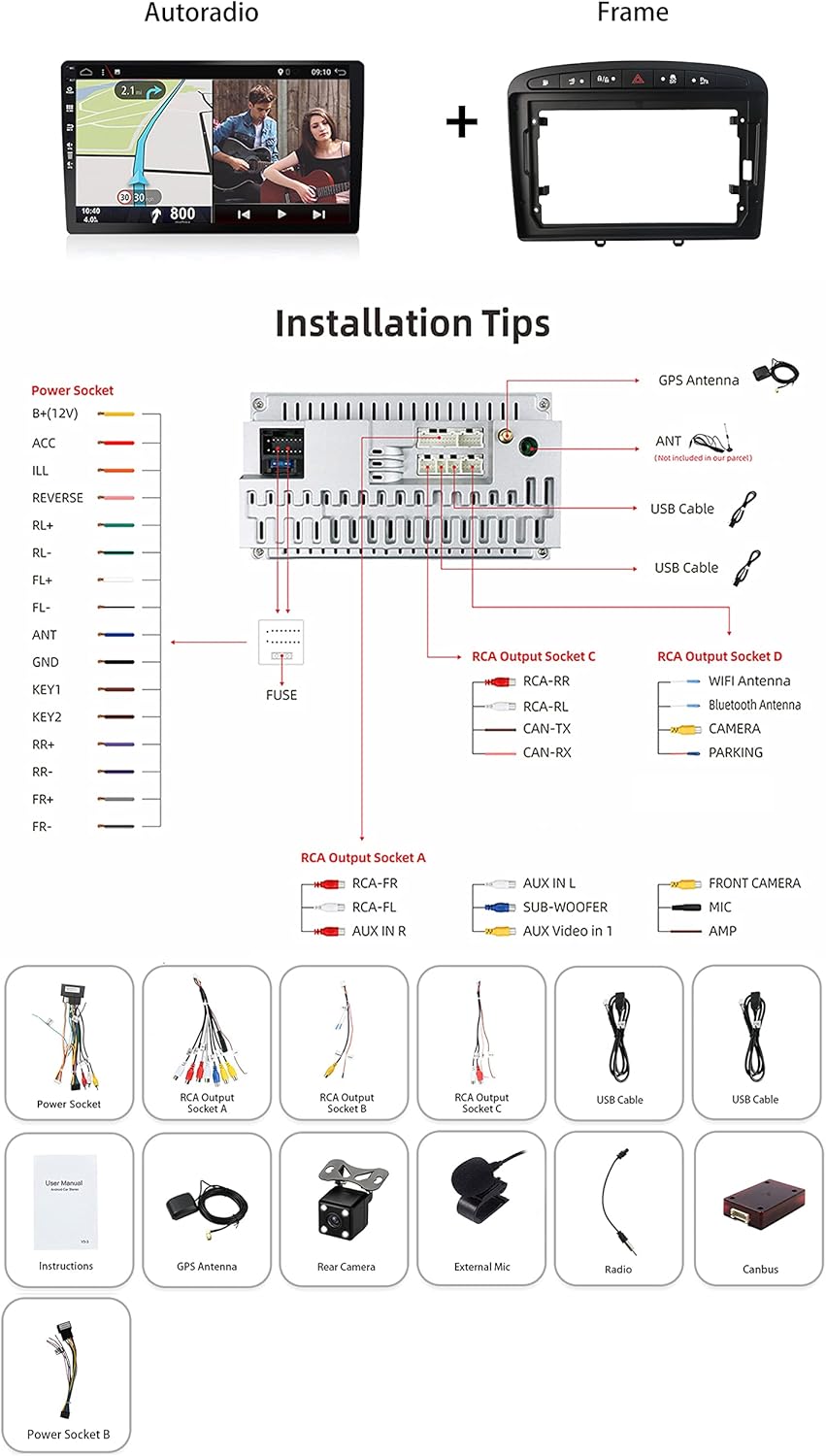
Figure 3.1: Included accessories and wiring diagram for installation.
4. Configuration et installation
Installation of the YUNTX Android Car Radio is designed to be straightforward, but professional installation is recommended. Ensure the vehicle's power is disconnected before beginning. The unit is compatible with Peugeot 308 models from 2007 to 2013.
4.1 Vérification de compatibilité
This unit is specifically designed for Peugeot 308 (2007-2013). If you are unsure about compatibility, compare your car's dashboard with the provided images or consult a professional.

Figure 4.1: Before and after installation in a Peugeot 308 dashboard.
4.2 Connexions de câblage
Refer to the wiring diagram (Figure 3.1) for detailed connection instructions. Key connections include:
- Prise de courant: Raccordez le faisceau d'alimentation principal à l'alimentation électrique du véhicule.
- Antenne GPS: Installez l'antenne GPS dans un endroit dégagé. view du ciel pour une réception optimale du signal.
- ANT (Radio Antenna): Connect the radio antenna for AM/FM reception.
- Câbles USB : Connectez les câbles USB fournis pour la connexion des périphériques externes.
- Prises de sortie RCA : Utilisez-les pour connecter des périphériques externes amplificateurs ou caissons de basses.
- CANBUS (le cas échéant) : If your vehicle requires a CANBUS decoder for steering wheel controls or other vehicle data integration, connect it as per the specific instructions provided with the CANBUS module.
- Caméra arrière : Connect the included rear camera. The unit will automatically switch to the rear view lorsque le véhicule est en marche arrière.
- Micro externe : Connect the external microphone for clearer hands-free communication.
After all connections are made, carefully secure the unit into the dashboard opening.
5. Mode d'emploi
The YUNTX Android 15 Car Radio offers a wide range of features. This section covers basic operation and key functionalities.
5.1 Initial Power On and Fast Boot
Once installed, turn on your vehicle's ignition. The unit features a fast boot function, allowing it to start up quickly (typically within 2 seconds from standby).
5.2 Interface à écran tactile
Navigate the system using the 9-inch IPS 2.5D touchscreen. The interface is intuitive, similar to a smartphone or tablet.
5.3 CarPlay et Android Auto
The unit supports both wireless and wired Apple CarPlay and Android Auto. Connect your smartphone to access navigation, music, calls, and messages directly from the car radio's screen. Use voice commands (e.g., Siri) for hands-free control.
5.4 Navigation GPS
Utilize pre-installed online and offline GPS navigation applications. The system supports 3D maps and voice guidance. You can listen to the radio, Bluetooth audio, or USB/SD media while navigation is active.
5.5Bluetooth 5.0
Pair your smartphone via Bluetooth 5.0 for hands-free calling and audio streaming. The system supports quick contact search and phonebook synchronization.
5.6 Radio (AM/FM/RDS)
Access AM/FM radio stations worldwide. The integrated RDS (Radio Data System) provides additional information such as station name and program type where available.
5.7 Processeur de son numérique (DSP)
The built-in DSP features a 64-band equalizer, allowing independent adjustment of front and rear speakers. Customize sound effects, surround sound, and speaker delay for an optimized audio experience.
5.8 Internet Connectivity (WiFi/4G)
Connect to the internet via the integrated WiFi module. For 4G connectivity, an optional external 4G modem (B089KGJT61) is required.
5.9 Lien miroir
Use Mirror Link to display and control your smartphone's screen on the car radio via USB cable or Wi-Fi connection.
5.10 commandes au volant
If your vehicle supports it and the CANBUS is correctly configured, you can control functions like track changes and volume directly from your steering wheel.
5.11 Arrière View Caméra
L'arrière inclus view camera automatically activates when reversing, providing enhanced safety and visibility, especially at night with its night vision capabilities.
5.12 Fonction d'écran partagé
The split-screen feature allows you to run two applications simultaneously, such as navigation and music playback, side-by-side on the display.

Figure 5.1 : Plusview of key operating features.
6. Spécifications
| Fonctionnalité | Spécification |
|---|---|
| Système | Android 15 |
| BÉLIER | 6 Go LPDDR4 |
| ROM | Disque SSD 128 Go |
| Processeur | Octa Core Rockchip AC8257, 2.0GHz |
| Afficher | 9-inch IPS 2.5D Digital Touchscreen |
| Résolution | 1280*600 (Supports 4K video playback) |
| Sortie audio | 4*50W (TDA7851 Amplifiant) |
| Radio IC | NXP TEF7708 (AM/FM Tuner, RDS) |
| Bluetooth | Version 5.0 |
| Connectivité | Integrated WiFi, External 4G support (optional modem) |
| GPS | Online/Offline Navigation, 3D Maps, Voice Guidance |
| DSP | Built-in 64-band Equalizer |
| CarPlay / Android Auto | Integrated Wireless/Wired |
| Lien miroir | Supported (USB/Wi-Fi) |
| USB/SD Storage | Jusqu'à 500 Go |
| Dimensions (L x l x H) | 2 x 3 x 1 cm |
| Poids | 2 kg |
| Compatibilité | Peugeot 308 (2007-2013) |

Figure 6.1: Detailed hardware and software specifications.
7. Entretien
Pour garantir la longévité et les performances optimales de votre autoradio, suivez ces consignes d'entretien :
- Nettoyage: Utilisez un chiffon doux et sec pour nettoyer l'écran tactile et l'extérieur de l'appareil. Évitez les nettoyants abrasifs et les solvants.
- Mises à jour logicielles : Periodically check for available software updates from the manufacturer to ensure you have the latest features and bug fixes.
- Conditions environnementales : Évitez d'exposer l'appareil à la lumière directe du soleil pendant des périodes prolongées ou à des températures extrêmes.
8. Dépannage
This section addresses common issues you might encounter. If a problem persists, contact customer support.
| Problème | Cause/solution possible |
|---|---|
| L'unité ne s'allume pas | Vérifiez les connexions du câble d'alimentation et la boîte à fusibles du véhicule. Assurez-vous que le contact est mis. |
| Pas de sortie audio | Verify speaker connections. Check volume settings and DSP equalizer settings. Ensure external ampLes amplificateurs (le cas échéant) sont mis sous tension. |
| Les commandes au volant ne fonctionnent pas | Ensure the CANBUS decoder (if required for your vehicle) is correctly installed and configured. Check wiring connections for steering wheel control. |
| Le signal GPS est faible ou imprécis. | Assurez-vous que l'antenne GPS est installée dans un endroit dégagé. view du ciel, loin de tout obstacle. Vérifiez la connexion de l'antenne. |
| Problèmes de connexion Bluetooth | Assurez-vous que le Bluetooth est activé sur l'autoradio et sur votre smartphone. Essayez de déconnecter puis de reconnecter les appareils. |
| Unit freezes or gets stuck (e.g., on parking assist) | Perform a system reset. Locate the small reset button (often a pinhole) on the unit and press it gently with a non-metallic pointed object. This may resolve temporary software glitches. |
| La caméra arrière ne s'affiche pas. | Vérifiez l'alimentation et les connexions vidéo de la caméra. Assurez-vous que le véhicule est en marche arrière. |
9. Garantie et assistance
Warranty information for your YUNTX Android Car Radio is typically provided with your purchase documentation. Please refer to those materials for details regarding warranty coverage and duration.
For technical support or assistance with installation and troubleshooting, please contact the seller or manufacturer directly. Keep your purchase receipt and product model number (B0C5324PLT) readily available when seeking support.