
1. Introduction
Thank you for choosing the Devoko Electric Height Adjustable Desk. This manual provides comprehensive instructions for the assembly, operation, and maintenance of your new desk. Designed for a healthier work-life balance, this desk allows you to seamlessly switch between sitting and standing positions, promoting better posture and productivity.
Key features include a robust steel frame, a spacious 120x80cm desktop, integrated USB-A and USB-C charging ports, and a smart control panel with memory presets and anti-collision functionality.

The Devoko Electric Height Adjustable Desk, showcasinson design épuré et ampl'espace de travail.
2. Consignes de sécurité
- Lisez attentivement toutes les instructions avant le montage et l'utilisation.
- Tenez les enfants et les animaux domestiques éloignés du bureau pendant son utilisation.
- Veillez à ce que tous les câbles soient correctement acheminés et fixés afin d'éviter les risques de trébuchement ou les dommages.
- Do not overload the desk beyond its maximum weight capacity (70 kg dynamic, 80 kg static).
- Évitez de déposer des liquides directement sur le panneau de commande ou à proximité des composants électriques.
- In case of malfunction, unplug the desk immediately and contact customer support.
- The desk is equipped with an anti-collision system. Do not obstruct its movement.
3. Contenu du colis
Veuillez vérifier que tous les composants sont présents avant de commencer l'assemblage :
- Panneaux de bureau (4 sections)
- Pieds de bureau (2)
- Composants de barre transversale/cadre
- Boitier de contrôle
- Panneau de commande avec ports USB
- Adaptateur secteur et câble
- Plateau de gestion de câbles
- Quincaillerie de montage (vis, boulons, etc.)
- Outils de montage (clé Allen, tournevis)
- Manuel d'utilisation
4. Instructions de montage
Le montage est conçu pour être simple et prend généralement une trentaine de minutes. Tous les outils nécessaires sont inclus.
Guide étape par étape :
- Déballer et organiser : Déballez soigneusement tous les composants et disposez-les sur une surface propre et douce afin d'éviter les rayures. Identifiez chaque pièce à l'aide du schéma fourni.
- Assemblez le cadre : Attach the crossbar components to the desk legs using the provided hardware. Ensure all connections are secure.
- Ajouter des panneaux de bureau : Secure the four desktop panels to the assembled frame. The pre-drilled holes will guide you.
- Install Control Box and Panel: Mount the control box and the control panel to the underside of the desktop as indicated in the instructions.
- Connecter les câbles : Connect the motor cables from the legs to the control box, and then connect the control panel cable to the control box. Finally, connect the power adapter to the control box.
- Installer le plateau de gestion des câbles : Attach the cable management tray to the underside of the desk to organize your power strips and cables.
- Vérifications finales : Vérifiez une dernière fois que toutes les vis et les connexions sont bien serrées et sécurisées.

The desk is designed for very easy installation, with assembly tools included.

The included cable management tray helps keep your workspace tidy.
5. Guide d'utilisation
Your Devoko desk features an intelligent control panel for effortless height adjustment and convenient charging.
Fonctions du panneau de contrôle :
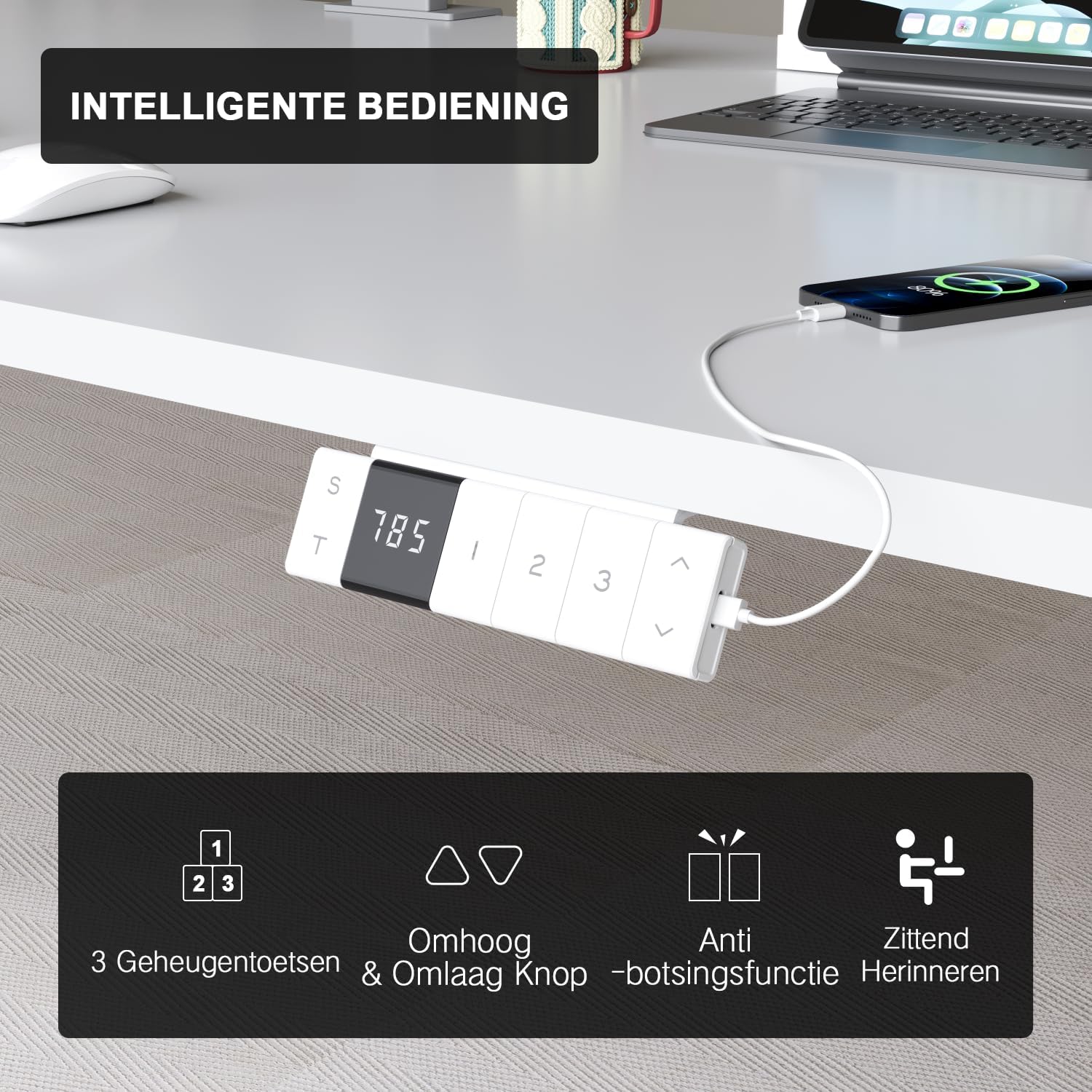
The intelligent control panel features a digital display, height adjustment buttons, memory presets, and USB charging ports.
- Boutons Haut/Bas (▲ / ▼) : Press and hold to smoothly adjust the desk height. The desk moves at a speed of 20mm/s with operating noise less than 45dB.
- Préréglages de mémoire (1, 2, 3) : Save your preferred sitting and standing heights. To set a preset: adjust the desk to the desired height, then press the 'S' button followed by the desired number (1, 2, or 3). The desk will automatically move to this height with a single press.
- USB-A & USB-C Charging Ports: Conveniently located on the control panel, these ports allow you to charge your devices directly from the desk, eliminating the need for extra wall adapters.
- Fonction anti-collision : The desk is equipped with a sensitive anti-collision system that detects obstacles during movement and automatically stops to prevent damage or injury.
- Sitting Reminder (T): The control panel may feature a timer function (indicated by 'T') to remind you to switch between sitting and standing positions for healthier work habits.

Easily switch between sitting mode (72 cm) and standing mode (118 cm) to optimize your comfort and health.
6. Entretien
- Nettoyage: Utilisez un chiffon doux et sec.amp Nettoyez le bureau et le cadre avec un chiffon. Évitez les nettoyants abrasifs ou les produits chimiques agressifs qui pourraient endommager la finition.
- Gestion des câbles: Vérifiez et réorganisez régulièrement les câbles pour éviter les enchevêtrements et assurer un bon fonctionnement.
- Fixations : Vérifiez régulièrement que toutes les vis et tous les boulons restent bien serrés. Resserrer si nécessaire.
- Entretien du moteur : The motor is designed for durability and has been tested over 10,000 cycles. No special maintenance is required for the motor itself.
7. Dépannage
If you encounter any issues with your Devoko desk, please refer to the following common problems and solutions:
| Problème | Cause possible | Solution |
|---|---|---|
| Le bureau ne bouge pas. | Power cable disconnected; Control box error. | Check power connection. Unplug and replug the desk for 10 seconds to reset the control box. |
| Le bureau bouge de façon irrégulière ou fait un bruit inhabituel. | Connexions desserrées ; Obstruction. | Check all assembly connections. Ensure no objects are obstructing the legs' movement. |
| Le système anticollision se déclenche trop souvent. | Réglage de la sensibilité ; Obstruction. | Ensure no objects are near the desk's path. Refer to the full manual for anti-collision sensitivity adjustment if available. |
| Les ports USB ne chargent pas. | Desk not powered; Device compatibility. | Ensure the desk is plugged in and powered on. Check if the device requires specific charging protocols. |
Si le problème persiste après avoir essayé ces solutions, veuillez contacter le service client de Devoko pour obtenir de l'aide supplémentaire.
8. Spécifications
| Fonctionnalité | Détail |
|---|---|
| Marque | Devoko |
| Numéro de modèle | 0077B-1222 |
| Couleur | Blanc |
| Dimensions du bureau (L x l) | 120 cm x 80 cm (47.2 x 31.5 pouces) |
| Plage de hauteur | 72 cm à 118 cm (28.3 à 46.5 pouces) |
| Matériel | FSC-certified particle board (desktop), Industrial-grade steel (frame) |
| Capacité de charge dynamique | 70 kg (154 lb) |
| Capacité de charge statique | 80 kg (176 lb) |
| Vitesse de levage | 20 mm/s |
| Niveau de bruit | < 45 dB |
| Caractéristiques spéciales | Electric height adjustment, Ergonomic design, Integrated USB-A & USB-C charging, 3-Function Memory, Anti-collision system, Mobile with wheels |
| Certifications | TÜV, CE |
| Poids du produit | 24.5 kg (54 lb) |

Desktop dimensions: 120cm x 80cm.

Key performance metrics: 70kg load capacity, 20mm/s speed, quiet operation, and anti-collision safety.
9. Garantie et assistance
The Devoko Electric Height Adjustable Desk comes with a Garantie de 5 ans, ensuring peace of mind regarding its durability and performance. This warranty covers manufacturing defects and motor malfunctions under normal use.
For technical support, warranty claims, or any questions not covered in this manual, please contact Devoko customer service through the retailer's platform or the official Devoko website. Please have your model number (0077B-1222) and purchase date ready when contacting support.