
1. Introduction
This manual provides detailed instructions for the setup, operation, maintenance, and troubleshooting of your Cosmic Byte ARES Wired Controller for PC. Designed for an enhanced gaming experience, this controller features Hall Effect joysticks and triggers, dual vibration, and customizable Turbo functions.
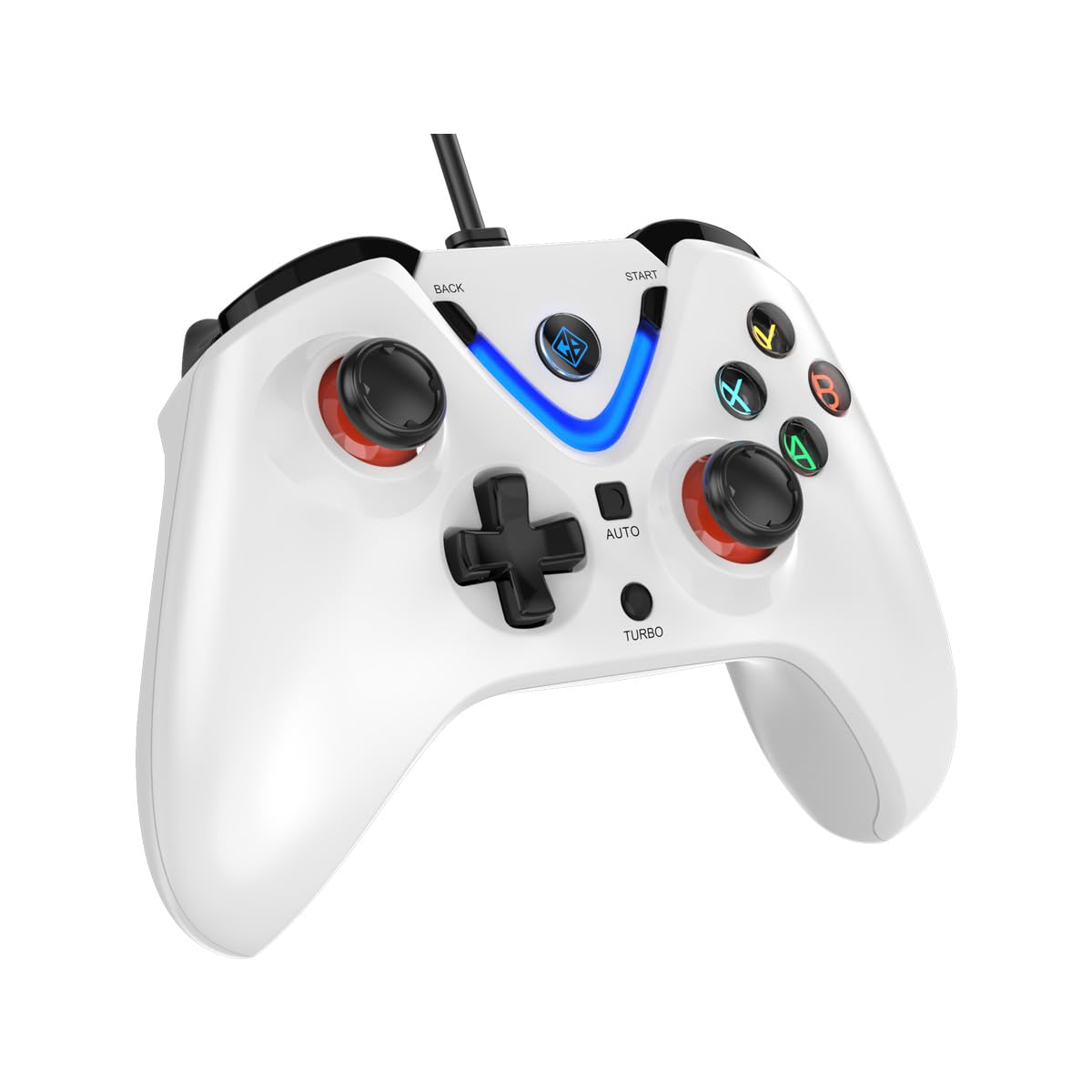
Image 1: The Cosmic Byte ARES Wired Controller in white, showcasinet son design ergonomique.
2. Instructions de configuration
2.1 Connexion au PC
- Assurez-vous que votre PC est sous tension.
- Localisez un port USB disponible sur votre ordinateur.
- Plug the USB connector of the Cosmic Byte ARES Wired Controller into the USB port.
- Le système d'exploitation détectera et installera automatiquement les pilotes nécessaires. Ce processus peut prendre quelques instants.
- Une fois l'installation terminée, le contrôleur est prêt à l'emploi.

Image 2: The controller connected via its wired USB connection, ensuring fast response.
3. Mode d'emploi
3.1 Contrôles de base
The Cosmic Byte ARES controller features standard gamepad layouts, including:
- Left and Right Analog Joysticks: Pour un contrôle précis des mouvements et de la caméra.
- Croix directionnelle: Pour les entrées directionnelles, souvent utilisées dans les menus ou pour des actions spécifiques dans le jeu.
- Boutons d'action (A, B, X, Y) : For primary game interactions.
- Boutons d'épaule (L1, R1) et gâchettes (L2, R2) : For various in-game functions like shooting, aiming, or accelerating.
- Boutons Démarrer et Retour : For pausing games, accessing menus, or specific in-game commands.
- Bouton Turbo : Pour activer les fonctions de tir rapide.
- Bouton automatique : For activating automatic rapid-fire functions.
3.2 Joysticks et gâchettes à effet Hall
The controller is equipped with Hall Effect joysticks and triggers, which use magnetic sensors instead of physical contacts. This technology provides:
- Précision améliorée : More accurate and responsive input.
- Durabilité accrue : Reduces wear and tear, preventing stick drift over time.
- Fonctionnement fluide : Consistent and linear response for triggers, allowing for nuanced control in games.

Image 3 : Une explosion view illustrating the Hall Effect joystick mechanism and the Hall Effect triggers.
3.3 Double retour de vibration
The controller features dual vibration motors that provide tactile feedback during gameplay, enhancing immersion by simulating in-game events such as impacts, explosions, or engine rumbling.
3.4 Backlit LED Buttons
The action buttons (A, B, X, Y) and the central V-shaped indicator feature LED backlighting, providing visibility in low-light conditions and adding to the controller's aesthetic.

Image 4: The controller with its LED buttons illuminated and visual representation of vibration effects.
3.5 Turbo and Auto Turbo Functions
The Turbo and Auto Turbo functions allow for rapid, repeated input of a button press without continuously pressing the button.
- Activation du Turbo : Press and hold the desired action button (e.g., A) and then press the Turbo button. The button will now rapidly repeat its input as long as you hold it down.
- Activating Auto Turbo: Press and hold the desired action button (e.g., A) and then press the Auto button. The button will now rapidly repeat its input automatically without needing to be held down.
- Deactivating Turbo/Auto Turbo: To deactivate, repeat the activation steps for the specific button, or press the Clair button (if available) or disconnect and reconnect the controller.

Image 5: Close-up of the controller showing the Turbo and Auto function buttons.
4. Entretien
- Nettoyage: Utilisez un chiffon doux et sec pour nettoyer la manette. Pour les saletés tenaces, un chiffon légèrement plus sec peut être utile.amp cloth can be used, ensuring no liquid enters the controller. Avoid harsh chemicals or abrasive cleaners.
- Stockage: Rangez la manette dans un endroit frais et sec, à l'abri de la lumière directe du soleil et des températures extrêmes. Évitez de poser des objets lourds dessus.
- Entretien des câbles : Do not sharply bend or pull the USB cable. Always grasp the plug when disconnecting from the PC.
5. Dépannage
- Contrôleur non reconnu :
- Assurez-vous que le câble USB est correctement connecté à la fois à la manette et à l'ordinateur.
- Essayez de brancher la manette sur un autre port USB.
- Redémarrez votre ordinateur.
- Check Device Manager on Windows to see if the controller is listed and if there are any driver issues.
- Boutons/joysticks ne répondent pas :
- Verify the controller is recognized by your PC (see above).
- Test the controller in a different game or a controller testing utility to rule out game-specific issues.
- Assurez-vous qu'aucun autre périphérique d'entrée n'interfère.
- Vibration ne fonctionne pas :
- Vérifiez les paramètres du jeu pour vous assurer que le retour de vibration est activé.
- Certains jeux peuvent ne pas prendre en charge les vibrations ou avoir des effets de vibration limités.
6. Spécifications
| Fonctionnalité | Détail |
|---|---|
| Marque | Octet cosmique |
| Nom du modèle | Arès |
| Appareils compatibles | PC |
| Type de contrôleur | Manette de jeu |
| Technologie de connectivité | USB |
| Caractéristiques du produit | Ergonomique |
| Quantité de boutons | 16 |
| Plateforme matérielle | PC |
| Type de source d'alimentation | Électrique filaire, câble USB |
| Poids de l'article | 220 gramme |
| Dimensions de l'article | 6 x 10 x 4 centimètres |
| Couleur | Blanc |
| Pays d'origine | Chine |

Image 6: A comparison table highlighting features of different ARES controller models.
7. Garantie et assistance
7.1 Informations sur la garantie
The Cosmic Byte ARES Wired Controller comes with a Garantie 1 an contre les défauts de fabrication À compter de la date d'achat. Veuillez conserver votre preuve d'achat pour toute réclamation au titre de la garantie.
7.2 Coordonnées du fabricant
For support, service, or warranty inquiries, please contact:
Octet cosmiquePrakash Warehousing, S. No.163, Hissa No 1-2-3-4-5A-5B/2/1,
Phursungi, Pune 412308, Maharashtra, India
For further assistance, please visit the official Cosmic Byte website ou contactez leur service client.