
LEVOIT LTF-F422-WUS
Manuel d'utilisation du ventilateur tour LEVOIT Classic 42 pouces
This manual provides essential information for the safe and efficient operation, maintenance, and troubleshooting of your LEVOIT Classic 42-inch Tower Fan.
Consignes de sécurité importantes
To reduce the risk of fire, electric shock, or injury, please read and follow all instructions and warnings before using this appliance.
- Always place the fan on a stable, level surface.
- Ne faites pas fonctionner le ventilateur avec un cordon ou une prise endommagés.
- Gardez le ventilateur loin de l'eau ou de la poussière.amp zones.
- N’insérez ni doigts ni objets étrangers dans les ouvertures.
- Débranchez le ventilateur avant de le nettoyer ou d'effectuer toute opération de maintenance.
- Ce produit contient des produits chimiques reconnus par l’État de Californie comme pouvant provoquer le cancer, des malformations congénitales ou d’autres troubles de la reproduction.
Produit terminéview
The LEVOIT Classic 42-inch Tower Fan (Model: LTF-F422-WUS) is designed to provide powerful and quiet air circulation for your home. It features a DC motor for energy efficiency and a user-friendly design.

Image : Avant view of the LEVOIT Classic 42-inch Tower Fan in white, showing its sleek design, digital display, and the included remote control. Blue arrows indicate airflow and oscillation.
Caractéristiques principales :
- Flux d'air puissant : Experience 1252 CFM airflow with speeds up to 25ft/s.
- Fonctionnement silencieux : Operates as low as 25dB, ideal for bedrooms and quiet environments.
- Oscillation large : Features 90° horizontal and 60° vertical oscillation for comprehensive air distribution.
- Confort personnalisable : Offers 12 speed settings and 4 modes (Normal, Auto, Turbo, Advanced Sleep).
- Temperature-Responsive: Built-in sensor adjusts fan speed based on room temperature in Auto mode.
- Entretien facile : Detachable back cover and filter for thorough cleaning.
- Conception conviviale : Includes a hidden handle and built-in remote storage.
Guide d'installation
1. Déballage et vérification des composants
Carefully open the box from the indicated side and remove all components. Ensure all parts are present before proceeding with assembly.
Video: This video demonstrates the unboxing process, base assembly, remote control storage, and fan blade removal for cleaning.
2. Assemblage de la base
The fan base comes in two halves. Align the two pieces and attach them together securely. Unscrew the nut from the bottom of the tower fan, then attach the assembled base to the fan and fasten the nut to secure it.

Image: Diagram illustrating the assembly of the fan base, showing how the two halves connect and attach to the main fan unit.
3. Configuration de la télécommande
The remote control comes with an insulating tab to preserve battery life. Pull out this tab before first use. The remote can be stored neatly in a dedicated slot on the back of the fan.
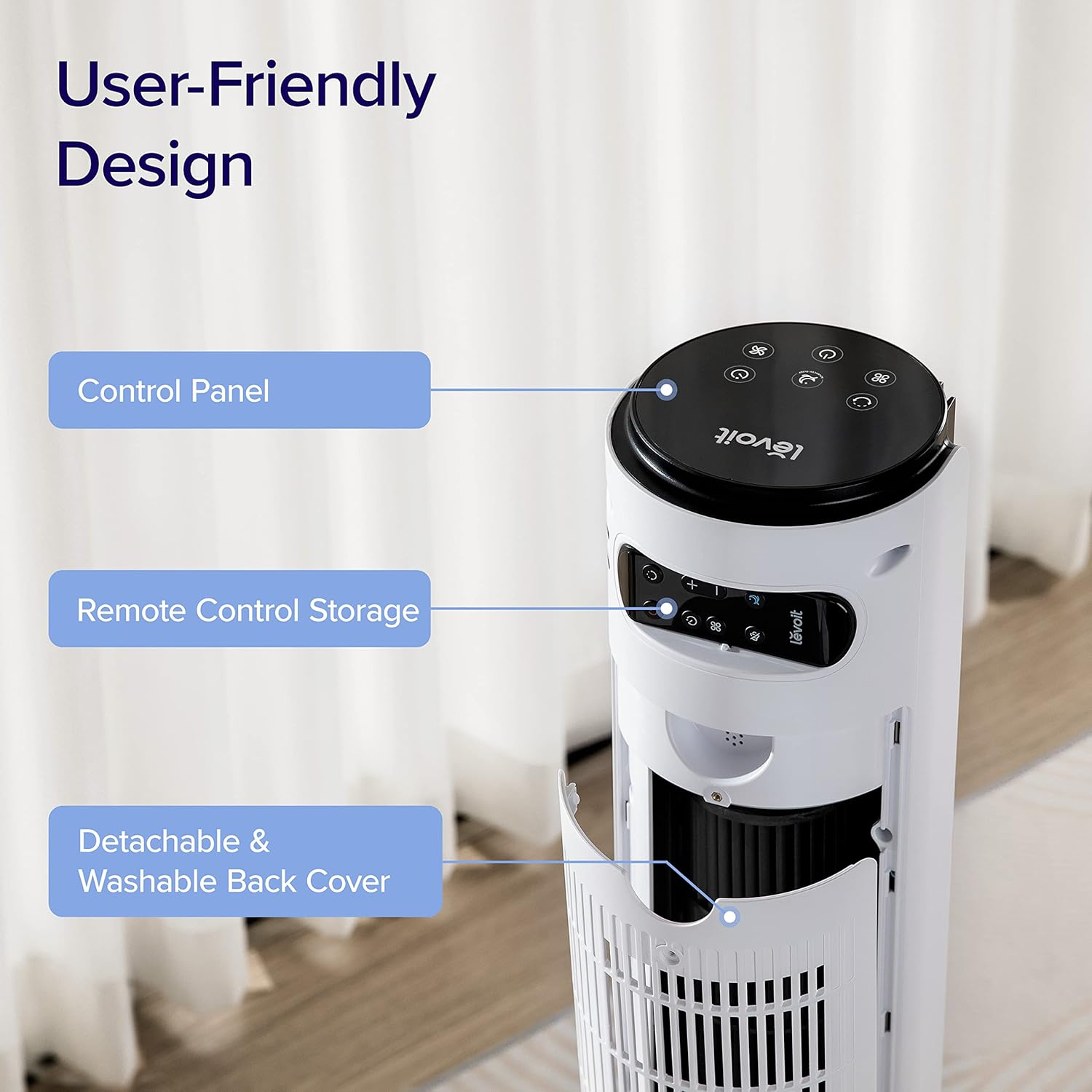
Image : Gros plan view of the top rear of the LEVOIT Tower Fan, highlighting the integrated storage compartment for the remote control.
Utilisation de votre ventilateur tour
Your LEVOIT tower fan offers various settings for personalized comfort.
1. Panneau de contrôle et écran
The fan features a touch-sensitive control panel on top and an LED display on the front. The display shows current settings such as speed, mode, and timer.
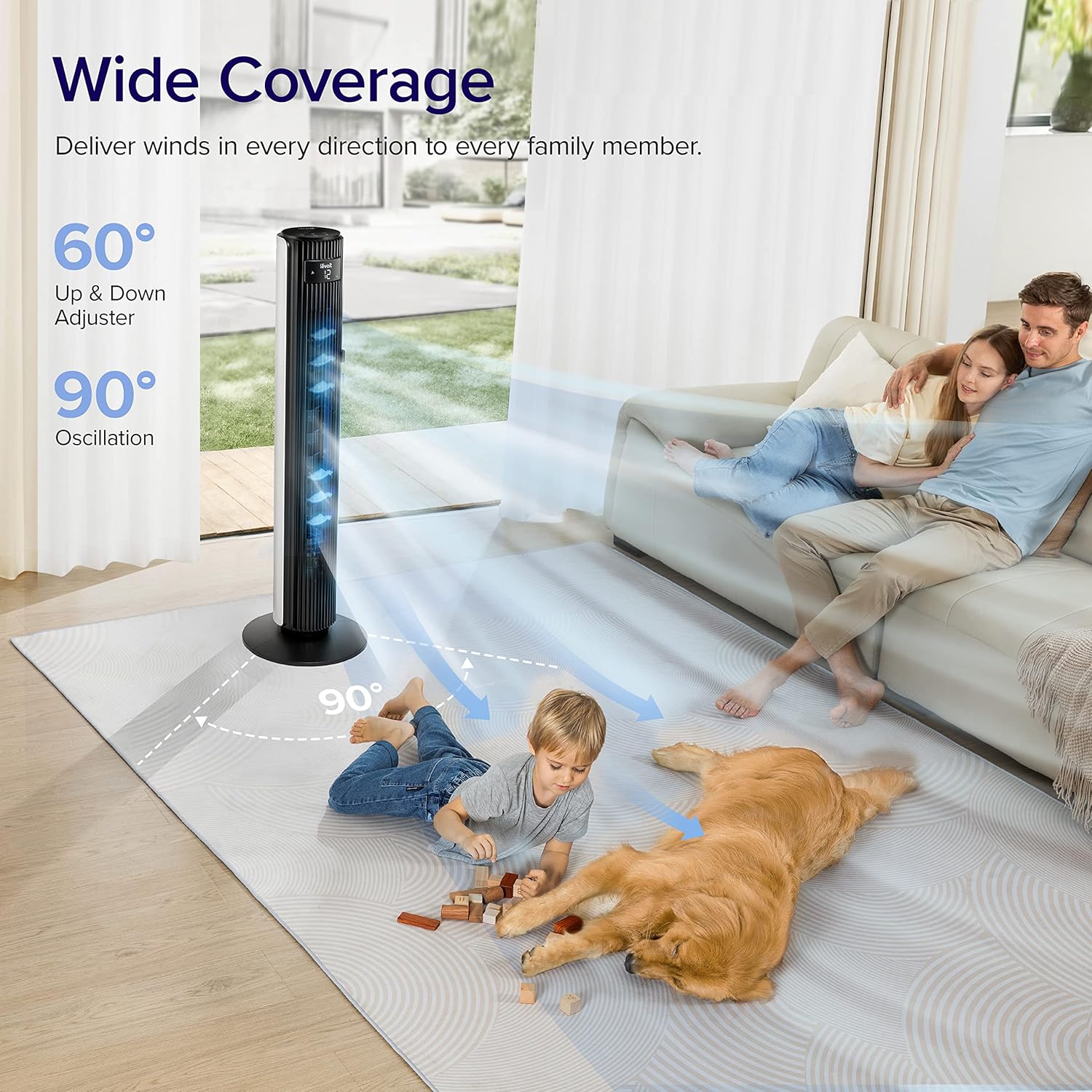
Image : Vue de dessus view of the LEVOIT Tower Fan's control panel with various touch buttons for power, mode, speed, oscillation, and timer. The front LED display shows the current fan speed.
2. Modes de fonctionnement
- Mode normal : Default mode allowing manual speed adjustment.
- Mode automatique: Fan speed adjusts automatically based on room temperature detected by the built-in sensor.
- Mode Turbo: Provides quick cooling and air circulation, starting at the highest speed with oscillation. Speed decreases as room temperature drops.
- Advanced Sleep Mode: Display and sound automatically turn off after 5 seconds. Fan does not oscillate for the first hour, then oscillates and decreases speeds to maintain comfort. Speed then changes by temperature.
3. Speed and Oscillation
- Paramètres à 12 vitesses : Choose from gentle breezes (1-3) to storm-strength winds (10-12).
- 90° Horizontal Oscillation: Répartit l'air sur une large zone.
- 60° Vertical Oscillation: Adjusts airflow up to 30° up or down for targeted cooling.

Image: A family and a dog enjoying the wide coverage of the LEVOIT Tower Fan's 90-degree horizontal and 60-degree vertical oscillation, illustrating effective air distribution.
4. Fonction de minuterie
Set the fan to automatically turn off after a specified period, up to 12 hours, for energy saving and convenience.
Entretien et nettoyage
Un nettoyage régulier garantit des performances optimales et une longue durée de vie à votre ventilateur.
1. Detachable Back Cover and Filter
Unlike traditional tower fans, the LEVOIT Classic features a detachable back cover and filter for easy and thorough cleaning. This allows access to the wind wheel for maintenance.

Image: Illustration of the LEVOIT Tower Fan's detachable back cover and internal fan blade, submerged in water to demonstrate its washable components for hassle-free cleaning.
2. Instructions de nettoyage
- Débranchez le ventilateur avant de le nettoyer.
- Use a soft cloth or brush to clean the exterior surfaces.
- To clean the internal wind wheel, remove the screw under the remote storage slot, then remove the back cover. Locate and remove the screw at the bottom of the fan blade, then carefully pull out the fan blade. Clean with a soft cloth or water.
- Assurez-vous que toutes les pièces sont complètement sèches avant de les remonter.
Guide de dépannage
| Problème | Solution |
|---|---|
| Fan suddenly starts to oscillate. | This is normal in Advanced Sleep Mode. It automatically starts oscillating after one hour of operation. |
| Air output decreased after cleaning the wind wheel. | Ensure screws are aligned with the flat surface of the motor shaft during installation, not the arc surface. Incorrect alignment will reduce air output. |
| Fan suddenly stops. | Check if the timer was accidentally set. Kindly check and try again. |
| Top control panel is not responsive. | Check if the fan is in Advanced Sleep Mode or if the screen is manually turned off. In screen-off state, the operation panel enters a semi-sleep state to prevent accidental touch. Press twice to wake up the panel and then adjust settings. |
Spécifications du produit
- Marque: LEVOIT
- Nom du modèle : Classic 42-inch
- Numéro de modèle : LTF-F422-WUS
- Couleur: Blanc
- Dimensions du produit : 6.3"P x 6.7"L x 42.4"H
- Poids de l'article : 11 livres
- Source d'alimentation : DC
- Quoitage: 26 watts
- Niveau de bruit : 25 dB
- Capacité de débit d'air : 1252 pieds cubes par minute (CFM)
- Nombre de niveaux de puissance : 12
- Oscillation: 90° horizontale, 60° verticale
- Minuteur: 12 heures
- Méthode de contrôle : À distance, tactile
- Composants inclus : Télécommande
- Matériel: Plastique
- Certifications: CA65, FCC, TSCA
Garantie et assistance
LEVOIT products come with a limited warranty. For detailed warranty information and customer support, please refer to the official LEVOIT website ou contactez leur service client.
Service client LEVOIT :
- Visit the official LEVOIT Store: Boutique LEVOIT sur Amazon
- For further assistance, refer to the contact information provided in your product packaging or on the LEVOIT website.
Ask a question about this manual
Ask about setup, troubleshooting, compatibility, parts, safety, or missing instructions. Manuals+ will review the question and use this page’s manual context to help answer it.