
Qanba JOV8S
Manuel d'utilisation du joystick d'arcade à tiges mécaniques Qanba Gravity JOV8S
Votre guide d'installation, d'utilisation et d'entretien.
1. Introduction
Thank you for choosing the Qanba Gravity JOV8S Mechanical Shafts Arcade Joystick. This product is designed to provide a precise and responsive input experience for arcade gaming enthusiasts. Featuring mechanical shaft switches, the JOV8S offers enhanced durability and faster response times, along with a silent operation for an improved gaming environment. This manual provides essential information for the proper installation, operation, and maintenance of your new joystick.
2. Contenu du colis
Upon opening your Qanba Gravity JOV8S package, please verify that all the following components are present:
- Qanba Gravity JOV8S Joystick Assembly
- 35mm Ball Top (Grey/Blue Marble)
- 5-pin Connector Cable
- Square Restrictor Gate
- Octagonal Restrictor Gate
- Circular Restrictor Gate
- Assorted Tension Springs (Light, Medium, Heavy)
- Lave-poussière
- Couvercle d'arbre
- Metal Storage Tin

Figure 2.1 : All components included with the Qanba Gravity JOV8S joystick, including the main assembly, ball top, cables, restrictor gates, springs, and storage tin.

Figure 2.2 : The Qanba Gravity JOV8S joystick and its accessories neatly packaged within the metal storage tin.
3. Caractéristiques
The Qanba Gravity JOV8S joystick incorporates several key features designed for high-performance arcade gaming:
- Mechanical Shaft Switches: Utilizes custom Omron grey mechanical switches for precise, silent, and durable input.
- Durabilité améliorée : Switches are rated for 70,000,000 operations, ensuring long-term reliability.
- Fonctionnement silencieux : Designed to minimize audible clicks, providing a quieter gaming experience.
- Customizable Feel: Includes multiple restrictor gates (square, octagonal, circular) and tension springs to tailor the joystick's feel to your preference.
- Standard 5-pin Connector: Ensures compatibility with most arcade fight sticks and control panels.

Figure 3.1 : Key features of the JOV8S, including its mechanical switch type, 5-pin connector, and 35mm ball top size.

Figure 3.2 : An exploded diagram illustrating the internal mechanical components of the Qanba Gravity JOV8S joystick.
4. Guide d'installation
Installing the Qanba Gravity JOV8S joystick requires access to the interior of your arcade fight stick or control panel. If you are unfamiliar with internal wiring or component replacement, it is recommended to seek assistance from an experienced technician.
4.1 Précautions de sécurité
- Always disconnect power from your arcade stick or control panel before beginning installation.
- Handle components carefully to avoid damage to sensitive electronics.
- Assurez-vous d'une mise à la terre correcte, le cas échéant.
4.2 Mounting the Joystick
- Open your arcade stick or control panel to access the mounting area for the joystick.
- Remove the existing joystick, if any, by unscrewing its mounting plate and disconnecting its wiring.
- Position the Qanba Gravity JOV8S joystick in the desired mounting location. The mounting plate has multiple holes for compatibility with various enclosures.
- Secure the joystick using appropriate screws (not included, typically provided with the arcade stick enclosure). Ensure it is firmly attached to prevent movement during use.
4.3 Connexion de câblage
- Locate the 5-pin connector on the underside of the Qanba Gravity JOV8S joystick.
- Connect the provided 5-pin cable to this connector.
- Connect the other end of the 5-pin cable to the corresponding 5-pin input on your arcade stick's PCB (Printed Circuit Board). Ensure the connector is oriented correctly to avoid damage.

Figure 4.1 : The underside of the JOV8S joystick, showing the 5-pin connector for wiring and the restrictor gate mechanism.
4.4 Restrictor Gate Adjustment
The JOV8S comes with square, octagonal, and circular restrictor gates. These determine the movement path of the joystick lever.
- To change the restrictor gate, first remove the joystick from its mounting if necessary to access the underside.
- Unclip or unscrew the current restrictor gate from the joystick base.
- Align the desired restrictor gate (square, octagonal, or circular) with the base and secure it in place. Ensure it clicks or screws firmly into position.
- Test the joystick movement to confirm the gate is correctly installed.
4.5 Réglage de la tension du ressort
The joystick includes various tension springs to customize the lever's resistance.
- To change the spring, you will need to disassemble the joystick shaft from the base. This typically involves removing the E-clip at the bottom of the shaft.
- Carefully remove the existing spring and replace it with your preferred tension spring (light, medium, or heavy).
- Reassemble the joystick shaft, ensuring all components are correctly seated and the E-clip is securely reattached.
5. Fonctionnement
Once installed, the Qanba Gravity JOV8S operates like a standard arcade joystick. The mechanical switches provide a distinct, yet silent, actuation point for each direction (Up, Down, Left, Right). Diagonal inputs are achieved by moving the lever between the cardinal directions, guided by the installed restrictor gate.
- Mouvement: Move the joystick lever in the desired direction. The internal mechanical switches will register the input.
- Silent Feedback: Unlike traditional microswitch joysticks, the Gravity JOV8S is designed for minimal audible feedback, relying on tactile feel for input confirmation.
- Précision: The mechanical switches and robust construction contribute to high input precision and responsiveness.
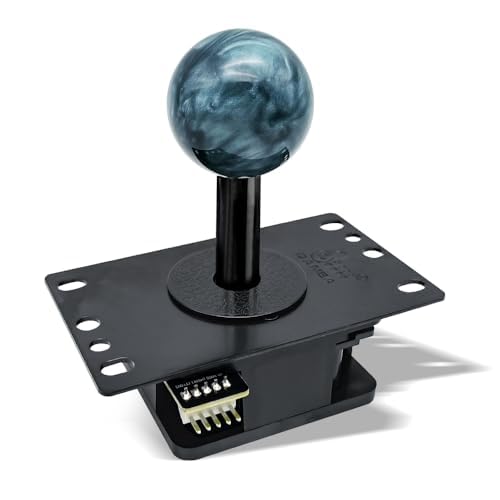
Figure 5.1 : The Qanba Gravity JOV8S joystick, ready for use in an arcade setup.
6. Entretien
Regular maintenance helps ensure the longevity and optimal performance of your Qanba Gravity JOV8S joystick.
- Nettoyage: Use a soft, dry cloth to wipe down the joystick lever and ball top. Avoid abrasive cleaners or solvents.
- Protection contre la poussière: Keep the joystick covered when not in use to prevent dust and debris from entering the mechanism.
- Inspection: Periodically inspect the mounting screws and wiring connections to ensure they remain secure.
- Lubrification: The mechanical switches are self-contained and generally do not require lubrication. If the shaft movement feels stiff, a small amount of silicone-based lubricant can be applied to the pivot point, avoiding contact with the switches.
7. Dépannage
If you encounter issues with your Qanba Gravity JOV8S joystick, refer to the following troubleshooting steps:
| Problème | Cause possible | Solution |
|---|---|---|
| Le joystick ne répond pas. | Loose 5-pin cable connection | Ensure the 5-pin cable is securely connected to both the joystick and the PCB. |
| Incorrect inputs / Missed inputs | Incorrect restrictor gate installation Câblage défectueux Joystick not properly mounted | Verify the restrictor gate is correctly seated. Check all wiring for damage or loose connections. Ensure the joystick mounting plate is securely fastened. |
| Joystick feels too loose or too stiff | Incorrect tension spring installed | Refer to Section 4.5 to change the tension spring to your preferred resistance. |
| Grinding noise or rough movement | Dust/debris in mechanism Manque de lubrification | Clean the joystick mechanism. Apply a small amount of silicone-based lubricant to the pivot point if necessary. |
8. Spécifications
Detailed technical specifications for the Qanba Gravity JOV8S Mechanical Shafts Arcade Joystick:
| Fonctionnalité | Spécification |
|---|---|
| Modèle | Gravity JOV8S |
| Fabricant | Qanba |
| Type de commutateur | Custom Omron Grey Mechanical Switch (High Elasticity) |
| Changer de vie | 70,000,000 opérations |
| Type de connecteur | 5 broches |
| Taille du haut de la balle | 35 mm |
| Restrictor Gates Included | Square, Octagonal, Circular |
| Dimensions du produit | 5.7 x 3.8 x 2.95 pouces |
| Poids de l'article | 13.1 onces |

Figure 8.1 : A comparison table detailing features across different Qanba Gravity joystick models, including the JOV8S.
9. Garantie et assistance
Qanba products are designed for durability and performance. For specific warranty information regarding your Qanba Gravity JOV8S joystick, please refer to the warranty card included with your purchase or visit the official Qanba website. For technical support, troubleshooting assistance, or inquiries about replacement parts, please contact Qanba customer service through their official channels.
Fabricant: Qanba
Website: www.qanba.com (Veuillez consulter les coordonnées des contacts d'assistance régionale)
Ask a question about this manual
Ask about setup, troubleshooting, compatibility, parts, safety, or missing instructions. Manuals+ will review the question and use this page’s manual context to help answer it.