
1. Introduction
This manual provides detailed instructions for the assembly, installation, operation, and maintenance of your AMANSON H07 ATX Mid Tower PC Case. Please read this manual thoroughly before beginning installation to ensure proper setup and safe operation. Keep this manual for future reference.

Figure 1.1: AMANSON H07 ATX Mid Tower PC Case with illuminated internal components.
2. Consignes de sécurité
- Always disconnect the power supply from the wall outlet before performing any installation or maintenance inside the PC case.
- Manipulez tous les composants avec précaution afin d'éviter tout dommage.
- Portez un bracelet antistatique pour éviter les dommages causés par les décharges électrostatiques (ESD) aux composants électroniques sensibles.
- Gardez les petites pièces et les matériaux d’emballage hors de portée des enfants.
- Assurez une ventilation adéquate autour du boîtier du PC pour éviter toute surchauffe.
3. Contenu du colis
Vérifiez que tous les éléments sont présents dans le colis :
- AMANSON H07 ATX Mid Tower PC Case
- Boîte d'accessoires (vis, entretoises, serre-câbles, etc.)
- Manuel de l'utilisateur (ce document)
4. Composant terminéview
The AMANSON H07 PC case features a panoramic design with tempered glass panels for full visibility of your internal components. It supports various motherboard sizes and extensive cooling configurations.

Figure 4.1: Top I/O Panel with power button, USB 3.0, USB 2.0, and audio ports.
Le panneau d'E/S supérieur comprend :
- Bouton d'alimentation
- Bouton de réinitialisation
- 2 ports USB 2.0
- 1 port USB 3.0
- Prises d'entrée/sortie audio
5. Configuration et installation
5.1. Préparation du dossier
The AMANSON H07 features tool-less hinged tempered glass side panels for easy access. Gently open the side panel by pulling it from the rear edge. The panels can also be removed by lifting them off their hinges for full access during installation.

Figure 5.1: Hinged tempered glass side panel for easy access.
5.2. Installation de la carte mère
The H07 supports E-ATX, ATX, Micro-ATX, and ITX motherboards. Install the necessary standoffs for your motherboard form factor. Carefully align your motherboard with the standoffs and I/O shield, then secure it with screws.
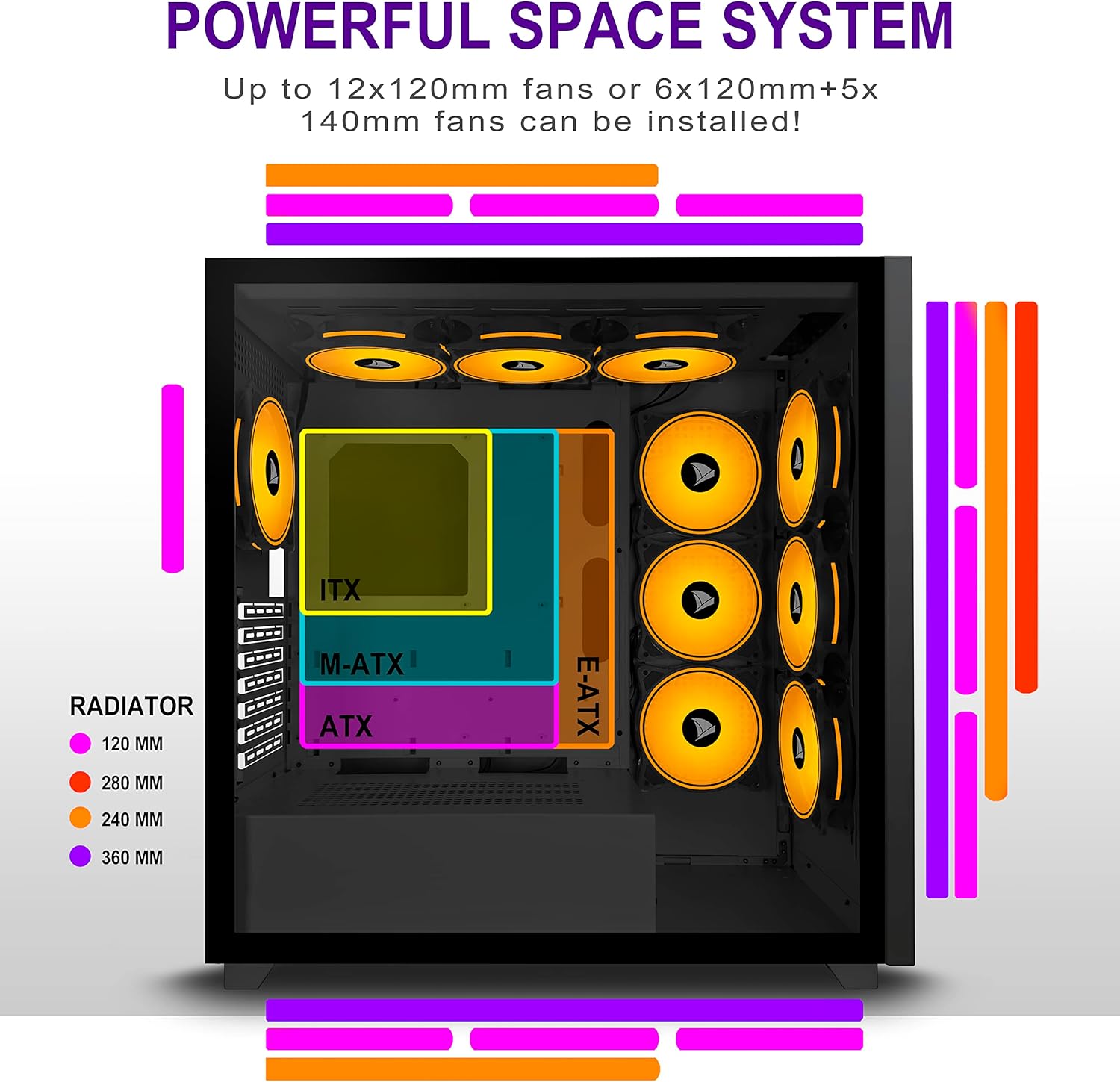
Figure 5.2: Motherboard and cooling component placement options.
5.3. Installation de l'alimentation
Install your power supply unit (PSU) into the dedicated compartment at the bottom rear of the case. Secure it with screws from the rear of the case.
5.4. Installation du périphérique de stockage
The case provides multiple mounting points for storage devices. Install your 3.5" HDDs and 2.5" SSDs into the designated trays and mounting locations. Refer to the case diagram for specific locations.

Figure 5.3: Storage drive mounting options for HDDs and SSDs.
5.5. Installation de la carte d'extension (GPU)
Remove the necessary PCI-E slot covers from the rear of the case. Insert your graphics card or other expansion cards into the motherboard's PCI-E slots and secure them with screws.
5.6. Gestion des câbles
Utilize the cable routing cutouts and tie-down points behind the motherboard tray to manage cables. This improves airflow and maintains a clean aesthetic.
6. Mode d'emploi
6.1. Mise sous/hors tension
Press the power button located on the top I/O panel to turn on your PC. To shut down, use the operating system's shutdown function or press and hold the power button for several seconds.
6.2. Using Front I/O Ports
Connect USB devices to the USB 2.0 or USB 3.0 ports. Use the audio jacks for headphones, microphones, or speakers.
7. Entretien
7.1. Nettoyage
Nettoyez régulièrement l'extérieur du boîtier avec un chiffon doux et sec.amp cloth. For internal cleaning, use compressed air to remove dust from fans and components. Ensure the PC is powered off and unplugged before cleaning.
7.2. Filtres à poussière
The AMANSON H07 may include removable dust filters. Clean these filters periodically to maintain optimal airflow and cooling performance.
8. Dépannage
- L'ordinateur ne s'allume pas : Check all power connections, including the PSU to the wall, the PSU to the motherboard, and the front panel power switch cable to the motherboard.
- Problèmes de surchauffe : Ensure all fans are properly installed and functioning. Verify that dust filters are clean and not obstructing airflow. Check thermal paste application on CPU cooler.
- Ports USB non fonctionnels : Confirm that the front panel USB cables are correctly connected to the motherboard headers.
- Audio jacks not working: Verify that the front panel audio cable is correctly connected to the motherboard's audio header.
9. Spécifications
Below are the technical specifications for the AMANSON H07 PC Case:
| Fonctionnalité | Détail |
|---|---|
| Modèle | H07 |
| Type de cas | Mid Tower |
| Compatibilité de la carte mère | E-ATX, ATX, Micro ATX, ITX |
| Matériel | Verre trempé |
| Dimensions du produit (L x l x H) | 19.69 x 13.78 x 19.69 pouces (500 x 350 x 500 mm) |
| Poids de l'article | 24.2 livres |
| Nombre de ports USB 2.0 | 2 |
| Nombre de ports USB 3.0 | 1 |
| Nombre d'emplacements d'extension | 8 |
| Méthode de refroidissement | Air |
| Type de montage de l'alimentation | Montage par le bas |

Figure 9.1: AMANSON H07 PC Case dimensions (520mm height, 510mm length, 250mm width).
10. Informations sur la garantie
Please refer to the product packaging or the official AMANSON webConsultez le site pour connaître les conditions générales de garantie. Conservez votre preuve d'achat pour toute réclamation au titre de la garantie.
11. Assistance
For technical assistance or customer support, please visit the official AMANSON webConsultez leur site web ou contactez leur service client. Les coordonnées se trouvent généralement sur l'emballage du produit ou sur le site de la marque. website.