1. Introduction
This user manual provides comprehensive instructions for the installation, operation, and maintenance of the Axis Communications AXIS Q6225-LE PTZ Camera. Please read this manual thoroughly before using the product to ensure proper functionality and safety. This camera is designed for robust outdoor surveillance in challenging conditions.
2. Consignes de sécurité
Respectez les consignes de sécurité suivantes afin d'éviter d'endommager le produit ou de blesser le personnel :
- Installation: Installation must be performed by qualified personnel in accordance with all local and national electrical and building codes.
- Alimentation: Use only the specified power supply (60 watts) for this device. Ensure the power source is stable and meets the camera's requirements.
- Environnement: The camera is designed for outdoor use. However, avoid exposing it to extreme conditions beyond its specified operating range.
- Nettoyage: Débranchez l'appareil avant de le nettoyer. Utilisez un chiffon doux et sec. N'utilisez pas de nettoyants liquides ni en aérosol.
- Modifications: Do not attempt to modify or disassemble the camera. This may void the warranty and pose safety risks.
3. Contenu du colis
Vérifiez que tous les éléments sont présents dans le colis :
- Caméra PTZ AXIS Q6225-LE
- Guide d'installation
- Support de montage et matériel
- Network Cable Connector
- CD de documentation et de logiciel (le cas échéant)
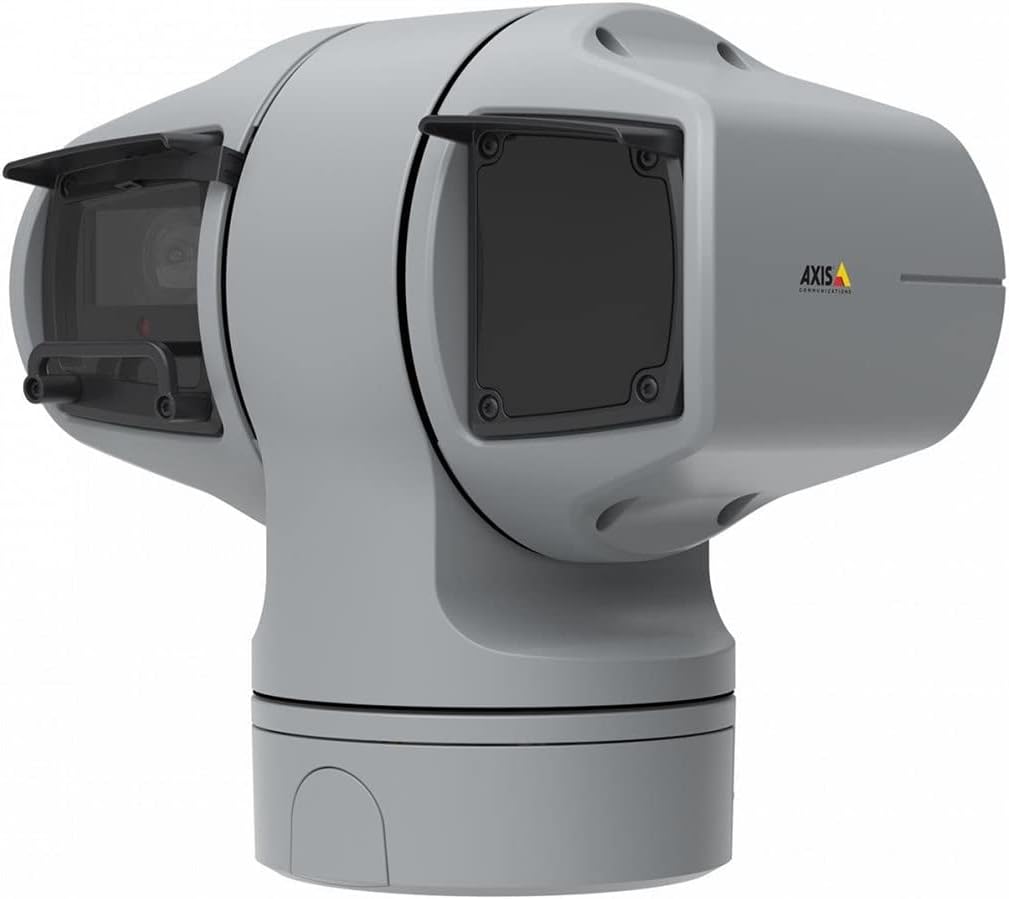
Figure 1 : AXIS Q6225-LE PTZ Camera. This image displays the grey-colored PTZ camera unit, highlighting its robust housing and integrated lens system, designed for outdoor surveillance.
4. Configuration et installation
4.1 Montage de la caméra
The AXIS Q6225-LE is designed for wall mount installation. Ensure the mounting surface is strong enough to support the camera's weight and withstand environmental conditions.
- Choisissez un emplacement de montage approprié qui offre le champ souhaité de view et est accessible en cas de raccordement à l'électricité et au réseau.
- Use the provided mounting template to mark drill holes on the wall.
- Drill pilot holes and secure the mounting bracket using appropriate screws and anchors.
- Fixez la caméra au support de montage en vous assurant qu'elle est bien verrouillée.
4.2 Alimentation et connexion réseau
Connect the camera to power and network as follows:
- Pouvoir: Connect the power cable to a 60-watt power source. Ensure the connection is secure and weatherproof.
- Réseau: Connect an Ethernet cable from your network switch or router to the camera's network port. The camera supports Wi-Fi for wireless communication. Refer to the network configuration section for wireless setup.
4.3 Configuration initiale
Après l'installation et la connexion physiques, accédez aux web interface pour la configuration initiale :
- Ouvrir un web browser on a computer connected to the same network as the camera.
- Enter the camera's IP address in the browser's address bar. If the IP address is unknown, use the AXIS IP Utility tool to discover it.
- Follow the on-screen prompts to set up a new password for the administrator account.
- Configure basic network settings, date/time, and video stream settings.
5. Utilisation de l'appareil photo
5.1 Commande panoramique, d'inclinaison et de zoom (PTZ)
The AXIS Q6225-LE camera features full PTZ capabilities, allowing remote adjustment of its viewing angle and zoom level. Control is typically performed via the camera's web interface ou logiciel de gestion vidéo (VMS) compatible.
- Casserole: Rotate the camera horizontally to cover a wider area.
- Inclinaison: Adjust the camera vertically to view objects at different heights.
- Zoom optique : Use the optical zoom feature to magnify distant objects without loss of image quality.
5.2 Détection de mouvement et alertes
The camera supports motion-only alerts. Configure motion detection zones and sensitivity settings in the web interface to trigger recordings or notifications when movement is detected.
5.3 Éclairage infrarouge (IR)
Equipped with infrared light sources, the camera provides clear video surveillance in low-light or complete darkness. IR illumination activates automatically or can be manually controlled.
6. Entretien
6.1 Nettoyage
Regular cleaning of the camera lens and housing is recommended to ensure optimal performance, especially in dusty or harsh environments.
- Gently wipe the lens with a soft, lint-free cloth. For stubborn dirt, use a lens cleaning solution specifically designed for optical surfaces.
- Nettoyez le boîtier de la caméra avec de l'eau.amp Chiffon. Évitez les nettoyants abrasifs ou les solvants.
6.2 mises à jour du micrologiciel
Vérifiez périodiquement les communications Axis website for firmware updates. Keeping the camera's firmware up-to-date ensures access to the latest features, security enhancements, and bug fixes.
7. Dépannage
Cette section aborde les problèmes courants que vous pourriez rencontrer avec votre appareil photo AXIS Q6225-LE.
| Problème | Cause possible | Solution |
|---|---|---|
| Pas de flux vidéo | Power disconnected, network issue, incorrect IP address. | Check power connection. Verify network cable or Wi-Fi connection. Confirm camera's IP address. |
| Mauvaise qualité d'image | Dirty lens, improper focus, low light conditions. | Clean the lens. Adjust focus via web interface. Ensure adequate lighting or verify IR functionality. |
| Les commandes PTZ ne répondent pas. | Network latency, software glitch, motor issue. | Check network connection. Restart the camera. If problem persists, contact support. |
8. Spécifications
| Fonctionnalité | Détail |
|---|---|
| Numéro de modèle | 02316-002 |
| Marque | Axis Communications |
| Type de montage | Support mural |
| Couleur | Blanc |
| Matériel | Métal |
| Quoitage | 60 watts |
| Technologie de connectivité | Sans fil, Wi-Fi |
| Utilisation intérieure/extérieure | De plein air |
| Méthode de contrôle | Télécommande |
| Technologie de capteur photo | CMOS |
| Format de capture vidéo | MPEG-4 |
| Type de source lumineuse | Infrarouge |
| Type d'alerte | Mouvement seulement |
| Type de zoom | Zoom optique |
| Poids de l'article | 0.01 kilogrammes (0.352 onces) |
| Composants inclus | Caméra/Accessoires |
9. Garantie et assistance
Pour obtenir des informations sur la garantie et l'assistance technique, veuillez consulter le site officiel d'Axis Communications. webConsultez notre site web ou contactez votre revendeur agréé. Conservez votre reçu d'achat comme preuve d'achat.
Ressources en ligne : www.axis.com