
Introduction
This manual provides detailed instructions for the proper use and care of your Casio Edifice EFB-680D-1AVUDF chronograph watch. Please read this manual thoroughly to ensure optimal performance and longevity of your timepiece. Keep this manual for future reference.
Installation
1. Réglage de l'heure
Pour régler l'heure sur votre montre :
- Pull the crown out to the second click position. The second hand will move to the 12 o'clock position.
- Rotate the crown to set the hour and minute hands to the desired time. Ensure the AM/PM setting is correct if your watch has a 24-hour indicator.
- Repoussez la couronne en position normale. La trotteuse reprendra son mouvement.
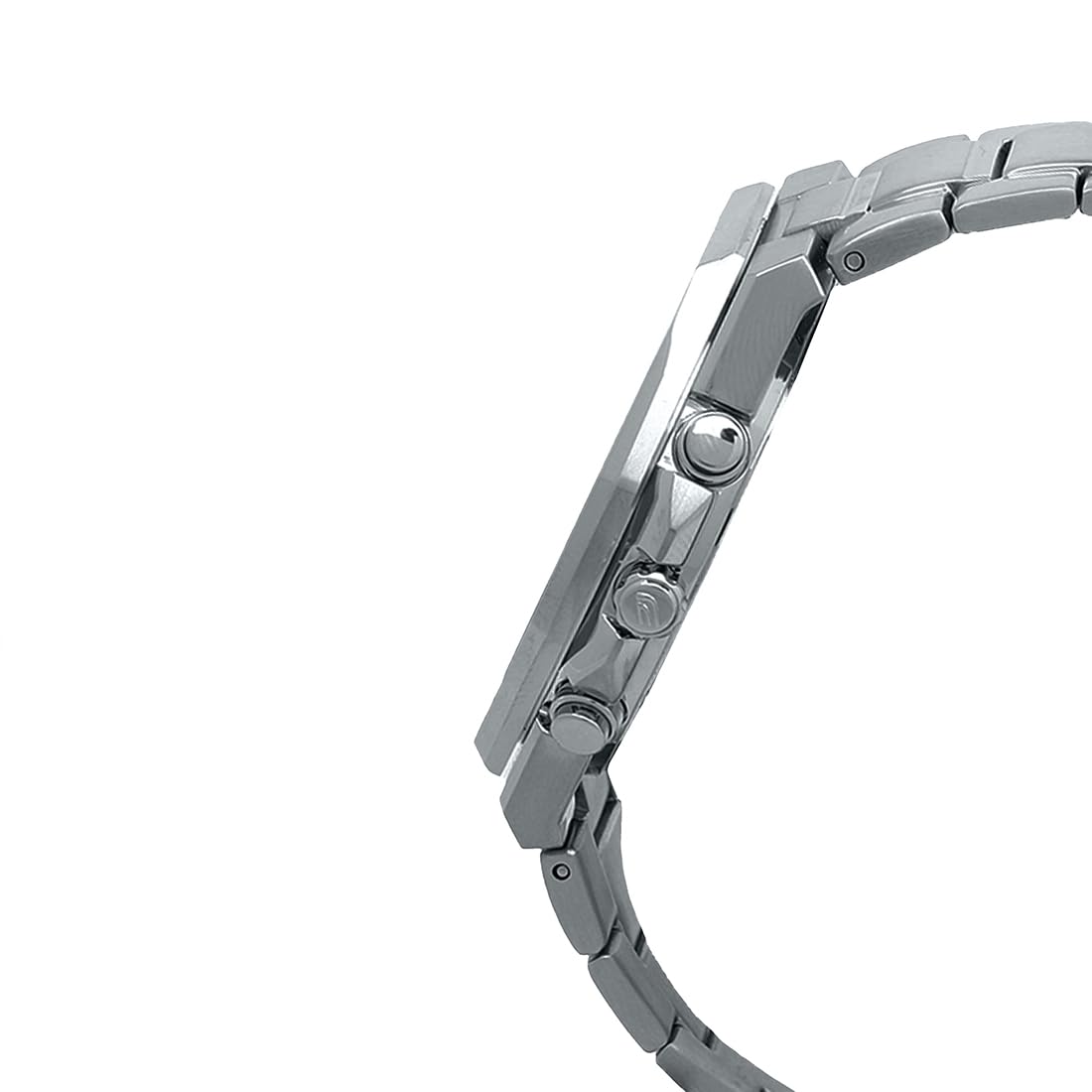
Image : Côté view of the watch, illustrating the crown and pushers used for time setting and chronograph operation.
2. Réglage de la date
Pour régler la date:
- Tirez la couronne jusqu'à la première position de clic.
- Rotate the crown to adjust the date. Avoid setting the date between 9:00 PM and 1:00 AM, as this may interfere with the automatic date change mechanism.
- Repoussez la couronne en position normale.
3. Réglage du bracelet
The stainless steel band can be adjusted by adding or removing links to achieve a comfortable fit. This procedure typically requires specialized tools and is best performed by a qualified jeweler or watch technician to prevent damage to the band or clasp.

Image: The watch displayed on a wrist, demonstrating how the band fits. Proper band adjustment ensures comfort and security.
Utilisation du chronographe
Your Casio Edifice EFB-680D-1AVUDF features a 1/10-second chronograph for measuring elapsed time.
- Démarrer une mesure : Press button A (top right pusher) to start the chronograph. The chronograph second hand and 1/10-second hand will begin moving.
- Stopping a Measurement: Press button A again to stop the chronograph. The elapsed time will be displayed.
- Réinitialisation du chronographe : After stopping, press button B (bottom right pusher) to reset the chronograph hands to the 12 o'clock position.
- Mesure du temps intermédiaire :
- Appuyez sur le bouton A pour démarrer.
- Press button B to record a split time. The chronograph hands will stop to indicate the split time, while internal timing continues.
- Press button B again to release the split time and display the current elapsed time.
- Press button A to stop the measurement.
- Appuyez sur le bouton B pour réinitialiser.
The chronograph has a measuring capacity of 59 minutes, 59.9 seconds.
Entretien et soins
1. Résistance à l'eau
This watch is water-resistant up to 100 meters (10 ATM). This means it is suitable for everyday use, swimming, and snorkeling. Ne pas actionner la couronne ou les poussoirs lorsque la montre est mouillée ou immergée dans l'eau. Évitez d'exposer la montre à l'eau chaude ou à la vapeur, car cela pourrait compromettre l'étanchéité.
2. Nettoyage
Wipe the watch case and band periodically with a soft, dry cloth to remove dirt and moisture. For stainless steel bands, a soft brush and mild soapy water can be used, followed by thorough rinsing and drying. Ensure the crown is pushed in before cleaning with water.
3. Remplacement de la batterie
The watch is powered by an SR920SW battery with an approximate life of 3 years. When the battery runs low, the second hand may start moving at two-second intervals to indicate a low battery. Battery replacement should be performed by a qualified watch technician to ensure proper sealing and function.
4. Sapphire Crystal Care
The watch features a sapphire crystal with a glare-resistant coating, known for its high scratch resistance. While highly durable, it is not entirely scratch-proof. Avoid direct impact or contact with extremely hard materials to prevent damage.
Dépannage
| Problème | Cause possible | Solution |
|---|---|---|
| La montre s'arrête ou fonctionne de manière imprécise. | Batterie faible. | Faites remplacer la batterie dans un centre de service agréé. |
| Chronograph hands do not reset to 12 o'clock. | Désalignement après un impact ou un changement de batterie. | Refer to the Casio official website for specific chronograph hand alignment procedures for your model, or consult a service center. |
| Infiltration d'eau. | Couronne/poussoirs actionnés sous l'eau ou joints d'étanchéité endommagés. | Apportez immédiatement la montre à un centre de service agréé pour inspection et réparation. N'essayez pas de la sécher vous-même. |
Caractéristiques
- Modèle: EFB-680D-1AVUDF
- Matériau du boîtier/de la lunette : Acier inoxydable
- Matériau du bracelet : Acier inoxydable
- Cristal: Sapphire crystal with glare-resistant coating
- Résistance à l'eau : 100 mètres (10 ATM)
- Mouvement: Quartz
- Précision: ± 20 secondes par mois
- Type de batterie : SR920SW
- Env. Autonomie de la batterie : 3 ans
- Chronographe: 1/10-second stopwatch, Measuring capacity: 59'59.9'', Measuring modes: Elapsed time, split time, 1st-2nd place times
- Dimensions (H x L x P) : Approximately 46.0 x 45.8 x 10.5 mm (Case diameter 45.8mm, Case thickness 10.5mm)
- Poids: Environ 151 g
- Type de fermoir : One-touch 3-fold Clasp, Double Locking Foldover Clasp

Image : Un côté profile view of the watch, highlighting its slim design and case construction.

Image : Arrière view of the watch, showing the screw lock back and engraved model information.
Informations sur la garantie
Your Casio Edifice EFB-680D-1AVUDF watch comes with a manufacturer's warranty. For specific details regarding the warranty period, coverage, and terms, please refer to the warranty card included with your purchase or visit the official Casio website. Extended warranty options may also be available from authorized retailers.
Assistance clientèle
For further assistance, technical support, or service inquiries, please contact Casio customer support. You can find contact information and frequently asked questions on the official Casio website:
Fabricant: Casio India Co Pvt Ltd
Adresse: A-41, 1st Floor, MCIE, Mathura Road, New Delhi-110044, India
Casio officiel Website: www.casio.com/in/