
1. Introduction
Merci pour votre achatasing the VSYSTO S2D+TPMS Motorcycle Dash Cam. This manual provides detailed instructions for the installation, operation, and maintenance of your device. Please read this manual thoroughly before use to ensure proper functionality and safety. Keep this manual for future reference.
Précautions de sécurité
- Ensure all components are securely installed to prevent detachment during riding.
- Évitez d'obstruer votre view or interfering with motorcycle controls during installation.
- Ne tentez pas de démonter ou de modifier l'appareil, car cela pourrait annuler la garantie et causer des dommages.
- Operate the device only when it is safe to do so and does not distract you from riding.
- Use only the provided accessories and cables to prevent damage.
2. Contenu du colis
Vérifiez que tous les éléments énumérés ci-dessous sont inclus dans votre colis :

The VSYSTO S2D+TPMS Motorcycle Dash Cam system, featuring the main display unit, front and rear cameras, a wired remote control, and tire pressure monitoring sensors.
- Main Unit (3-inch LCD Monitor) x 1
- Front Camera x 1 (with mounting screws/adhesive)
- Rear Camera x 1 (with mounting screws/adhesive)
- Module GPS x 1
- TPMS Sensors x 2
- Câble d'alimentation x 1
- 2 câbles d'extension pour caméra
- Support pour unité principale x 1
- Câble de test USB x 1
- Attaches de câble x 8
- Manuel d'utilisation x 1
- Télécommande filaire x 1
3. Produit terminéview
Main Unit (Display)

A close-up of the dash cam's 3-inch IPS display, illustrating the comprehensive information available at a glance, including current speed, trip distance, date and time, battery voltage, and real-time tire pressure data from the TPMS sensors.
The main unit features a 3.0-inch IPS LCD monitor for real-time viewing and menu navigation. It displays various information such as speed, trip data, date, time, battery voltage, and TPMS data.
Télécommande filaire

The wired remote control, ergonomically designed for handlebar mounting, allows for easy operation of the dash cam's functions without taking hands off the grips. It features dedicated buttons for switching camera views, accessing menus, and activating the stopwatch function.
The remote control allows easy access to key functions:
- Up Key (Short Press): Switches between front and rear camera views.
- Up Key (Long Press): Switches to full-screen front camera view.
- OK Key (Long Press): Enters/confirms menu settings.
- Down Key (Short Press): Switches to rear camera backup assist mode with guide lines.
- Down Key (Long Press): Switches to driving support interface (date/time, speed, short-term memory, GPS info, battery voltage, TPMS display).
- Voyants lumineux : Show recording status, GPS status, etc.
Caméras
The system includes front and rear cameras, both featuring SONY IMX307 sensors with STARVIS technology and 150° wide-angle lenses for clear Full HD 1080P recording.
Module GPS

The external GPS module provides accurate speed and location data, which is recorded along with the video footage, offering comprehensive trip information.
The GPS module records your vehicle's speed and location data, which can be viewed with the recorded video files.
Capteurs TPMS
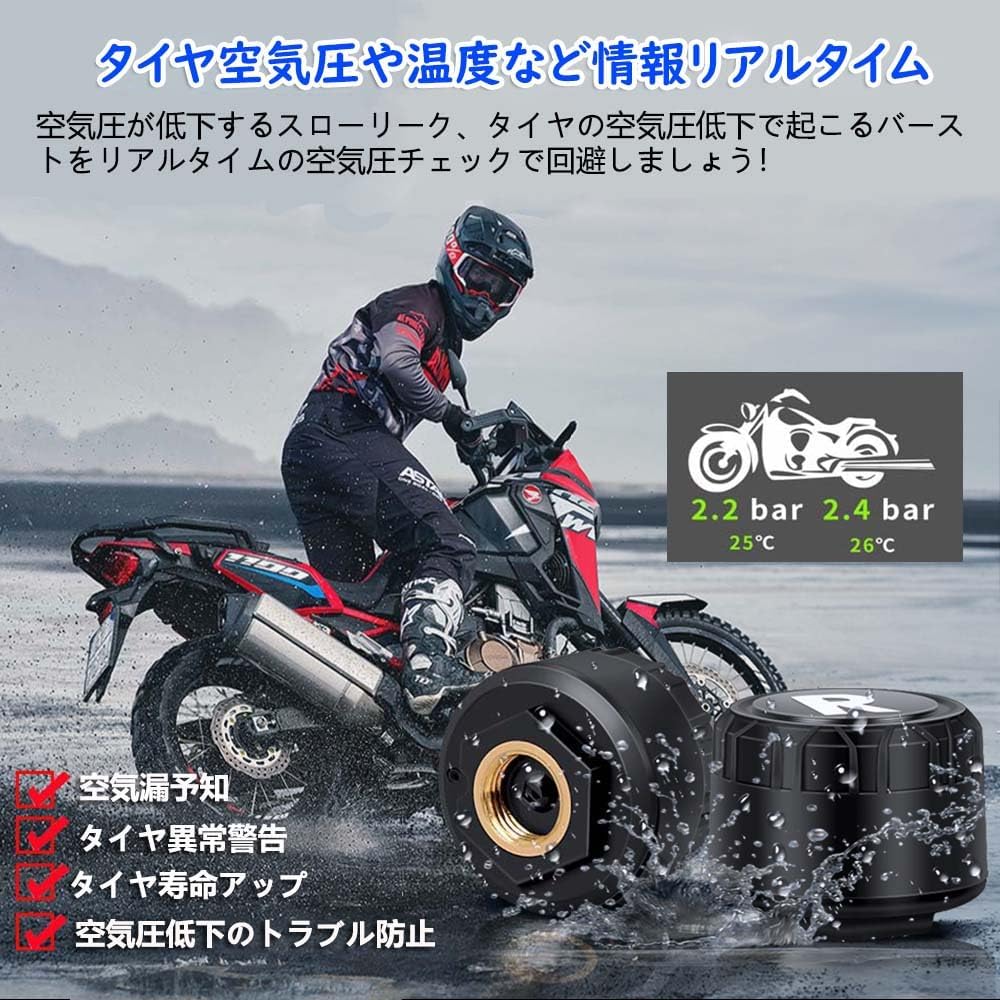
The external TPMS sensors are easily installed on the tire valves, providing real-time tire pressure and temperature data to the dash cam display, enhancing riding safety.
Two high-quality, high-precision TPMS sensors monitor front and rear tire pressure and temperature in real-time.
4. Configuration et installation
Follow these steps to properly install your VSYSTO S2D+TPMS Motorcycle Dash Cam.
4.1 Initial Power Test
Before permanent installation, it is recommended to perform a power test to ensure all components are working correctly.
- Connect the wired remote, cameras, and GPS module to their corresponding connectors on the main unit.
- Connect the main unit to a 5V/2A mobile battery or charger using the USB power cable.
- Once powered on, check if the display lights up and cameras show video feed.
- If the TPMS alarm sounds, install the tire pressure sensors on the front and rear tires. The alarm should stop once sensors are installed and detected.
This video provides an unboxing experience of the VSYSTO S2D+TPMS Motorcycle Dash Cam, detailing all included components and their initial connection for a power test.
A step-by-step guide on installing the TPMS tire pressure sensors and how the system alerts for low pressure, followed by instructions on adjusting alarm values in the settings.
4.2 Montage de l'unité principale
Mount the main unit securely on your motorcycle's dashboard or handlebars using the provided mount. Ensure it does not obstruct your view ou interférer avec les commandes.
4.3 Installation des caméras
Install the front and rear cameras in suitable positions, ensuring a clear view of the road. Use the provided adhesive pads or screws for secure attachment.
4.4 Connecting the Wired Remote Control
Mount the wired remote control on your handlebars for easy access. Connect its cable to the corresponding port on the main unit.
4.5 Installing TPMS Sensors
Screw the TPMS sensors onto the tire valves of your front and rear wheels. Ensure they are tightened securely to prevent air leakage.
4.6 Câblage et raccordement électrique
Connect the ACC power cable to your motorcycle's ACC power source (switched power that turns on/off with the ignition). Ensure all cable connections are secure and waterproof. Route cables neatly to avoid interference with moving parts.
5. Mode d'emploi
5.1 Mise sous/hors tension
The dash cam is designed with engine linkage. It will automatically power on and begin recording when your motorcycle's engine starts, and power off when the engine is turned off.
5.2 Enregistrement
The device supports automatic loop recording. Once powered on, it will continuously record video. When the memory card is full, the oldest files sera automatiquement écrasé.
5.3 Utilisation de la télécommande filaire
A demonstration of the wired remote control's functions, showing how to switch between front and rear camera views, access different display modes (speed, date/time, GPS info, battery voltage, TPMS), and activate the backup assist mode.
Use the Up and Down keys on the remote to navigate through different display modes and camera views as described in the Product Overview section.
5.4 Smartphone App Usage (Wi-Fi)

The integrated Wi-Fi module allows seamless connection to the dedicated VSYSTO smartphone app, enabling live view, video playback, file management, and settings adjustments directly from your mobile device.
This video guides users through connecting the dash cam to the VSYSTO smartphone app via Wi-Fi, demonstrating how to preview vivre footage, manage recorded files (download/delete), and adjust settings.
- Téléchargez gratuitement
Ask a question about this manual
Ask about setup, troubleshooting, compatibility, parts, safety, or missing instructions. Manuals+ will review the question and use this page’s manual context to help answer it.