
Introduction
This manual provides instructions for the safe and efficient operation of your WUIPET Elevated Automatic Smart Pet Feeder. Please read this manual thoroughly before use and retain it for future reference.
Consignes de sécurité
- Pour usage intérieur uniquement.
- Ne plongez pas l’unité principale dans l’eau.
- Utilisez uniquement des croquettes pour animaux.
- Tenir hors de portée des enfants et des animaux domestiques lorsqu'il n'est pas utilisé ou pendant le montage.
- Assurez-vous que l’adaptateur secteur est correctement connecté.
- Do not use damaged power cords or adapters.
- Éliminez les piles conformément aux réglementations locales.
- Clean the feeder regularly as per maintenance instructions.
Contenu du colis
- WUIPET Automatic Pet Feeder Main Unit
- Food Storage Container Lid
- Bol alimentaire en acier inoxydable
- Support pour bol de nourriture
- Feeder Raisers (1-inch and 2-inch)
- USB-C Power Adapter and Cable
- Manuel de l'utilisateur (ce document)
Produit terminéview
The WUIPET Elevated Automatic Smart Pet Feeder is designed to provide scheduled meals for your cats and dogs, offering convenience and promoting healthy eating habits. It features WiFi connectivity for app control, adjustable height, voice recording, and dual power options.
Caractéristiques principales
- Contrôle d'APP: Manage feeding schedules and portions remotely via the "Smart Life" app (2.4GHz WiFi required).
- Hauteur réglable: Includes raisers to elevate the food bowl, reducing neck strain and aiding digestion.
- Horaires flexibles : Program up to 10 meals per day with up to 12 portions per meal (1/12 cup per portion).
- Enregistreur vocal : Enregistrez un message de 10 secondes pour appeler votre animal de compagnie à l'heure des repas.
- Alimentation double : Operates with USB-C adapter or 3 D-cell batteries (not included) for uninterrupted feeding.
- Grande capacité : 4-liter (17-cup) food storage suitable for extended periods.
Installation
1. Déballage et montage
- Retirez tous les composants de l’emballage.
- Placez le distributeur principal sur une surface plane et stable.
- Attach the food bowl holder to the main unit.
- Insert the stainless steel food bowl into the holder.
- If desired, attach the 1-inch or 2-inch feeder raisers to the bottom of the food bowl holder to adjust the height.
- Open the lid of the food storage container and fill it with dry pet food. Ensure the lid is securely closed.
2. Alimentation du distributeur
Le distributeur peut être alimenté de deux manières :
USB-C Power Adapter (Primary)
- Connect the USB-C cable to the port on the back of the feeder.
- Branchez l'adaptateur dans une prise murale standard.
- The feeder will power on.
D-Cell Batteries (Backup)
- Open the battery compartment on the bottom of the feeder.
- Insert 3 D-cell alkaline batteries (not included), ensuring correct polarity.
- Fermez le compartiment à piles.
- Note: Batteries provide backup power in case of an outage. A built-in coin battery retains settings.
3. Installation de l'application et connexion Wi-Fi
- Téléchargez l'application « Smart Life » depuis l'App Store (iOS) ou le Google Play Store (Android).
- Inscrivez-vous ou connectez-vous à votre compte Smart Life.
- Ensure your smartphone is connected to a 2.4GHz WiFi network. (Note: 5GHz networks are not supported).
- On the feeder, press and hold the WiFi reset button (usually located near the power port) until the indicator light flashes rapidly.
- In the Smart Life app, tap "+" to add a device. Select "Small Home Appliance" > "Pet Feeder (Wi-Fi)".
- Follow the on-screen instructions to connect the feeder to your WiFi network.
- Once connected, the WiFi indicator light on the feeder will become solid.

Image: The Smart Life app allows convenient remote control and scheduling of your pet's meals.
Mode d'emploi
1. Setting Up Feeding Schedule (via App)
- Open the "Smart Life" app and select your WUIPET feeder.
- Accédez à la section « Programme » ou « Plan d’alimentation ».
- Tap "Add Meal" to set a new feeding time.
- Select the desired time for the meal.
- Choose the number of portions (1/12 cup per portion, up to 12 portions).
- Save the schedule. You can set up to 10 meals per day.

Image: The app enables you to manage your pet's feeding schedule from anywhere, ensuring timely meals.
2. Alimentation manuelle
Pour distribuer les aliments manuellement :
- Via l'application : In the Smart Life app, select your feeder and tap the "Feed Now" or "Manual Feed" button. You can usually select the number of portions to dispense.
- Via le bouton Feeder : Press the manual feed button on the feeder (often labeled with a food bowl icon) to dispense one portion. Press multiple times for more portions.
3. Enregistrement d'un message vocal
- Via l'application : In the Smart Life app, go to the "Voice" or "Record" section.
- Tap "Record" and speak your message (up to 10 seconds).
- Save the recording. This message will play before each scheduled meal.
- Via le bouton Feeder : Some models may have a dedicated record button. Press and hold it, speak your message, then release. Refer to the specific button layout on your device.

Image: Record a personalized 10-second message to call your pet for meals.
4. Adjusting Feeder Height
The feeder comes with two sets of raisers (1-inch and 2-inch).
- Detach the food bowl holder from the main unit.
- Attach the desired raisers to the bottom of the food bowl holder.
- Reattach the food bowl holder with raisers to the main unit.
- This elevation helps reduce strain on your pet's neck and joints.

Image: The elevated design helps reduce strain on your pet's neck and promotes healthy digestion.
Entretien
1. Nettoyage du distributeur
Regular cleaning is essential for your pet's health.
- Disconnect the power adapter and remove any backup batteries.
- Remove the food storage container lid, food storage container, food bowl, and food bowl holder.
- The stainless steel food bowl, food bowl holder, and food storage container are washable. Hand wash these components with mild soap and water.
- Rincer abondamment et sécher complètement avant le remontage.
- Ne pas laver l'unité principale avec de l'eau. Essuyez l'extérieur de l'unité principale avec le produit adamp tissu.
- Assurez-vous que toutes les pièces soient parfaitement sèches avant de remonter le tout et de le remplir à nouveau d'aliments.
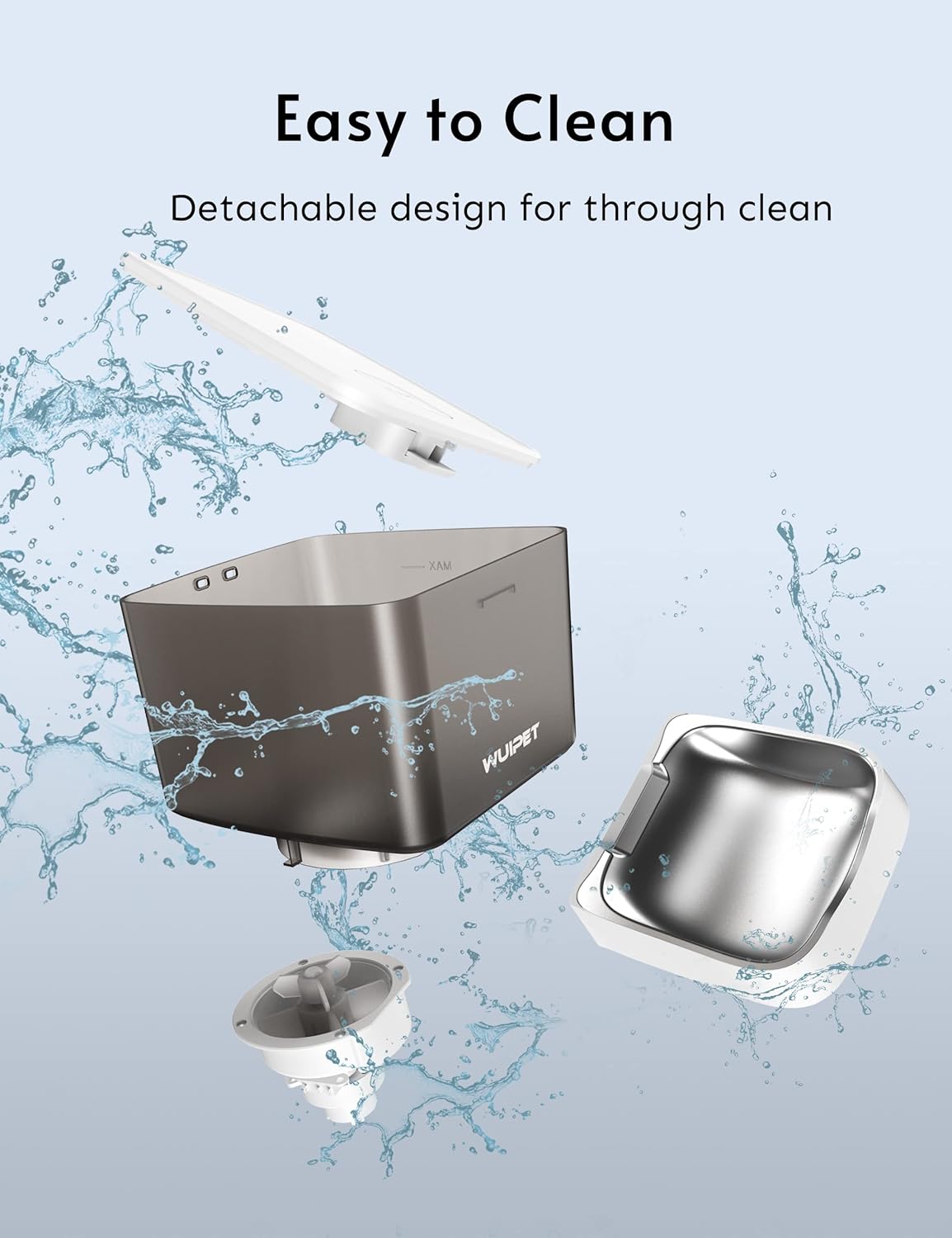
Image: The feeder features a detachable design for easy and thorough cleaning of food-contact parts.
2. Réapprovisionnement des aliments
Monitor the food level in the container. When low, open the lid and refill with dry pet food. Ensure the lid is securely closed to maintain food freshness.
3. Remplacement de la batterie
If using D-cell batteries for backup, replace them when the low battery indicator appears (if applicable) or approximately every 6-12 months, depending on usage.

Image: The feeder supports dual power supply with a USB-C adapter and D-cell batteries (not included) for continuous operation.
Dépannage
Distributeur de nourriture ne distribuant pas de nourriture :
- Vérifiez si le distributeur est alimenté et connecté à une source d'alimentation.
- Assurez-vous que le récipient alimentaire n'est pas vide.
- Verify that the food chute is not blocked by kibble.
- Check the app for any error messages or if the schedule is correctly set.
- Ensure the food size is appropriate for the feeder (typically 5-15mm dry kibble).
Problèmes de connexion Wi-Fi :
- Confirm your router is broadcasting a 2.4GHz WiFi signal.
- Ensure the feeder is within range of your WiFi router.
- Reset the feeder's WiFi by pressing the reset button until the indicator flashes rapidly, then re-pair via the app.
- Redémarrez votre routeur et essayez à nouveau de vous connecter.
L'enregistrement vocal ne fonctionne pas :
- Ensure the voice message was successfully recorded and saved in the app.
- Check the volume settings in the app.
- Verify that scheduled meals are active.
Feeder is offline in the app:
- Check the feeder's power supply.
- Vérifiez que votre réseau Wi-Fi domestique est actif et stable.
- If the feeder was moved, it might be out of WiFi range.
- Try restarting the feeder and your router.
Caractéristiques
| Fonctionnalité | Spécification |
|---|---|
| Numéro de modèle | DU4L-WC-01 |
| Capacité | 4 litre (environ 17 tasses) |
| Dimensions (L x l x H) | 19.05 x 17.53 x 28.7 cm |
| Poids | 2.18 kg |
| Matériel | ABS Plastic (main unit), Stainless Steel (food bowl) |
| Alimentation électrique | USB-C Adapter (included), 3 x D-cell batteries (not included) |
| Connectivité | 2.4GHz WiFi |
| Nombre maximal de repas par jour | 10 |
| Portions par repas | 1-12 (1/12 cup per portion) |
| Enregistrement vocal | Jusqu'à 10 secondes |
| Espèces ciblées | Chats, chiens |
Garantie et assistance
For warranty information and technical support, please refer to the contact details provided on the WUIPET official webConsultez le site ou contactez votre détaillant. Conservez votre reçu d'achat comme preuve d'achat.
Élimination
This product should not be disposed of with household waste. Please recycle it at an appropriate collection point for electrical and electronic equipment.