
1. Introduction
This manual provides essential instructions for the safe and efficient operation of your Rigol DHO1074 Digital Oscilloscope. The DHO1074 is a 4-channel, 70 MHz digital oscilloscope featuring a 12-bit resolution and a 2 GSa/s real-time sample rate, designed for precise signal analysis in various applications. Please read this manual thoroughly before using the device to ensure proper functionality and to prevent damage.
2. Consignes de sécurité
Respectez les consignes de sécurité suivantes afin d'éviter les blessures et les dommages à l'instrument :
- Use only the power cord specified for this instrument.
- Assurez-vous que l'instrument est correctement mis à la terre afin d'éviter tout risque d'électrocution.
- N’utilisez pas l’instrument dans des conditions humides ou détendues.amp conditions.
- Évitez d'opérer dans des atmosphères explosives.
- Do not remove the instrument cover. Refer servicing to qualified personnel.
- Use appropriate probes and accessories.
- Débranchez l’alimentation avant le nettoyage.
3. Contenu du colis
Vérifiez que tous les éléments énumérés ci-dessous sont inclus dans votre colis :
- Rigol DHO1074 Digital Oscilloscope (1 unit)
- Cordon d'alimentation (1 unité)
- Passive Probes (4 units, one for each channel)
- Câble USB (1 unité)
- Guide rapide (1 unité)
- Resource CD (1 unit)
4. Installation
4.1 Connexion de l'alimentation
- Ensure the oscilloscope's power switch is in the OFF position.
- Branchez le cordon d'alimentation fourni à l'entrée d'alimentation CA située sur le panneau arrière de l'oscilloscope.
- Branchez l'autre extrémité du cordon d'alimentation dans une prise de courant alternatif mise à la terre.
4.2 Connexion des sondes
- Connect the BNC connector of a passive probe to one of the input channels (CH1, CH2, CH3, or CH4) on the front panel.
- Attach the probe ground clip to a common ground point in your circuit.
- Connect the probe tip to the test point in your circuit.
- For accurate measurements, compensate the probe before use. Refer to the "Probe Compensation" section in the full user manual for detailed instructions.
4.3 Mise sous tension initiale
- Press the power switch on the front panel to turn on the oscilloscope.
- The instrument will perform a self-test and display the startup screen.
- Once the main interface appears, the oscilloscope is ready for use.
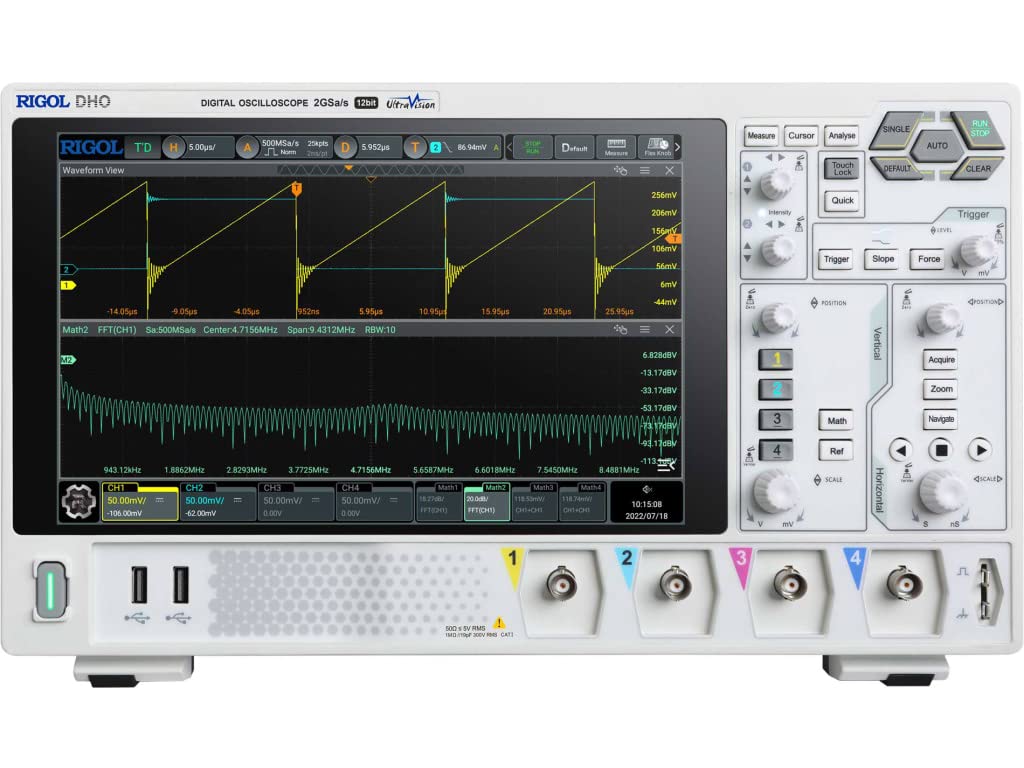
Figure 4.1 : Face avant view of the Rigol DHO1074 Digital Oscilloscope, showing the display, control panel, and input channels.
5. Utilisation de l'oscilloscope
The Rigol DHO1074 offers a user-friendly interface for capturing and analyzing waveforms. Key features include 4 analog channels, 70 MHz bandwidth, and a 12-bit vertical resolution for enhanced signal fidelity.
5.1 Acquisition de formes d'onde de base
- Mise sous tension : Ensure the oscilloscope is powered on as described in Section 4.3.
- Signal de connexion : Connect your signal source to an input channel using a compensated probe.
- Configuration automatique : Appuyez sur le AUTO button on the front panel. The oscilloscope will automatically adjust vertical, horizontal, and trigger settings to display a stable waveform.
- Réglages manuels :
- Utilisez le VERTICAL knobs (VOLTS/DIV) to adjust the vertical scale (voltage per division) for each channel.
- Utilisez le HORIZONTAL knob (SEC/DIV) to adjust the horizontal scale (time per division).
- Utilisez le DÉCLENCHEMENT controls to set the trigger level and mode for stable waveform capture.
5.2 fonctionnalités avancées
- Haute résolution: Benefit from the 12-bit vertical resolution, providing 16 times more quantization levels than standard 8-bit oscilloscopes, which improves measurement accuracy and reduces quantization noise.
- Deep Memory: The DHO1074 features a 50 Mpts maximum memory depth (expandable to 100 Mpts with option DHO1000-RLU-01), allowing for longer waveform captures at high samples tarifs.
- Serial Decoding: Standard serial decoding capabilities include SPI, I2C, RS232/UART, CAN, and LIN, simplifying the analysis of common serial bus communications.
- Fonctions de mesure : Access various automatic measurement functions (e.g., Vpp, Vrms, Frequency, Period) via the MESURE menu.
- Fonctions mathématiques : Utilize built-in math functions (e.g., Add, Subtract, Multiply, Divide, FFT) to perform waveform analysis.
6. Entretien
6.1 Nettoyage de l'appareil
- Débranchez toujours le cordon d'alimentation avant de nettoyer.
- Utilisez un chiffon doux dampened with a mild detergent solution to clean the exterior surfaces.
- Do not use abrasive cleaners or solvents that could damage the plastic parts.
- Évitez de vaporiser des liquides directement sur l'instrument.
6.2 Stockage
- Store the oscilloscope in a clean, dry environment, away from direct sunlight and extreme temperatures.
- Protégez l'écran des rayures.
6.3 Étalonnage
For optimal performance and measurement accuracy, periodic calibration by qualified service personnel is recommended. Refer to Rigol's official support channels for calibration services.
7. Dépannage
| Problème | Cause possible | Solution |
|---|---|---|
| Aucun courant ne s'allume. | Power cord not connected; power outlet faulty; instrument fuse blown. | Vérifiez le branchement du cordon d'alimentation ; testez la prise de courant ; contactez le service après-vente pour le remplacement du fusible. |
| Aucune forme d'onde affichée. | Probe not connected; signal source off; vertical/horizontal scale incorrect; trigger not set correctly. | Verify probe connection; check signal source; adjust VOLTS/DIV and SEC/DIV; adjust trigger level or use AUTO button. |
| Forme d'onde instable. | Trigger settings incorrect; noisy signal. | Adjust trigger mode, source, and level; ensure proper grounding of the probe. |
| Mesures incorrectes. | Probe compensation incorrect; wrong measurement settings. | Compensate probes; verify measurement parameters. |
If the problem persists after attempting these solutions, please contact Rigol customer support.
8. Spécifications
| Paramètre | Valeur |
|---|---|
| Modèle | DHO1074 |
| Bande passante | 70 MHz |
| Chaînes analogiques | 4 |
| Résolution verticale | 12 bits |
| Max Sample taux | 2 GSa/s (real-time) |
| Profondeur de la mémoire | 50 Mpts (100 Mpts with DHO1000-RLU-01 option) |
| Serial Decoding | SPI, I2C, RS232/UART, CAN, LIN |
| Dimensions du produit | 18 x 11 x 12 pouces |
| Poids de l'article | 12 livres |
| Fabricant | RIGOL TECHNOLOGIES USA INC |
9. Garantie et assistance
Rigol products are designed for reliability and performance. This instrument is covered by a standard manufacturer's warranty. For specific warranty terms and conditions, please refer to the warranty card included with your product or visit the official Rigol website.
For technical support, service, or inquiries regarding your Rigol DHO1074 Digital Oscilloscope, please contact Rigol Technologies USA Inc. customer service through their official website ou les coordonnées fournies dans la documentation de votre produit.
Des ressources en ligne et des documents supplémentaires peuvent être disponibles sur le Rigol website.