Introduction
This manual provides comprehensive instructions for the Thomson ROC4301 4-in-1 Web-Programmable Universal Remote Control. This device allows you to control up to four different infrared-controlled electronic devices, such as TVs, DVD players, Blu-ray players, Set-Top Boxes (STB), VCRs, and audio equipment, using a single remote.
The ROC4301 features web-based programming for easy setup and a continuously updated code database to ensure compatibility with a wide range of brands and models.
Caractéristiques principales
- Controls up to 4 devices via one infrared remote control.
- Fast and easy programming via a web-based database accessible on PC, laptop, or tablet.
- Data transfer to the remote control is facilitated by a 3.5 mm jack cable (30 cm).
- Up to 4 devices can be programmed simultaneously.
- Compatible with TV, DVD, Blu-ray player, STB, VCR, and audio equipment.
- Continuously updated code database available online.
Configuration et programmation
The Thomson ROC4301 remote control is programmed using an online database, ensuring access to the latest device codes. This method requires a computer (PC, laptop, or tablet) with internet access and the included 3.5 mm jack cable.
Étapes pour Web-Based Programming:
- Préparez la télécommande : Ensure fresh AAA batteries are installed in the remote control. (See "Maintenance" section for battery installation).
- Access the Programming Website: Ouvrir un web browser on your PC, laptop, or tablet and navigate to the official Thomson remote control programming website. (Refer to the product packaging or manufacturer's website pour le site exact URL).
- Connectez la télécommande : Plug one end of the supplied 3.5 mm jack cable into the designated port on the remote control and the other end into the headphone jack of your computer.
- Sélectionner les appareils : On the programming website, follow the on-screen instructions to select the types of devices (e.g., TV, DVD, STB) and their respective brands and models you wish to control. The database will provide the necessary codes.
- Transfer Codes: Once you have selected your devices, initiate the data transfer process on the website. The codes will be transmitted through the audio jack to your remote control. Ensure your computer's volume is set to a suitable level as instructed by the website.
- Testez la télécommande : After the transfer is complete, disconnect the remote control from your computer. Test the remote with each programmed device to ensure all functions work correctly. If a device does not respond or functions are incorrect, repeat the programming process, trying alternative codes if available on the website.
Le web database is continuously updated, providing access to codes for new devices. You can program up to four devices simultaneously.
Utilisation de la télécommande
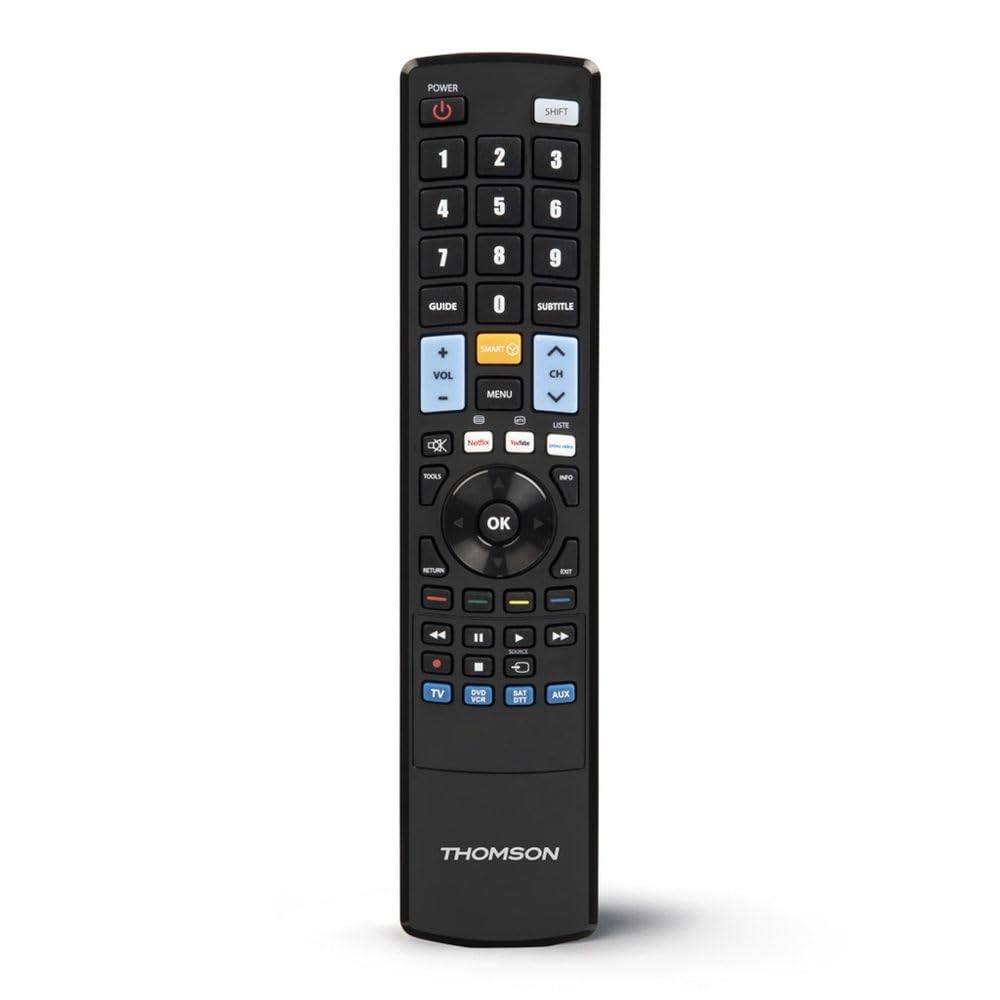
Once programmed, the Thomson ROC4301 functions like a standard remote control for your selected devices. It features 48 buttons designed for intuitive control.
Fonctionnement général :
- Sélection de l'appareil : Use the dedicated device buttons (e.g., TV, DVD, STB, AUDIO) at the top of the remote to switch between controlling different devices. The remote will typically indicate which device is currently selected (e.g., via an LED indicator).
- Marche/Arrêt : Appuyez sur le POUVOIR bouton permettant d'allumer ou d'éteindre l'appareil sélectionné.
- Channel/Volume: Utilisez le CANAL +/- et VOLUME +/- buttons to adjust channels and volume respectively.
- Navigation: La croix directionnelle (haut, bas, gauche, droite) et OK button are used for menu navigation on most devices.
- Clavier numérique: Use the numeric buttons (0-9) to directly enter channel numbers or other numerical inputs.
- Boutons de fonction : Other buttons such as Play, Pause, Stop, Fast Forward, Rewind, Menu, Exit, and colored function buttons will perform their corresponding actions on the selected device.
Ensure there is a clear line of sight between the remote control and the infrared receiver of the device you are operating. The maximum effective range is approximately 10 meters.
Entretien
Installation et remplacement de la batterie :
The Thomson ROC4301 remote control requires two AAA batteries (included). When the remote's performance degrades or it stops responding, it's time to replace the batteries.
- Localisez le couvercle du compartiment à piles à l'arrière de la télécommande.
- Faites glisser le couvercle vers le bas ou appuyez sur le loquet et soulevez pour ouvrir le compartiment.
- Remove the old batteries, if any.
- Insérez deux piles AAA neuves, en veillant à ce que les bornes positive (+) et négative (-) correspondent aux marquages à l'intérieur du compartiment.
- Remettez le couvercle du compartiment à piles en place jusqu'à ce qu'il s'enclenche correctement.
Important: Always dispose of used batteries responsibly according to local regulations. Do not mix old and new batteries, or different types of batteries.
Nettoyage:
Pour nettoyer la télécommande, utilisez un chiffon doux et sec. Pour les saletés tenaces, frottez-la légèrement avec un chiffon doux et sec.ampNettoyez le chiffon avec de l'eau. N'utilisez pas de nettoyants abrasifs, de solvants ni d'alcool, car ils pourraient endommager la surface ou les composants internes de la télécommande.
Dépannage
If you encounter issues with your Thomson ROC4301 universal remote control, try the following troubleshooting steps:
- La télécommande ne répond pas :
- Check the batteries. Ensure they are correctly inserted and have sufficient charge. Replace them if necessary.
- Ensure there is a clear line of sight between the remote's IR emitter and the device's IR receiver. Obstructions can block the signal.
- Make sure you have selected the correct device mode (e.g., TV, DVD) on the remote.
- Device Not Responding After Programming:
- Re-program the remote for that specific device. The web database often provides multiple codes for a single brand/model. Try the next available code if the first one doesn't work.
- Ensure the 3.5 mm jack cable connection was secure and the computer's volume was adequate during programming.
- Verify that the device you are trying to control is indeed an infrared-controlled device.
- Certaines fonctions ne fonctionnent pas :
- Even with the correct code, some advanced functions might not be fully supported by a universal remote.
- Try alternative codes for your device, as some codes might offer better functionality mapping.
- Programming Issues (e.g., data transfer failure):
- Vérifiez votre connexion Internet.
- Assurez-vous que les pilotes audio de votre ordinateur sont à jour.
- Temporarily disable any sound enhancements or equalizers on your computer that might interfere with the audio signal.
- Try using a different computer or web browser if problems persist.
Si ces étapes ne résolvent pas le problème, veuillez consulter la section « Assistance » pour obtenir de l’aide supplémentaire.
Caractéristiques
| Marque | Thomson |
| Nom du modèle | ROC4301 Web-Programmable Universal Remote Control 4-in-1 |
| Numéro de modèle de l'article | 00132679 |
| Technologie de connectivité | Infrarouge (IR) |
| Nombre maximal d'appareils pris en charge | 4 |
| Appareils compatibles | TV, DVD, Blu-ray player, STB, VCR, Audio equipment |
| Type de contrôleur | Contrôle des boutons |
| Nombre de boutons | 48 |
| Portée maximale | 10 mètres |
| Couleur | Noir |
| Piles | 2 piles AAA (incluses) |
| Dimensions du produit | 22.9 x 5.2 x 2.5 cm |
| Poids de l'article | 149.32 g |
| Fabricant | Thomson |
| Pays d'origine | Chine |
Informations sur la garantie
The Thomson ROC4301 Universal Remote Control comes with a Garantie constructeur d'un an. Please retain your proof of purchase for warranty claims. For specific terms and conditions, refer to the warranty documentation included with your product or visit the official Thomson website.
Soutien
For further assistance, updated device codes, or to access the web-based programming tool, please visit the official Thomson support website. You may also find FAQs and additional resources there.
If you require technical support, please contact Thomson customer service through the channels provided on their official website.
Produit terminéview