
Surview
The TFCFL 5-Channel Mini Audio Mixer is a versatile and compact sound board console system designed for various audio mixing applications, including DJing, studio recording, and live streaming. It features digital USB and Bluetooth connectivity, 48V phantom power for condenser microphones, and multiple input/output options to enhance your audio experience.

Image: The TFCFL 5-Channel Mini Audio Mixer connected to a laptop, demonstrating its use in a digital audio setup.
Caractéristiques principales
- Mélangeur 5 canaux : Features three stereo channels and independent stereo source channels with high-sensitivity potentiometers for precise volume control. Supports Bluetooth/USB playback, stereo input/output, computer recording, and monitor output.
- Construction de haute qualité : Made of durable plastic, resistant to rust and water, ensuring long-term use. Lightweight and portable design for on-the-go music creation. Can be powered by computer, power supply, or rechargeable power supply for indoor and outdoor use.
- 48V Phantom Power & Reverb Effect: Equipped with 48V phantom power for professional recording condenser microphones. Includes built-in reverb effects and stage equalization adjustment with adjustable reverb depth and delay.
- Diverse Connections: Built-in Bluetooth module for wireless audio connection. Connects to various audio devices, amplifiers, CD players, computers, headphones, and musical instruments. Features stereo channel inputs/outputs and low-noise microphone inputs for detailed sound.
- Facile à utiliser : Simple USB connection to a computer for tuning, suitable for live events or online teaching. Includes a USB cable and user manual for easy setup.

Image: The TFCFL 5-Channel Mini Audio Mixer highlighting its versatility across different audio applications.
Guide d'installation
Déballage et inspection initiale
Carefully remove all components from the packaging. Verify that all items listed in the package contents are present. Inspect the mixer for any signs of damage during transit.
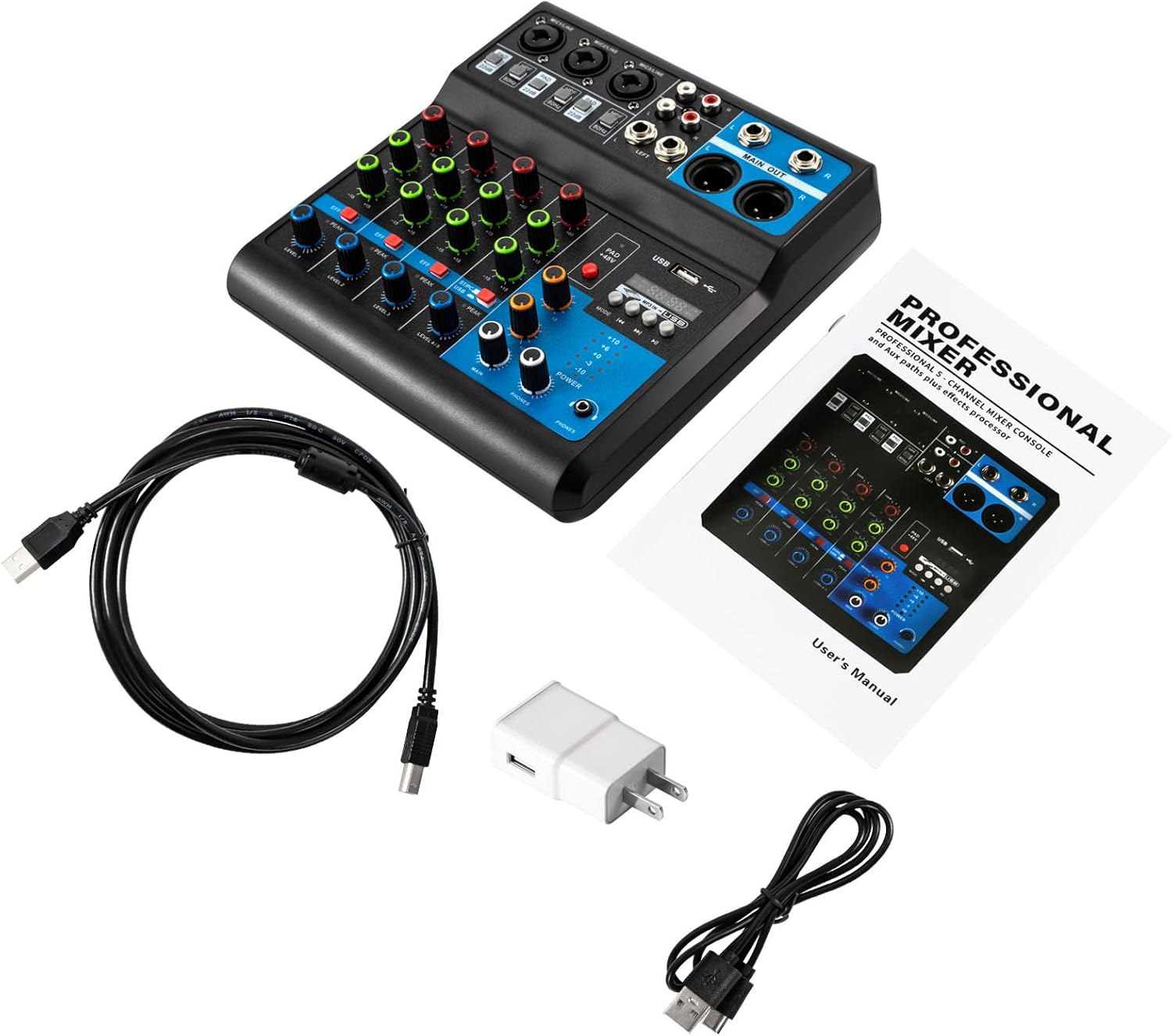
Image: The TFCFL 5-Channel Mini Audio Mixer and its included accessories, such as the user manual and cables.
Video: A demonstration of unboxing the mixer and connecting various components, including microphones and power.
Connexion électrique
Connect the provided power adapter to the DC 5V 1A input port on the mixer. Plug the adapter into a suitable power outlet. Turn on the power switch located on the mixer.
Video: Instructions on how to connect the power cord and turn on the mixer, followed by connecting a wireless microphone receiver and an RCA cable.
Connexion des microphones et des entrées ligne
The mixer features multiple input channels. For microphones, use the XLR/TRS combo jacks. For condenser microphones requiring power, activate the Alimentation fantôme +48 V button for the respective channel. For line-level devices (e.g., instruments, media players), use the 1/4" TRS or RCA inputs.

Image: A comprehensive diagram showing how to connect different audio sources and outputs to the mixer.
Connectivité USB et Bluetooth
To connect to a computer for recording or playback, use the USB-B port. The mixer can function as an audio interface. For wireless audio streaming, activate Bluetooth mode on the mixer and pair it with your device (e.g., smartphone, tablet).
Video: This video demonstrates connecting an XLR cable, activating phantom power, and pairing a Bluetooth device with the mixer.
Fonctionnement de votre mixeur
Contrôles des canaux
Each channel on the mixer has dedicated controls for fine-tuning your audio:
- GAIN: Ajuste la sensibilité d'entrée du canal.
- HAUT/MOYEN/BAS : Égaliseur 3 bandes pour régler les fréquences aiguës, médiums et graves.
- EFF : Controls the amount of effect sent from the channel to the built-in effects processor.
- PIC: An indicator light that illuminates when the input signal is too high, indicating potential clipping.
- NIVEAU: Ajuste le niveau de sortie global du canal.

Image : détaillée view of the individual channel controls, including gain, EQ, and effect send knobs.
Sortie principale et surveillance
The mixer provides main outputs for connecting to speakers or recording devices, and a dedicated headphone output for monitoring.
- MAIN OUT (XLR/1/4"): Balanced XLR and unbalanced 1/4" outputs for connecting to main speakers or amplificateurs.
- TÉLÉPHONES: 1/4" stereo jack for connecting headphones to monitor the overall mix.

Image: The main output section of the mixer, detailing the various output jacks for speakers and recording.
Video: This video demonstrates connecting headphones and adjusting the headphone monitor and channel levels.
Processeur d'effets
The mixer includes a built-in effects processor. Use the RETARD et RÉPÉTER knobs to adjust the characteristics of the selected effect. The MODE button allows you to cycle through different playback options for USB/MP3.
Video: A short demonstration of the mixer's effects and USB playback functions.
USB Player Functions
The integrated USB player allows for direct playback of MP3 files from a USB drive. Use the control buttons (play/pause, next/previous track, mode) to manage playback. The USB port also facilitates connection to a computer for digital audio input/output.
Video: A sound test of the audio mixer, demonstrating its functionality with various inputs and outputs.
Entretien et maintenance
To ensure the longevity and optimal performance of your TFCFL Mini Audio Mixer, follow these maintenance guidelines:
- Nettoyage: Utilisez un chiffon doux et sec pour nettoyer la surface du mixeur. Évitez d'utiliser des nettoyants liquides ou des produits abrasifs, car ils pourraient endommager la finition ou les composants internes.
- Stockage: Rangez le mixeur dans un endroit frais et sec, à l'abri de la lumière directe du soleil, des températures extrêmes et d'une forte humidité.
- Manutention: Manipulez le mixeur avec précaution afin d'éviter tout dommage physique. Évitez de le faire tomber ou de le soumettre à des chocs violents.
- Relations: Always ensure cables are securely connected but do not force them. Disconnect cables by pulling the plug, not the cable itself.
Dépannage des problèmes courants
If you encounter any issues with your mixer, refer to the following troubleshooting tips:
- Pas de sortie audio :
- Check if the mixer is powered on and connected correctly.
- Ensure all channel level knobs and the main output fader are turned up.
- Verify that speakers or headphones are properly connected and their volume is adjusted.
- Check input source connections and ensure they are active.
- Son déformé :
- Réduisez le gain du canal concerné.
- Check the PEAK indicator; if it's consistently red, the signal is too hot.
- If using a microphone, ensure the PAD button (if available) is correctly set.
- Le microphone ne fonctionne pas :
- For condenser microphones, ensure the Alimentation fantôme +48 V is activated for the correct channel.
- Check the microphone cable for damage and ensure it's securely connected.
- Si possible, essayez avec un autre microphone ou câble.
- Problèmes de connexion Bluetooth :
- Assurez-vous que la table de mixage est en mode Bluetooth (indiqué sur l'écran).
- Assurez-vous que le Bluetooth de votre appareil est activé et détectable.
- Essayez de déconnecter puis de reconnecter l'appareil.
- Assurez-vous qu'aucun autre appareil n'interfère avec le signal Bluetooth.
Spécifications techniques
| Fonctionnalité | Spécification |
|---|---|
| Nombre de canaux | 5 canaux |
| Matériel | Plastique |
| Technologie de connectivité | Interfaces, USB, Bluetooth |
| Pouvoir | 5W |
| Entrée de courant | USB2A on |
| Niveau de sortie maximal | +26 dBu |
| Taux de rejet en mode commun | >75 dB |
| Niveau d'entrée ligne | +24 dBu |
| Réponse en fréquence | 20HZ-20KHz |
| Niveau d'entrée du microphone | +24 dBu |
| Distorsion harmonique totale | <0.01% |
| Bruit | -80 dB |
| Version Bluetooth | 5.0 |
| Volume de la prisetage | US Plug 110V |
| Taille du produit | 20.5*21*6.5cm/ 8.07*8.27*2.58in |
| Poids net | 0.8 kg / 1.76 livres |
Garantie et support client
For warranty information, technical support, or any inquiries regarding your TFCFL Mini Audio Mixer, please refer to the contact details provided in your product packaging or reach out to the seller directly. Keep your purchase receipt as proof of purchase for warranty claims.