
1. Introduction
Thank you for choosing the Telbum PL-31X Stage Lights with Stand. This LED Par Light set is designed for various events such as parties, mobile DJ booths, weddings, and church bands. It features sound activation, remote control, and versatile installation options. Please read this manual thoroughly before operation to ensure proper setup, safe use, and optimal performance of your lighting system.
2. Consignes de sécurité
- Branchez toujours l'appareil à une prise de courant mise à la terre.
- Assurez une ventilation adéquate autour de l'appareil afin d'éviter toute surchauffe. Ne bloquez pas les ouvertures de ventilation.
- N'exposez pas l'appareil à la pluie ou à l'humidité.
- Évitez toute exposition directe des yeux à la source lumineuse, car cela peut causer des lésions oculaires.
- Débranchez l'appareil avant de le nettoyer ou de l'entretenir.
- Ce produit est destiné à un usage intérieur uniquement.
- Tenir hors de portée des enfants.
3. Contenu de la boîte
Carefully unpack your Telbum PL-31X Stage Lights and check that all components are present and in good condition:
- 1 x Telbum PL-31X Par Light Set
- 1 x télécommande
- 1 x Tripod Light Stand
- 1 x Manuel d'utilisation (ce document)

Image: Contents of the Telbum PL-31X Stage Lights package.
4. Instructions de configuration
The Telbum PL-31X offers two primary installation methods: using the included tripod stand or hanging from a truss with its integrated handle.
4.1. Tripod Stand Installation
- Dépliez le trépied : Place the tripod stand on a flat, stable surface. Carefully spread the legs of the tripod until they are fully extended and stable.
- Sécuriser la base : Tighten the knob at the base of the tripod to lock the legs in position, ensuring maximum stability.
- Prolonger le support : The stand's central pole is divided into three sections. Loosen the locking knobs on each section and extend them to your desired height. Securely tighten each knob after adjusting.
- Fixez la barre lumineuse : Align the mounting bracket on the Telbum PL-31X light bar with the top of the extended tripod stand. Insert the stand's pin into the bracket's hole.
- Tighten the Bracket: Secure the light bar to the stand by tightening the knob on the mounting bracket. Ensure the light bar is firmly attached and does not wobble.
- Connecter l'alimentation : Plug the power cable into the 'POWER IN' port on the back of the light bar and then into a suitable power outlet.
Video: Detailed guide on how to install the Telbum PartyBar onto its tripod stand.

Image: Illustration of the two primary installation methods for the light bar.
4.2. Truss Hanging Installation
The Telbum PL-31X light bar includes a handle that can be used for hanging it from a truss or ceiling. Ensure that any hanging hardware (not included) is rated for the weight of the light bar and is securely installed by a qualified professional.
5. Mode d'emploi
The Telbum PL-31X can be operated using the included remote control. Ensure the remote has working batteries and is pointed towards the IR receiver on the light bar.
5.1. Fonctions de la télécommande

Image: Remote control layout and available lighting modes.
- MARCHE/ARRÊT : Allume ou éteint l'appareil.
- Sélection de couleur : Buttons for Red, Green, Blue, White, Rose, Amber, Cyan, and various color combinations (e.g., R&G, G&B, R&B, RGB).
- Vitesse: Ajuste la vitesse des modes dynamiques.
- Sélection du mode :
- Mode couleur statique : Affiche une seule couleur constante.
- Mode saut : Les lumières changent brusquement de couleur.
- Mode stroboscopique : Les lumières clignotent rapidement.
- Mode fondu : Lights smoothly transition between colors.
- Mode automatique: Il fait défiler automatiquement différents effets lumineux préprogrammés.
- Mode sonore: Lights react to the rhythm of music or ambient sound.
- Sensibilité sonore : To increase voice sensitivity in Sound Mode, first press the SOUND MIX button on the remote control, then press SEN+.
6. Features and Modes
The Telbum PL-31X is equipped with 4 LED PAR lights, each featuring 3-color (RGB) LEDs, and offers a variety of dynamic lighting effects:
- Utilisation polyvalente : Ideal for parties, mobile DJ setups, weddings, and stage lighting. Can be floor-mounted for uplighting.
- Conception portable : Comes with 4 LED PARs and a tripod stand, designed for quick setup and teardown.
- Son activé : The lights change colors and speed in synchronization with music or sound, enhancing the party atmosphere.
- Télécommande: Provides flexible control over color selection, flash speed, and all 6 function modes.
- Modes multiples : Includes Static color, Jump, Strobe, Fade, Auto, and Sound modes to suit different event requirements.

Image : Examples of various color outputs and lighting effects.
7. Entretien
To ensure the longevity and optimal performance of your Telbum PL-31X Stage Lights, follow these maintenance guidelines:
- Nettoyage: Regularly wipe the exterior of the light bar and stand with a soft, dry cloth. Do not use abrasive cleaners or solvents.
- Nettoyage des lentilles : Gently clean the light lenses with a soft, lint-free cloth to maintain light output clarity.
- Ventilation: Ensure the fan and ventilation openings on the unit are free from dust and debris to prevent overheating.
- Stockage: When not in use, store the light set in a cool, dry place, away from direct sunlight and extreme temperatures.
- Inspection des câbles : Vérifiez régulièrement le câble d'alimentation afin de déceler tout signe de dommage. En cas de dommage, remplacez-le immédiatement par un câble homologué.
8. Dépannage
If you encounter issues with your Telbum PL-31X Stage Lumières, veuillez vous référer aux problèmes et solutions courants suivants :
| Problème | Cause possible | Solution |
|---|---|---|
| La lumière ne s'allume pas. | No power, faulty cable, unit off. | Check power connection, try another outlet, ensure power button is pressed. |
| La télécommande ne fonctionne pas. | Dead batteries, remote not aimed at IR receiver, obstruction. | Replace remote batteries, ensure clear line of sight to IR receiver, remove obstructions. |
| Le mode activé par le son ne répond pas. | Low sound sensitivity, no sound input. | Increase sound sensitivity via remote (SOUND MIX then SEN+), ensure music is playing loudly enough near the unit. |
| Les lumières clignotent ou fonctionnent de manière erratique. | Loose connection, power fluctuation, internal issue. | Check all connections, try a different power source. If problem persists, contact support. |
9. Spécifications
Detailed technical specifications for the Telbum PL-31X Stage Lumières :
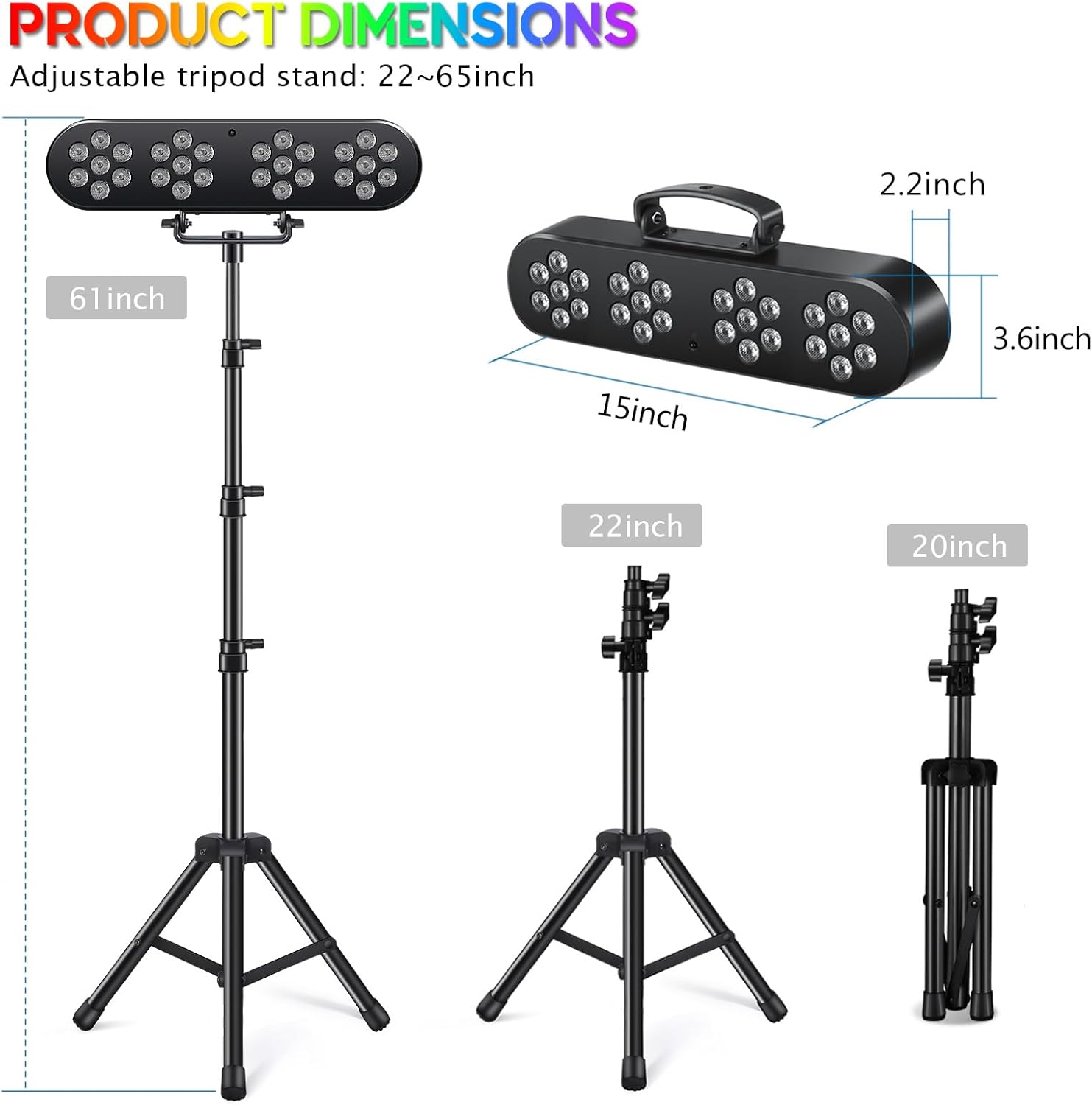
Image: Product dimensions for the light bar and tripod stand.
| Fonctionnalité | Détail |
|---|---|
| Numéro de modèle | PL-31X |
| Nom de marque | Telbum |
| Couleur | Noir |
| Matériel | Plastique |
| Type de source lumineuse | Diode électroluminescente (DEL) |
| Nombre de sources lumineuses | 4 (PAR lights) |
| Source lumineuse maximale compatibletage | 10 watts |
| Source d'énergie | Électrique avec fil |
| Type de montage | Floor Mount (with tripod) / Handle for hanging |
| Poids de l'article | 2.34 kilogrammes |
| Dimensions de l'article (L x l x H) | 17.7"L x 9.8"l x 4.7"H |
| Composants inclus | Par light set, Remote, Tripod light stand, User manual |
| Fabricant | Guangzhou Xinyu Stage Lighting Installation Factory |
10. Garantie et assistance
The Telbum PL-31X Stage Lights come with a 6-month manufacturer's warranty from the date of purchase. This warranty covers defects in materials and workmanship under normal use.
For warranty claims, technical support, or any questions regarding your product, please contact Telbum customer service through the retailer's platform or the official Telbum website. Please have your purchase receipt and model number (PL-31X) ready when contacting support.