SSK SC211 11-in-1 USB-C Laptop Docking Station User Manual
Model: SC211 | Brand: SSK
1. Introduction
The SSK SC211 11-in-1 USB-C Laptop Docking Station is a versatile multiport adapter designed to expand the connectivity of your USB-C enabled laptop, tablet, or smartphone. It integrates multiple essential ports into a single compact device, enhancing productivity and simplifying your workspace.
2. caractéristiques du produit
This docking station provides 11 ports for comprehensive connectivity:
2 ports HDMI : Supports 4K video output. HDMI1 supports up to 4K@60Hz, and HDMI2 supports up to 4K@30Hz.
1 port VGA : Supports video output up to 1920x1080@60Hz, especially when used in dual or triple display configurations.
1 x Ethernet/RJ-45 Port: Provides stable wired network connectivity with 1000Mbps Gigabit speed.
2 ports USB 3.0 : Offers high-speed data transfer rates of up to 5Gbps.
1 port USB 2.0 : Ideal for connecting wireless mouse and keyboard receivers, minimizing interference.
1 port audio 3.5 mm : Supports both microphone input and audio output.
1 x USB-C PD3.0 Charging Port: Delivers up to 100W Power Delivery for fast charging of compatible Type-C devices.
1 lecteur de carte SD : For standard SD cards, with data transfer speeds up to 80MB/s.
1 lecteur de carte TF (Micro SD) : For Micro SD cards, with data transfer speeds up to 80MB/s. Both SD and TF card slots can be used simultaneously.
Figure 1 : Plusview of the SSK SC211 11-in-1 USB-C Docking Station with all ports clearly labeled, including PD 3.0, USB 2.0, HDMI1 (4K@60Hz), HDMI2 (4K@30Hz), RJ45 Ethernet, SD/TF Card, 2x USB 3.0, 3.5mm Audio, and VGA (1080P@60Hz).
3. Guide de configuration
Se connecter au périphérique hôte : Plug the integrated USB-C cable from the docking station into the USB-C port of your laptop, tablet, or smartphone. Ensure your device's USB-C port supports "Display Port Alternate Mode" for video output functionality.
Connexion électrique (facultative mais recommandée) : For stable performance and charging, connect your device's original power adapter or a compatible USB-C PD charger (up to 100W) to the docking station's USB-C PD port.
Connecter des écrans externes :
For HDMI displays, connect HDMI cables from your monitors to the HDMI1 and/or HDMI2 ports on the docking station.
Pour les écrans VGA, connectez un câble VGA de votre moniteur au port VGA de la station d'accueil.
Connectez les périphériques :
Plug USB devices (e.g., external hard drives, flash drives) into the USB 3.0 ports.
Connect wireless mouse/keyboard receivers to the USB 2.0 port.
Insérez les cartes SD ou TF dans les emplacements respectifs du lecteur de cartes.
Pour une connexion Internet filaire, branchez un câble Ethernet au port RJ-45.
Branchez des écouteurs ou des haut-parleurs au port audio 3.5 mm.
Driver Installation (Mac OS Specific): For Mac OS, due to its MST (Multi-Stream Transport) display limitations, installing DisplayLink drivers may be required to achieve extended display functionality across multiple distinct displays. Refer to the DisplayLink website for the latest drivers and installation instructions. For Windows, it is generally plug-and-play.
Video 1: A demonstration of connecting a docking station to a laptop and external monitors, showcasing its multi-display capabilities and various port connections.
4. Mode d'emploi
4.1 Modes d'affichage
La station d'accueil prend en charge différentes configurations d'affichage en fonction de votre système d'exploitation :
For Windows 10/11 OS:
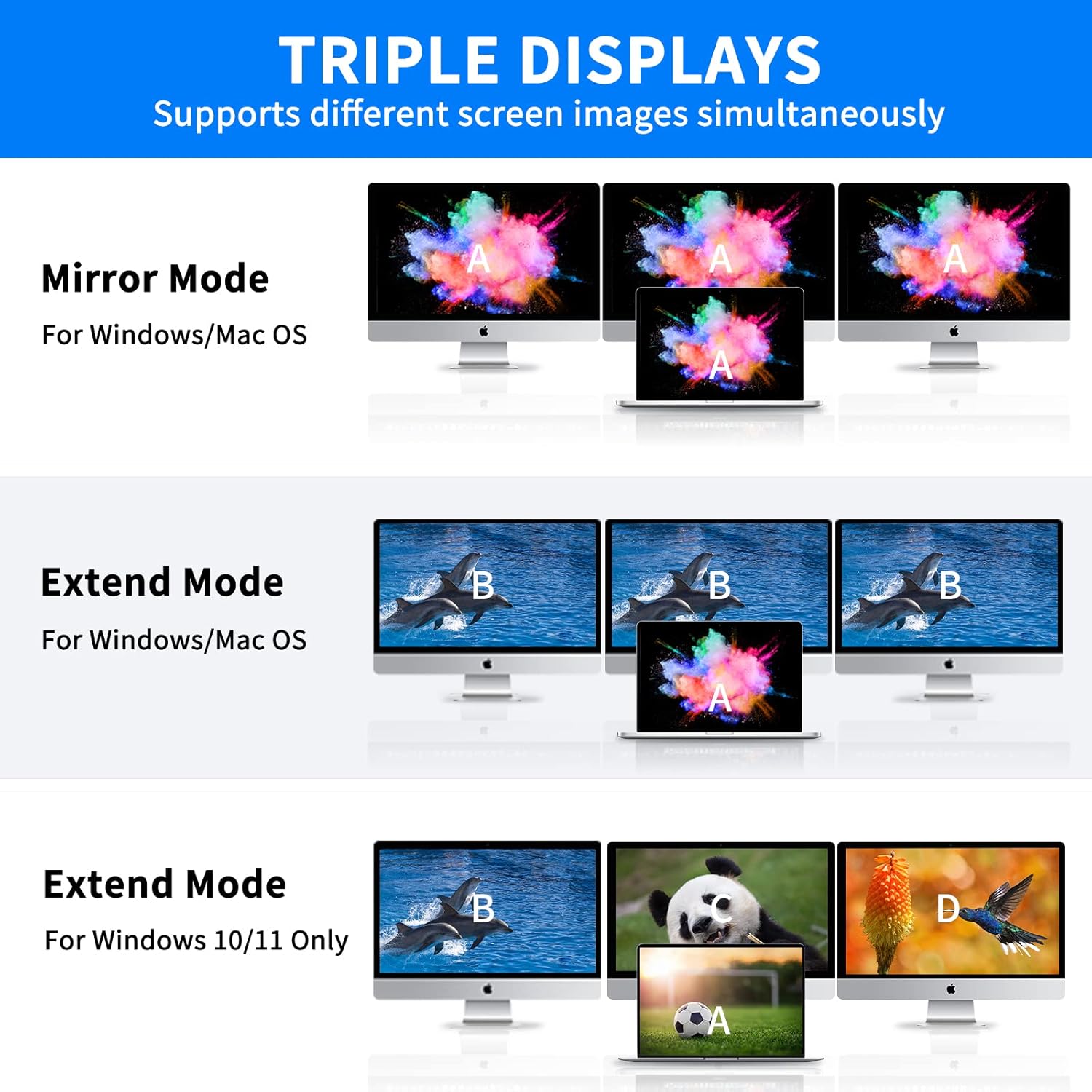
Mode miroir (A-AAA) : All connected displays (laptop screen, HDMI1, HDMI2, VGA) show the same content.
Mode étendu (A-BBB) : The laptop screen and external monitors display different content, extending your desktop workspace. This supports up to three different screens (laptop + 2 external monitors via HDMI + VGA).
Mode étendu (A-BCD) : Similar to A-BBB, allowing for distinct content across multiple displays.
Pour Mac OS :
Due to Mac OS limitations (lack of MST support), the docking station primarily supports extending one monitor, with other external monitors mirroring that extended display. All three screens will display the same picture when VGA is connected alongside HDMI displays.
Extend Mode (A-AAA or A-BBB): The docking station supports extending one monitor. Any additional external monitors will mirror the content of the first extended monitor.
Mode miroir : Tous les écrans connectés affichent le même contenu.
Note on VGA: When the VGA port is connected, the maximum resolution for each monitor will be limited to 1920x1080@60Hz.
Figure 2: Visual representation of Mirror Mode and Extend Mode for both Windows and Mac OS, illustrating how screens are duplicated or extended.
4.2 Transfert de données
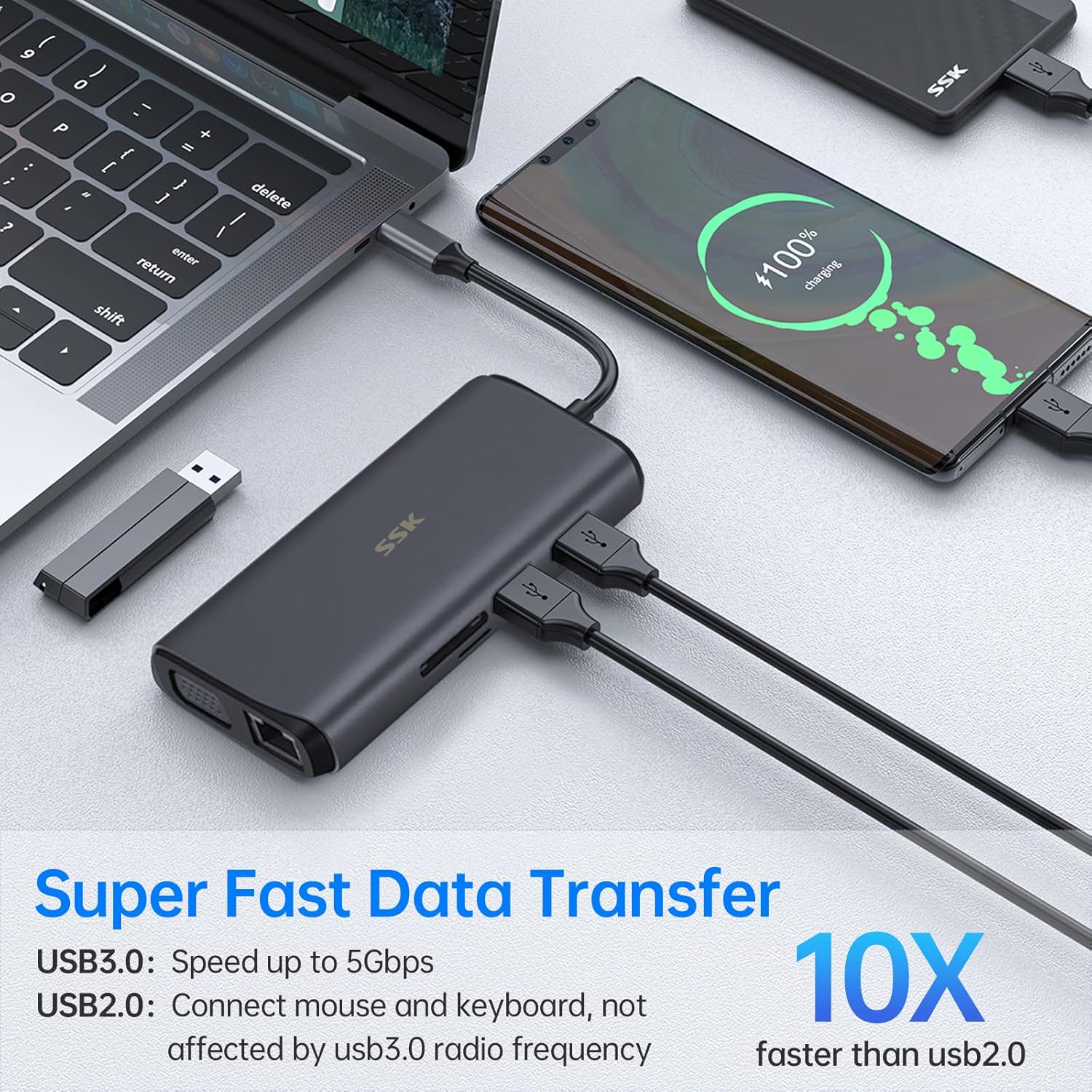
Utilize the USB 3.0 ports for rapid data transfer with compatible devices. The SD and TF card readers also offer fast data access for memory cards.
Figure 3: Illustration of the docking station facilitating super-fast data transfer via USB 3.0 ports and SD/TF card readers, connected to a laptop.
4.3 Alimentation électrique
The 100W PD3.0 port allows you to charge your Type-C laptop or other compatible devices while using the docking station. This port is for power input only and does not support data transfer.
Figure 4: The docking station connected to a laptop and a power adapter, demonstrating its PD3.0 Power Delivery feature for fast charging.
5. Compatibilité
The SSK SC211 docking station is compatible with a wide range of devices and operating systems that feature a USB-C port supporting "Display Port Alternate Mode" for video output. This includes, but is not limited to:
Ordinateurs portables : MacBook Pro (2017-2020), MacBook Air (2018-2020), Dell XPS 13/15, Lenovo Yoga 720/910/920/930, Microsoft Surface Book 2/Surface Go/Surface Laptop 3, Dell Latitude 13 7000/E7370, and other USB-C enabled laptops.
Tablettes et smartphones : Devices with a full-featured USB-C port.
Systèmes d'exploitation : Windows 10/11, Mac OS, Chrome OS, Linux, Android.
Important: To enable HDMI and VGA functions, your laptop or phone's USB-C port must support "Display Port Alternate Mode" video output.
Figure 5: The SSK SC211 docking station shown with logos of compatible operating systems, highlighting its broad compatibility.
6. Spécifications techniques
Fonctionnalité
Spécification
Numéro de modèle
SC211
Dimensions
5 x 3 x 1 pouces
Poids
5.1 onces
Sortie HDMI 1
Jusqu'à 4K à 60 Hz
Sortie HDMI 2
Jusqu'à 4K à 30 Hz
Sortie VGA
Jusqu'à 1920 x 1080 à 60 Hz
Ports USB 3.0
2 ports, 5Gbps data transfer
Port USB 2.0
1 port, for low-bandwidth peripherals
Port USB-C PD
Puissance de sortie jusqu'à 100 W (entrée uniquement)
Port Ethernet
1000Mbps Gigabit RJ-45
Lecteurs de cartes
SD and TF (Micro SD), up to 80MB/s, simultaneous use
Port Audio
3.5mm (Mic and Audio)
Matériel
Alliage d'aluminium casing
7. Dépannage
Aucune sortie d'affichage :
Ensure your host device's USB-C port supports "Display Port Alternate Mode."
Vérifiez toutes les connexions des câbles (USB-C à l'hôte, HDMI/VGA aux moniteurs).
Vérifiez que les sources d'entrée du moniteur sont correctement sélectionnées.
For Mac OS, ensure DisplayLink drivers are installed if using extended mode for multiple distinct displays.
Essayez de redémarrer votre appareil hôte.
Connectivité intermittente :
Ensure the docking station is receiving adequate power, especially when multiple power-hungry devices are connected. Connect a PD charger to the docking station.
Vérifiez les connexions desserrées.
Évitez de placer la station d'accueil à proximité de sources d'interférences électromagnétiques importantes.
Transfert de données lent :
Ensure you are using USB 3.0 compatible devices and cables for the USB 3.0 ports.
Verify that your host device's USB-C port supports USB 3.0 or higher speeds.
Problèmes de charge :
Confirm your USB-C PD charger and cable are compatible and capable of delivering sufficient wattage (par exemple, 100W).
Ensure the charger is connected to the docking station's dedicated PD port.
Ethernet ne fonctionne pas :
Vérifiez la connexion du câble Ethernet au routeur/modem et à la station d'accueil.
Vérifiez les paramètres réseau de votre appareil hôte.
Assurez-vous que vos pilotes réseau sont à jour.
8. Entretien et maintenance
Tenez la station d'accueil éloignée de l'eau, du feu et des liquides corrosifs.
Évitez de laisser tomber ou de soumettre l'appareil à des impacts violents.
N’essayez pas de démonter ou de réparer l’appareil vous-même. Contactez le service client en cas de problème.
Nettoyez l'appareil avec un chiffon doux et sec. N'utilisez pas de produits chimiques agressifs ni de matériaux abrasifs.
Conserver dans un endroit frais et sec lorsqu'il n'est pas utilisé.
9. Garantie et assistance
SSK products come with a standard manufacturer's warranty. For detailed warranty information, technical support, or service inquiries, please refer to the official SSK webConsultez leur site web ou contactez leur service client. Veuillez conserver votre preuve d'achat pour toute réclamation au titre de la garantie.