
I2GO I2GEAR106
I2GO Air Sound Go 2.0 TWS Bluetooth Earbuds User Manual
Model: I2GEAR106
Produit terminéview
The I2GO Air Sound Go 2.0 TWS Bluetooth Earbuds offer a completely wireless audio experience with premium sound quality, powerful bass, and up to 20 hours of total battery life. Designed for both calls and music playback, these earbuds provide convenience and performance for daily use.
Les principales caractéristiques comprennent :
- True Wireless Stereo (TWS) technology for a seamless audio experience.
- Bluetooth 5.2 for stable and efficient wireless connectivity up to 10 meters.
- Environmental Noise Cancellation (ENC) for clearer calls.
- Intuitive touch controls for managing music and calls.
- Compatibility with a wide range of devices including smartphones, laptops, and tablets.
- IPX4 water resistance, protecting against splashes and sweat.
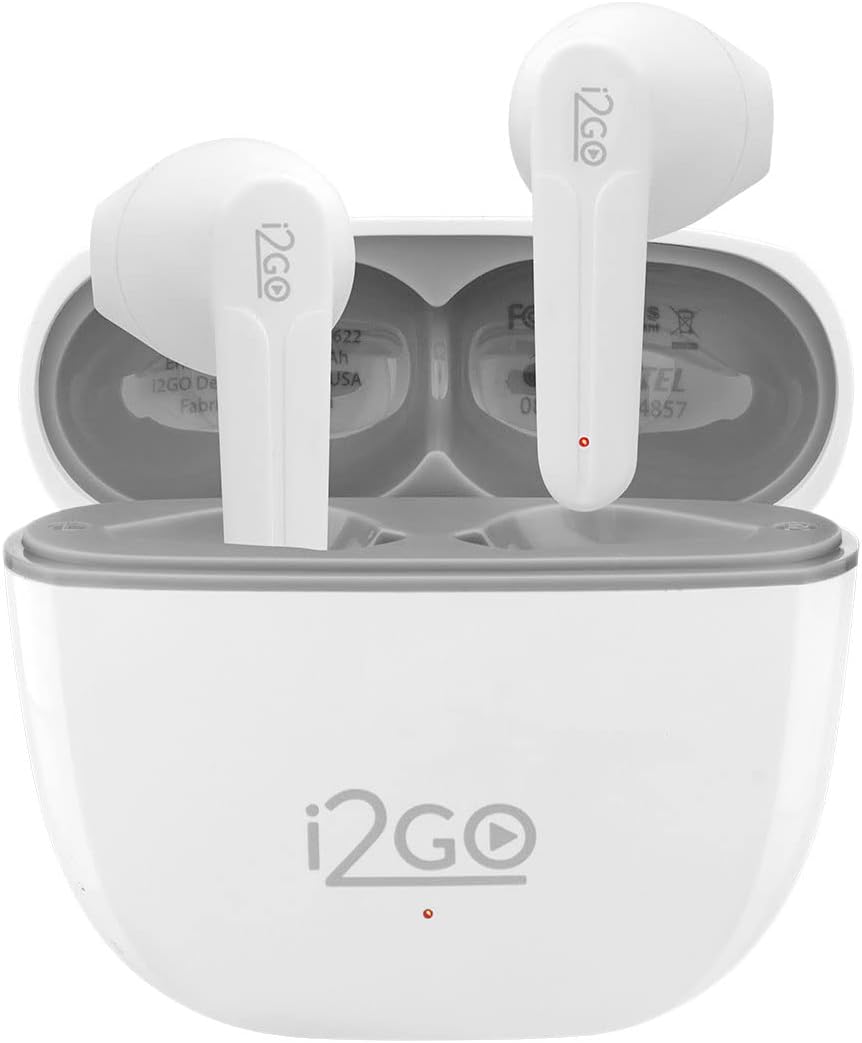
Figure 1: I2GO Air Sound Go 2.0 TWS Earbuds in their open charging case.
Installation et première utilisation
1. Préparation initiale
Before using your new I2GO Air Sound Go 2.0 earbuds, ensure you remove any protective stickers or films that may be covering the charging contacts on the earbuds. These are typically found on the stem or the part that sits in the charging case.
2. Chargement des écouteurs et de l'étui
For optimal performance, fully charge the earbuds and the charging case before first use. Connect the charging case to a power source using the provided USB Type-C cable. The charging time for a full charge is approximately 1.5 hours.

Figure 2: The I2GO Air Sound Go 2.0 charging case with earbuds inserted and lid closed.
3. Couplage avec un appareil
- Assurez-vous que les écouteurs sont chargés et placés dans l'étui de chargement.
- Open the lid of the charging case. The earbuds will automatically enter pairing mode, indicated by a flashing LED light on the earbuds or case.
- Sur votre smartphone, tablette ou ordinateur portable, accédez aux paramètres Bluetooth.
- Rechercher available devices. You should see "I2GO Air Sound Go 2.0" or a similar name appear in the list.
- Select the earbuds from the list to connect. Once connected, a voice prompt or solid LED light will confirm successful pairing.
The earbuds have a maximum operational distance of 10 meters from the connected device.
Mode d'emploi
Commandes tactiles
The I2GO Air Sound Go 2.0 earbuds feature intuitive touch controls on each earbud for easy management of audio playback and calls. Specific functions may vary slightly, but common controls include:
- Lecture/Pause : Appuyez une fois sur l'un des écouteurs.
- Piste suivante : Appuyez deux fois sur l'écouteur droit.
- Piste précédente: Appuyez deux fois sur l'écouteur gauche.
- Répondre/Terminer l'appel : Appuyez une seule fois sur l'un ou l'autre écouteur pendant un appel entrant.
- Rejeter l'appel : Maintenez la pression sur l'un ou l'autre écouteur pendant un appel entrant.
- Activer l'assistant vocal: Triple tap on either earbud (functionality depends on device).

Figure 3: Control your music and answer calls with a simple touch.
Suppression du bruit dans l'environnement (ENC)
The earbuds are equipped with ENC technology, which helps filter out ambient noise during calls, ensuring clearer communication for both you and the person on the other end.
Autonomie de la batterie
The I2GO Air Sound Go 2.0 offers up to 20 hours of total battery life, combining the charge from the earbuds themselves and the charging case. Each earbud provides approximately 5 hours of playback on a single charge, with the charging case providing an additional 15 hours (3 full charges).

Figure 4: Enjoy up to 20 hours of music with the earbuds and charging case.
Entretien et soins
To ensure the longevity and optimal performance of your I2GO Air Sound Go 2.0 earbuds, regular cleaning and proper care are recommended.
- Nettoyage: Regularly clean the earbuds, especially the ear tips and charging contacts, using a soft, dry, lint-free cloth. Avoid using abrasive materials or harsh chemicals.
- Résistance à l'eau : The earbuds feature an IPX4 water resistance rating, meaning they are resistant to splashes of water and sweat. They are not designed for submersion in water. Avoid exposing them to heavy rain or showering.
- Stockage: When not in use, store the earbuds in their charging case to protect them from dust and physical damage.
- Température: Évitez d'exposer les écouteurs à des températures extrêmes (chaudes ou froides), car cela peut affecter la durée de vie de la batterie et les performances générales.

Figure 5: IPX4 rating ensures resistance to water splashes and sweat.
Dépannage
If you encounter issues with your I2GO Air Sound Go 2.0 earbuds, try the following troubleshooting steps:
- Les écouteurs ne s'appairent pas ou ne se connectent pas :
- Assurez-vous que les deux écouteurs sont complètement chargés.
- Replacez les deux écouteurs dans l'étui de chargement, fermez le couvercle, attendez quelques secondes, puis rouvrez le couvercle.
- On your device, forget or unpair the "I2GO Air Sound Go 2.0" from your Bluetooth settings, then attempt to pair again.
- Assurez-vous que le Bluetooth de votre appareil est activé et à moins de 10 mètres.
- One earbud has low volume or no sound:
- Check if the earbud's charging contacts are clean and free of debris.
- Ensure the earbud is properly seated in the charging case to make good contact for charging.
- Try resetting the earbuds by placing them in the case, closing the lid, and then reopening.
- Verify that the audio balance settings on your connected device are not skewed to one side.
- Bluetooth connection is unstable or frequently disconnects:
- Move closer to your connected device to ensure you are within the 10-meter range.
- Avoid environments with significant wireless interference (e.g., crowded Wi-Fi areas, other Bluetooth devices).
- Assurez-vous qu'il n'y ait aucun obstacle physique entre les écouteurs et votre appareil.
- Restart both your earbuds (by placing them in the case and taking them out) and your connected device.
Si ces étapes ne résolvent pas le problème, veuillez consulter la section Garantie et assistance.
Caractéristiques
| Fonctionnalité | Détail |
|---|---|
| Nom du modèle | TWS AIR SOUND GO (I2GEAR106) |
| Technologie de connectivité | Sans fil (Bluetooth 5.2) |
| Contrôle du bruit | Annulation active du bruit (ENC) |
| Réponse en fréquence | 20.2 kHz |
| Sensibilité | 90 dB |
| Impédance | 32 ohms |
| Temps de charge | 1.5 heures |
| Durée de vie moyenne de la batterie | 20 heures (total avec étui) |
| Niveau de résistance à l'eau | IPX4 (résistant aux éclaboussures) |
| Distance de fonctionnement maximale | 10 mètres |
| Matériel | Plastique |
| Poids du produit | 40 gramme |
| Composants inclus | Cable, Charging Station (Case) |
| Appareils compatibles | Cell phones, Game consoles, Desktops, Notebooks, Tablets |
| Certification | ANATEL : 08425-22-14857 |
Garantie et assistance
The I2GO Air Sound Go 2.0 earbuds come with a manufacturer's warranty of 1 an à compter de la date d'achat.
For warranty claims or technical assistance, it is recommended to contact the retailer or point of purchase where you acquired the product. Please retain your proof of purchase for warranty validation.
While direct support from the manufacturer may be limited, your retailer is typically the primary point of contact for product issues and warranty services.
Ask a question about this manual
Ask about setup, troubleshooting, compatibility, parts, safety, or missing instructions. Manuals+ will review the question and use this page’s manual context to help answer it.