
Introduction
This manual provides instructions for the Voyager WVSXC150 Auto Pairing Wireless Backup Camera. This camera is designed for use with the Voyager WVOS541 Digital Wireless Backup System featuring WiSight 2.0 Technology. It offers both backup and rear observation views for towed vehicles, enhancing safety and convenience.
Key features include a built-in microphone, advanced CMOS sensor technology, 14 infrared LED lights for superior low-light performance, and an IP69K waterproof design for durability in various environmental conditions.
Contenu du colis
Avant de commencer l'installation, veuillez vérifier que tous les composants sont présents dans l'emballage :
- Voyager WVSXC150 Wireless Backup Camera
- Support de montage
- Hardware Kit (screws, nuts, etc.)
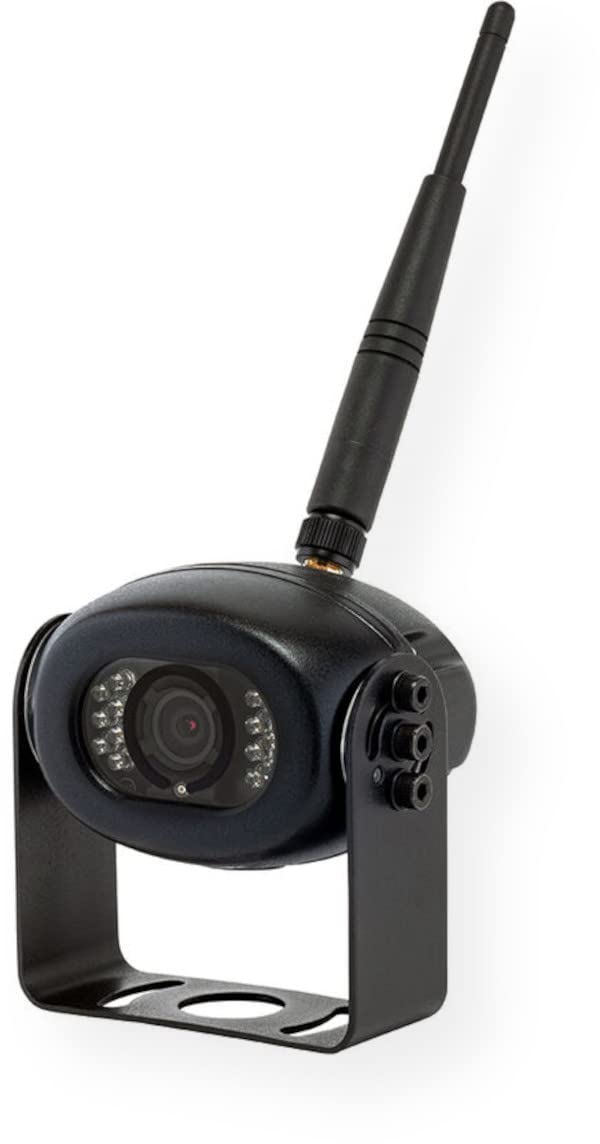
The image displays the Voyager WVSXC150 wireless backup camera along with its mounting bracket and associated hardware.
Configuration et installation
The WVSXC150 camera is designed for auto-pairing with compatible Voyager WiSight 2.0 systems. Follow these steps for proper installation:
- Montage de la caméra : Select a suitable location on your vehicle for mounting the camera, typically at the rear. Use the provided bracket and hardware to securely attach the camera. Ensure the camera has a clear, unobstructed view and a direct line of sight to the monitor for optimal wireless signal transmission.
- Connexion électrique : Connect the camera to a stable 12V DC power source. This may involve tapping into existing vehicle wiring (e.g., reverse lights for backup functionality, or running lights for continuous observation). Consult your vehicle's service manual or a qualified technician for proper wiring procedures to avoid damage.
- Couplage automatique : Once the camera is powered on and the compatible Voyager WiSight 2.0 monitor (sold separately) is also active, the camera will automatically attempt to pair. If automatic pairing does not occur, refer to the specific pairing instructions provided with your Voyager monitor system.
This image illustrates the Voyager WVSXC150 wireless backup camera, showing a typical external mounting position on a vehicle.
Mode d'emploi
Once properly installed and paired, the WVSXC150 camera will transmit video to your Voyager monitor. Familiarize yourself with its operational features:
- Transmission vidéo: The camera continuously transmits a live video feed to your compatible Voyager monitor. The monitor allows you to switch between different camera views if multiple cameras are connected to your system.
- Performances en basse lumière : The camera is equipped with 14 infrared LED lights. These lights automatically activate in low-light conditions, providing clear black-and-white visibility even in complete darkness, which is crucial for nighttime maneuvering.
- Microphone intégré : The integrated microphone captures ambient audio from the camera's vicinity. This audio is transmitted along with the video feed to your monitor, allowing you to hear sounds from the rear of your vehicle or towed unit.
- Large ViewAngle d'attaque : The camera provides a wide field of view to minimize blind spots. The viewing angles are approximately 100° horizontal, 74° vertical, and 137° diagonal.
This image represents the wide-angle view captured by the Voyager WVSXC150 wireless backup camera, as it would appear on a compatible monitor.
Entretien
The WVSXC150 camera features an IP69K waterproof design, making it highly resistant to dust and high-pressure, high-temperature water jets. For optimal performance and longevity, follow these maintenance guidelines:
- Nettoyage de la lentille : Nettoyez régulièrement l'objectif de l'appareil photo avec un chiffon doux et sec.amp cloth to remove any accumulated dirt, dust, or debris. This ensures a clear and unobstructed view. Avoid using abrasive cleaners, solvents, or harsh chemicals, as these can damage the lens coating.
- Inspection: Regularly inspect the camera's mounting bracket and hardware to ensure they remain tight and secure. Check all cable connections for corrosion or damage and ensure they are properly seated.
- Exposition environnementale : While the camera is highly durable, prolonged exposure to extreme weather conditions (e.g., direct sunlight for extended periods, extreme cold) can affect its lifespan.
Dépannage
If you encounter issues with your Voyager WVSXC150 camera, refer to the following common troubleshooting steps:
- Aucune image sur l'écran :
- Ensure the camera is receiving adequate 12V DC power. Check all power connections.
- Verify that the camera is properly paired with your Voyager monitor. Refer to your monitor's instruction manual for specific pairing procedures.
- Check for any physical obstructions or significant metal objects between the camera and the monitor that might interfere with the wireless signal.
- Confirm that your monitor is set to the correct camera input channel.
- Mauvaise qualité d'image :
- Clean the camera lens thoroughly with a soft, damp tissu.
- Ensure there are no physical obstructions (e.g., dirt, ice, stickers) blocking the camera's view.
- Check for strong electromagnetic interference sources (e.g., high-power antennas, certain electronic devices) nearby that could degrade the wireless signal.
- No Audio from Microphone:
- Ensure the microphone opening on the camera is not obstructed.
- Check the audio settings on your Voyager monitor to ensure the volume is turned up and audio input from the camera is enabled.
Caractéristiques
| Marque | Voyageur |
| Numéro de modèle | WVSXC150 |
| Capteur d'images | Capteur CMOS 1/3" |
| Résolution | 640x480 pixels (480p) |
| Éclairage minimal | 0 Lux avec IR activé |
| Résistance à l'eau | IP69K |
| ViewAngle d'inclinaison (Horizontal) | 100° |
| ViewAngle de rotation (vertical) | 74° |
| ViewAngle d'entrée (Diagonale) | 137° |
| Source d'énergie | 12 V CC |
| Connectivité | Wireless (WiSight 2.0 compatible) |
| Dimensions (L x H x P) | 3.36 x 3.35 x 2.35 pouces |
| Poids | 0.7 livres |
| Fonctionnalités intégrées | Microphone, 14 Infrared LED Lights |
Garantie et assistance
For detailed warranty information, technical assistance, or customer support regarding your Voyager WVSXC150 Wireless Backup Camera, please refer to the warranty card or documentation included with your original purchase. You may also visit the official Voyager website for the most current support resources and contact information.
Important: Retain your proof of purchase (receipt or invoice) as it will be required for any warranty claims or service requests.