
Introduction
This manual provides detailed instructions for the proper setup, operation, and maintenance of your TOMLOV DM04 Digital Microscope. Please read this manual thoroughly before using the device to ensure optimal performance and longevity.
The TOMLOV DM04 is a versatile digital microscope featuring a 9-inch LCD screen, 16MP camera, and up to 1300X digital magnification. It is designed for various applications including coin inspection, circuit board repair, and general observation of small objects. It is compatible with Windows and Mac OS for advanced functions.
Contenu du colis
Vérifiez que tous les éléments énumérés ci-dessous sont inclus dans votre colis :
- 9-inch Microscope Unit
- Base Plate
- 10-inch Stand Pole
- Télécommande
- USB Cable for Microscope (Micro USB)
- USB Cable for Base (USB-C)
- Barrière lumineuse
- Manuel d'utilisation
- Carte SD 32 Go (préinstallée ou fournie séparément)

Image: All components included in the TOMLOV DM04 Digital Microscope package, including the microscope unit, stand, base, cables, remote, and manual.
Instructions d'installation
- Assemblez le support : Attach the 10-inch stand pole to the base plate. Ensure it is securely fastened.
- Monter le microscope : Slide the microscope unit onto the stand pole and tighten the securing screw at the desired height.
- Connecter l'alimentation :
- Connect the Micro USB cable to the microscope unit and a power source (e.g., USB adapter, computer USB port).
- Connect the USB-C cable to the base plate (for auxiliary lights) and a separate power source.
- Insérez la carte SD : If not pre-installed, insert the provided 32GB SD card into the slot on the back of the microscope unit.
- Position Auxiliary Lights: Adjust the flexible auxiliary lights on the base to illuminate your observation area as needed.
- Mise sous tension : Press and hold the power button on the microscope unit to turn it on.
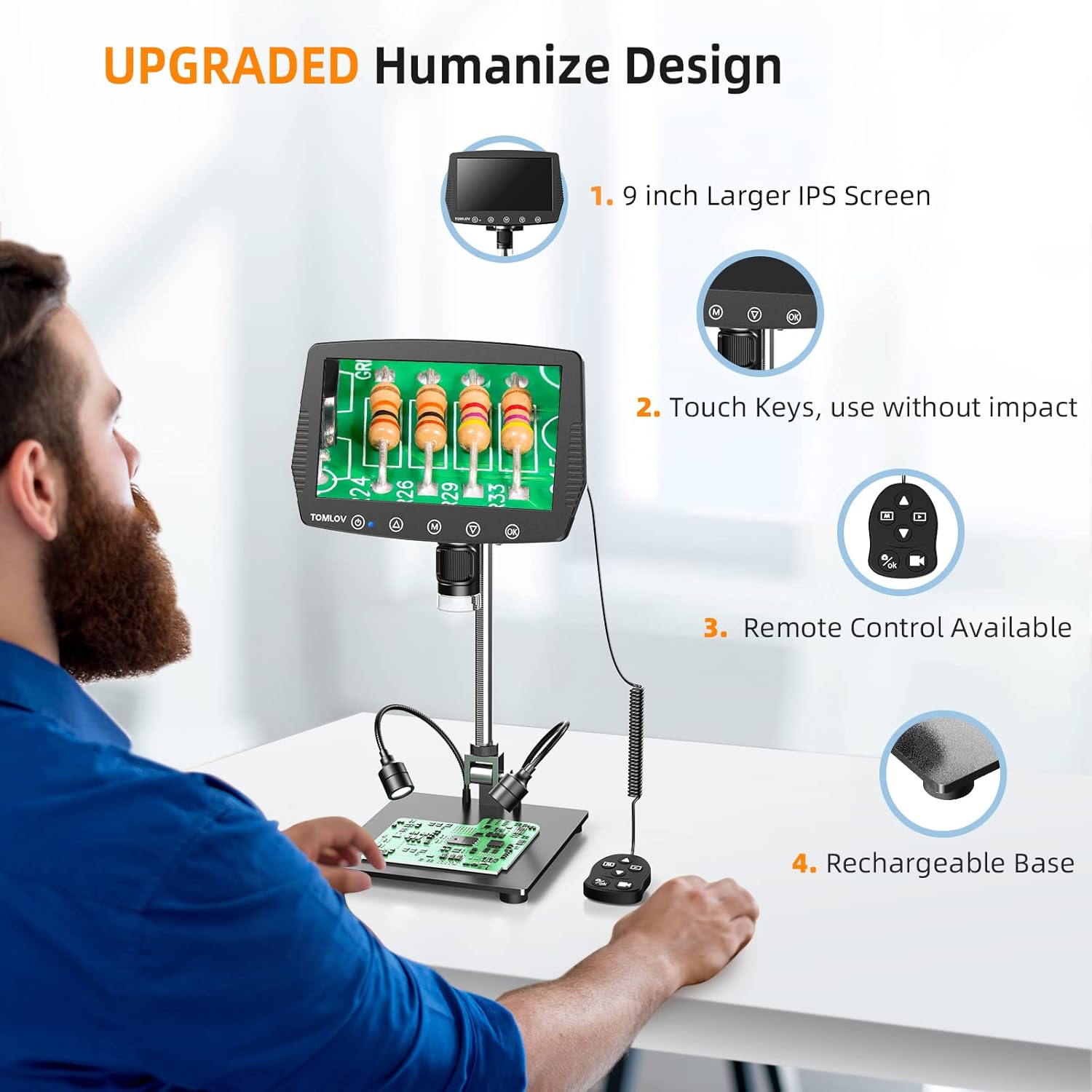
Image: A user setting up the TOMLOV DM04 microscope, demonstrating the assembly of the stand and placement of the microscope unit.
Mode d'emploi
Fonctionnement de base
- Marche/Arrêt : Appuyez et maintenez enfoncé le bouton d'alimentation (⑂) pour allumer ou éteindre l'appareil.
- Réglage de la mise au point : Rotate the focus wheel on the microscope unit to achieve a clear image on the 9-inch LCD screen.
- Grossissement: The microscope offers digital magnification up to 1300X. Adjust the height of the microscope on the stand and use the digital zoom functions (if available via menu) to change magnification.
- Éclairage:
- Lumières LED intégrées : The microscope head has built-in LED lights. These can be adjusted via the menu or dedicated buttons.
- Auxiliary Base Lights: The two flexible lights on the base can be adjusted independently using their respective controllers to provide additional illumination.
- Capturer des images/vidéos :
- Appuyez sur le OK button on the microscope or remote control to take a picture.
- Appuyez et maintenez enfoncé le OK bouton pour démarrer/arrêter l'enregistrement vidéo.
- Captured images and videos are saved to the inserted SD card.
Fonctionnalités avancées
- Navigation dans les menus : Utilisez le M (Menu) button and arrow buttons (▲, ▼) to navigate through settings and options on the LCD screen.
- Télécommande: The included remote control allows for stable operation, reducing image shake during capture.
- Rotatable Screen & Bracket Pole: The screen can be rotated up to 80 degrees and the bracket pole up to 180 degrees for flexible viewangles d'inclinaison.
- PC Connection (Windows/Mac OS):
- Connect the microscope to your computer using the appropriate USB cable.
- Select "PC Camera" mode on the microscope's screen.
- Install the dedicated software (refer to the included software CD or manufacturer's website for download) to enable measurement and marking functions, and to view the live feed on your computer.
- Files can be transferred directly from the SD card when connected to a PC.

Image: The TOMLOV DM04 microscope connected to a laptop, showing the "PC Camera" function and measurement capabilities on the computer screen.

Image : Gros plan view of the TOMLOV DM04 microscope's dual auxiliary lighting system, highlighting the built-in LED ring light and the two flexible base lights.
Video: A demonstration of the TOMLOV DM04 digital microscope's capabilities, showing a detailed view of a fly. This video illustrates the clarity and magnification achievable with the device.
Entretien
- Nettoyage:
- Use a soft, dry cloth to clean the exterior of the microscope and screen.
- Pour la lentille, utilisez un chiffon et une solution nettoyante spéciale pour lentilles. Évitez les matériaux abrasifs.
- Do not use liquid cleaners directly on the screen or lens.
- Stockage: Store the microscope in a clean, dry environment away from direct sunlight and extreme temperatures.
- Entretien de la batterie: For optimal battery life, charge the microscope regularly and avoid fully discharging it for extended periods.
- Mises à jour logicielles : Periodically check the TOMLOV official website for any available software or firmware updates for your DM04 model.
Dépannage
| Problème | Cause possible | Solution |
|---|---|---|
| Aucune image à l'écran | Device not powered on; lens cap on; focus not adjusted. | Ensure device is powered on. Remove lens cap. Adjust focus wheel. |
| L'image est floue | Improper focus; insufficient lighting; dirty lens. | Adjust focus wheel. Increase illumination using built-in or auxiliary lights. Clean the lens. |
| Impossible d'enregistrer les images/vidéos | No SD card inserted; SD card full or corrupted; incorrect file paramètres de mise en forme. | Insert a compatible SD card. Delete unnecessary files or replace SD card. Check menu settings for file format. |
| PC connection not working | Incorrect USB cable; "PC Camera" mode not selected; driver issues. | Ensure correct USB cable is used. Select "PC Camera" mode on microscope. Install necessary drivers/software. |
Caractéristiques
- Modèle: DM04
- Taille de l'écran : Écran LCD de 9 pouces
- Résolution de la caméra : 16 mégapixels
- Résolution vidéo : 1080P
- Grossissement numérique : Jusqu'à 1300X
- Stand Length: 10 pouces
- Plage de mise au point : Up to 8 inches (with enhanced stand)
- Éclairage: Built-in 8-LED fill lights, Rechargeable base lights (2)
- Contrôle: Touch buttons, Remote control
- Stockage: Compatible avec les cartes Micro SD (32 Go incluses)
- Compatibilité PC : Windows, Mac OS
- Source d'alimentation : Alimenté par batterie (5 Volts)
- Matériel: 10'' Metal Stand + 9'' LCD Screen + Large Metal Base
Informations sur la garantie
TOMLOV products typically come with a standard manufacturer's warranty. Please refer to the warranty card included in your product packaging or visit the official TOMLOV webConsultez le site pour connaître les conditions générales de garantie détaillées, y compris la période de couverture et les procédures de réclamation.
Assistance clientèle
For technical assistance, troubleshooting not covered in this manual, or warranty inquiries, please contact TOMLOV customer support:
- Website: www.tomlov.com (Remarque : Ceci est un espace réservé URLVeuillez consulter la documentation de votre produit pour obtenir l'assistance officielle. website.)
- E-mail: Veuillez vous référer à la documentation de votre produit.
- Téléphone: Veuillez vous référer à la documentation de votre produit.
When contacting support, please have your product model (DM04) and purchase information ready.