
1. Produit terminéview
The imuto 14001 is a compact and versatile portable power station designed to provide reliable power for various electronic devices. It features multiple output ports, including USB-C, USB-A, and an AC outlet, making it suitable for charging laptops, smartphones, tablets, and other small appliances. Its lightweight and portable design ensures power is available wherever you need it.

The imuto 14001 Portable Power Station is designed for portability, fitting comfortably in one hand. Its integrated display shows battery status and output.
2. Contenu du colis
Veuillez vérifier que le colis contient les éléments suivants :
- imuto 14001 Portable Power Station
- Manuel d'utilisation
- Câble de charge (USB-C vers USB-C)
Note: The AC adapter is sold separately.
3. Caractéristiques et ports du produit
The imuto 14001 is equipped with various ports and features for versatile power delivery:

This diagram illustrates the various output ports available on the imuto 14001, including DC, USB-C, USB-A, and AC outlets, designed to meet diverse charging needs. Note: AC adapter is sold separately.
- USB-C1 (Input/Output): PD 100W for fast charging compatible devices or recharging the power station.
- USB-A1/A2 (Output): 5V 4.8A for standard USB device charging.
- USB-C2 (Output): PD 20W for charging compatible devices.
- Sortie CA: 200W (110V/60Hz) for small appliances.
- DC2/3 Output: 12V 10A for DC-powered devices.
- Entrée DC1 : 12V 24A for recharging the power station.
- Affichage LED: Affiche le pourcentage de batterietage, entrée/sortie wattage, et l'état opérationnel.
- Lumière LED : Éclairage intégré.
- Bouton d'alimentation : To turn the unit on/off and activate specific outputs.
4. Configuration et chargement
4.1 Frais initiaux
Before first use, fully charge the imuto 14001. Connect the provided USB-C to USB-C cable to the USB-C1 port and to a compatible PD 100W wall charger (sold separately). The LED display will show the charging progress.
4.2 Recharge de la centrale électrique
The power station can be recharged via:
- Port USB-C1 : Use a PD compatible charger (up to 100W).
- DC1 Input Port: Use a 12V 24A DC adapter.
During charging, the display will indicate the input wattage et pourcentage de batterietage. Charging time varies depending on the input power source.
5. Mode d'emploi
5.1 Allumer/Éteindre
Press and hold the Power button for 3 seconds to turn the power station on or off. The LED display will illuminate when the unit is on.
5.2 Using USB Outputs (USB-C, USB-A)
Connect your device to the desired USB-C or USB-A port. The power station will automatically detect and begin charging. The display will show the output wattage.
5.3 Utilisation de la sortie CA
To use the AC outlet, ensure the power station is on. Press the AC button (if available, or the main power button if it controls all outputs) to activate the AC output. Plug your appliance into the AC outlet. The display will show the AC output wattage.
The imuto 14001 can power various devices, including laptops, cameras, and drones:
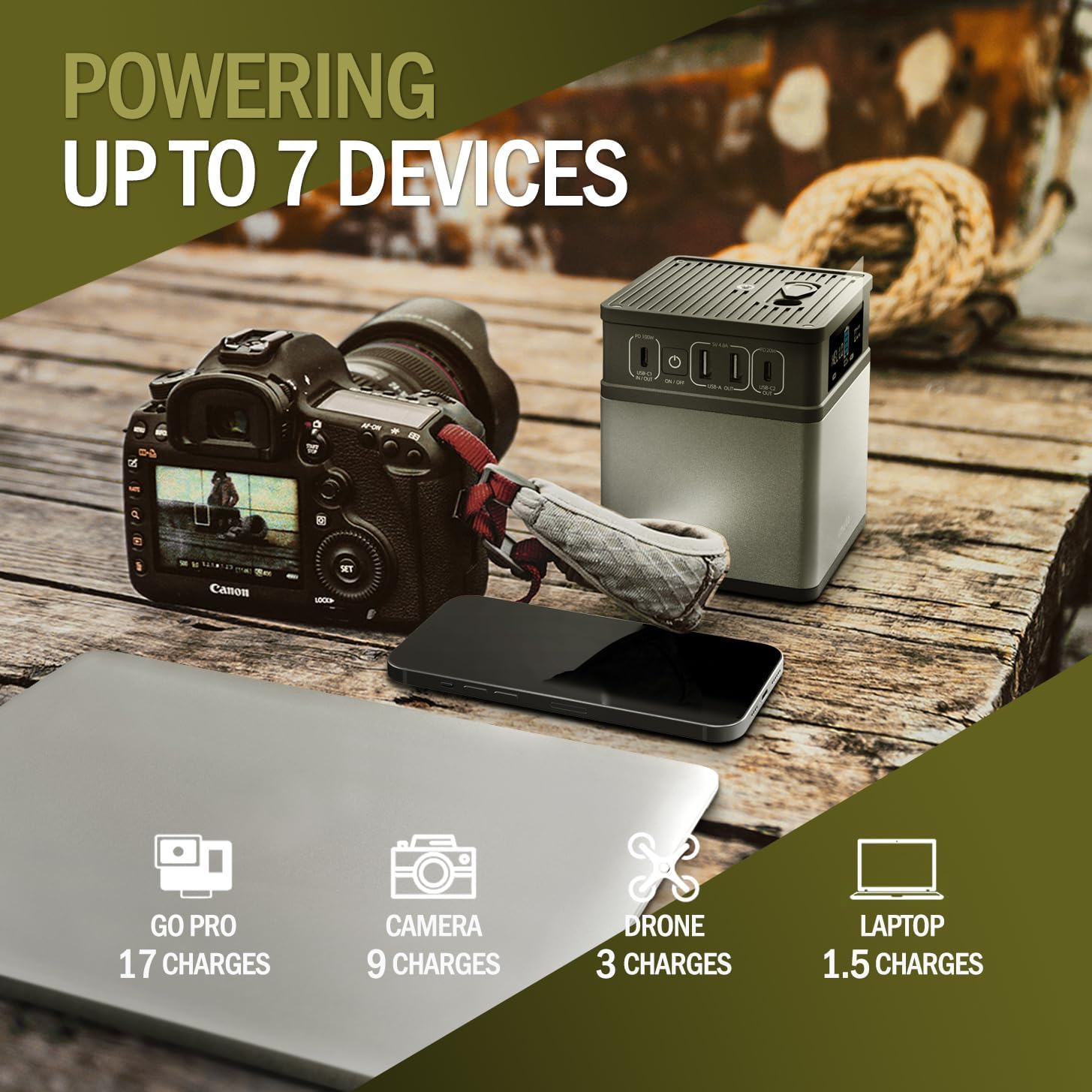
The power station can charge multiple devices, including a GoPro (17 charges), camera (9 charges), drone (3 charges), and laptop (1.5 charges).
5.4 Utilisation de la lumière LED
Press the dedicated LED light button (if available, or a short press of the power button) to turn the LED light on or off. Some models may have multiple brightness settings or an SOS mode.

The imuto 14001 can serve as a home backup power source, capable of powering essential devices like a lamp (12W for 10H), Wi-Fi router (10W for 11H), and charging a phone (3950mAh for 8 charges).
6. Maintenance et stockage
6.1 Nettoyage
Wipe the exterior with a soft, dry cloth. Do not use abrasive cleaners or immerse the unit in water.
6.2 Stockage
Store the power station in a cool, dry place away from direct sunlight and extreme temperatures. For long-term storage, it is recommended to charge the unit to approximately 50-80% every 3-6 months to maintain battery health.
7. Consignes de sécurité
The imuto 14001 is designed with multiple safety features:
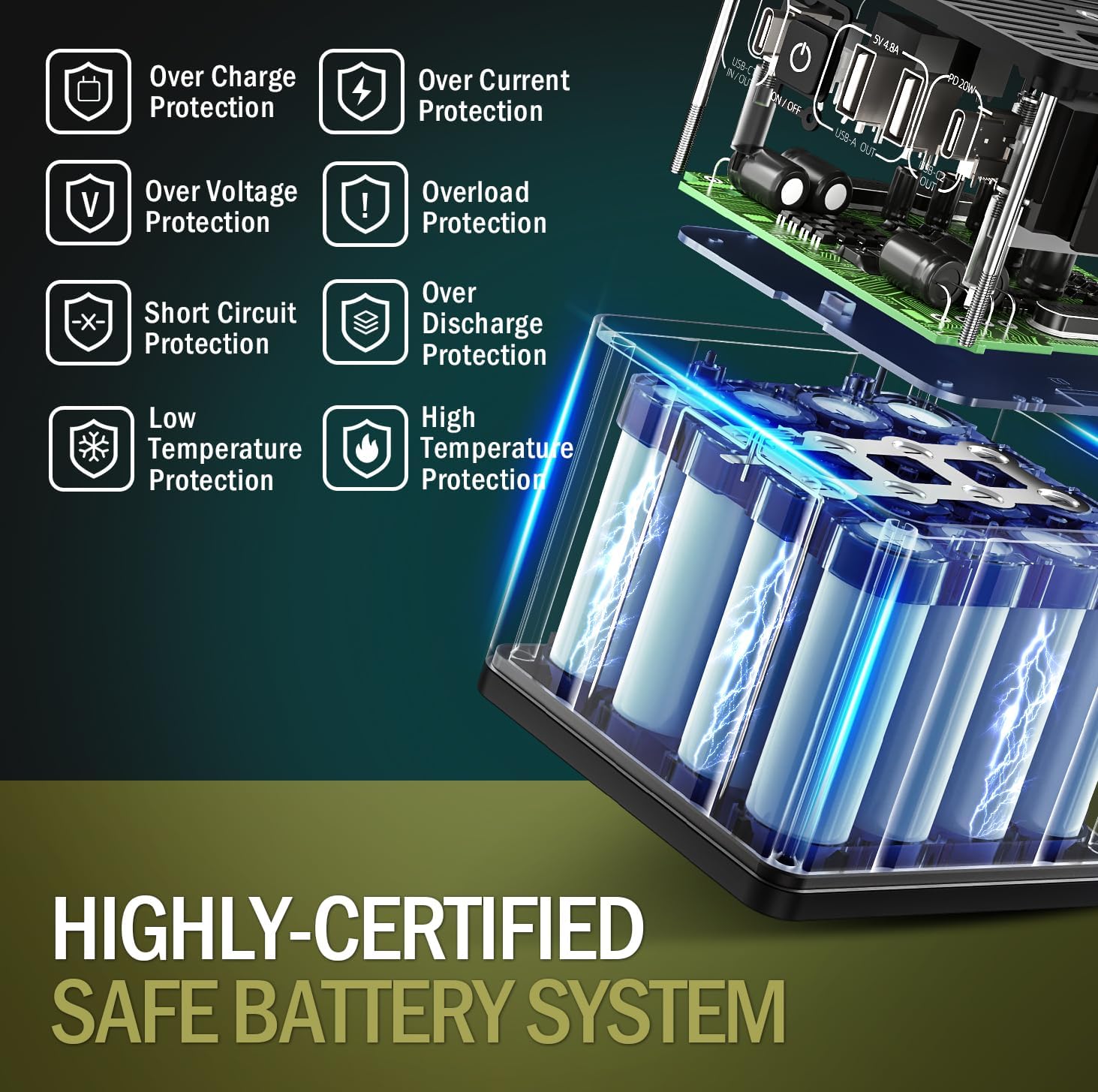
The imuto 14001 incorporates a highly-certified safe battery system with multiple protection features, including over-charge, over-current, over-voltage, overload, short circuit, low temperature, and high temperature protection.
- Protection contre les surcharges : Prévient les dommages causés à la batterie par une charge excessive.
- Protection contre les surintensités: Dispositifs de protection contre les courants de surintensité.
- Plus de voltaget Protection: Protège contre le voltage surtensions.
- Protection contre les surcharges : Empêche les dommages causés par une consommation d'énergie excessive.
- Protection contre les courts-circuits : S'arrête automatiquement en cas de court-circuit.
- Protection contre les basses températures : Assure un fonctionnement sûr par temps froid.
- Protection haute température : Empêche la surchauffe.
Always use the product in a well-ventilated area. Do not disassemble, puncture, or expose the unit to fire or water. Keep out of reach of children.
8. Dépannage
8.1 L'appareil ne s'allume pas
- Assurez-vous que la batterie est chargée. Branchez l'appareil à une source d'alimentation et laissez-le charger pendant au moins 30 minutes.
- Appuyez sur le bouton d'alimentation et maintenez-le enfoncé pendant 3 à 5 secondes.
8.2 Appareils ne chargeant pas
- Check if the power station is turned on.
- Verify that the correct output port is activated (e.g., AC output button pressed for AC devices).
- Ensure the charging cables are securely connected to both the power station and your device.
- Check if your device's power requirements exceed the power station's output capacity.
8.3 Charge lente
- Ensure you are using a compatible fast-charging cable and adapter for your device and the power station.
- Some devices may limit charging speed when the power station's battery is low.
9. Spécifications
| Fonctionnalité | Détail |
|---|---|
| Numéro de modèle | 14001 |
| Dimensions | 9.98 x 9.98 x 12.07 cm (3.93 x 3.93 x 4.76 pouces) |
| Poids | 1.2 kg (2.64 lb) |
| Type de batterie | Lithium Ion (12 cells) |
| Entrée/sortie USB-C1 | DP 100W Max |
| Sortie USB-A1/A2 | 5V 4.8A Max |
| Sortie USB-C2 | DP 20W Max |
| Sortie CA | 200W (60 Hz) |
| Sortie DC2/3 | 12V 10A |
| Entrée DC1 | 12V 24A |
| Caractéristiques spéciales | LED Light, Digital Display |
| Appareils compatibles | Tablets, Laptops, Smartphones, Drones, Cameras |
10. Garantie et assistance
imuto products come with a standard warranty. For detailed warranty information, product support, or technical assistance, please refer to the warranty card included with your purchase or visit the official imuto website. Veuillez avoir à portée de main votre numéro de modèle (14001) et la date d'achat lorsque vous contactez l'assistance.